

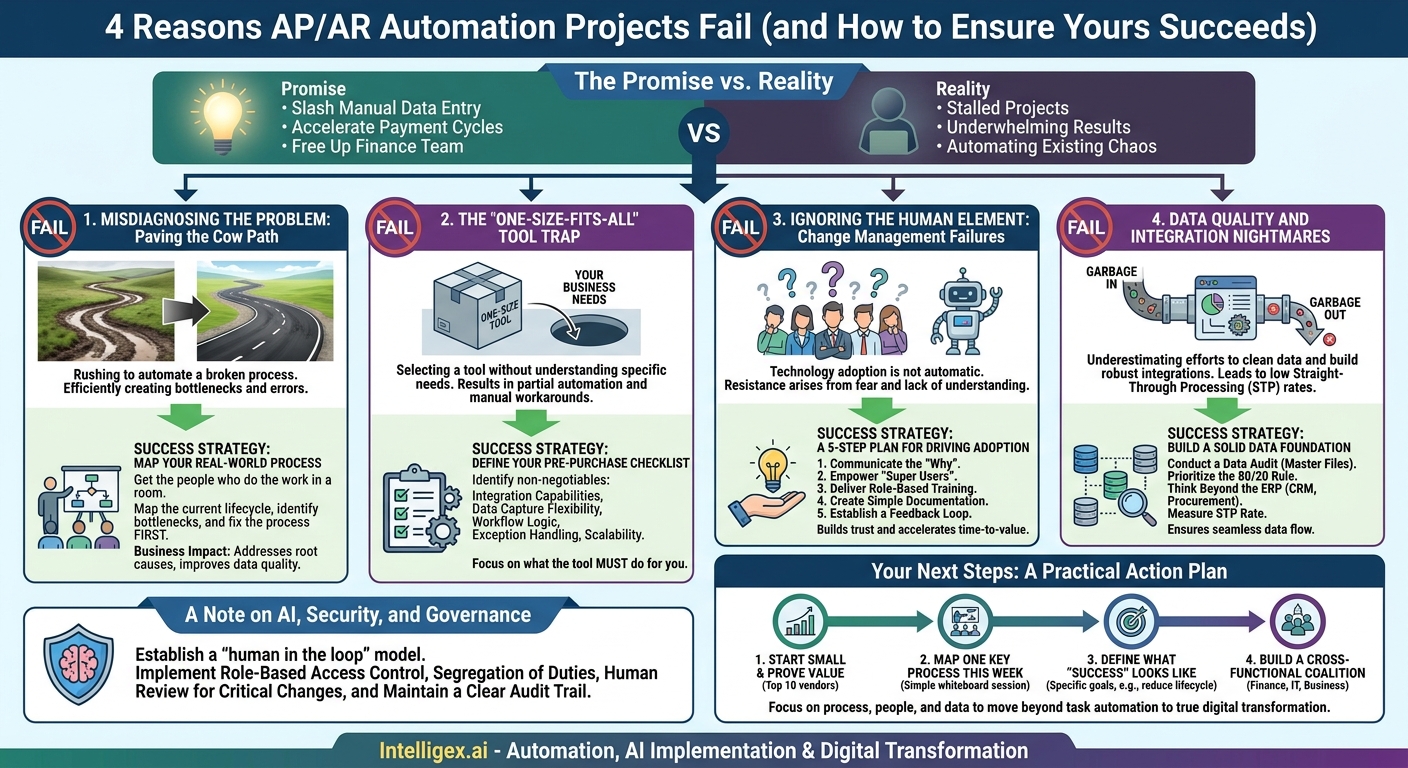
Accounts Payable (AP) and Accounts Receivable (AR) are often the first targets for automation, and for good reason. The promise is compelling: slash manual data entry, accelerate payment cycles, and free up your finance team for more strategic work. Yet, many of these projects stall, underwhelm, or fail outright, leaving teams frustrated with a new, expensive tool that only automates their existing chaos.
The problem is rarely the technology itself. Success hinges on a clear-eyed approach to the process, the people, and the data that fuel these critical functions. Failure often stems from a handful of common, avoidable mistakes. By understanding these pitfalls, you can sidestep them and build an automation framework that delivers tangible business value in speed, cost, quality, and visibility.
Misdiagnosing the Problem: Paving the Cow Path
The most common failure point is rushing to automate a fundamentally broken process. If your current workflow relies on convoluted email chains, unclear approval hierarchies, and manual workarounds, applying technology on top will only help you execute a bad process faster. You’ll be efficiently creating the same bottlenecks and errors, just with a prettier interface.
Before you ever look at a software demo, you must map your current state. This isn’t about creating a perfect, multi-layered process diagram. It’s about understanding reality.
How to Map Your Real-World Process
Get the people who actually do the work in a room. This includes AP clerks, AR specialists, and representatives from departments that frequently submit or approve invoices, like Marketing or Operations. Ask them to walk you through the lifecycle of a typical invoice or collection activity. Key questions to ask include:
- Where does this process start (e.g., an invoice arriving in an email inbox)?
- What is every single step, manual or otherwise, that happens next?
- Who is responsible for each step? Is there a backup?
- Where do things get stuck? (e.g., waiting for manager approval, hunting down a missing PO number).
- How are exceptions and errors handled? (e.g., a price mismatch between the invoice and the PO).
Business Impact: This simple exercise exposes the root causes of delays and errors. You might discover that 30% of your AP team’s time is spent chasing down purchase order numbers from the sales team, a problem no software can fix on its own. Fixing the process first, for example, by enforcing a “No PO, No Pay” policy, is a prerequisite for successful automation. This improves data quality at the source, which directly translates to higher straight-through processing rates and lower costs per invoice.
The “One-Size-Fits-All” Tool Trap
The market for AP/AR automation tools is crowded, and every vendor promises a seamless, AI-powered solution. It’s easy to be swayed by a slick demo that shows a perfect PDF invoice being processed in seconds. But your reality is likely much messier, involving a mix of paper invoices, emailed PDFs of varying quality, EDI files, and supplier portal submissions.
Selecting a tool without a detailed understanding of your specific needs is a recipe for disappointment. You may end up with a system that handles 60% of your invoices beautifully but requires time-consuming manual work for the other 40%, completely negating your expected ROI.
Your Pre-Purchase Technology Checklist
Before engaging with vendors, create a clear list of your non-negotiable requirements. This document becomes your yardstick for evaluating every potential solution. It should cover:
- Integration Capabilities: Does the tool have proven, pre-built connectors for your ERP (e.g., Oracle NetSuite, SAP S/4HANA, Microsoft Dynamics 365)? Asking for customer references who use the same ERP is critical.
- Data Capture Flexibility: Can the system ingest invoices from all your required channels (email, SFTP, scanner, supplier portal)? How accurate is its OCR and AI-based data extraction for your typical invoice formats, including those with line-item detail?
- Workflow and Approval Logic: Can you easily configure approval workflows that reflect your business rules? This includes multi-level approvals, dollar-based thresholds, and conditional routing (e.g., routing all IT invoices to the CIO).
- Exception Handling: What does the process look like when the tool finds an exception, such as a duplicate invoice or a vendor not found in the master file? The goal is to make exception management easier, not just different.
- Scalability: Will the tool’s pricing model and performance support your company’s growth over the next three to five years?
By defining these needs upfront, you shift the conversation from what the tool can do to what the tool must do for you. This leads to a much better fit and avoids costly surprises after implementation.
Ignoring the Human Element: Change Management Failures
You can implement the perfect technology for a perfectly designed process, but if your team doesn’t understand it, trust it, or know how to use it, they will revert to their old spreadsheets and email folders. Technology adoption is not automatic. It requires a deliberate change management strategy that addresses the human side of the equation.
Resistance to change is often rooted in fear: fear of redundancy, fear of being unable to learn a new system, or fear of losing control. A successful rollout anticipates these concerns and addresses them proactively.
A 5-Step Plan for Driving Adoption
A structured approach to change management ensures your team feels supported, not replaced. This builds trust and accelerates the time-to-value for your new system.
- Communicate the “Why” Early and Often: Before you even select a tool, explain the reasons for the change to the affected teams. Frame it around benefits that matter to them. Instead of saying “We’re automating to reduce headcount,” say “We’re automating the tedious data entry so you can focus on higher-value activities, like vendor relationship management, analyzing spending trends, and improving our cash flow.”
- Designate and Empower “Super Users”: Identify enthusiastic team members within the AP/AR function who are tech-savvy and well-respected by their peers. Involve them in the tool selection and testing process. They will become your internal champions, providing frontline support and training to their colleagues.
- Deliver Role-Based Training: A department manager who only needs to approve an invoice once a week requires very different training from an AP specialist who will be in the system all day. Tailor your training sessions to specific roles to keep them relevant and concise.
- Create Simple, Accessible Documentation: Don’t rely on the vendor’s 300-page user manual. Develop one-page quick-reference guides or short video tutorials for the most common tasks, such as “How to Code an Invoice” or “How to Handle a Quantity Mismatch.”
- Establish a Feedback Loop: After launch, actively solicit feedback. Hold weekly check-ins for the first month to discuss what’s working and what’s not. This shows the team you are listening and allows you to address minor issues before they become major frustrations.
Data Quality and Integration Nightmares
Automation is fundamentally a data-driven process. The adage “garbage in, garbage out” has never been more true. A leading cause of failure is underestimating the effort required to clean up foundational data and build robust system integrations. The automation tool is only as good as the data it receives from your other systems.
The most common culprit is the vendor or customer master file in your ERP. If this data is messy, with duplicate entries, outdated addresses, or missing tax information, your automation platform will constantly struggle. For example, an invoice from “Intelligex Corp.” won’t automatically match if your vendor master lists “Intelligex, Incorporated.” This creates an exception that requires a human to manually investigate and resolve, defeating the purpose of the automation.
Building a Solid Data Foundation
Conduct a Data Audit: Before you begin, perform an audit of your master data. Identify and merge duplicate vendor and customer records. Establish clear standards for data entry going forward. Who is responsible for creating new vendor records? What information is mandatory?
Prioritize the 80/20 Rule: You don’t need to clean up all your data at once. Identify your top 20% of vendors by invoice volume and focus on ensuring their master records are perfect. This will likely resolve 80% of your initial matching errors.
Think Beyond the ERP: Consider all the systems that touch the AP/AR process. For AP, this might include your procurement platform. For AR, it’s your CRM. A seamless integration ensures that when a sales order is created in the CRM, the resulting data flows cleanly to the ERP and the AR system, preventing discrepancies that lead to collection issues down the line.
What to Measure: The key metric to track here is the straight-through processing (STP) rate. This is the percentage of transactions that are processed from start to finish with zero human intervention. A low STP rate is a clear signal that you have underlying data quality or integration problems that need to be addressed.
A Note on AI, Security, and Governance
Modern AP/AR platforms increasingly use artificial intelligence to improve data extraction and detect anomalies. While powerful, this introduces new considerations for governance and security. Entrusting financial processes to an algorithm requires clear guardrails to protect sensitive data and ensure compliance.
Implementing automation safely is not about avoiding AI, but about using it responsibly. Focus on establishing a “human in the loop” model for critical decisions.
- Role-Based Access Control: The principle of least privilege is paramount. An employee who submits expense reports should not be able to view all company invoices. A department head should only be able to approve payments up to a certain threshold. Configure user roles carefully to limit data exposure.
- Segregation of Duties: Ensure your automated workflow enforces separation of duties. For example, the person who creates a new vendor in the system should not be the same person who can approve a payment to that vendor.
- Human Review for Critical Changes: Never allow an automated system to autonomously change critical vendor or customer information, such as bank account details. Any such request must be flagged for manual review and multi-person verification. This is a crucial control to prevent payment fraud.
- Maintain a Clear Audit Trail: The system must log every action: who uploaded an invoice, what data the AI extracted, who approved it, and when it was paid. This immutable log is essential for internal audits, financial reporting, and regulatory compliance.
Your Next Steps: A Practical Action Plan
Embarking on an AP/AR automation journey can seem daunting, but a pragmatic, step-by-step approach dramatically increases your chances of success. The goal isn’t just to buy software, but to build a more efficient, visible, and scalable financial operation. Avoid the common pitfalls by focusing on a solid foundation.
Here’s how to get started:
- Start Small and Prove Value: Don’t try to automate everything at once. Select a single, high-impact process to begin with. A great candidate is automating the capture and coding of invoices from your top 10 highest-volume vendors. A quick win here builds momentum and demonstrates the value of the initiative to stakeholders.
- Map One Key Process This Week: You don’t need a formal project to start. Grab a key member of your AP or AR team and a whiteboard. Ask them to walk you through the journey of a single invoice or a customer collection call. Document the steps, handoffs, and pain points. This simple act will reveal immediate opportunities for improvement.
- Define What “Success” Looks Like: Be specific about your goals. Is it to reduce the invoice approval lifecycle from 14 days to 4? Is it to increase the capture of early payment discounts from 20% to 75%? Is it to reduce the DSO (Days Sales Outstanding) by 5 days? Having clear, measurable targets will guide your project and help you quantify its impact.
- Build a Cross-Functional Coalition: Successful automation is a team sport. Involve representatives from Finance, IT, and any key business departments (like procurement or sales) from the very beginning. This ensures the solution meets everyone’s needs and fosters the shared ownership required for long-term success.
By focusing on process before technology, managing the human side of change, and ensuring data quality, you can move beyond simply automating tasks and begin the work of true digital transformation.
Your Next Read:
Get a FREE
Proof of Concept
& Consultation
No Cost, No Commitment!
