

In the world of incident management, speed and clarity are everything. Every minute spent toggling between screens, manually creating communication channels, or copy-pasting status updates is a minute lost. This “context switching” is more than just an annoyance. It introduces delays, increases the risk of human error, and inflates the cost of downtime. While your team is busy managing the communication logistics, the actual problem remains unresolved, impacting customers, employees, and your bottom line.
The solution lies in connecting your system of record, the single source of truth for structured work, with your system of engagement, the dynamic hub where real-time collaboration happens. For thousands of organizations, this means integrating ServiceNow and Slack. This integration is not about adding another tool. It’s about creating a seamless, automated workflow that brings the incident data directly to the people who need to solve it, right where they are already working.
Why Connect Your System of Record with Your System of Engagement?
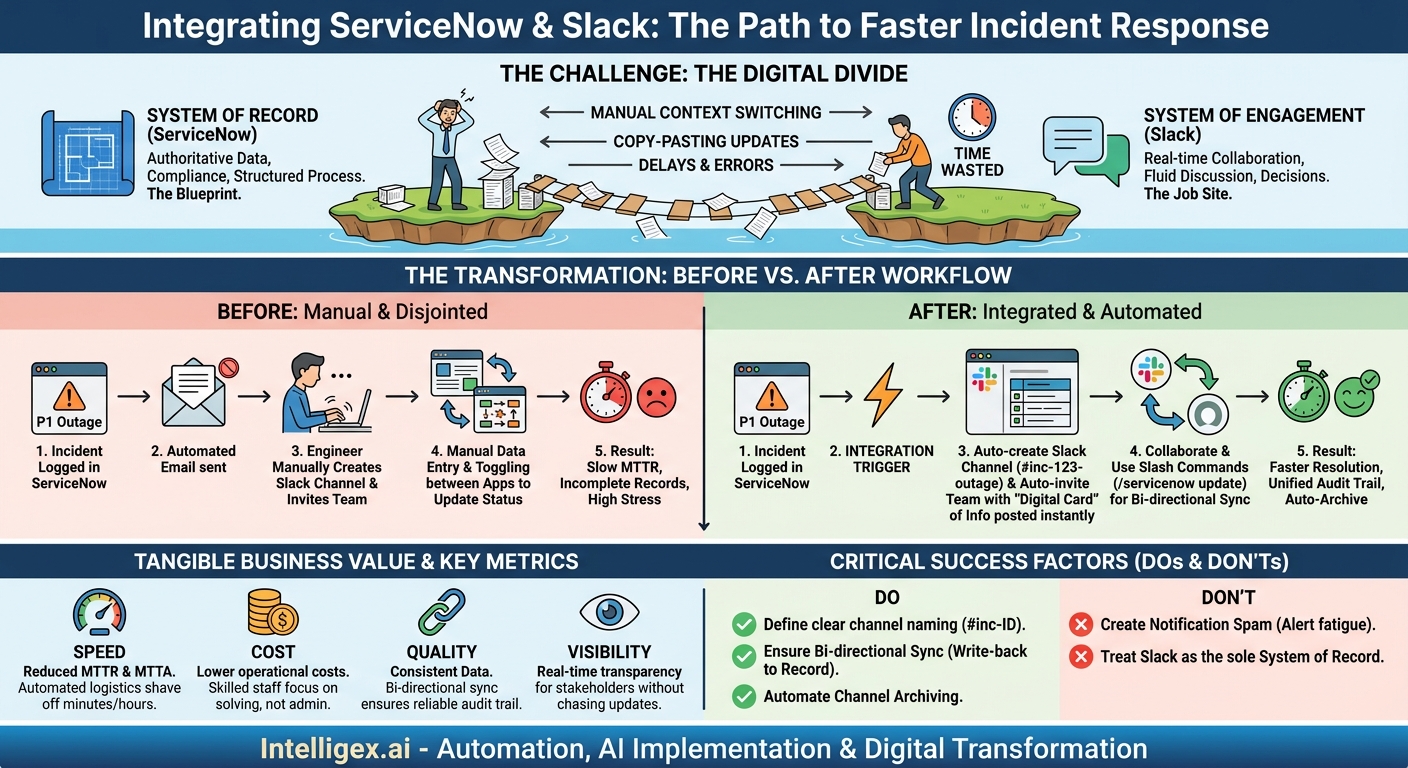
Think of ServiceNow as the official blueprint for a project. It contains the authoritative record: who is responsible, what the requirements are, the history of every action taken, and the final outcome. It ensures compliance, auditability, and structured process management. It is your system of record.
Slack, on the other hand, is the job site where the team collaborates. It’s where quick questions are asked, ideas are debated, and urgent decisions are made. It is fast, fluid, and conversational. It is your system of engagement.
When these two platforms operate in silos, you create a digital divide. Your team is forced to act as a manual bridge, constantly translating structured data from ServiceNow into unstructured conversation in Slack, and vice versa. This manual bridging is inefficient and prone to error. An integration closes this gap, creating a powerful synergy that delivers tangible business value:
- Speed: By automating the creation of communication channels and the delivery of critical updates, you shave precious minutes, even hours, off your incident response times. This directly impacts key metrics like Mean Time to Resolution (MTTR).
- Cost: Reducing manual administrative tasks frees up your highly skilled technical staff to focus on problem-solving, not communication management. This boosts productivity and reduces the operational cost associated with each incident.
- Quality: Automation ensures that information is consistent across both platforms. It eliminates the errors that come from manual data entry and ensures that the ServiceNow ticket always reflects the latest state of the incident, creating a reliable audit trail.
- Visibility: Stakeholders no longer need to chase down updates. With key information pushed automatically to designated Slack channels, everyone from the on-call engineer to the business leader has real-time visibility into the status of an incident, improving transparency and trust.
The Anatomy of a Modern Incident Response Workflow
To understand the impact of this integration, let’s compare a typical incident response process before and after connecting ServiceNow and Slack.
Before Integration: A Disjointed, Manual Process
A critical P1 incident, a website outage, is logged in ServiceNow. An automated email is sent to the IT operations distribution list, but it gets lost in a sea of other notifications. The on-call engineer, Sarah, sees the ticket and realizes she needs to assemble a response team. She manually creates a new Slack channel, `#website-outage-mar24`, and starts inviting the web development lead, the database administrator, and the network engineer one by one. She then copies the incident number and a summary from ServiceNow and pastes it into the channel.
As the team works, the discussion unfolds in Slack. The database administrator discovers the root cause. Sarah needs to update the ticket, so she switches back to ServiceNow, finds the incident, and types in the latest findings. A business stakeholder messages her directly in Slack asking for an update, so she types out another summary. The process is a constant shuffle between two applications, with the official record in ServiceNow quickly falling out of sync with the real-time conversation in Slack.
After Integration: A Streamlined, Automated Workflow
The same P1 website outage is logged in ServiceNow. This time, the integration triggers an immediate, automated sequence of events:
- A new, dedicated Slack channel, `#inc-2024-54321-website-outage`, is instantly created. The name automatically includes the incident number for easy reference.
- The on-call engineer (Sarah), the web development team lead, the database administrator, and a pre-defined group of business stakeholders are automatically invited to the channel.
- A “digital card” is posted in the channel with key details from the ServiceNow ticket: a short description, priority level, affected service, and a direct link back to the full record.
- Sarah and her team begin collaborating in the channel. When the DBA identifies the root cause, she uses a simple slash command (e.g., `/servicenow notes The database connection pool is exhausted.`) to add that update directly to the ServiceNow work notes without ever leaving Slack.
- When a major status change occurs, like moving the incident to “In Progress,” Sarah uses another command (`/servicenow update`) which presents a simple form inside Slack to update the ticket fields. This action is recorded in both the channel and the ServiceNow ticket.
- Once the issue is fixed, Sarah resolves the incident in ServiceNow. The integration posts a final confirmation in the Slack channel and, after a set period, automatically archives the channel to keep the workspace clean.
The result is a single, unified workflow. The conversation happens in Slack, but the system of record in ServiceNow is kept perfectly up to date, creating a complete and accurate audit trail with minimal administrative effort.
Getting Started: A Step-by-Step Integration Guide
Implementing this integration is a strategic project, not just a technical task. A thoughtful approach ensures you build a solution that truly meets your business needs. Here is a practical roadmap to guide your implementation.
- Define Your Use Cases and Goals: Before configuring anything, ask what you want to achieve. Is your primary goal to reduce MTTR for P1 incidents? Or is it to improve the request-to-fulfillment time for HR onboarding? Start with one or two high-impact use cases. Clearly document the pain points you are trying to solve.
- Choose Your Integration Method: You have several options for connecting the platforms. ServiceNow offers its own official “ServiceNow for Slack” application, which provides a solid foundation for common use cases. For more complex or custom workflows, you might consider using a third-party integration platform as a service (iPaaS) or building a custom solution. The native connector is often the best place to start.
- Configure Core Permissions and Authentication: Security is non-negotiable. The integration needs to be set up with the principle of least privilege. This involves creating a dedicated integration user in ServiceNow with specific roles and permissions. Authentication should be handled securely using modern standards like OAuth, ensuring that the connection between the two systems is authorized and encrypted.
- Map Your Workflows: This is where you translate your use cases into technical rules. What specific event in ServiceNow should trigger an action in Slack? For example: “When an incident’s priority changes to 1, post a high-priority notification to the `#it-major-incidents` channel.” Or, “When a user in Slack uses the `/servicenow create` command, generate a new incident ticket with the details provided.”
- Start Small and Test Rigorously: Don’t try to boil the ocean. Begin with a single team and a single, well-defined workflow, such as P1 incident response for your core application. Run a pilot program, gather feedback from the team, and iterate. This allows you to work out the kinks and demonstrate value before a wider rollout.
- Document and Train Your Teams: New tools are only effective if people know how to use them. Create simple, clear documentation. A one-page guide on the available slash commands and the expected workflow is often more effective than a lengthy manual. Hold short training sessions to walk teams through the new process and answer their questions.
Beyond IT: Extending the Value Across Your Organization
While incident management is the most common starting point, the power of a ServiceNow and Slack integration extends far beyond the IT department. Any business function that relies on structured requests and collaborative fulfillment can benefit.
- Human Resources: An urgent employee onboarding request is created in ServiceNow HR Service Delivery. An integration can automatically create a private Slack channel inviting the hiring manager, the HR business partner, and the IT provisioning specialist. They can collaborate in real-time to resolve any access issues, ensuring the new hire has a smooth and productive first day.
- Finance and Procurement: A purchase request for a critical software license needs expedited approval. When the request is submitted in ServiceNow, a Slack notification is sent directly to the department head. They can review the details and approve it with a single click on a button within Slack, dramatically speeding up the procurement cycle.
- Customer Service: A high-priority customer case is logged in ServiceNow Customer Service Management. A dedicated “war room” channel is created in Slack, bringing together the assigned agent, a product specialist, and an engineering lead. This enables them to swarm the problem, share information quickly, and deliver a faster resolution to the customer.
- Supply Chain: A material shortage alert is triggered in ServiceNow. A Slack channel instantly connects the supply chain manager, the warehouse lead, and the sales team. They can work together to assess customer impact, find alternative suppliers, and update fulfillment timelines, all from one central communication hub that is linked to the official record.
What to Measure: Gauging the Impact of Your Integration
To justify the investment and fine-tune your workflows, you need to measure the impact of the integration. Focus on metrics that directly tie back to your initial business goals.
Speed and Efficiency Metrics
- Mean Time to Acknowledge (MTTA): How quickly is an incident seen and acted upon by the assigned team? Automated Slack notifications should significantly reduce this time.
- Mean Time to Resolve (MTTR): The ultimate measure of incident management success. Track this for integrated workflows versus non-integrated ones to show a clear improvement.
- Reduction in Manual Updates: Use team surveys to gather qualitative feedback on how much time is saved by eliminating the need to manually copy and paste information between systems.
Quality and Communication Metrics
- Incident Record Completeness: Compare the richness and timeliness of work notes in tickets managed via the integration versus those that are not. The log should be more detailed and accurate.
- Post-Incident Review Feedback: In your post-mortems, ask participants to rate the clarity and timeliness of communication during the incident. This score should improve.
- Number of Escalations: A more efficient, collaborative process often leads to fewer escalations, as problems are solved faster by the initial response team.
Best Practices and Common Pitfalls to Avoid
A successful integration is as much about process as it is about technology. Follow these best practices to maximize your chances of success and avoid common roadblocks.
Checklist for Success
- Do define clear channel naming conventions. A consistent prefix, like `#inc-` for incidents or `#req-` for requests, followed by the ticket number, makes channels predictable and easy to find.
- Do establish rules of engagement. Clarify that the Slack channel is for active collaboration and troubleshooting, while the ServiceNow ticket remains the single source of truth for official status, approvals, and resolution details.
- Do use threaded conversations. Encourage your teams to use threads in Slack to keep discussions on specific sub-topics organized and prevent the main channel from becoming chaotic.
- Do automate channel archiving. Once an incident or case is closed in ServiceNow, automatically archive the corresponding Slack channel to reduce clutter and keep the workspace focused on active issues.
- Don’t create notification spam. Be highly selective about what triggers a notification. Alerting a channel for every minor ticket update will lead to alert fatigue, causing users to ignore important messages. Focus on high-priority events and state changes.
- Don’t treat Slack as the new system of record. This is the most critical pitfall. The integration must be bidirectional. Key findings, decisions, and status updates made in Slack must be pushed back to the ServiceNow record to maintain a complete audit trail.
A Note on Security and Data Governance
When connecting systems, data security is paramount. Incident details can contain sensitive customer information or internal system data. It is crucial to implement access controls based on roles in both ServiceNow and Slack. Use private channels for incidents involving sensitive data to limit visibility. Ensure your integration authenticates securely (for example, using OAuth) and that all data in transit is encrypted. Remember that automation is there to support your experts, not replace them. Always maintain a human in the loop for critical approvals and decisions.
Your Next Steps to a More Connected Workflow
Moving from a siloed, manual process to an integrated, automated one is a journey, but the return on investment in speed, quality, and efficiency is substantial. You can start today by taking a few simple, practical steps.
- Identify the Pain: Pinpoint your most painful, high-volume, or business-critical process. Is it P1 incident response? Employee onboarding? Customer escalations? Start where the friction is most acute.
- Map the Flow: Whiteboard the current communication process for that use case. Where are the delays? Where does information get lost? Identify the specific bottlenecks that an integration could solve.
- Build a Coalition: Schedule a workshop with key stakeholders from both the business and IT. Present your findings and collaborate on designing a future-state workflow that leverages a ServiceNow and Slack integration.
- Plan Your Pilot: Scope out a small, manageable pilot project. Explore the native integration capabilities offered by ServiceNow and Slack, or consult with an integration partner to design a scalable solution that fits your unique needs.
By connecting your core systems, you are not just adopting new technology. You are building a more responsive, resilient, and productive organization.
Your Next Read:
Category:
Get a FREE
Proof of Concept
& Consultation
No Cost, No Commitment!
