

Accounts Payable (AP) and Accounts Receivable (AR) are the financial heartbeat of your organization. When they function smoothly, cash flows predictably, suppliers are paid on time, and customers settle their bills promptly. Yet for many businesses, these critical functions are a patchwork of manual data entry, disconnected spreadsheets, and siloed software. This fragmentation doesn’t just slow down your finance team. It creates hidden costs and risks that ripple across the entire company, impacting everything from supply chain reliability to sales forecasting.
The solution isn’t another standalone tool. It’s about creating a connected, automated ecosystem where information flows seamlessly between your core financial systems. By strategically integrating your Enterprise Resource Planning (ERP) platform, bank accounts, billing systems, and even your email inbox, you can transform AP and AR from reactive, labor-intensive cost centers into proactive, data-driven strategic assets. This shift unlocks significant business value, improving speed, reducing costs, and providing the visibility needed to make smarter financial decisions.
The Hidden Costs of Disconnected Finance Operations
Before exploring the “how” of integration, it’s essential to understand the “why.” Disconnected AP and AR processes create friction that slows business down and introduces unnecessary risk. The problems often manifest in ways that teams outside of finance feel acutely, even if they can’t pinpoint the source.
Consider these common scenarios:
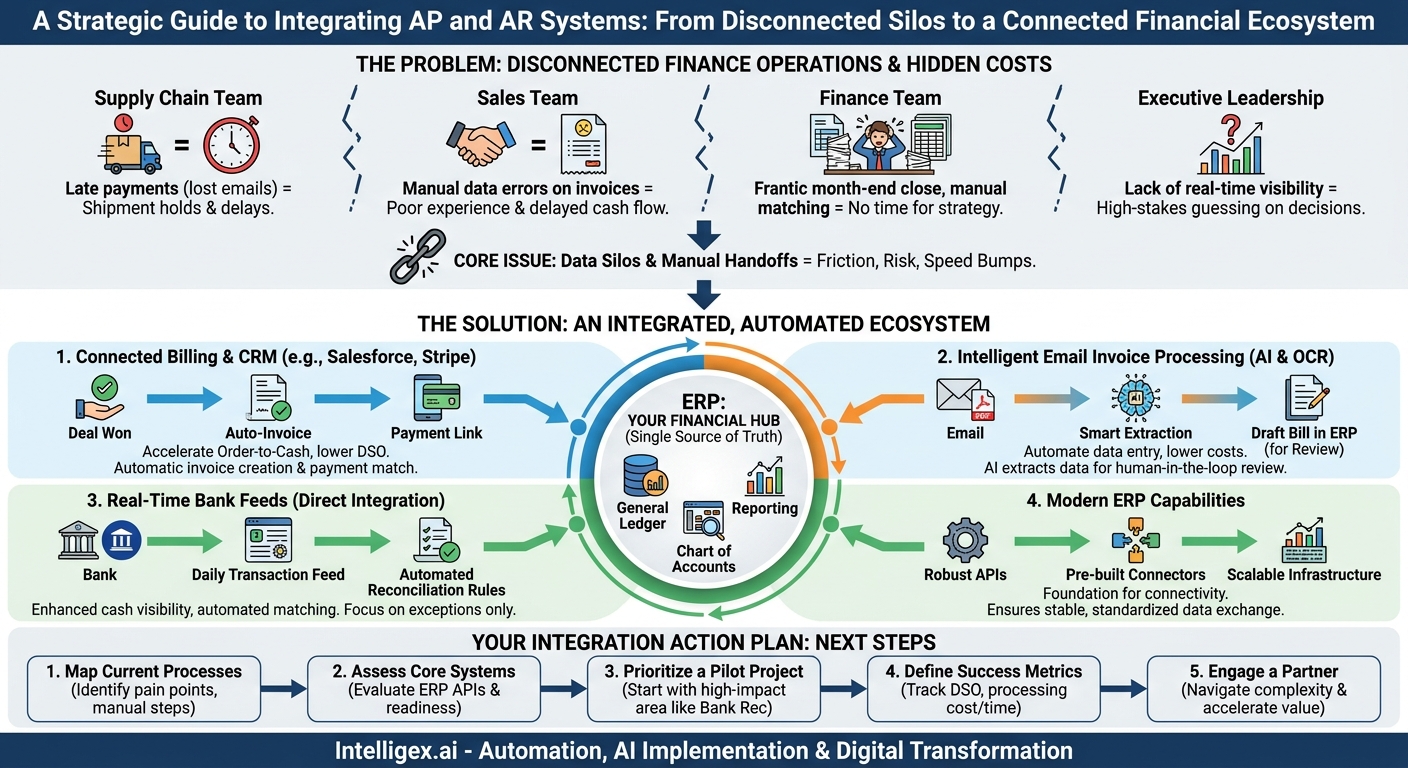
- For the Supply Chain Team: A critical supplier places a hold on shipments because an invoice, lost in an email chain, was paid late. The AP team had no visibility into the invoice’s status until the issue escalated, causing a production delay.
- For the Sales Team: A salesperson closes a major deal, but the customer’s first invoice contains errors because the contract details were manually re-keyed into the billing system. This creates a poor initial experience and delays the first payment, affecting the salesperson’s commission and the company’s cash flow forecast.
- For the Finance Team: The month-end close process is a frantic scramble. The team spends days manually matching bank statements to thousands of transactions in the ERP, chasing down approvals for invoices, and correcting data entry errors. This leaves no time for strategic analysis.
- For Executive Leadership: When asked for a real-time cash position, the answer is, “We can get that to you by tomorrow.” The lack of immediate, accurate visibility into cash flow makes strategic planning, like deciding on a capital investment, a high-stakes guessing game.
These issues are not isolated incidents. They are symptoms of a systemic problem rooted in data silos. Each manual handoff between systems, whether it’s downloading a CSV file or retyping invoice data, is a potential point of failure. It introduces the risk of error, creates delays, and consumes valuable employee time that could be spent on higher-value activities like vendor negotiations or customer credit analysis.
Integration Point 1: The ERP as Your Financial Hub
Your Enterprise Resource Planning (ERP) system is the logical center of your financial universe. It houses your general ledger, chart of accounts, and financial reporting tools. Therefore, the first principle of AP/AR integration is to establish the ERP as the single source of truth. All other systems, from banking to billing, should feed data into the ERP, not operate in parallel to it.
An effective ERP integration ensures that when a payment is made, a bill is sent, or an invoice is received, the transaction is recorded consistently and accurately in your general ledger. This eliminates the need for manual reconciliation between systems, which is a primary source of errors and delays during the financial close.
What to Look For in an ERP for Seamless Integration
Not all ERPs are created equal when it comes to integration. A modern, cloud-based ERP is typically built with connectivity in mind. When evaluating your current system or a new one, consider its integration capabilities:
- Robust APIs: Does the ERP offer a well-documented Application Programming Interface (API)? An API allows other software applications to communicate with your ERP in a standardized, secure way. This is the gold standard for real-time data exchange.
- Pre-built Connectors: Many ERP providers, like Oracle NetSuite or SAP, offer marketplaces with pre-built connectors to popular banking, CRM, and procurement platforms. These can significantly reduce implementation time and cost.
- Data Handling: Can the system handle data in standard formats like JSON or XML? How does it manage data validation to prevent bad data from being written to your financial records?
- Scalability: Will the ERP’s infrastructure support a growing volume of transactions as your business expands? A system that slows down under load will become a bottleneck.
By treating the ERP as the core hub, you create a stable foundation upon which all other financial process automation can be built. Every subsequent integration point should be designed to enrich the data within the ERP, not to create a competing record.
Integration Point 2: Bank Feeds for Real-Time Cash Visibility
For most businesses, bank reconciliation is a tedious, manual process that happens days or even weeks after the fact. The finance team downloads bank statements and then painstakingly matches each line item against entries in the ERP. This delay means your cash balance in the ERP is never truly up to date, making accurate cash forecasting nearly impossible.
Direct bank integration automates this entire process. By connecting your business bank accounts directly to your ERP, you can establish a secure, automated flow of transaction data. This has two primary benefits: automated reconciliation and enhanced cash visibility.
With an active bank feed, transaction data appears in the ERP daily. Automation software can then use matching rules (based on amount, date, and vendor/customer name) to automatically reconcile the vast majority of transactions. Your finance team only needs to manage the exceptions, transforming their role from data entry clerks to financial controllers.
Steps to Implement Automated Bank Reconciliation
Implementing bank integration requires careful planning between your Finance and IT teams, along with your banking partner.
- Identify Your Banking Partner’s Capabilities: Start by talking to your bank. Do they offer direct API-based connections? Or do they rely on older methods like Secure File Transfer Protocol (SFTP)? API is preferred for real-time data, but SFTP is still a reliable and common method for batch transfers.
- Map Your Data Fields: Work with your implementation partner to map the data fields from the bank feed (e.g., transaction date, description, amount) to the corresponding fields in your ERP’s cash module. This is a critical step to ensure data is interpreted correctly.
- Configure Matching Rules: Define the logic the system will use to match transactions. Start with simple rules (e.g., exact amount and date match) and gradually build more complex ones (e.g., matching based on invoice numbers in the description field).
- Run a Pilot Program: Before going live across all accounts, test the integration with a single, non-critical bank account. This allows you to identify and fix any issues with the data mapping or matching rules in a controlled environment.
- Train the Team on Exception Handling: The goal is not 100% automation. It’s to automate the bulk of the work so your team can focus on the exceptions. Ensure they are trained on the new process for investigating and resolving unmatched transactions directly within the ERP.
The key metric to track here is reconciliation time. Teams often see this reduced from days to mere hours, freeing up significant time for more strategic financial analysis at the end of each month.
Integration Point 3: Billing Platforms to Accelerate Order-to-Cash
The order-to-cash cycle begins the moment a sale is made and ends only when the cash is in your bank account. A long cycle ties up working capital and can strain business operations. Integrating your billing or CRM system (where the sale is recorded) with your ERP (where the financial record lives) is crucial for shortening this cycle.
Without integration, the process looks like this: A salesperson marks a deal as “won” in a CRM like Salesforce. Someone in finance then manually creates a customer record and an invoice in the ERP, hoping they copy all the details correctly. The invoice is emailed, and the AR team waits. The process is slow and prone to error.
With integration, the “won” deal in the CRM can automatically trigger the creation of an accurate invoice in the ERP. The invoice can then be delivered to the customer instantly via an integrated portal or email. When the customer pays via an online payment link, the cash receipt can be automatically recorded in the ERP and matched against the open invoice, often triggering an update back in the CRM. This seamless flow dramatically reduces Days Sales Outstanding (DSO), a critical measure of how quickly you collect revenue.
Example: A B2B SaaS Company
Imagine a software company using a billing platform like Stripe to manage subscriptions. By integrating Stripe with their ERP, they can achieve end-to-end automation.
- A new customer signs up online, and Stripe creates a subscription and processes the first payment.
- An API call from Stripe to the ERP automatically creates the customer record and a sales order.
- The payment from Stripe is recorded as a cash receipt and applied to the order, closing the invoice immediately.
- The daily payout from Stripe is automatically reconciled against the transactions in the ERP via the bank feed.
The entire process requires zero manual intervention from the finance team, allowing the company to scale its customer base without needing to scale its AR headcount.
Integration Point 4: Email for Intelligent Invoice Processing
Despite the push toward digital procurement portals, a significant percentage of invoices still arrive as PDF attachments in an email inbox, typically sent to a generic address like `[email protected]`. For many AP teams, this inbox represents a major operational bottleneck. Team members must manually open each email, download the attachment, identify key information (invoice number, date, amount, line items), and type it into the ERP.
This is an area where modern AI-powered tools can deliver transformative results. By integrating this email inbox with an intelligent document processing (IDP) solution, you can automate the entire data extraction process.
Here’s how it works: The IDP software monitors the designated inbox. When a new email with an attachment arrives, it uses a combination of Optical Character Recognition (OCR) to “read” the document and machine learning models to “understand” it. The AI identifies and extracts the relevant data points, even if they are in different locations on invoices from different suppliers. This extracted data is then staged for review and, with high confidence, can be used to automatically create a draft bill in the ERP, ready for coding and approval.
A Note on Governance and Human Oversight
Automating data entry from unstructured documents like invoices introduces new considerations for governance. While powerful, AI models are not infallible. It is critical to implement a “human-in-the-loop” workflow, especially in the early stages.
Do not aim for 100% “straight-through” processing from day one. Instead, configure the system so that data extracted by the AI is reviewed by a human operator. The system can highlight fields where its confidence is low, directing the operator’s attention to potential issues. As the model learns from corrections made by your team, its accuracy will improve, and you can gradually increase the threshold for straight-through processing. This approach balances the efficiency gains of automation with the financial control and accuracy your business requires. Also, ensure strict access controls are in place, so only authorized personnel can manage and approve these automated entries.
The primary metric to measure here is invoice processing cost. By reducing the manual labor required for each invoice, businesses can dramatically lower this cost while also improving the invoice processing cycle time.
Your Integration Action Plan: Next Steps
Transforming your AP and AR functions through integration is a journey, not a single project. It requires a strategic approach that prioritizes the highest-impact opportunities first. A logical path forward involves focusing on building a solid foundation and then expanding capabilities incrementally.
Here is a practical action plan to get you started:
- Map Your Current Processes: Before you can automate, you must understand. Document your existing order-to-cash and procure-to-pay workflows. Identify the manual handoffs, data entry points, and sources of delay. This map will reveal your biggest pain points and opportunities for improvement.
- Assess Your Core Systems: Evaluate the integration capabilities of your current ERP. Does it have the necessary APIs and tools to serve as your financial hub? If not, a system upgrade may be a prerequisite for meaningful automation.
- Prioritize a Pilot Project: Don’t try to boil the ocean. Select one high-impact area for a pilot project. For many, automating bank reconciliation is an excellent starting point because it provides quick wins in terms of time savings and improved visibility.
- Define Success Metrics: Before you begin, define what success looks like. Choose a few key performance indicators (KPIs) to track, such as Days Sales Outstanding (DSO), Invoice Processing Cost, or Month-End Close Time. Measure your baseline before the project and track your progress against it.
- Engage a Partner: Unless you have deep in-house expertise in systems integration and financial process automation, consider working with a specialist partner. The right partner can help you navigate the technical complexities, avoid common pitfalls, and accelerate your time to value.
By connecting your ERP, bank, billing, and email systems, you build a resilient and efficient financial core for your business. This isn’t just about making the finance team’s job easier. It’s about providing the entire organization with the speed, visibility, and data accuracy it needs to grow and compete effectively.
Your Next Read:
Get a FREE
Proof of Concept
& Consultation
No Cost, No Commitment!
