

When a critical data synchronization job fails, what happens next? For too many organizations, the answer is either a concerning silence or a loud, meaningless alarm. A sales lead entered into your marketing platform never appears in the CRM. An updated product price from your ERP never reaches your e-commerce site. These aren’t just technical glitches. They are silent business killers that erode data quality, create operational friction, and lead to poor decision-making.
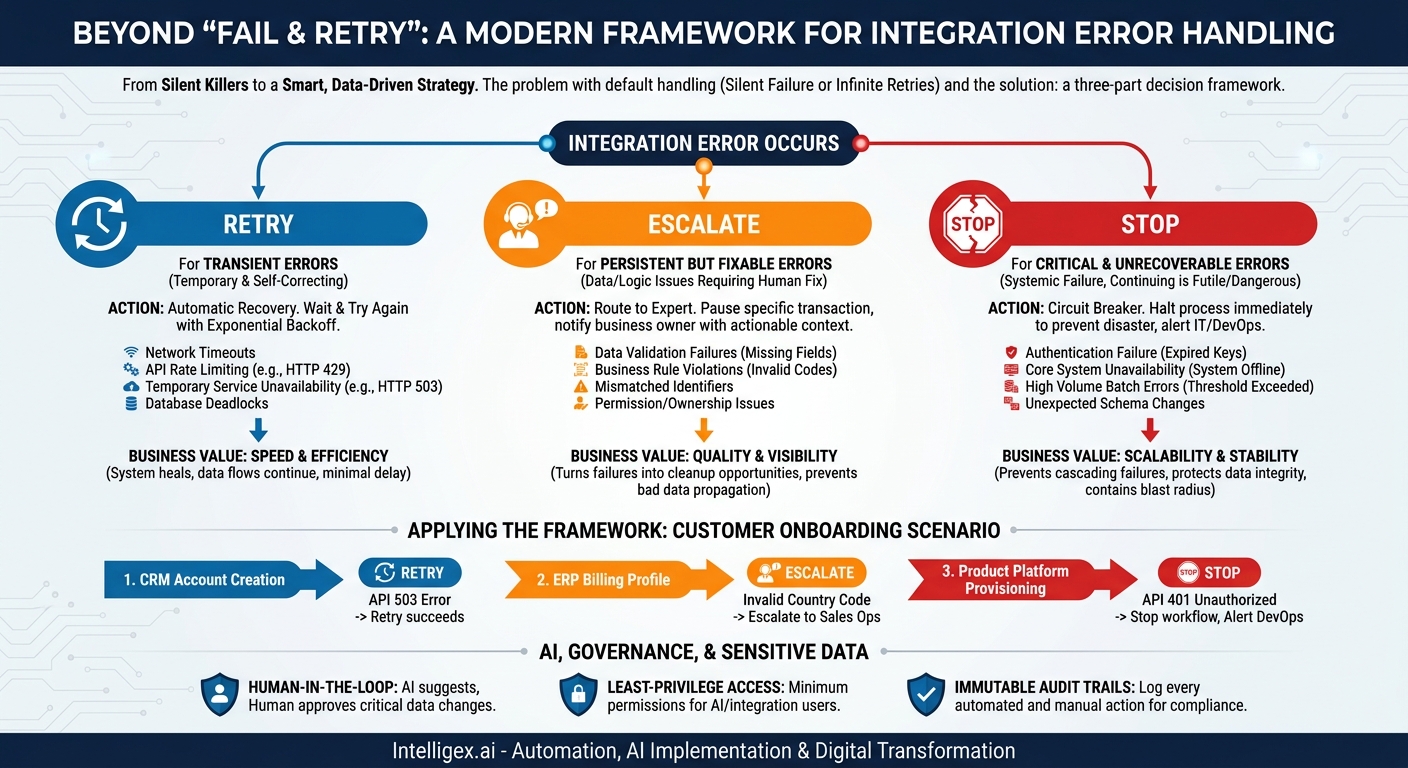
The default error handling in many integration platforms is often a simple, binary choice: fail and stop, or retry indefinitely. Neither is sufficient for a modern, data-driven enterprise. Failing silently leaves you unaware of a growing data gap until a customer complains or a report looks wrong. Retrying forever on a permanent error wastes expensive computing resources and can overload system APIs. To build resilient, scalable, and trustworthy automated processes, you need a more intelligent strategy. It all comes down to making the right choice between three simple actions: Retry, Escalate, or Stop.
Why Your Current Error Handling Is a Hidden Cost
Without a deliberate error-handling strategy, you are likely losing money, time, and trust in your data. The problem lies in treating all errors as equal. A temporary network hiccup is not the same as a permanently invalid customer ID, yet a basic integration might handle them identically. This one-size-fits-all approach creates significant business risks that often go unnoticed until the damage is done.
Consider two common failure modes and their business impact:
- Silent Failure or “Log and Forget”: The job fails, writes an obscure line to a log file that nobody reads, and moves on. A crucial update to a customer’s shipping address is dropped. The next multi-thousand-dollar shipment goes to the wrong location, leading to recovery costs, customer frustration, and potential churn. The root cause is a data quality issue that could have been fixed in seconds, but no one was ever notified. This directly impacts operational quality and customer satisfaction.
- Infinite Retries or “Hopeful Looping”: The job encounters an error, like trying to sync an order to a sales territory that no longer exists. It retries every five minutes, all day, every day. Each attempt consumes API calls and server resources, potentially contributing to higher platform costs. More importantly, this constant noise masks the real issue. The sales team is missing its quota because orders aren’t being assigned correctly, but the system just looks “busy.” This impacts cost, visibility, and business performance.
A mature error-handling framework isn’t a technical luxury. It’s a core component of digital transformation that directly drives business value by improving the speed, cost, quality, and visibility of your operations.
The Three Core Strategies: A Simple Framework
Moving beyond basic error handling means implementing a decision-making framework. Instead of a single, default reaction, your system should be smart enough to classify an error and choose the most appropriate response. The entire strategy can be built around three key actions.
Retry
This is for transient errors. These are temporary, self-correcting problems where simply trying again after a short wait is likely to succeed. The key is that the underlying data and logic are correct, but a temporary environmental issue is blocking the process.
Escalate
This is for persistent but fixable errors. The system cannot resolve the issue on its own, but a person can. These errors often stem from bad data, broken business rules, or configuration changes. The goal is to route the problem to the right human for a quick manual fix, without stopping the entire process.
Stop
This is for critical and unrecoverable errors. Continuing the process would either be futile or, worse, cause widespread data corruption. This action is a protective measure, a circuit breaker designed to prevent a small problem from turning into a catastrophic failure.
By categorizing every potential failure into one of these three buckets, you can build automated workflows that are more resilient, efficient, and transparent.
When to Retry: Automating Recovery from Temporary Glitches
The “Retry” strategy is your first line of defense against the unpredictability of networked systems. Its goal is to handle temporary disruptions automatically, without any human intervention, ensuring that processes complete successfully with only a minor delay. This is ideal for issues that are short-lived by nature.
Common scenarios for a Retry strategy:
- Network Timeouts: A connection to a remote server is temporarily lost.
- API Rate Limiting: A cloud service like Salesforce or Shopify temporarily blocks requests because you’ve sent too many in a short period (e.g., HTTP 429 “Too Many Requests”).
- Temporary Service Unavailability: A dependency system is down for a few seconds for a restart or deployment (e.g., HTTP 503 “Service Unavailable”).
- Database Deadlocks: Two processes temporarily block each other from accessing the same database record. One will typically be terminated, and a retry will succeed.
Implementing a smart retry mechanism involves more than just a simple loop. Follow these steps for a robust setup:
- Identify Transient Error Codes: Explicitly define which error types (like HTTP status codes 429, 503, or specific connection timeout errors) should trigger a retry. Do not retry on data validation errors like a 400 “Bad Request.”
- Implement Exponential Backoff: Instead of retrying every 10 seconds, increase the delay between attempts. For example, wait 2 seconds, then 4, then 8, and so on. This prevents a “thundering herd” of retries from overwhelming a service that is trying to recover.
- Set a Strict Maximum: Never retry forever. Define a reasonable cap, such as 5 or 10 retry attempts. If the job still fails after the maximum number of retries, the problem is not transient. It must then be escalated.
- Log the First Failure and Subsequent Retries: Ensure your logging system captures the initial error and each retry attempt. This provides visibility into how often transient errors are occurring, which can help diagnose underlying network or system instability.
Business Value: The primary value here is speed and efficiency. The system heals itself from minor issues, ensuring data flows continue with minimal delay and without consuming the valuable time of your operations or IT teams.
What to Measure: Track your “Retry Success Rate.” A high success rate (e.g., over 95% of retries eventually succeed) indicates your logic is correctly identifying transient errors. Also monitor the “Mean Time to Recovery” for these jobs to understand the typical delay caused by these issues.
When to Escalate: Bringing in the Human Experts
While retries handle temporary system issues, escalations handle permanent data or logic issues. An escalation is a managed “call for help,” a systematic way of pausing a single problematic transaction and routing it to the person or team best equipped to fix it. This is not about sending another email to a generic IT helpdesk inbox. It’s about delivering an actionable alert to the business process owner.
Common scenarios for an Escalate strategy:
- Data Validation Failures: A sync job tries to create a new user in a downstream system, but the source record is missing a required field like “email address.”
- Business Rule Violations: An order from your e-commerce platform has a discount code that doesn’t exist in your ERP’s pricing module.
- Mismatched Identifiers: A product update job fails because the SKU in the source system does not match any product in the destination system.
- Permission or Ownership Issues: A job attempts to update a sales record owned by a different team, and the integration user lacks the necessary permissions.
An effective escalation process is about context and clarity. The notification must contain everything the recipient needs to solve the problem quickly. Use this checklist to design your alerts:
Escalation Alert Checklist
- [ ] Is the recipient correct? The alert for a failed sales order sync should go to Sales Operations, not a database administrator. The owner of the business process is usually the one who can fix the data.
- [ ] Is the subject line clear and actionable? “Action Required: Customer Order Sync Failure” is better than “Integration Job Error.”
- [ ] Does it include key identifiers? Provide the Order ID, Customer ID, SKU, or whatever primary identifier is relevant to the data.
- [ ] Does it contain a direct link? Include a hyperlink that takes the user directly to the failed record in the source system so they can correct it.
- [ ] Is the error message human-readable? Translate technical jargon. “Validation Error: ‘State’ field does not match picklist values” is far more helpful than “SOAP FAULT: INVALID_OR_NULL_FOR_RESTRICTED_PICKLIST.”
Business Value: Escalation is a powerful tool for improving data quality and operational visibility. It turns failures into opportunities for data cleanup and process improvement. Instead of letting bad data propagate, you quarantine it and notify the people who can ensure its integrity.
When to Stop: Using a Circuit Breaker to Prevent Disaster
Some errors are so severe that the only safe response is to stop everything immediately. The “Stop” strategy, often implemented as a “circuit breaker” pattern, is designed to prevent a localized failure from causing a system-wide catastrophe. Continuing the process in the face of a critical error could lead to massive data corruption, exorbitant API costs, or a complete system outage.
Common scenarios for a Stop strategy:
- Authentication Failure: The API key or password for a critical system is invalid or has expired. Every subsequent call is guaranteed to fail, so there is no point in continuing.
- Core System Unavailability: A key system like your central ERP or database is completely offline. Attempting to sync thousands of records will only generate thousands of failures.
- High Volume of Batch Errors: A job designed to sync 10,000 product updates fails on the first 500 records. This indicates a systemic problem (like a schema change or a bad data export), not just a few isolated bad records. Continuing would be wasteful and dangerous.
- Unexpected Schema Changes: An integration expects a field named “customer_id” but the source system’s API now returns “customerID.” This will cause every single record to fail until the integration code is updated.
The key to the Stop strategy is defining a clear threshold. For batch jobs, this is often a percentage. For example: “If more than 5% of records in a single batch fail, stop the entire job and send a P1 alert to the IT/DevOps team.” This prevents a bad deployment or data file from corrupting your entire dataset. It contains the blast radius.
Business Value: The Stop strategy is crucial for maintaining system scalability and stability. By preventing cascading failures, you ensure that one faulty integration doesn’t consume all available resources or bring down other critical business processes. It also protects data integrity by halting processes that would otherwise write bad or incomplete data into your core systems.
Applying the Framework: A Customer Onboarding Scenario
Let’s see how this works in a practical, multi-step business process. A new enterprise customer signs up. This triggers a workflow:
- Create an Account in the CRM.
- Create a Billing Profile in the ERP.
- Provision the service in the main Product Platform.
Here is how our error-handling framework would manage failures at each step:
- Step 1 (CRM): The job tries to create the account, but the CRM’s API is briefly unavailable and returns a 503 error.
- Action: RETRY. The system waits 5 seconds and tries again. It succeeds, and the workflow continues. No human intervention needed.
- Step 2 (ERP): The CRM account was created, but the data includes a non-standard “Country” code (“United States” instead of “US”). The ERP, which has a strict list of country codes, rejects the record.
- Action: ESCALATE. The system pauses this specific customer’s workflow. It sends an alert to the Sales Ops team with a link to the new CRM account, stating, “Failed to create billing profile due to invalid Country field. Please correct and manually resume sync.” Other customer onboarding jobs continue to run normally.
- Step 3 (Product Platform): The workflow tries to provision the service, but the platform’s API returns a 401 “Unauthorized” error on every attempt.
- Action: STOP. This indicates the platform’s API key stored in the integration tool has expired. Retrying is pointless. The system immediately halts the entire onboarding workflow for ALL new customers and sends a high-priority alert to the DevOps team to update the credentials. This prevents a backlog of thousands of failed jobs and gets the right team involved instantly.
AI, Governance, and Sensitive Data
As integrations become more complex, some organizations are using AI models to help classify errors and even suggest resolutions. For instance, an AI could analyze an error log and, based on historical patterns, predict whether a retry is likely to succeed or if an immediate escalation is more efficient. This can add a powerful layer of intelligence to your error-handling strategy.
However, introducing automation, especially AI, into processes that handle sensitive customer, financial, or employee data requires careful governance. The goal is to make processes more efficient without compromising security or compliance.
- Human-in-the-Loop: For any automated action that modifies critical data (like an AI “fixing” an address), require human approval. The AI can suggest the change, but a person from the relevant business team must provide the final sign-off.
- Least-Privilege Access: Ensure the integration user accounts and any associated AI services have the minimum permissions necessary. If a job only needs to read product data and write order data, it should not have permission to view customer PII or modify financial records. For robust security information, you can always refer to official documentation from your cloud providers, such as Amazon Web Services.
- Immutable Audit Trails: Every action taken by the error-handling system, whether automated or manual, must be logged. The log should clearly state what happened, what data was affected, which system or user took the action, and when. This is non-negotiable for compliance and troubleshooting.
Your Next Steps: Building a Resilient Integration Strategy
Moving from a reactive to a proactive error-handling model doesn’t require a massive overhaul. It’s an iterative process of improvement that delivers immediate value. You can start today by focusing on your most critical data flows.
- Audit Your Top 3 Sync Jobs: Identify the three most critical integrations for your business. This could be your lead-to-cash process, your inventory management sync, or your employee onboarding workflow.
- Document the “As-Is”: For each job, ask: What happens right now when an error occurs? Who gets notified? How long does it take to discover the failure? Be honest about the current state.
- Define the “To-Be” Rules: Using the Retry, Escalate, and Stop framework, map out the desired behavior for different types of errors. Define your retry limits, your escalation paths (who gets the alert and what’s in it), and your circuit breaker thresholds.
- Implement and Monitor: Put your new rules into practice, starting with one job. Measure the results. Are you seeing fewer manual interventions? Is data quality improving? Use the data you gather to refine your approach and then expand it to other critical integrations.
By treating error handling as a core business function rather than a technical afterthought, you build a more resilient, efficient, and scalable organization. You create a foundation of trustworthy data that empowers your teams to make better decisions, faster.
Your Next Read:
Get a FREE
Proof of Concept
& Consultation
No Cost, No Commitment!
