

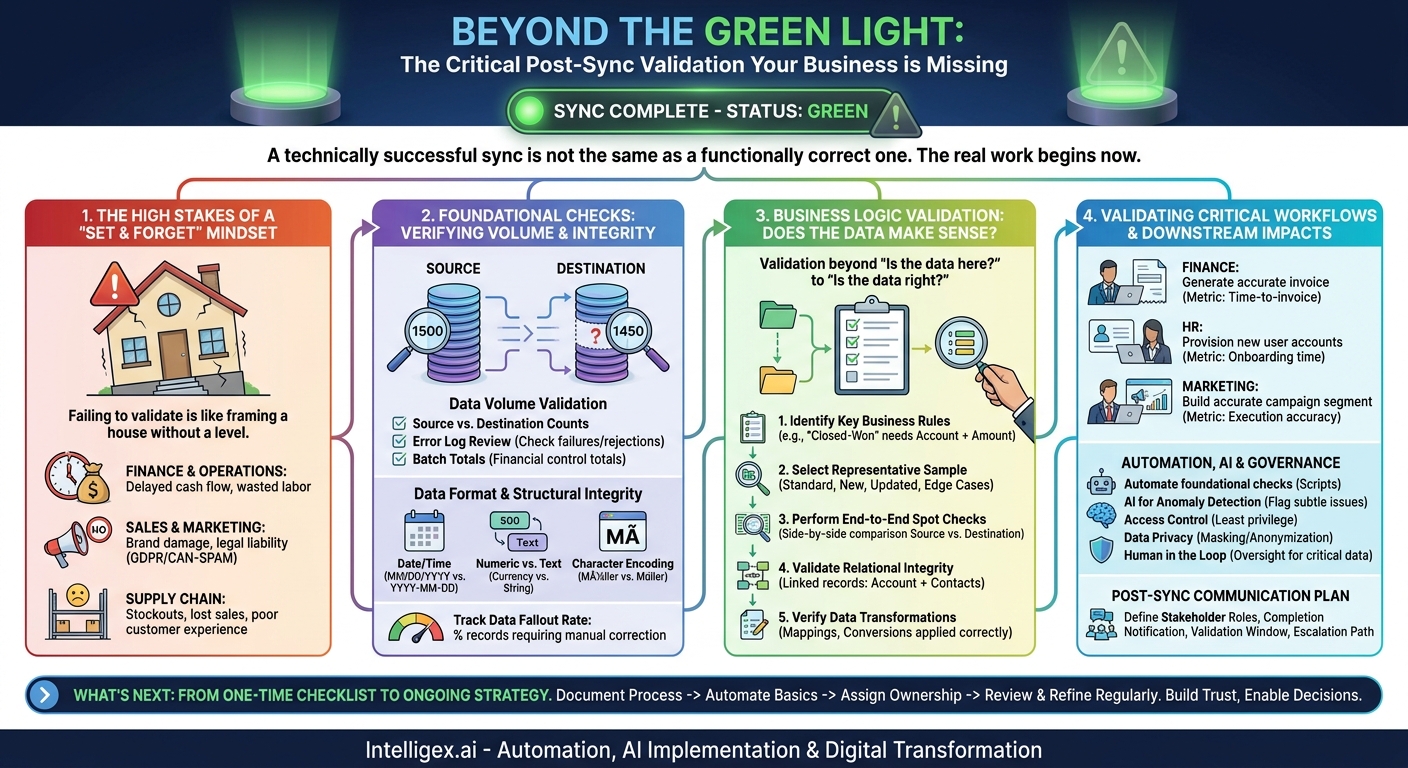
The synchronization is complete. The status indicator is green, the logs report success, and the automated job has moved on. For many teams, this is the end of the story. But in reality, the most critical work is just beginning. A technically successful sync is not the same as a functionally correct one. The difference between the two can impact everything from financial reporting and customer relationships to supply chain efficiency.
Assuming a “green light” means the job is done is a common, and costly, mistake. Data that is technically present but contextually wrong can silently corrupt downstream processes, leading to flawed business intelligence, operational errors, and a gradual erosion of trust in your data infrastructure. The real goal of any synchronization is not just to move data, but to deliver reliable, actionable information where it’s needed. This requires a disciplined post-sync validation process. It’s the essential step that transforms a data pipeline from a simple utility into a strategic business asset.
The High Stakes of a “Set and Forget” Mindset
Failing to validate a data sync is like a builder framing a house without ever using a level. The pieces fit together, but the foundation is skewed, and the problems will only multiply as you build upon it. In the business world, these problems manifest as tangible costs and risks.
Consider a few common scenarios where a lack of validation creates significant business friction:
- Finance and Operations: An e-commerce platform syncs new customer orders to the main Enterprise Resource Planning (ERP) system. A technical success is reported, but a subtle mapping error fails to transfer the shipping tax code for certain regions. The finance team cannot generate accurate invoices, causing delays in accounts receivable, frustrating customers, and requiring hours of manual cleanup. The business cost here is measured in delayed cash flow and wasted labor hours.
- Sales and Marketing: A CRM syncs an updated contact list to a marketing automation platform. The sync fails to update the “Opt-Out” status for a group of contacts who recently unsubscribed. The marketing team, unaware of the error, includes them in a new campaign. This not only irritates customers but also creates a risk of non-compliance with privacy regulations like GDPR or CAN-SPAM. The cost is brand damage and potential legal liability.
- Supply Chain and Inventory: A Warehouse Management System (WMS) performs its hourly sync of inventory levels with the central ERP. A network hiccup causes a partial failure, and the sync completes without updating the stock counts for a popular product. The ERP shows ample stock, so the system doesn’t trigger a reorder. The result is a stockout, lost sales, and a poor customer experience. The business value lost is direct revenue and customer loyalty.
A rigorous validation checklist isn’t about technical perfectionism. It’s about risk management and value assurance. It ensures that the speed and efficiency gained from automation are not undermined by poor data quality. It’s the bridge between a working integration and a trustworthy one.
Foundational Checks: Verifying Volume and Integrity
Before diving into complex business rules, your first validation step should confirm that the data arrived in the expected shape and size. These foundational checks are quick to perform and can catch a surprising number of common synchronization errors. Think of this as taking attendance before starting the lesson.
Data Volume Validation
The most basic question is: did everything that was supposed to move actually arrive? A mismatch in record counts is the clearest indicator of a problem. Your initial checklist should include these simple but powerful comparisons:
- Source vs. Destination Counts: Does the number of records extracted from the source system match the number of records loaded into the destination system? For example, if 1,500 new lead records were created in your CRM, did all 1,500 make it into your email marketing platform?
- Error Log Review: Don’t just check the final count. Check the error or rejection log. If 1,500 records were sent but only 1,450 were loaded, the log should tell you precisely which 50 failed and why. Common reasons include duplicates, missing required fields, or formatting issues.
- Batch Totals: For financial data, validate control totals. If you are syncing a batch of invoices, does the sum of all invoice amounts in the source system match the sum in the destination system? This can catch issues where a record was transferred but a key numeric value was dropped or corrupted.
Data Format and Structural Integrity
Once you’ve confirmed the right number of records arrived, you need to ensure they are usable. Data corruption can happen in many ways during transit, especially when moving between systems with different data standards.
Look for common formatting problems:
- Date and Time Fields: A classic issue. System A might use `MM/DD/YYYY` while System B expects `YYYY-MM-DD`. A validation check ensures dates are not just present, but correctly interpreted. An incorrect date format can break reporting, scheduling, and billing workflows.
- Numeric vs. Text Fields: Was a currency value like 199.99 accidentally converted into a text string? This would cause it to be ignored in financial calculations and reports. Similarly, was a zip code that needs to be treated as text (like “01234”) converted to a number (1234)?
- Character Encoding: In our global economy, names and addresses often contain special characters (e.g., Müller, François, Peña). An encoding mismatch can turn these into gibberish (e.g., Müller). This not only looks unprofessional but can also break search and matching logic.
A key metric to track here is the data fallout rate. This is the percentage of synced records that require manual correction in the destination system. A high fallout rate indicates a fundamental problem with the integration’s transformation logic that needs to be addressed.
Business Logic Validation: Does the Data Make Sense?
This is where your business teams become critical partners in the validation process. A sync can be technically perfect, with all records present and correctly formatted, but still be functionally useless if it violates core business rules. This level of validation moves beyond “Is the data here?” to “Is the data right?”
Validating business logic requires a systematic approach. You cannot check every single record, so a structured sampling process is essential. Here is a step-by-step method that IT and business teams can use together.
- Identify Key Business Rules and Invariants: Before the sync runs, document the non-negotiable rules for your data. These are the conditions that must always be true. For instance, in a sales context, a rule might be: “An opportunity in Salesforce marked as ‘Closed-Won’ must always have an associated Account, a non-zero value in the ‘Amount’ field, and a valid Close Date.”
- Select a Representative Data Sample: After the sync, choose a small but diverse set of records to inspect manually. A good sample includes a mix of record types:
- Standard Records: A few typical, everyday records to check the baseline.
- Recently Created Records: The newest records from the sync.
- Recently Updated Records: Records that were modified, not created, to ensure updates are flowing correctly.
- Edge Cases: Records with unusual data, such as international addresses, large order values, or special discount codes. These are often where lazy logic breaks.
- Perform End-to-End Spot Checks: With your sample, open the same record in both the source and destination systems and compare them side-by-side. Is the customer’s shipping address in the ERP identical to the one from the e-commerce platform? Does the employee’s start date in the payroll system match what’s in the HRIS? This manual check is invaluable for building trust.
- Validate Relational Integrity: Data rarely exists in isolation. Check that the relationships between records were preserved. If you sync a new company account and its three associated contacts, did all three contacts get correctly linked to that account in the destination system? Or are they now “orphaned” records? This is crucial for maintaining a 360-degree view of your customers.
- Verify Data Transformations: Often, data is not just moved, it is changed along the way. For example, a lead status of “Contacted” in one system might need to be mapped to “In Progress” in another. Or currencies might be converted. Your validation must confirm that this transformation logic was applied correctly and consistently across the sample set.
Validating Critical Workflows and Downstream Impacts
The ultimate test of a data sync is whether it enables or breaks downstream business processes. A successful sync ensures that the next person or system in the chain can do their job effectively. This is where you connect the technical process of data movement to tangible business outcomes.
The best way to do this is to have the actual end-users perform a test on the newly synced data. Their validation should answer a simple question: “Can I do my job with this data?”
- Finance Scenario: After sales orders are synced from the CRM to the ERP, a member of the accounting team should immediately try to generate an invoice for one of the new orders. If they can do it without any errors, the workflow is validated. If the process fails because a required field like a Purchase Order number or tax ID is missing, then the sync has a critical business-level flaw. The metric here is time-to-invoice; a bad sync can extend this from minutes to days.
- HR Scenario: When a new hire’s profile is synced from the HRIS to IT systems like Active Directory, the IT team should immediately try to provision the new user’s accounts. Can they log in? Is their email address created? Are they assigned to the correct security groups? The metric is new employee onboarding time. A smooth sync makes Day 1 productive, while a broken one creates frustration and delays.
- Marketing Scenario: When a new contact segment is synced from the data warehouse to the marketing platform, the marketing team should build a draft campaign targeting that segment. Does the audience count look correct? Are suppression lists and opt-out flags from other systems being honored? The metric is campaign execution accuracy, which directly impacts marketing ROI and brand reputation.
Involving business users in this final step is non-negotiable. They are the ultimate arbiters of data quality because they are the ones who depend on it to create value.
A Note on Automation, AI, and Governance
As your integrations become more complex, manual validation for every sync becomes impractical. The goal is to automate as much of the validation process as possible while ensuring proper governance and oversight.
Automated scripts can handle most of the foundational checks, such as comparing record counts, checking for null values in critical fields, and validating data formats. These scripts can run immediately after a sync and raise an alert if a discrepancy is found, allowing your team to investigate before a business user ever sees the bad data.
More advanced systems can use AI and machine learning for anomaly detection. Instead of just checking for broken rules, these models can learn the normal patterns in your data. They can then flag subtle issues that a rules-based system might miss, such as an unexpected 50% drop in the average order value from a specific country, which could indicate a currency conversion error in the sync logic.
However, automation brings its own set of responsibilities, especially around data governance.
- Access Control: The systems and scripts performing the validation must operate under the principle of least privilege. An automated process checking invoice data does not need access to employee salary information. Restricting access reduces the risk of accidental data exposure.
- Data Privacy: When validating with sensitive customer or employee data (personally identifiable information), be mindful of privacy. Use data masking or anonymization techniques for testing whenever possible. Human reviewers who perform spot checks must be authorized to view the data they are handling.
- Human in the Loop: Automation should not eliminate human oversight, it should focus it. For the most critical data flows, like payroll calculations or large financial transfers, automated checks should flag exceptions for a mandatory human review. This “human in the loop” approach provides a safety net against costly automated errors and builds organizational trust in the system.
Building a Post-Sync Communication Plan
Validation is a team sport. A successful sync depends on clear and timely communication between technical teams and business stakeholders. When issues are found, a good communication plan ensures they are reported to the right people and resolved quickly. Without it, business users may either not know the data is ready for them or, worse, not know who to tell when they find a problem.
Your communication plan doesn’t need to be complicated. It should clearly define:
- Stakeholder Roles: Who are the primary business owners for this data? For a customer data sync, this might be the Head of Sales Ops and the Marketing Manager. They are the first point of contact.
- Completion Notification: How are stakeholders notified that a sync is complete and ready for their review? A message in a shared Slack or Teams channel is often more effective than an automated email that gets lost in a crowded inbox.
- Escalation Path: What is the exact process if an issue is discovered? Who does the business user contact? How is the issue logged? What is the protocol for deciding whether to pause future syncs or roll back the data? A clear escalation path prevents panic and ensures a swift, orderly response.
–Validation Window: Define a specific and reasonable timeframe for business users to perform their spot checks (e.g., “within one business hour of notification”). This creates a predictable routine.
What’s Next: From One-Time Checklist to Ongoing Strategy
A post-sync validation checklist is more than a technical task; it’s a foundational element of a mature data governance strategy. It codifies the process of ensuring data is not just moved, but is delivered fit-for-purpose. By consistently validating your data flows, you build a culture of data accountability and reliability that is essential for scaling your business and enabling true digital transformation.
To put this into practice, start with these actionable steps:
- Document Your Process: Take the concepts here and create a standardized validation checklist template for your organization. Tailor it for your most critical data flows first, such as order-to-cash or lead-to-close.
- Automate the Basics: Begin by automating the simple but crucial checks. Implement scripts to verify record counts and flag null values in required fields. This provides an immediate safety net and frees up your team for more complex validation tasks.
- Assign Clear Ownership: For each key integration, designate a specific business owner responsible for sign-off. This creates accountability and ensures that the people who rely on the data have a voice in verifying its quality.
- Review and Refine Regularly: Your business is not static, and neither are your data needs. Schedule a quarterly review of your validation checklists and processes. As new fields, systems, or business rules are introduced, update your validation logic to match.
Ultimately, rigorous post-sync validation is about building trust. When your teams can trust the data in their systems, they can make faster, more confident decisions. That trust is the true return on investment of a well-executed integration strategy.
Your Next Read:
Get a FREE
Proof of Concept
& Consultation
No Cost, No Commitment!
