

When a customer places an order, a simple question arises: is the product actually in the warehouse? Answering that question with 100% confidence, every single time, separates market leaders from their competition. The reality for many businesses is a frustrating gap between what their warehouse management system (WMS) knows and what their enterprise resource planning (or ERP) system reports. This disconnect isn’t just a technical problem; it’s a drag on revenue, a drain on efficiency, and a source of constant cross-departmental friction.
The physical world of pallets, bins, and scanners often moves faster than the financial world of ledgers, invoices, and forecasts. Closing this gap requires a seamless, automated flow of inventory data. It’s about ensuring that a pallet received on the loading dock is immediately visible as a financial asset, and an item picked for shipping is instantly reflected in the company’s profitability reports. Getting this flow right transforms inventory from a logistical challenge into a strategic, data-driven asset.
Why a Disconnected Inventory Flow Hurts Your Business
An inventory data lag or mismatch creates cascading problems that ripple through every department. While it might seem like an operational issue, the consequences are felt company-wide, impacting everything from cash flow to customer loyalty.
The Impact on Key Departments:
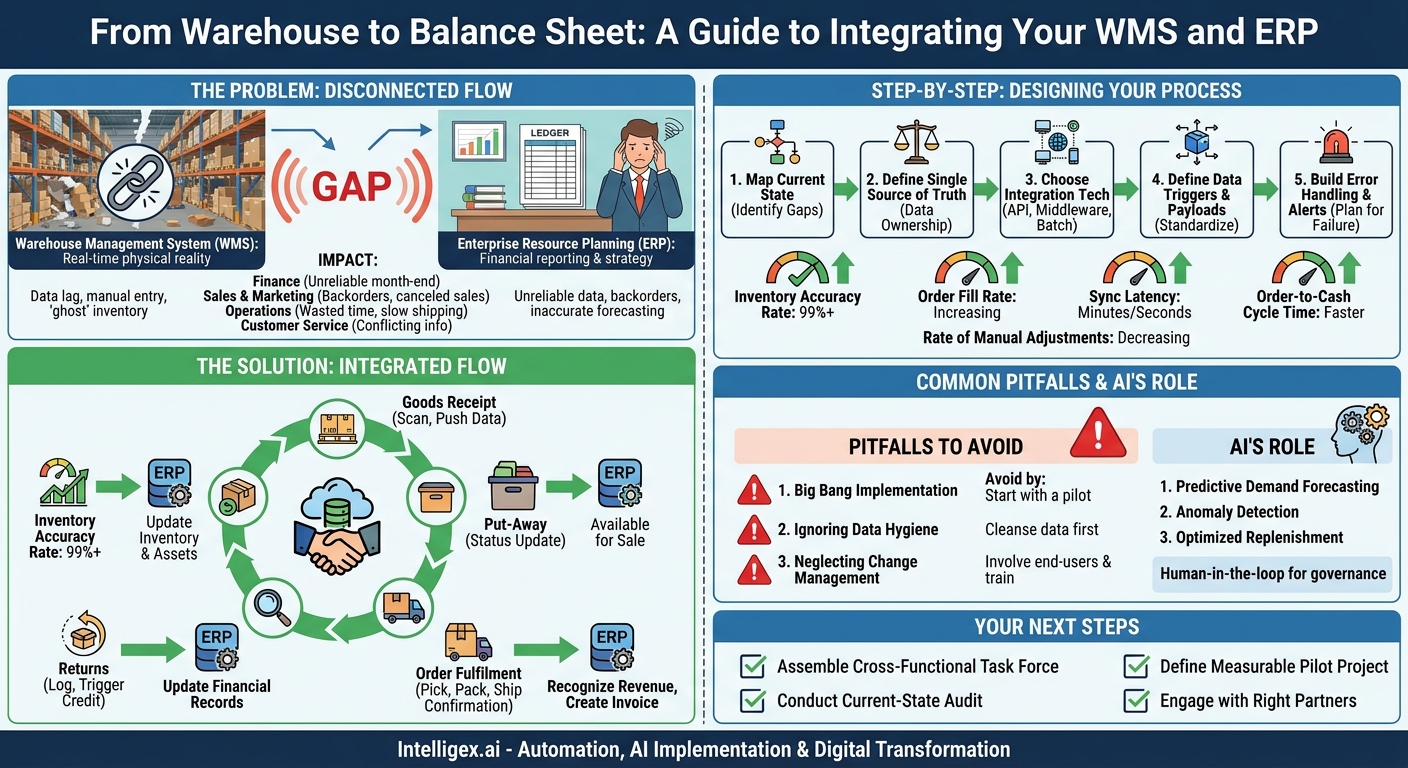
- Finance: When the ERP’s inventory valuation is based on old data, financial statements become unreliable. Month-end closing becomes a frantic, manual reconciliation effort, delaying reports and increasing the risk of compliance errors. Inaccurate cost of goods sold (COGS) data also distorts profitability analysis, leading to flawed strategic decisions.
- Sales and Marketing: The sales team’s worst nightmare is selling a product that isn’t there. This leads to backorders, canceled sales, and frustrated customers. Marketing teams might launch promotions for items that are nearly out of stock, wasting budget and damaging brand reputation when the promised products are unavailable.
- Operations and Supply Chain: The warehouse team bears the brunt of bad data. They waste time searching for “ghost” inventory that the system says exists but is physically missing. This slows down picking, packing, and shipping, increasing labor costs per order and hurting on-time delivery metrics. It also makes accurate demand forecasting and reordering nearly impossible, leading to a cycle of stockouts on popular items and overstocking of slow-movers.
- Customer Service: When a customer calls to ask about their order status, the service team needs a single, reliable source of truth. If the ERP says an order has shipped but the WMS shows it’s still waiting to be picked, the customer gets conflicting information, eroding trust and satisfaction.
The Anatomy of an Integrated Inventory Flow
To fix the disconnect, we must first understand the key moments where data needs to move between the warehouse and the central business system. A truly integrated flow treats the WMS and ERP as partners in a continuous conversation, each providing the other with timely, accurate information. The core stages of this data exchange are critical for maintaining a unified view of your inventory.
These are the fundamental checkpoints in an item’s journey where synchronization is not just beneficial, but essential:
- Goods Receipt: When a new shipment arrives from a supplier, the warehouse staff scans it into the WMS. This is the first touchpoint. An automated flow should immediately push this data (SKU, quantity, lot number, receipt date) to the ERP. This allows the ERP to update inventory on hand, increase the value of inventory assets on the balance sheet, and match the receipt against the original purchase order.
- Put-Away: After receipt, items are moved to a specific storage bin. The WMS tracks this location. While the ERP may not need the exact bin number, it needs a status update confirming the items are no longer “in receiving” and are now “available for sale.” This is a crucial step that releases inventory to be allocated to new customer orders.
- Order Fulfillment (Pick, Pack, and Ship): This is the most dynamic phase. As an order is picked, the WMS decrements the available quantity. Once the order is packed and a shipping label is generated, a “shipment confirmation” trigger is sent to the ERP. This message is vital. It tells the ERP to recognize the revenue, calculate COGS, generate the customer invoice, and officially decrease the inventory asset account.
- Cycle Counting and Adjustments: No system is perfect. Regular physical counts (cycle counts) are necessary to reconcile reality with system data. When a discrepancy is found in the WMS (e.g., a damaged item is written off), that adjustment must be sent to the ERP with a reason code. This ensures the financial records accurately reflect the loss or change in inventory value.
- Returns (Reverse Logistics): When a customer returns a product, the process runs in reverse. The WMS logs the item’s return and condition. This data flows to the ERP to trigger a customer credit or refund and to adjust inventory levels, adding the item back into stock if it’s in sellable condition.
Step-by-Step: Designing Your Modernized Update Process
Building a robust and automated inventory flow is a systematic process. It requires moving from manual processes and nightly data dumps to a more event-driven, real-time architecture. This approach reduces errors, increases speed, and provides the visibility needed for modern commerce.
A Phased Approach to Integration:
- Map Your Current State and Identify Gaps: Before you can build the future, you must understand the present. Document every step in your current inventory process, from receiving to shipping. Identify every system, spreadsheet, and manual entry point. Ask critical questions: Where does data live? Who is responsible for entering it? How long does it take for an update in one system to appear in another? This map will reveal your biggest bottlenecks and points of failure.
- Define the Single Source of Truth for Key Data: A common mistake is having two systems trying to be the master of the same data. This leads to conflicts and confusion. Establish clear rules. For example, the WMS is the source of truth for physical quantity and location. The ERP is the source of truth for financial value, standard cost, and overall company-wide availability. This principle of “data ownership” is fundamental to a clean integration.
- Choose the Right Integration Technology: Your choice of technology depends on your need for speed and your existing infrastructure.
- API-Based Integration: This is the modern standard. Using Application Programming Interfaces (APIs), the WMS and ERP can communicate in near real-time. When an event happens (like a shipment), the WMS makes an API call to the ERP instantly. This is ideal for high-volume e-commerce operations.
- Middleware Platforms: For complex environments with multiple systems (e.g., WMS, ERP, e-commerce platform), a middleware solution can act as a central hub. It translates and routes messages between systems, providing a single place to manage and monitor all data flows.
- Scheduled File Transfers (Batch Processing): While older, this method can still be effective for less time-sensitive processes. For example, a file of the day’s shipments is sent from the WMS to the ERP every hour. The main drawback is the built-in latency.
- Define Data Triggers and Payloads: Be extremely specific about what causes data to be sent and what information is included. A “trigger” is the event (e.g., “scan to shipping truck”). The “payload” is the data packet itself. For a shipment confirmation, the payload should include the Order ID, Shipment Tracking Number, Shipping Date, and a list of shipped items with SKUs and quantities. Documenting these payloads is crucial for developers and prevents miscommunication. For standardized product identification, adopting a global standard like GS1 can ensure SKUs are consistent across all systems and partners. You can learn more at their official site: https://www.gs1.org/.
- Build a Robust Error Handling and Alerting Protocol: Integrations will occasionally fail. A network issue, a data mismatch, or a system outage can interrupt the flow. A well-designed system doesn’t pretend this won’t happen; it plans for it. Your process must include automated logging of failures, alerts sent to the right team (IT, Operations), and a clear procedure for manually resolving and resubmitting the failed transaction.
Key Metrics to Track for Success
Implementing a new data flow is only half the battle. To justify the investment and ensure continuous improvement, you must measure its impact on the business. Tracking the right metrics provides clear evidence of the value being delivered in terms of cost savings, efficiency gains, and improved quality of service.
What to Measure Before and After Integration:
- Inventory Accuracy Rate: This is the foundational metric. It’s the percentage agreement between the physical inventory count and the inventory recorded in your system of record (the ERP). A high accuracy rate (ideally 99%+) is a direct indicator that your integrated flow is working.
- Order Fill Rate: The percentage of customer orders that can be fulfilled completely from existing stock without backorders or cancellations. A rising fill rate shows that your sales team is working with reliable availability data.
- Sync Latency: How much time elapses between a physical event in the warehouse and its corresponding update in the ERP? This could be “time from goods receipt scan to asset update” or “time from ship confirmation to invoice creation.” Your goal is to drive this latency down from hours or days to minutes or seconds.
- Rate of Manual Adjustments: Track the number of manual inventory corrections made by the finance or operations teams each month. A successful integration should dramatically reduce the need for these adjustments, freeing up valuable time and reducing the risk of human error.
- Order-to-Cash Cycle Time: This measures the time from when a customer places an order to when the payment is received. By automating the shipment-to-invoice process, you can bill customers faster, which directly improves cash flow.
Common Pitfalls and How to Avoid Them
Integration projects are powerful, but they can be complex. Many organizations stumble over predictable hurdles. By anticipating these common pitfalls, you can navigate your project more smoothly and avoid costly rework.
Pitfall: The “Big Bang” Implementation. Trying to automate every single inventory process at once is a recipe for failure. It creates too much risk, complicates troubleshooting, and overwhelms your teams with too much change.
How to avoid it: Start with a pilot project. Choose one high-impact, relatively simple process, such as synchronizing goods receipts. Perfect that flow first. Success in a pilot builds momentum, provides valuable lessons, and demonstrates value to the organization, making it easier to secure resources for subsequent phases.
Pitfall: Ignoring Data Hygiene. An integration will only automate the transfer of data; it won’t fix the data itself. If your WMS uses a different SKU format than your ERP, or if product descriptions are inconsistent, the automated flow will constantly fail.
How to avoid it: Conduct a data cleansing project before you begin integration. Ensure that key identifiers like SKUs, units of measure, and vendor codes are standardized and consistent across all systems. This upfront work is tedious but absolutely essential for long-term success. Many ERPs, such as those from SAP, have data management tools to assist with this process.
Pitfall: Neglecting Change Management. You are not just changing technology; you are changing how people do their jobs. If warehouse staff and finance clerks are not trained on the new process and don’t understand its benefits, they may resist the change or develop manual workarounds that undermine the entire system.
How to avoid it: Involve end-users from all affected departments in the design process. Their practical knowledge is invaluable. Provide clear documentation, hands-on training sessions, and ongoing support. Celebrate early wins to show them how the new system makes their jobs easier, not harder.
AI’s Role in a Smarter Inventory Flow
Once your WMS and ERP are seamlessly connected, you create a rich, reliable data stream. This is the perfect foundation for applying artificial intelligence and machine learning to move from reactive to proactive inventory management. AI isn’t about replacing human expertise; it’s about augmenting it with powerful analytical capabilities.
Practical AI Applications:
- Predictive Demand Forecasting: By analyzing historical sales data from the ERP alongside real-time stock levels from the WMS, AI models can forecast future demand with greater accuracy than traditional methods. This allows for smarter purchasing, reducing the risk of both stockouts and costly overstocking.
- Anomaly Detection: AI can monitor the constant flow of inventory data and flag transactions that fall outside normal patterns. For example, it could automatically alert a manager if an unusual number of high-value items are being written off as “damaged” at a specific warehouse, potentially indicating a training issue, a process flaw, or even theft.
- Optimized Replenishment and Allocation: For businesses with multiple warehouses, AI can recommend where to position inventory to minimize shipping costs and delivery times. It can analyze order patterns and suggest automated stock transfers between facilities to prepare for anticipated regional demand.
A Note on Safe and Governed Implementation
Leveraging AI with sensitive operational and financial data requires a thoughtful approach to governance. Trust is paramount. Start by ensuring robust access controls are in place, limiting who can view or alter critical inventory and order data. When implementing AI-driven recommendations, use a “human-in-the-loop” model. The AI should suggest a large inventory purchase or a significant write-off, but the final decision should be confirmed by a manager. This combines the analytical power of the machine with the contextual understanding and accountability of a human expert, ensuring that automation is implemented safely and responsibly.
Your Next Steps to an Integrated System
Achieving a seamless inventory flow is a journey, not a single event. The key is to start now with a deliberate and focused plan. By taking a structured approach, you can methodically eliminate data silos and build a foundation for a more responsive, efficient, and profitable operation.
Here is a simple action plan to get you started:
- Assemble a Cross-Functional Task Force: Bring together leaders from Operations, Finance, IT, and Sales. This project cannot succeed if it’s owned by a single department. Shared ownership ensures all perspectives are considered and builds company-wide buy-in.
- Conduct a Current-State Audit: Use the mapping exercise described earlier to create a definitive document of your existing processes, systems, and pain points. This audit will be the basis for your business case and technical requirements.
- Define a Measurable Pilot Project: Select your first integration point. Synchronizing inbound purchase order receipts is often a great place to start. Define what success looks like with clear metrics, such as reducing the time from delivery to financial recognition from 48 hours to 15 minutes.
- Engage with the Right Partners: Look for technology partners and integrators who have deep expertise in both warehouse logistics and financial systems. The best partners understand that this is not just an IT project, but a fundamental business process transformation.
Your Next Read:
Get a FREE
Proof of Concept
& Consultation
No Cost, No Commitment!
