

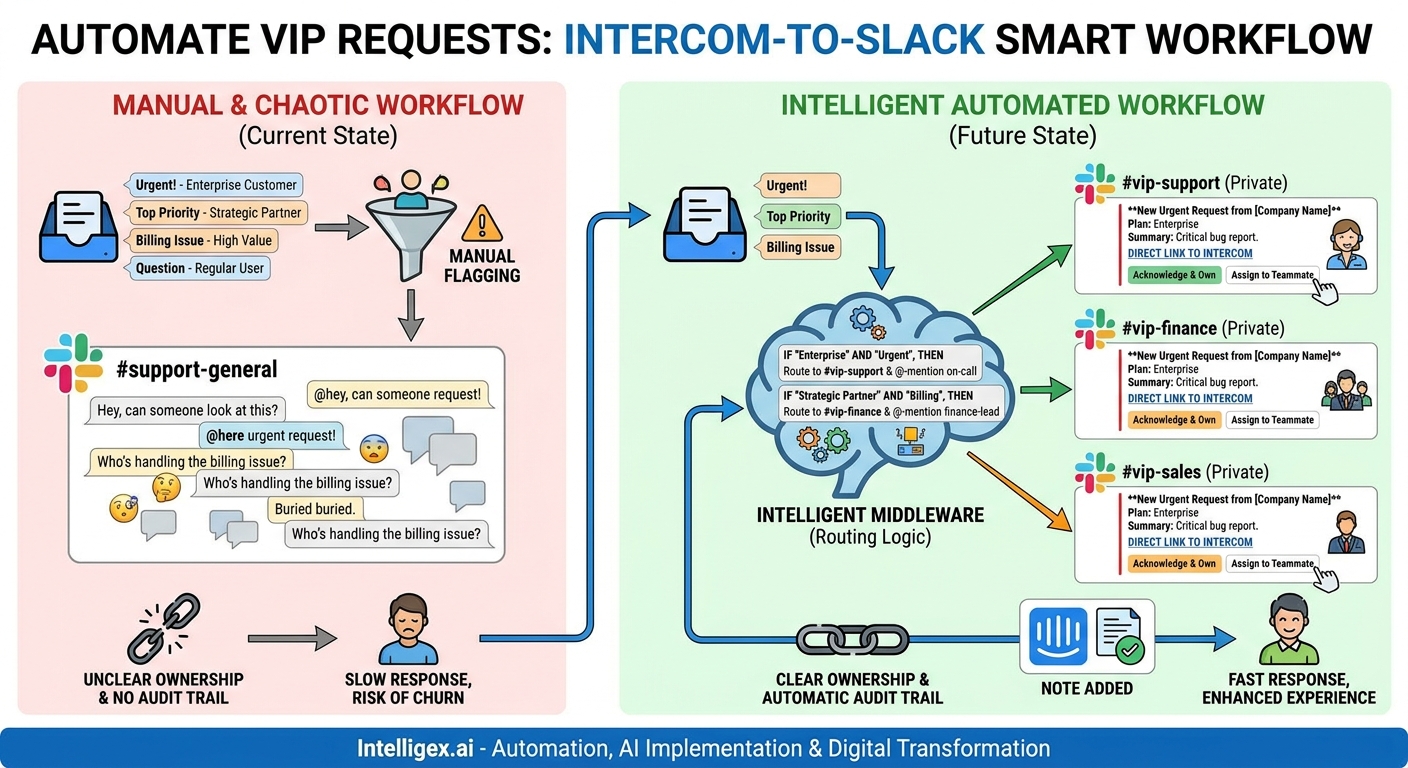
Your most valuable customers and partners expect a higher level of service. When they reach out with an urgent request, the clock starts ticking. Yet, for many organizations, these critical conversations land in the same general support queue as every other inquiry. The result is a scramble. Team members manually flag the request, @-mention colleagues in a noisy channel, and hope the right person sees it. Ownership is unclear, response times lag, and there is no reliable way to track the request from initiation to resolution.
This internal chaos directly impacts customer experience and operational efficiency. High-value relationships are put at risk, and your team wastes precious time on coordination instead of execution. The solution is not to work harder, but to build a smarter, automated workflow. By integrating your customer communication platform, like Intercom, with your internal collaboration hub, like Slack, you can create a dedicated fast lane for VIP requests. This isn’t about simply forwarding messages; it’s about building an intelligent system that routes, assigns, and tracks critical tasks with precision, creating both accountability and a complete audit trail.
Why a Simple “Forward to Slack” Integration Isn’t Enough
Many default integrations offer a simple “push notification” from one system to another. When a new Intercom message arrives, a notification appears in a designated Slack channel. While this seems helpful at first, it often creates more problems than it solves. This basic approach treats all communications as equal, leading to a firehose of information that quickly overwhelms your team.
Consider the common pitfalls of a rudimentary integration:
- Channel Noise: A single channel flooded with every customer message, from simple “thank you” notes to system-down emergencies, becomes impossible to monitor. Important requests are easily buried, defeating the purpose of the notification.
- The Bystander Effect: When a message is posted to a large group, everyone assumes someone else will handle it. Without a clear assignment mechanism, critical requests can languish for hours or even days before anyone takes ownership.
- Lack of Context: A simple notification often lacks the necessary context for a team member to act. They have to switch back to Intercom, find the customer’s history, and understand the situation before they can even begin to formulate a response. This constant context-switching is a major drain on productivity.
- No Audit Trail: The conversation about who is handling the request happens in a separate, disconnected Slack thread. There is no record within Intercom (your system of record for customer communication) of who took ownership or when. This makes it impossible to audit response times or analyze process bottlenecks.
To truly add value, your integration needs logic. It must be able to identify what is important, route it to the right people, facilitate clear ownership, and write key actions back to the source system. This transforms the integration from a simple notification tool into a robust operational workflow.
Defining Your VIPs and Their Critical Requests
Before you can build an intelligent routing system, you must first define what constitutes a “VIP request.” This definition is unique to every business and even to different departments within it. The process of defining these criteria is a valuable exercise in its own right, forcing you to align on what activities have the most significant business impact.
Start by identifying your key customer segments and the types of requests that require immediate attention. Look beyond just the support team; this process is relevant across the entire organization.
Examples Across Business Functions:
- Sales & Customer Success: A request from a user at a “Top 10” target account who is currently in a trial. A cancellation request from a high-annual-contract-value (ACV) customer.
- Finance & Billing: An urgent payment failure notification for an enterprise-tier account. A question about a large, complex invoice from a key partner.
- IT & Operations: A report of a critical bug or outage from a customer on a premium support plan. An infrastructure access request from a strategic integration partner.
- Supply Chain & Logistics: An expedited shipping request for a major distributor. A stock-out inquiry from a high-volume retailer.
Once you’ve identified these scenarios, the next step is to translate them into data points that live within your systems. Intercom allows you to use a combination of standard and custom data attributes to segment users and companies. This is the foundation of your routing logic.
Your VIP Definition Checklist:
- Identify Key Segments: Use attributes like subscription plan (e.g., “Enterprise”), monthly recurring revenue (MRR), employee count, or a custom tag like “Strategic Account.”
- Define Trigger Events: Determine what kind of communication from these segments is critical. Is it any new conversation? Or only messages containing specific keywords like “urgent,” “outage,” or “billing issue”?
- Map to Internal Teams: For each combination of segment and trigger, determine the precise team or individual who should be notified. A billing issue from an enterprise customer should go to the senior finance team, not the general support queue.
- Establish Service Level Agreements (SLAs): Define the expected response and resolution times for these requests. This will help you measure the effectiveness of your new workflow.
Architecting the Intelligent Routing Workflow
With your VIP criteria defined, you can now design the technical workflow. This process involves a trigger, a logic layer to make decisions, a structured notification, and a crucial feedback loop to close the loop. This model ensures that information flows efficiently and that actions are tracked systematically.
Here is a step-by-step guide to building this workflow, typically using a middleware platform (like Workato or Zapier) or custom code connecting the Intercom API and Slack API.
-
Set Up the Trigger in Intercom:
The workflow begins when a new conversation is started or a new message is received in Intercom. Your trigger should be configured with filters based on the VIP criteria you defined earlier. For example, the trigger could be: “Fire when a new message is received from a user whose company has the ‘Enterprise’ tag AND the message body contains the word ‘urgent’.”
-
Extract and Enrich the Data Payload:
Once triggered, the workflow should pull relevant data from Intercom. Don’t just grab the message text. Collect a rich payload of context that will help your team act quickly. This should include the customer’s name, company name, a direct link to the Intercom conversation, their subscription plan, and any other relevant custom attributes.
-
Apply Routing Logic in the Middleware:
This is the brain of your operation. Your middleware tool receives the data payload from Intercom and uses conditional logic to determine the correct destination. For example: IF the message contains “billing,” THEN route to the private `#vip-finance-alerts` Slack channel. IF the message contains “API” or “outage,” THEN route to `#vip-tech-escalations` and @-mention the on-call engineer.
-
Send a Structured, Actionable Slack Message:
Do not post a simple text notification. Use Slack’s Block Kit to create a message that is easy to scan and act upon. A well-designed message is a mini-dashboard for the request. It should include:
- Clear Title: e.g., “New Urgent Request from [Company Name]”
- Key Details: Customer name, plan, summary of the request.
- Direct Link: A prominent button that links directly back to the Intercom conversation.
- Action Buttons: Interactive buttons like “Acknowledge & Own,” “Assign to Teammate,” or “Mark as Resolved.”
-
Create the Feedback Loop to Intercom:
This is the most critical step for creating accountability and an audit trail. When a team member clicks an action button in Slack, it should trigger a corresponding action back in Intercom. For example, clicking “Acknowledge & Own” should:
- Assign the conversation in Intercom to the person who clicked the button.
- Post an internal note in the Intercom conversation, such as: “[User Name] has taken ownership of this request via Slack at [Timestamp].“
- Update the original Slack message to show who now owns the request, e.g., “Status: Owned by [User Name].” This prevents duplication of effort.
Building Ownership and an Unbreakable Audit Trail
The primary business value of this intelligent workflow lies in its ability to establish clear ownership and maintain a permanent record of every action taken. This moves your team from a reactive, chaotic state to a proactive, organized one.
Eliminating the Bystander Effect
The “Acknowledge & Own” button is a simple but powerful psychological tool. It transforms a broadcasted message into a specific task with a single, named owner. When a team member clicks it, they are publicly committing to seeing the request through to resolution. The updated Slack message immediately informs the rest of the channel that the issue is being handled, allowing them to focus on other priorities. This simple click replaces a series of back-and-forth messages, saving time and eliminating ambiguity.
Creating a System of Record
While the action happens in Slack, the record of that action must live in Intercom. Intercom is your central hub for all customer interactions. By programmatically adding internal notes (“John Doe took ownership,” “Jane Smith resolved the issue”), you are building a detailed, timestamped audit trail directly within the customer’s conversation history.
This audit trail is invaluable for several reasons:
- Performance Management: Managers can easily review how quickly VIP requests are being picked up and resolved, and by whom.
- Process Improvement: By analyzing the data, you can identify bottlenecks. Are requests often reassigned? It may indicate that your initial routing logic needs refinement.
- Compliance & Accountability: For regulated industries or clients with strict SLAs, having an immutable, timestamped record of every action is non-negotiable.
Measuring Success: Metrics That Matter
To justify the investment in building and maintaining this workflow, you need to track its impact. Move beyond vanity metrics and focus on operational KPIs that directly reflect improvements in speed, quality, and efficiency.
Establish a baseline before you implement the new system, and then track these metrics over time:
- VIP Time to First Response: How long does it take from the moment a VIP message is received until the first internal team member “owns” it? Your goal is to drive this down dramatically.
- VIP Time to Resolution: How long does it take to fully resolve the issue? A faster response is good, but a faster resolution is better.
- First Contact Assignment Accuracy: Measure the percentage of requests that are handled by the first person they are routed to. A high rate indicates your routing logic is effective and reduces internal friction.
- Agent Touches Per Conversation: Track how many different internal team members have to get involved in a single conversation. The goal is to reduce this number by getting the request to the right expert immediately.
- Internal Team Satisfaction: Don’t forget the qualitative aspect. Survey your team members. Do they feel less stressed? Do they find it easier to manage their priorities? A happy, efficient team leads to better customer outcomes.
Implementation Pitfalls and How to Avoid Them
Building a robust integration requires careful planning. Here are some common traps and how to sidestep them:
Don’t: Use a public Slack channel for alerts.
Do: Create dedicated, private channels (e.g., `#vip-escalations-sales`, `#vip-escalations-finance`). This protects sensitive customer information and ensures that notifications are only seen by the relevant team members, reducing noise for everyone else.
Don’t: Create a one-way data push.
Do: Prioritize the feedback loop. The real value is unlocked when actions in Slack update the status in Intercom. A one-way notification is just a slightly more advanced email; a two-way sync creates a true, unified workflow.
Don’t: Use plain-text notifications.
Do: Invest the time to build structured messages using Slack’s Block Kit. Clear formatting, contextual data, and interactive buttons make it significantly easier and faster for your team to understand and act on a request.
Don’t: Try to automate everything at once.
Do: Start with the single most painful and high-impact use case. Pick one type of VIP request for one team. Build it, test it, get feedback from the team, and iterate. Once that workflow is proven and stable, you can use it as a template to expand to other teams and use cases.
A Note on Security and Data Governance
When you connect systems and move data, you must maintain a strong security and governance posture. This workflow can be implemented safely by following a few core principles.
Principle of Least Privilege: Ensure that the API keys or service accounts used for the integration have only the permissions they absolutely need to perform their functions. They should be able to read conversations, add notes, and assign them, but perhaps not delete users or export all company data.
Access Control: Use private Slack channels and be diligent about managing their membership. Regularly audit who has access to channels containing potentially sensitive customer information and remove anyone who no longer needs it.
Data Minimization: Be thoughtful about the data you pass from Intercom to Slack. Send only the information necessary for the team to take the initial action. The goal is to provide enough context to act, not to replicate your entire CRM in Slack. The link back to Intercom should be the gateway to the full customer record.
Your Next Steps
Moving from a reactive support model to a proactive, automated system for handling VIP requests is a significant operational upgrade. It enhances the customer experience, improves internal efficiency, and provides invaluable visibility into your team’s performance. The key is to approach it methodically.
Here is a simple action plan to get started:
- Define and Align: Schedule a meeting with stakeholders from Sales, Support, Finance, and Operations. Your first goal is to create a shared, company-wide definition of a “VIP request” and map out the top 3-5 scenarios.
- Audit Your Toolkit: Identify the tools you have. You have Intercom and Slack. Do you have a middleware platform like Zapier, Workato, or Make? Or do you have internal development resources to build a custom integration?
- Pilot a Single Workflow: Choose one of the scenarios you identified and build an end-to-end pilot. For example, focus only on routing urgent billing questions from enterprise customers to the finance team.
- Measure and Iterate: Before you launch the pilot, establish the baseline metrics. After it’s live, track its performance, gather feedback from the team using it, and refine the logic and the messaging until it is seamless.
By taking a structured approach, you can build a powerful system that ensures your most important customers always feel like a top priority.
Your Next Read:
Category:
Get a FREE
Proof of Concept
& Consultation
No Cost, No Commitment!
