

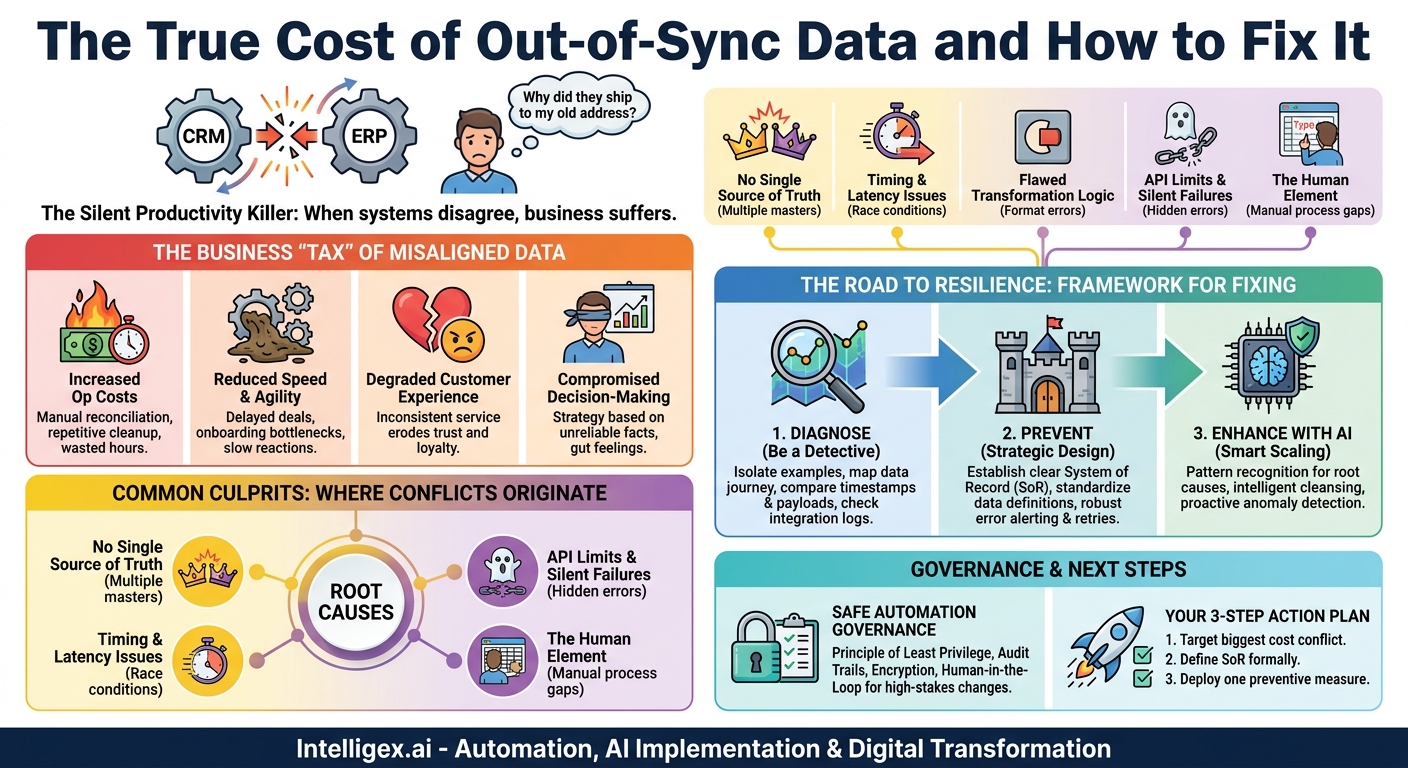
A customer calls your support line, frustrated. They updated their shipping address in their online profile last week, but their latest order was just sent to their old address. Your team scrambles to fix it, costing time, money, and customer trust. In the background, two systems failed to agree. The customer portal and the warehouse management system are out of sync, and your business is paying the price for their disagreement.
This is a sync conflict. It happens when two or more software systems hold different information about the same entity, whether it’s a customer, a product, an employee, or an order. These discrepancies are more than just technical glitches. They are silent productivity killers that create friction across your entire organization, leading to wasted resources, poor decisions, and a damaged reputation.
Resolving these conflicts isn’t just an IT problem; it’s a fundamental business challenge. The goal is to move from a state of constant, reactive data cleanup to one of proactive, reliable data flow. This allows your teams to trust the tools they use and focus on their actual jobs: selling, marketing, and supporting your customers.
The True Business Cost of “Out-of-Sync” Data
When data doesn’t align across your tech stack, the consequences ripple through every department. The cost isn’t just a line item for “IT maintenance.” It’s a hidden tax on efficiency and growth, impacting the core pillars of business value.
- Increased Operational Costs: Every time data is inconsistent, a person has to manually investigate and fix it. Think of the hours your finance team spends reconciling mismatched invoice numbers between your CRM and your accounting software. Or the cost of shipping replacement products because the fulfillment system had the wrong order details. These manual interventions are expensive, repetitive, and entirely preventable.
- Reduced Speed and Agility: Sync conflicts act like sludge in your operational gears. A new hire can’t get to work because their access credentials, synced from the HR system to IT’s identity manager, are incorrect. A critical sales deal is delayed because the pricing approved in the quoting tool hasn’t correctly updated in the contract management system. In a competitive market, these delays can mean the difference between winning and losing.
- Degraded Customer Experience: Customers expect a seamless experience. They don’t know or care that your marketing platform and your e-commerce store are different systems. When they receive a promotion for a product they just bought or have to repeat their issue to three different support agents because the CRM data is stale, their confidence in your brand erodes.
- Compromised Visibility and Decision-Making: Leaders rely on dashboards and reports to make strategic decisions. But if the sales data from your CRM doesn’t match the revenue data in your financial ERP, which number do you trust? Inconsistent data undermines the integrity of all your business intelligence, forcing you to make decisions based on gut feelings rather than reliable facts.
Common Culprits: Where Sync Conflicts Originate
Data discrepancies rarely appear out of thin air. They are symptoms of underlying issues in how your systems, processes, and people interact. Understanding these root causes is the first step toward building a more resilient and reliable data ecosystem.
Lack of a “Single Source of Truth”
This is the most common cause. It happens when multiple systems are allowed to be the “master” for the same piece of data. For example, both the sales team in the CRM and the finance team in the ERP can edit a customer’s billing address. When they both make a change, a “last update wins” battle begins, and the result is often chaos. Without a clear owner, data integrity is left to chance.
Timing, Latency, and Race Conditions
Integrations don’t happen instantly. There is always a delay, or latency, between an update in System A and its appearance in System B. A “race condition” occurs when changes happen in a sequence the integration wasn’t designed to handle. For instance, a user updates a customer’s phone number in the CRM, and a second later, an automated process updates their company name. If the integration syncs these changes separately, it might overwrite the new phone number with the old one during the second update.
Flawed Transformation Logic
Data is rarely in the exact same format in every system. An integration must often transform it along the way. A US state might be “California” in one system and “CA” in another. A date could be MM/DD/YYYY or YYYY-MM-DD. A small error in this transformation logic (e.g., misinterpreting a date format) can corrupt thousands of records as they pass through the integration, creating widespread discrepancies that are difficult to untangle.
API Limitations and Silent Failures
The Application Programming Interfaces (APIs) that allow systems to talk to each other have rules and limits. An integration might fail because it exceeded its hourly API call limit (throttling) or because an API temporarily went down. The most dangerous failures are “silent.” The integration simply fails to update the data but doesn’t send an error alert, leaving you unaware of the growing discrepancy until a customer or employee reports a problem.
The Human Element
Process gaps often lead to manual errors that break syncs. A sales representative updates a key contact’s email address in their personal spreadsheet but forgets to enter it into the CRM. A finance clerk manually corrects an invoice in the accounting system without updating the corresponding order record. Without strong processes and training, these small, individual actions accumulate into significant data integrity problems.
A Step-by-Step Guide to Diagnosing Your Sync Issues
Before you can fix a problem, you need to understand it. Instead of trying to solve every data discrepancy at once, focus on one high-impact issue and investigate it thoroughly. This forensic approach helps you identify the root cause and provides a blueprint for solving other, similar problems. Follow these steps to become a data detective.
- Isolate a Specific, Painful Example. Don’t start with a vague goal like “fix our data.” Start with a concrete problem that people complain about. For example, “Orders for our ‘Pro’ subscription plan frequently have the wrong pricing in NetSuite, causing billing delays.” Find a specific order number that demonstrates this problem.
- Map the Complete Data Journey. For that single order, map every system it touches from creation to fulfillment. It might look something like this: Website Checkout > Salesforce (CRM) > Zuora (Billing) > NetSuite (ERP). Draw it on a whiteboard. Identify every “hop” the data makes.
- Compare Timestamps and Payloads. For your specific order number, look at the “Last Modified” or “Updated At” timestamp in each system. This tells you the sequence of events. Then, look at the actual data payload at each step. Did the pricing change between Salesforce and Zuora? Did the customer address get modified between Zuora and NetSuite? The timestamps will tell you when it happened, and the payload will tell you what happened.
- Check the Integration Logs. This is where you may need help from your IT or integration partner. Ask them to pull the logs for the specific integration (e.g., the “Zuora to NetSuite” sync) for the time period when your problematic order was updated. Look for any entries containing that order ID. The logs will often contain explicit error messages like “API limit exceeded” or “Invalid field value for ‘country_code’.”
- Document the Root Cause Hypothesis. Based on your findings, formulate a clear hypothesis. For example: “The Zuora-to-NetSuite sync is failing for orders with multi-year discounts because the transformation logic doesn’t correctly handle the ‘discount_end_date’ field, causing the pricing to default to the non-discounted rate.” This clear, specific diagnosis is something your technical team can act on immediately.
Prevention Strategies for Building Resilient Integrations
Fixing sync conflicts one by one is a losing battle. The real goal is to design a system that prevents them from happening in the first place. This requires a strategic approach that combines clear governance, smart technical design, and standardized processes.
Establish a Clear System of Record
For every critical piece of data in your business (like a customer’s email address, a product’s price, or an employee’s start date), you must designate one, and only one, system as the “System of Record” (SoR) or “Single Source of Truth.”
This system is the ultimate authority. Other systems can read the data from the SoR, but they cannot be the primary source for editing it. For example, your ERP is the SoR for financial data like customer billing addresses and payment terms. Your CRM can display that information, but the fields should be locked or read-only, directing users to make the change in the ERP. This simple rule eliminates the “last update wins” problem entirely.
Implement Robust Error Handling and Monitoring
Integrations will inevitably encounter temporary issues. A resilient design anticipates these failures and handles them gracefully, rather than letting them cause silent data corruption.
- Automated Alerts: Your integration platform should immediately notify the appropriate team (via email, Slack, or a ticketing system) the moment a sync fails. The alert should include the error message and the specific record that failed, so it can be investigated quickly.
- Retry Logic: For temporary issues like a brief network outage, the integration should automatically retry the sync a few times before flagging it as a permanent failure.
- Reconciliation Reports: Don’t assume everything is working just because you aren’t getting error alerts. Proactively schedule a daily or weekly automated job that compares key data points between two systems. For instance, run a report that compares the total number of “active” customers in your CRM and your marketing platform. If the numbers don’t match, it flags a potential issue for a human to review.
What to measure: Track your Integration Failure Rate (the percentage of sync jobs that error out) and your Time to Resolution for data discrepancies. Your goal is to see both of these metrics trend downward over time.
Standardize Data and Processes
You cannot have process integrity without data integrity. Work with business teams to create and enforce data standards. A simple Data Dictionary that defines key fields, their formats, and their allowed values can prevent a huge number of errors. For example, it might state that the “Country” field must use the official two-character ISO code (e.g., “US,” “CA,” “GB”). Then, configure validation rules in your source systems to enforce this standard at the point of data entry, ensuring bad data never even enters the ecosystem.
AI’s Practical Role in Enhancing Data Integrity
Artificial intelligence is not a magic solution, but it offers powerful tools for maintaining data quality at a scale that is impossible for humans to manage manually. Instead of thinking of AI as a replacement for good design, think of it as a powerful assistant that enhances your prevention and detection strategies.
Pattern Recognition for Root Cause Analysis: An AI model can analyze millions of integration log entries to find subtle patterns that a human might miss. It could discover that sync failures for customer records only happen between 3:00 and 4:00 AM on the first day of the month and only for customers in a specific region. This insight can pinpoint a conflict with another scheduled batch process, allowing for a precise fix.
Intelligent Data Cleansing and Enrichment: Before data is synced, AI-powered services can automatically clean and standardize it. This goes beyond simple format changes. AI can correct misspelled street names, identify and merge duplicate contacts, or even enrich a company record by adding its industry or employee count using public data sources. This ensures that only high-quality, consistent data is passed between systems.
Anomaly Detection for Proactive Monitoring: AI excels at learning what “normal” looks like in a stream of data and then flagging outliers. An anomaly detection model could monitor product price updates. A 5% price change is normal, but if a sync attempts to change a product’s price from $100 to $1, the AI would flag this as a statistical anomaly and hold the update for human review, preventing a catastrophic pricing error from reaching your e-commerce site.
A Note on Governance and Safe Automation
As you automate more data flows, especially when using AI, maintaining strong governance and security is critical. The goal is to enable speed and efficiency without introducing new risks. A well-governed integration is built on principles of trust and security.
When implementing any data synchronization, particularly for sensitive information like customer PII or financial records, use this checklist as a guide:
- Principle of Least Privilege: Does the account used by the integration have the absolute minimum permissions required to do its job? It should never have full administrator access. If it only needs to update contact records, it should not have permission to delete accounts.
- Data Privacy and Security: Is sensitive data encrypted both while in transit over the network (using protocols like TLS) and at rest in the database? For integrations with third-party systems, make sure you understand their security practices as well. Consider using services on platforms like Amazon Web Services that offer robust, built-in security controls.
- Human-in-the-Loop Workflow: For high-stakes data changes, automation should not have the final say. An automated sync that attempts to update a vendor’s bank account number in your ERP should not commit the change directly. Instead, it should flag the change and place it in a queue for a manager in the finance department to approve. This combines the efficiency of automation with the judgment of a human expert.
– Audit Trails: Are all data changes logged? For any given record, you should be able to see a clear history of what changed, when it changed, and which system or user initiated the change. This is essential for both troubleshooting and compliance.
Your Next Steps: From Firefighting to Prevention
Resolving sync conflicts is a journey from reactive firefighting to proactive, strategic prevention. You don’t need to solve every problem overnight. The key is to start small, build momentum, and demonstrate value with each step. A systematic approach will build a reliable data foundation that supports, rather than hinders, your business growth.
Here is a simple, three-step action plan to get started:
- Target Your Most Costly Conflict. Convene a brief meeting with leaders from sales, finance, and operations. Ask them: “Which data error forces you to perform the most manual cleanup work each week?” Pick that one problem and use the diagnostic steps outlined above to find its root cause.
- Formally Define the System of Record. For the data involved in that single process, make a decision. Which system is the master? Document this decision and communicate it clearly to all teams involved. Implement the change, even if it’s just making a field read-only in a secondary system.
- Deploy One Preventive Measure. Based on your diagnosis, implement one small, proactive improvement. This could be setting up an automated email alert for sync failures in that specific workflow, or creating a simple daily report that compares record counts between the two systems. Measure the impact. You will likely see a dramatic reduction in manual effort.
By taking these focused, incremental steps, you begin to build a culture of data integrity. You replace ambiguity with clarity and transform your technology stack from a source of friction into a true enabler of business velocity and intelligence.
Related Posts


Get a FREE
Proof of Concept
& Consultation
No Cost, No Commitment!
