

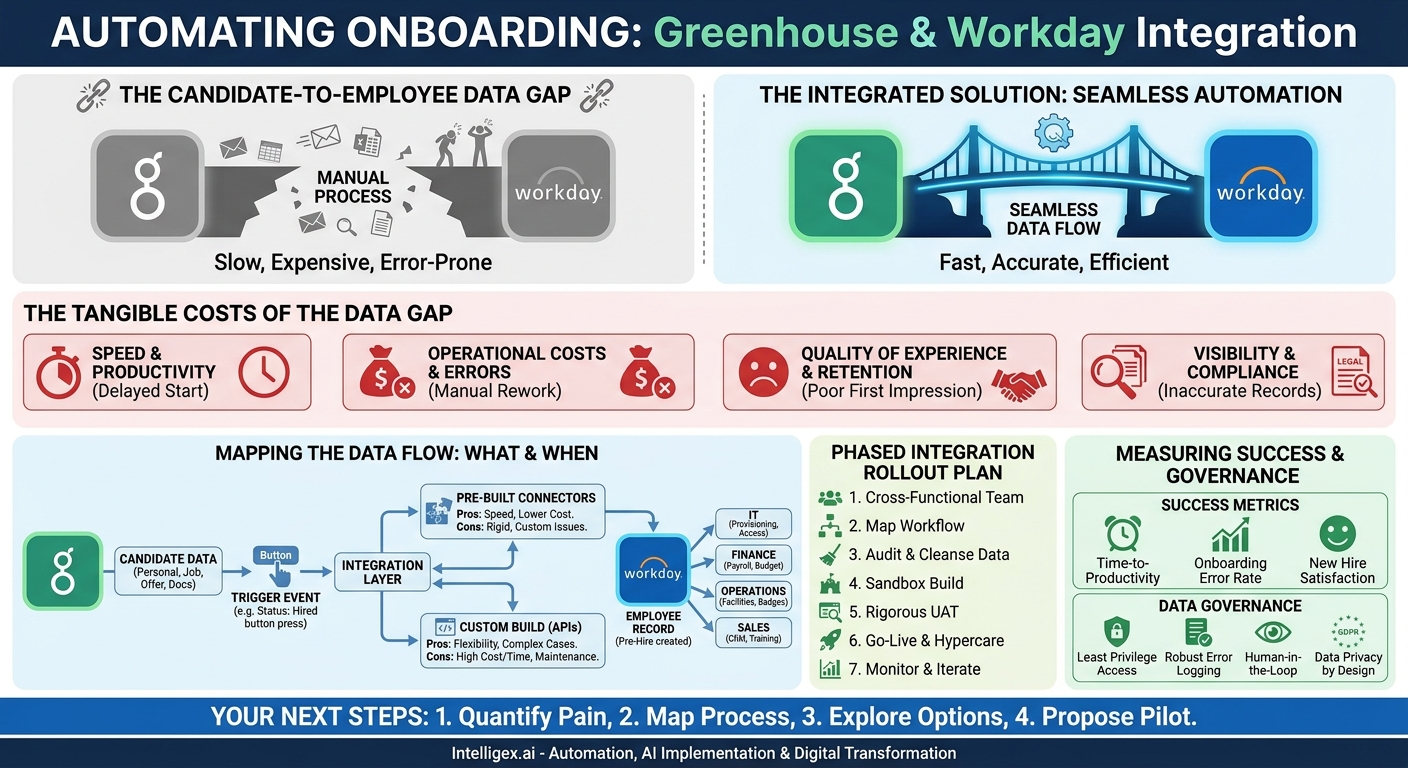
A new hire’s first day sets the tone for their entire tenure. Imagine their frustration when they arrive to find no laptop, no system access, and their manager unaware of their start date. This isn’t just a bad first impression; it’s a symptom of a common but costly operational failure: the data gap between your Applicant Tracking System (ATS) and your Human Capital Management (HCM) system. For many organizations, this is the chasm between Greenhouse and Workday.
When a candidate accepts an offer in Greenhouse, a cascade of manual processes often begins. Recruiters or HR coordinators scramble to copy-paste information into Workday, kicking off a chain of emails and spreadsheets to provision assets and set up payroll. This manual bridge is slow, expensive, and riddled with errors. Integrating these two powerful platforms closes this gap, transforming a disjointed, manual workflow into a seamless, automated process that delivers immediate business value.
The Tangible Costs of the Candidate-to-Employee Data Gap
The friction between hiring and onboarding isn’t just an HR inconvenience. It creates measurable negative impacts across the entire organization, affecting everything from revenue generation to employee retention.
Speed and Productivity
Every day a new employee is not fully equipped is a day of lost productivity. For a sales representative, that means delayed pipeline development. For a software engineer, it means a delay in contributing to the product roadmap. For a supply chain analyst, it means orders go unmanaged. This “time-to-productivity” metric is a critical business KPI. Manual data transfer between Greenhouse and Workday can add days or even weeks to this timeline, directly delaying the return on your recruiting investment.
Operational Costs and Errors
Manual data entry is a direct labor cost. Calculating the hours your HR, IT, and operations teams spend re-keying information reveals a significant, recurring expense. But the indirect costs are even higher. A single typo in a salary field can lead to payroll errors, requiring hours of work from both HR and Finance to correct. An incorrect start date can cause benefit enrollment issues. These errors not only cost money to fix but also erode trust and damage the employee experience from day one.
Quality of Experience and Retention
The onboarding experience is a critical factor in employee retention. A seamless, organized process signals to the new hire that they have joined a competent, well-run organization. Conversely, a chaotic experience filled with delays and administrative errors suggests disorganization and can create immediate regret. In a competitive talent market, the quality of your operational processes is a key part of your employer brand.
Visibility and Compliance
When employee data lives in disconnected spreadsheets and email chains, there is no single source of truth. This makes accurate headcount reporting, financial forecasting, and organizational planning incredibly difficult. Finance leaders cannot trust their projections, and HR leaders struggle to analyze workforce trends. Furthermore, this lack of visibility creates compliance risks. Ensuring data for background checks, I-9 verification, and other legal requirements is correctly captured and stored is much harder without a reliable, automated data flow from the candidate record to the permanent employee file.
Mapping the Data Flow: What to Sync and When
A successful integration begins with a clear understanding of what data needs to move and precisely when it should be triggered. This isn’t just a technical exercise; it’s a crucial business process design decision that requires input from multiple stakeholders.
Defining the Core Data Set
The goal is to transfer all necessary information to create a complete pre-hire record in Workday, which can then trigger all other downstream onboarding processes. While the exact fields may vary, a typical data set includes:
- Personal Information: Legal Name, Preferred Name, Personal Email, Phone Number, Home Address.
- Job Information: Job Title, Department, Business Unit, Cost Center, Manager, Office Location.
- Offer and Compensation: Start Date, Base Salary, Bonus Structure, Equity Details, Employment Type (Full-time, Part-time, Contractor).
- Supporting Documents: Signed Offer Letter, Resume, Confidentiality Agreements.
It’s vital to identify not just the standard fields but also any custom fields in Greenhouse that are critical for downstream processes. For example, a custom field indicating a required security clearance or a specific software license needs to be mapped correctly.
Choosing the Trigger Point
The single most important decision in the mapping process is defining the trigger event. This is the action in Greenhouse that initiates the data sync to Workday. The most common trigger is changing a candidate’s status to “Hired.”
However, you might need a more nuanced approach. Some organizations create a custom step like “Ready for Hire” that an HR team member must approve before the sync occurs. This adds a layer of human review to ensure data quality and confirm that all prerequisites, like a completed background check, are met. This decision should be based on your company’s unique compliance and operational workflows.
For example, when a candidate for a “Senior Marketing Manager” role has their status changed to “Hired” in Greenhouse, the integration should automatically create a pre-hire record in Workday. This single event can then initiate a dozen other automated actions: creating an IT ticket for a laptop, adding the employee to the marketing department’s security group, and notifying the payroll team of the new salary information.
Choosing Your Integration Path: Connectors vs. Custom Builds
Once you know what data to move, the next question is how to move it. You generally have two options: using a pre-built connector or developing a custom integration using APIs. Each path has distinct advantages and is suited to different organizational needs.
Pre-Built Connectors
Both Greenhouse and Workday have a marketplace of partners that offer pre-built integration connectors. These tools are designed to handle the most common use cases for syncing candidate data.
Pros:
- Speed to Deploy: Connectors can often be configured and running in days or weeks, not months.
- Lower Initial Cost: The subscription or license fee is typically lower than the cost of a custom development project.
– Maintenance and Support: The vendor is responsible for maintaining the connector and ensuring it remains compatible with updates to the Greenhouse and Workday APIs.
Cons:
- Limited Flexibility: They are built for the 80% use case. If you have highly complex or unique business processes, a connector may not be able to accommodate them.
- Custom Field Challenges: While many connectors support custom fields, the mapping can sometimes be rigid or require workarounds.
Custom Integration via APIs
A custom integration involves writing code that communicates directly with the APIs (Application Programming Interfaces) of both Greenhouse and Workday. This approach offers complete control over the data flow.
Pros:
- Total Flexibility: The integration can be tailored to your exact business logic, no matter how complex. You can build custom validation rules, data transformations, and approval workflows.
– Handles Unique Cases: Perfect for organizations with non-standard hiring processes, complex entity structures, or the need for bi-directional data updates.
Cons:
- Higher Cost and Time: Custom development requires skilled engineering resources and a significantly larger upfront investment in time and money.
- Ongoing Maintenance: Your team is responsible for maintaining the code, monitoring for errors, and updating it when either Greenhouse or Workday changes their APIs.
For most companies with standard hiring workflows, starting with a pre-built connector is the most practical path. If your processes are highly customized, a custom build may be necessary, but it should be approached as a significant software development project.
A Phased Integration Rollout Plan
Deploying an integration that touches your core employee data requires a careful, methodical approach. Rushing the process can lead to data corruption and operational chaos. Following a phased plan ensures a smooth transition and successful adoption.
- Assemble a Cross-Functional Team: This is not just an IT or HR project. Your team must include stakeholders from HR (Recruiting and HR Operations), IT (System Administrators), Finance (Payroll), and at least one hiring manager from a key department. Clearly define roles: who is the project lead, who is responsible for testing, and who will sign off on the final process?
- Document the “To-Be” Workflow: Before touching any technology, map out the ideal future state on a whiteboard or in a diagram. Start from the moment a recruiter marks a candidate as “Hired” in Greenhouse. What, exactly, should happen next? What record should be created in Workday? What notifications should be sent? Who needs to approve what? Getting agreement on this process document is 90% of the battle.
- Conduct a Data Audit and Cleansing: The principle of “garbage in, garbage out” is critical here. Before you connect the systems, audit the data quality in Greenhouse. Are job titles, departments, and office locations standardized? If not, you must clean up this data first. An integration will only amplify existing data inconsistencies.
- Configure and Build in a Sandbox: Never build or test in your live production environment. Use the Workday and Greenhouse sandbox (or test) instances to configure the connector or build your custom code. This allows you to experiment and make mistakes without affecting real employee data.
- Conduct Rigorous User Acceptance Testing (UAT): Once the technical build is complete, it’s time for the end-users to test it. Have recruiters, HR generalists, and payroll administrators run through dozens of test scenarios. Test for a standard corporate hire, an international hire, an hourly retail employee, and an internal transfer. Document all bugs and feedback, and do not proceed until the core team signs off.
- Plan for Go-Live and Hypercare: Choose a go-live date during a lower-volume hiring period if possible. For the first two weeks after launch, establish a “hypercare” period. This means having a dedicated team of IT and HR experts on standby to immediately address any issues that arise as the first real candidates flow through the new system.
- Monitor, Measure, and Iterate: The project isn’t over at go-live. Set up monitoring and alerting to track the success and failure of syncs. Gather feedback from users after 30 and 90 days. Use this information to make iterative improvements to the process and the integration itself.
Beyond HR: Creating Value Across the Business
A Greenhouse-to-Workday integration is the foundational step in a much larger digital transformation of the employee lifecycle. Once Workday becomes the reliable, real-time source of truth for new hire data, you can extend this automation to nearly every department in the company.
IT and Security: The pre-hire record in Workday can automatically trigger a ticket in a system like ServiceNow or Jira. Based on the new hire’s role, department, and location, this can provision a laptop, create user accounts (Active Directory, email, Slack), and assign access to specific software. This eliminates manual requests and ensures the employee is ready to work on day one.
Finance and Payroll: With accurate data flowing directly into Workday, the payroll team gets immediate, reliable information on salary, start date, and banking details. This dramatically reduces the risk of payroll errors and eliminates the need for last-minute data entry before a payroll run. It also provides finance leaders with more accurate headcount data for forecasting and budget management.
Operations and Facilities: The new hire event can trigger notifications to the facilities team to assign a desk or security badge. For remote employees, it can kick off a shipping order for equipment to their home address.
Sales and Marketing: A new sales hire can be automatically enrolled in the company’s CRM (like Salesforce), added to relevant training courses in a Learning Management System (LMS), and subscribed to internal sales communication channels.
Measuring Success: Metrics That Matter
To justify the investment in an integration project, you must be able to demonstrate its impact with clear metrics. Track these KPIs before and after the implementation to prove its value.
- Time-to-Productivity: This is the most important business-facing metric. Measure the average number of days from “Offer Accepted” to when the new hire has their laptop, core system access, and is marked as “Day 1 Ready” by their manager. The goal is to shrink this time significantly.
- Onboarding Data Error Rate: Track the number of support tickets or manual correction requests related to new hire data each month. This includes payroll mistakes, incorrect job titles, or wrong manager assignments. A successful integration should drive this number toward zero.
- HR and IT Onboarding Process Time: Survey your HR and IT teams to estimate the number of hours spent per new hire on manual data entry and provisioning tasks. Remeasure this 3 months after go-live to calculate the direct labor savings.
- New Hire Satisfaction Score: As part of your onboarding survey, ask a direct question like, “On a scale of 1-10, how smooth and organized was your pre-boarding and Day 1 experience?” A seamless, automated process consistently leads to higher scores.
Data Governance and Security: A Non-Negotiable Foundation
This integration handles some of your company’s most sensitive data: Personally Identifiable Information (PII) and compensation details. Building a secure and well-governed process is not optional; it’s a fundamental requirement.
The Principle of Least Privilege: The service account used for the integration must have the minimum permissions necessary to perform its job. It should only be able to read specific candidate data from Greenhouse and create/update pre-hire records in Workday. It should never have full administrative access to either system.
Robust Error Handling and Logging: What happens if the Workday API is temporarily down or a record fails to sync due to a data validation error? The integration must have a reliable mechanism to log the error, notify an administrator, and allow for easy reprocessing of the failed record. Data should never be silently lost.
Human-in-the-Loop for Key Decisions: Pure automation isn’t always the right answer. For highly sensitive data, like final executive compensation packages, you can build in a human approval step. For instance, the integration can stage the data in Workday but require an HR Business Partner to review and approve it before it becomes the official employee record. This combines the speed of automation with the wisdom of human oversight.
Data Privacy by Design: Ensure the integration is designed with regulations like GDPR and CCPA in mind. This means handling data securely, respecting candidate consent, and ensuring you are not transferring more data than is strictly necessary for the onboarding process.
Your Next Steps to Bridge the Gap
Moving from manual data entry to a seamless, automated workflow is an achievable goal that delivers rapid business value. The key is to start with a deliberate, well-planned approach.
1. Quantify Your Current Pain: Begin by measuring. For one week, track the time your teams spend manually moving data from Greenhouse to Workday. Document every error that requires a manual fix. This data will be the foundation of your business case.
2. Map Your Current Process: Create a simple flowchart of your existing candidate-to-employee process. Identify every manual step, every email, and every spreadsheet. This visual map will make the bottlenecks and inefficiencies obvious to everyone.
3. Explore Your Options: Investigate the pre-built connectors available in the Greenhouse and Workday partner marketplaces. Request demos and ask detailed questions about how they handle your specific needs, such as custom fields and approval workflows.
4. Propose a Pilot Project: You don’t have to boil the ocean. Propose a pilot integration for a single department or country. A successful pilot provides a powerful case study, builds momentum, and allows you to learn valuable lessons before a full-scale, company-wide rollout.
Your Next Read:
Get a FREE
Proof of Concept
& Consultation
No Cost, No Commitment!
