

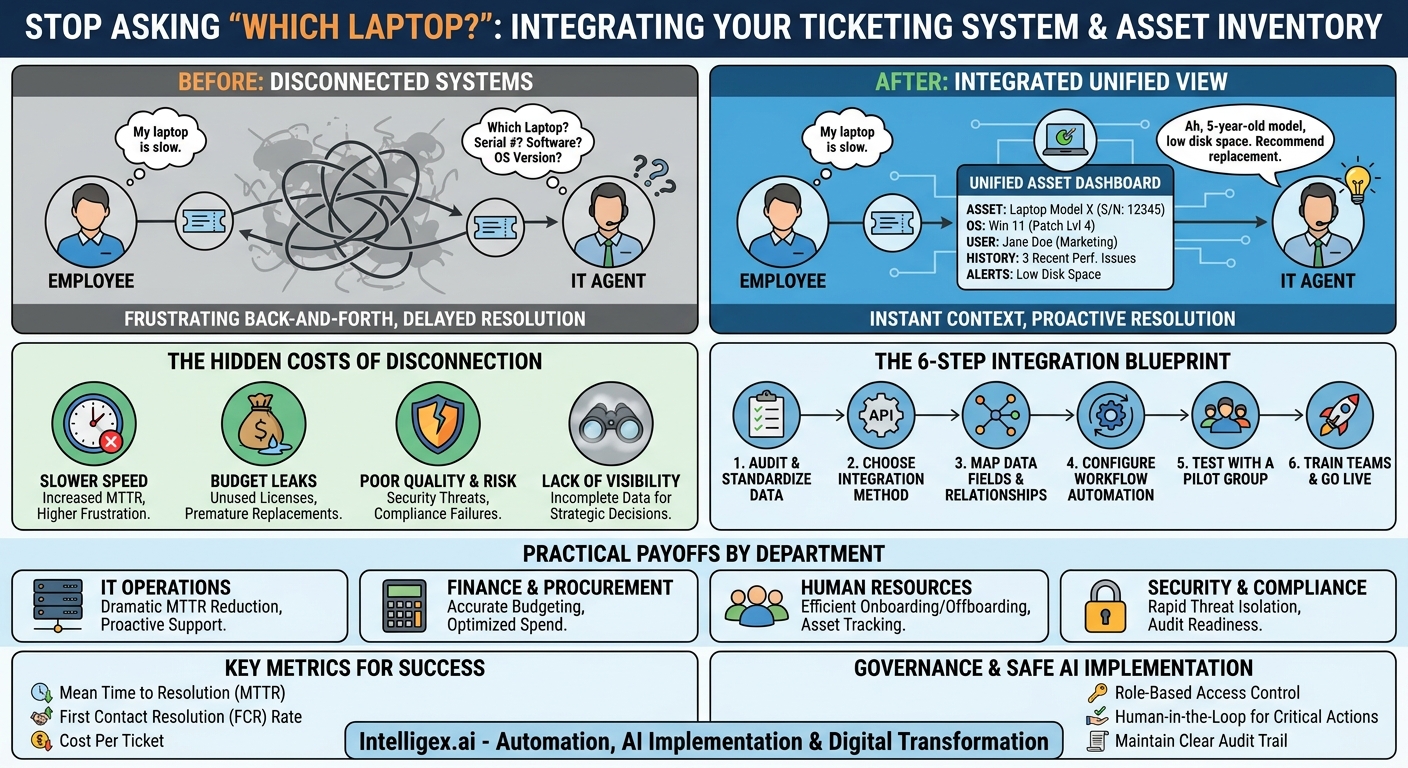
A support ticket arrives: “My laptop is slow.” It’s a common complaint, but it triggers a frustrating and costly chain of questions. Which laptop? What is its serial number? What software is installed? How old is it? Each question is a delay, a back-and-forth exchange that kills productivity for both the employee and the IT support agent. This small friction, multiplied across hundreds or thousands of tickets, reveals a significant operational gap: the disconnect between your ticketing system and your asset inventory.
When the system that tracks problems is blind to the system that tracks things, your organization loses time, money, and control. The solution is to create a unified view where every support request is automatically enriched with complete, accurate data about the associated device or software. This integration is not just a technical convenience; it is a foundational step in building a more efficient, secure, and scalable business operation.
The Hidden Costs of Disconnected Systems
The “unknown device” problem is more than just an IT headache. It creates tangible business risks and inefficiencies that ripple across departments. When you cannot instantly connect a problem to a specific asset, you are silently accepting costs in four key areas: speed, budget, quality, and visibility.
Slower Speed, Higher Frustration
The most immediate cost is time. Every minute an IT agent spends manually hunting for device information is a minute not spent solving the actual problem. This directly impacts Mean Time to Resolution (MTTR), a critical metric for support team performance. For the employee, this delay means extended downtime, preventing them from completing their work. A simple five-minute fix can turn into a day-long ordeal of emails and system checks, eroding employee satisfaction and productivity.
Budget Leaks and Inefficient Spending
Finance and procurement teams rely on accurate asset data for budgeting, depreciation, and forecasting. Without a clear link between assets and their operational status, you might be paying for software licenses that are no longer in use or replacing hardware prematurely. Consider a scenario where an employee gets a new laptop, but their old one is never properly decommissioned in the system. The company might continue paying for software subscriptions tied to the old device, creating a slow but steady drain on the budget. An integrated system flags these discrepancies automatically.
Poor Quality of Service and Increased Risk
From a security perspective, an unknown device on your network is a significant threat. If a security alert is triggered, your team needs to know immediately which machine is involved, who it belongs to, and what its configuration is to contain the threat. A disconnected system makes this rapid response nearly impossible. Furthermore, compliance with regulations like GDPR, SOX, or HIPAA requires a clear audit trail of where sensitive data is stored and who has access to it. If you can’t accurately track the devices holding this data, you risk failing an audit and facing severe penalties.
Lack of Visibility for Strategic Decisions
Effective business strategy relies on good data. How can you plan a company-wide hardware refresh if you don’t have accurate data on the age and performance of your current fleet? How can you negotiate a better enterprise software agreement if you can’t tell which departments are actually using the software? When asset and ticketing data live in separate silos, you are making critical decisions with incomplete information, hindering your ability to optimize operations and scale effectively.
What an Integrated System Looks Like in Practice
Integrating your asset inventory and ticketing system means creating a single, authoritative source of information. In practice, it transforms the support process from a reactive investigation into a proactive resolution. Instead of asking “Which laptop?” the system provides the answer upfront.
When a user submits a ticket, their assigned assets, from their primary laptop and mobile phone to their software licenses and cloud accounts, are automatically retrieved from the asset database and linked to the ticket. The support agent doesn’t see a generic request; they see a complete dashboard.
This dashboard might include:
- Hardware Details: Model, serial number, asset tag, purchase date, and warranty expiration.
- Software & OS: Operating system version, patch level, and a list of installed applications.
- User Information: The employee’s name, department, and role.
- Recent History: A log of past tickets related to that specific asset, helping to identify recurring issues.
- Performance Alerts: Data from monitoring tools, such as low disk space or high CPU usage, can also be pulled in to provide context.
This rich context allows the agent to diagnose the problem faster. They might see that the “slow laptop” is five years old and scheduled for replacement, or that it is missing a critical security patch known to cause performance issues. The conversation shifts from data gathering to problem-solving. Leading platforms like ServiceNow and Atlassian’s Jira Service Management are built around this principle, often using a Configuration Management Database (CMDB) as the central asset repository.
The Step-by-Step Integration Blueprint
Connecting these two critical systems requires a methodical approach. While the technical details depend on the specific platforms you use, the overall process follows a clear path from data cleanup to workflow automation. Rushing this process can lead to poor results, so a deliberate, step-by-step plan is essential for success.
- Audit and Standardize Your Asset Data: Before you can integrate anything, your asset inventory must be accurate and reliable. This is the most critical step. Begin by auditing your existing data. Identify missing information and inconsistencies. Define a standard set of mandatory fields for every asset type. For a laptop, this might include Asset Tag, Serial Number, Model, Assigned User, Purchase Date, and Status (e.g., Active, In Repair, Retired).
- Choose Your Integration Method: There are several ways to connect your systems. The most common method is through APIs (Application Programming Interfaces) that allow the two platforms to communicate directly. Many modern IT Service Management (ITSM) and asset management tools also offer pre-built connectors or marketplace apps that simplify the process. For more complex environments, a central integration platform (iPaaS) can be used to manage the data flow.
- Map Data Fields and Relationships: This is where you define the logic of the integration. You must map the fields from one system to the other. For example, the “Requester” field in a Jira ticket needs to be mapped to the “Assigned User” field in your asset inventory. This ensures that when a ticket is created by a specific user, the system knows exactly whose assets to look up.
- Configure the Workflow Automation: With the data mapped, you can build the automation rules. The primary rule is straightforward: “When a new ticket is created, query the asset database for all assets assigned to the ticket requester and display them within the ticket view.” You can also create more advanced workflows, such as automatically assigning tickets related to a specific software application to the team that manages it.
- Test with a Pilot Group: Never roll out a major change like this to the entire organization at once. Start with a pilot group, typically the IT department itself or another tech-savvy team. Let them use the new system and provide feedback. This allows you to identify and fix bugs, refine the user interface, and ensure the integration is providing real value before a full launch.
- Train Your Teams and Go Live: Once the pilot is successful, train your support agents on how to use the new integrated view. Show them where to find the asset information and how it can help them resolve tickets faster. If your system allows, also teach employees how to select their affected asset when submitting a ticket, which further accelerates the process. Finally, roll out the integration to the rest of the organization.
–
Practical Payoffs for Every Department
The benefits of this integration extend far beyond the IT help desk. By creating a reliable connection between people, problems, and assets, you empower teams across the business to work smarter and make better decisions.
IT Operations
For IT, the primary benefit is a dramatic reduction in ticket resolution times. With instant access to device context, technicians can often skip the entire diagnostic questioning phase. This also enables proactive support. For example, an automated ticket can be generated when the system detects a laptop’s warranty is about to expire, allowing IT to arrange a replacement before the user even experiences a problem.
Finance and Procurement
Finance gains a crystal-clear view of the entire asset lifecycle. This simplifies depreciation accounting and makes annual audits much smoother. Procurement can use the data to forecast hardware and software needs with greater accuracy, preventing last-minute purchases and allowing for better negotiation with vendors. By identifying underutilized assets, such as expensive software licenses assigned to employees who never use them, the company can reclaim those licenses and reduce unnecessary spending.
Human Resources
Employee onboarding and offboarding become significantly more efficient and secure. When a new employee joins, a ticket can trigger the automated provisioning of all necessary hardware and software, with each asset correctly assigned to them from day one. More importantly, during offboarding, a single ticket can generate a comprehensive checklist of all assets that must be returned, from the laptop and phone to security fobs and software accounts. This closes a common security gap and prevents asset loss.
Security and Compliance
This integrated view is a game-changer for security teams. When a threat is detected, they can instantly see which device is involved, what its network configuration is, and who is using it. This allows for rapid isolation of the compromised asset. For compliance officers, demonstrating that you have a complete and auditable inventory of all devices that handle sensitive data is crucial for passing audits and meeting regulatory requirements.
What to Measure: Key Metrics for Success
To justify the investment and demonstrate the value of the integration, it is essential to track the right metrics. Focus on business outcomes, not just technical achievements. Before you begin the project, benchmark your current performance in these areas so you can clearly show the improvement afterward.
Time and Efficiency Metrics
- Mean Time to Resolution (MTTR): This is the most direct measure of the integration’s impact on support speed. A significant decrease here proves the project’s value immediately.
- First Contact Resolution (FCR) Rate: The percentage of tickets solved on the first interaction. When agents have all the information they need upfront, this number should increase.
- Ticket Triage Time: The time it takes for a new ticket to be assigned to the correct team. Automation can reduce this from hours to seconds.
Cost and Value Metrics
- Cost Per Ticket: Calculated by dividing the total operational cost of your service desk by the number of tickets. As agents spend less time per ticket, this cost will decrease.
- Asset Utilization Rate: By identifying and reclaiming unused software licenses or hardware, you can demonstrate direct cost savings.
–
Quality and Risk Metrics
-
–
- Number of Security Incidents Linked to “Unknown Devices”: This should trend toward zero as your visibility improves.
- Audit Reporting Time: How long does it take your team to produce a list of all devices for a compliance audit? This process should become dramatically faster.
Governance and Safe Implementation with AI
As you connect these systems, you are centralizing a vast amount of operational data. This creates opportunities for advanced automation and AI, but it also requires careful governance to ensure data is used safely and responsibly.
AI can enhance this integration by analyzing ticket text to predict which asset is the likely cause of an issue, even if the user doesn’t specify. It can also identify systemic problems, for instance, by noticing that multiple tickets about “poor Wi-Fi” are all coming from users with the same model of laptop, suggesting a driver issue. However, as you introduce more automation, it’s vital to have guardrails in place.
Use this checklist to guide a safe implementation:
- Role-Based Access Control: Not everyone needs to see everything. An HR manager reviewing an onboarding ticket should see that a laptop has been assigned, but they should not see its detailed network configuration. Implement strict access controls based on job roles.
- Data Privacy and Minimization: Be mindful of what data you are exposing. Is it necessary to display a user’s precise location history in a ticket about a software bug? Only pull in the data that is directly relevant to solving the problem.
- Human in the Loop for Critical Actions: Automation should assist, not replace, human judgment in high-stakes situations. For example, an automated workflow might suggest wiping a device that is reported lost, but it should always require explicit confirmation from an authorized person before executing the command.
- Maintain a Clear Audit Trail: Every action, whether performed by a human or an automated process, should be logged. If a system automatically updates an asset’s status based on a ticket, that change must be recorded and traceable.
Your Next Steps: From Plan to Action
Moving from a disconnected, reactive support model to an integrated, proactive one is a journey, but it starts with a few clear actions. You don’t need to solve everything at once. The key is to start small, prove the value, and build momentum.
- Assess Your Current State: Before you can chart a course, you need to know where you are. Conduct a frank assessment. How accurate is your current asset inventory? How much time does your support team spend manually identifying devices? Quantify the problem.
- Identify a Project Champion: Find a leader, either in IT or a key business department, who feels the pain of the current system. This person can advocate for the resources needed and help communicate the benefits across the organization.
- Start with a High-Value Pilot: Choose one common, high-volume ticket category (e.g., “laptop performance issues”) and one well-documented asset class (e.g., standard employee laptops). Use this focused use case for your initial integration pilot.
- Define and Measure Success: Select two or three key metrics from the list above, like MTTR and First Contact Resolution. Benchmark them before you start and track them throughout the pilot. A successful pilot with clear, positive results is the best way to secure the support needed to scale the solution across the entire business.
By connecting your asset inventory with your ticketing system, you do more than just solve “unknown device” issues. You build a more resilient, efficient, and data-driven foundation for your entire operation.
Your Next Read:
Get a FREE
Proof of Concept
& Consultation
No Cost, No Commitment!
