

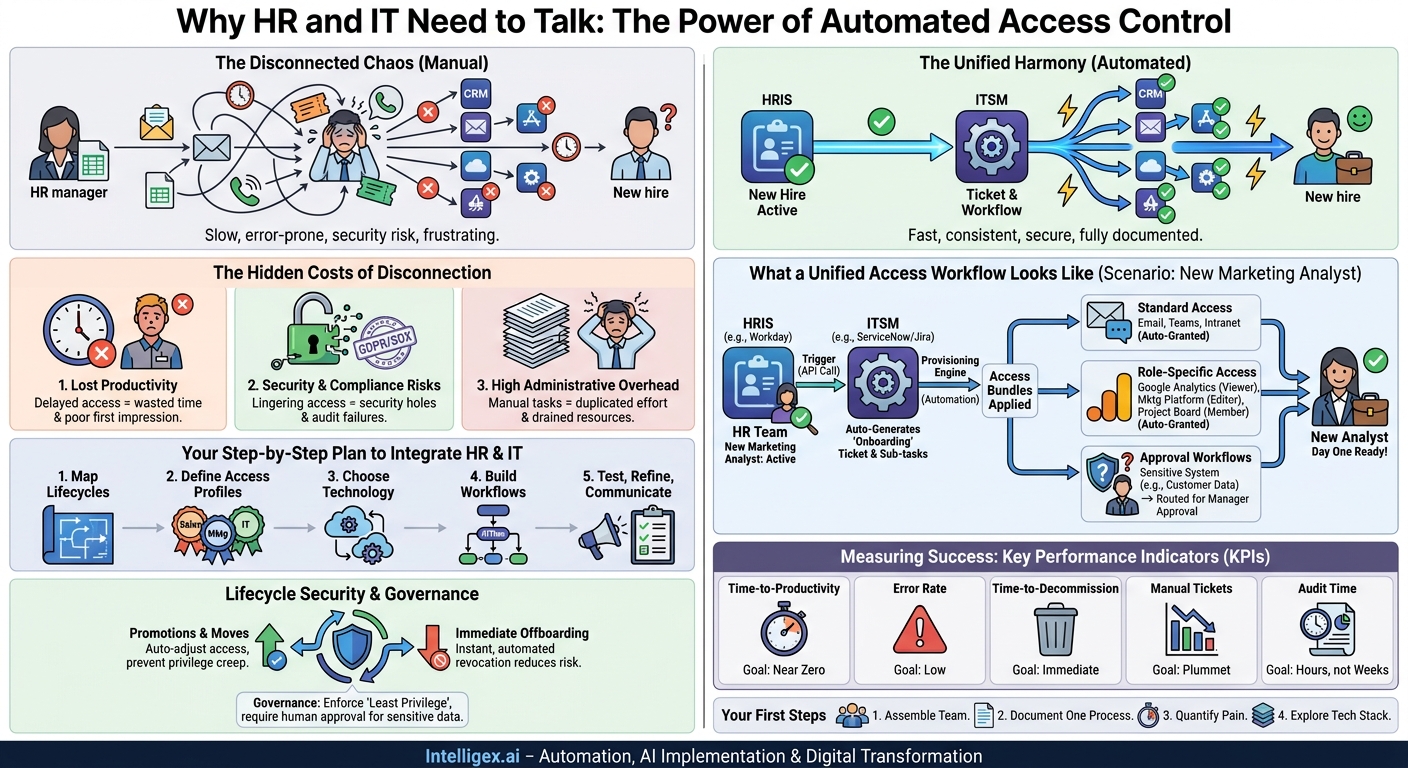
The moment a new employee accepts an offer, a clock starts ticking. It’s not just a countdown to their first day, but a race to get them the tools they need to be productive. Far too often, this race is a chaotic relay of emails, spreadsheets, and manual tickets. An HR manager sends a welcome email, a hiring manager fills out a separate IT request form, and help desk staff manually create accounts for a dozen different systems. This isn’t just inefficient; it’s a hidden drag on growth, a security risk, and a frustrating first impression for your new talent.
The disconnect between Human Resources (HR) and Information Technology (IT) systems is a common operational bottleneck. HR holds the authoritative data on who an employee is, their role, and their status. IT manages access to the digital tools needed to perform that role. When these two functions operate in silos, the process for granting, modifying, and revoking access is slow, prone to error, and impossible to audit effectively. Integrating your HR information system (HRIS) with your IT ticketing platform transforms this process from a manual chore into an automated, standardized workflow that delivers significant business value.
The Hidden Costs of a Disconnected Process
On the surface, manual access requests seem like a minor administrative task. But when you multiply that task across every new hire, promotion, and departure, the cumulative cost becomes substantial. These costs manifest in several critical business areas.
1. Lost Productivity and Delayed Time-to-Value
Every day a new employee waits for access to essential systems is a day of lost productivity. Consider a new sales representative who can’t access the CRM for their first three days. They can’t follow up on leads, learn the customer history, or contribute to the pipeline. A new supply chain analyst without access to the inventory management system is simply waiting. This delay directly impacts their time-to-value and creates a frustrating onboarding experience that can harm long-term engagement.
2. Security Vulnerabilities and Compliance Risks
The offboarding process is even more critical. When an employee leaves, their access to sensitive company data, from financial records to customer lists, must be revoked immediately. A manual process makes this difficult. An email can be missed, a ticket can be forgotten, and access can linger for days or weeks, creating a significant security hole. For companies subject to regulations like SOX or GDPR, failing to demonstrate a timely and complete de-provisioning process can lead to failed audits and severe penalties.
3. High Administrative Overhead
Manual requests consume an enormous amount of time for everyone involved. Think about the typical workflow:
- New Hire: Anxiously waits for logins, repeatedly checking in with their manager.
- Hiring Manager: Spends hours filling out forms, chasing approvals, and following up with IT.
- HR Team: Manually notifies IT and other departments, often using insecure methods like email.
- IT Help Desk: Deciphers incomplete requests, seeks clarification, and manually creates each account, a repetitive and low-value task.
This duplicated effort is a direct drain on resources that could be focused on more strategic initiatives. It’s a process that doesn’t scale, becoming exponentially more chaotic as your organization grows.
What a Unified Access Workflow Looks Like
By integrating your HRIS with your IT service management (ITSM) or ticketing platform, you create a single, automated source of truth for employee identity and access. The HR system becomes the trigger, and the IT system becomes the engine for execution. This creates a seamless, event-driven process.
Let’s walk through a common scenario: onboarding a new Marketing Analyst.
In a disconnected environment, their manager might email IT with a list of software like “the marketing tool, the analytics thing, and the project board.” IT then has to translate this into specific applications and permission levels, often requiring several back-and-forth emails.
In an integrated environment, the process is entirely different:
- The Trigger: The HR team marks the new Marketing Analyst as “Active” in the HRIS (like Workday or BambooHR) on their start date.
- The Automation: This status change automatically triggers a secure API call to the IT ticketing system (like Jira Service Management or ServiceNow).
- The Ticket: The system automatically generates a master “Onboarding” ticket or a set of sub-tasks. Because the employee’s role and department are passed from the HRIS, the system already knows what they need.
- The Provisioning: Pre-defined “access bundles” are applied. The “Marketing Analyst” bundle might automatically grant:
- Standard Access: Email account, team messaging, and company intranet.
- Role-Specific Access: “Viewer” permissions to Google Analytics, “Editor” access to the marketing automation platform, and membership in the marketing team’s project management board.
- Approval Workflows: If access to a sensitive system like the customer data platform requires manager approval, a ticket is automatically routed to the hiring manager for a simple one-click approval.
The result is that on day one, the new analyst has everything they need waiting for them. The process is fast, consistent, secure, and fully documented without a single manual email request.
Your Step-by-Step Plan to Integrate HR and IT
Building this integration requires a structured approach that involves both technical configuration and process re-engineering. It’s a collaboration between HR, IT, and department leaders.
Step 1: Map Your Identity and Access Lifecycles
Before you build anything, you need a clear blueprint. Document your current processes for the three key lifecycle events:
- Onboarding: What happens from the moment an offer is signed to the end of the first week? Who requests what, who approves, and how is it delivered?
- Role Change: What happens when an employee is promoted or moves to a new department? How is old access revoked and new access granted?
- Offboarding: What is the exact sequence of events when an employee resigns or is terminated? What is the timeline for revoking all access?
Identify the bottlenecks, manual steps, and points of failure in each process. This map is your justification and your guide for the new design.
Step 2: Define Standard Access Profiles (Role-Based Access Control)
Work with department heads to define baseline access packages based on roles. This is the foundation of Role-Based Access Control (RBAC). A “Sales Development Representative” profile will be different from a “Senior Accountant” profile. Don’t aim for perfection; start with your most common roles. For each profile, define the applications, permission levels (e.g., read-only, editor, admin), and any required licenses.
Step 3: Choose Your Integration Technology
Your existing HRIS and ITSM platforms are the core components. Review their native integration capabilities. Most modern platforms have robust APIs designed for this purpose. You may need a connector or an integration platform as a service (iPaaS) to act as the “glue” between the systems, especially if you need to orchestrate complex workflows across multiple applications.
Step 4: Configure and Build the Workflows
This is the technical implementation phase. Configure your IT platform to listen for triggers from the HRIS. Build the logic that maps HR data (like job title and department) to the access profiles you defined in Step 2. Create the automated ticketing and approval workflows. For example, a “termination” event in the HRIS should trigger a high-priority “EMERGENCY OFFBOARDING” ticket that is automatically assigned to the identity management team.
Step 5: Test, Refine, and Communicate
Thoroughly test every scenario. Use test accounts to run through onboarding, role changes, and offboarding. Ensure that approvals are routed correctly and that access is granted and revoked as expected. Once you’re confident, plan a phased rollout. Start with a single department to gather feedback. Communicate the changes clearly to hiring managers, explaining how the new process is simpler and faster for them.
Beyond Onboarding: Lifecycle Management as a Security Strategy
While onboarding is often the initial focus, the real security and compliance gains come from applying this integrated model to the entire employee lifecycle.
Promotions and Internal Moves: When an employee moves from an individual contributor role to a management role, their access needs change. A manual process risks “privilege creep,” where users accumulate access rights over time without ever having old permissions removed. An integrated system automates this. The “Job Title” change in the HRIS can trigger a workflow that revokes permissions from the old role and grants permissions for the new one, ensuring the Principle of Least Privilege is maintained.
Immediate Offboarding: This is the most critical security use case. When HR processes a termination, the integration can trigger an immediate, automated de-provisioning sequence. This can include disabling their primary account, revoking access to all cloud applications, and removing them from all security groups. This automated process drastically reduces the risk of data exfiltration or unauthorized access by a disgruntled former employee. It transforms offboarding from a manual checklist into a reliable, instant security control.
Measuring the Success of Your Integration
To demonstrate the value of this project, you must track the right metrics. Shift your focus from activity to impact. Instead of counting tickets closed, measure how the business benefits.
Key Performance Indicators (KPIs) to Track:
- New Hire Time-to-Productivity: The average time from an employee’s official start date to when all their required access is confirmed as active. The goal is to get this as close to zero as possible.
- Access Provisioning Error Rate: The percentage of new hires who report missing or incorrect access in their first week. This measures the quality and accuracy of your automated profiles.
- Time-to-Decommission: The average time from an employee’s termination event in the HRIS to the moment all critical system access is revoked. For security, this is your most important metric.
- Reduction in Manual Access Tickets: Track the volume of access-related tickets submitted manually. A successful integration should see this number plummet, freeing up IT staff for more complex work.
- Audit and Compliance Reporting Time: Measure the hours spent gathering evidence for access reviews and audits. With an integrated system, this data is centralized and easily reportable, reducing preparation time from weeks to hours.
A Note on Governance and Human Oversight
Automation is a powerful tool for efficiency and consistency, but it does not replace the need for sound governance. Implementing an automated access system requires clear rules and human checkpoints.
Maintain Clear Approval Chains: While baseline access can be provisioned automatically, access to highly sensitive data (like financial systems or production databases) should always require explicit, logged approval from a manager or data owner. Your automated workflow should facilitate this approval, not bypass it.
The Principle of Least Privilege: Your role-based access profiles should be designed around the principle of least privilege. Grant employees only the minimum access necessary to perform their job functions. Avoid creating overly broad profiles that grant unnecessary permissions.
Regular Access Reviews: Automation doesn’t eliminate the need for periodic access reviews. Department managers should still be required to regularly certify that their team members’ access rights are appropriate. Your integrated system makes this easier by providing clean, up-to-date reports for them to review.
The goal is to use technology to enforce your security and compliance policies at scale, with a clear audit trail for every action taken, whether automated or manually approved. Strong identity and access management is a foundational part of modern digital trust. For more on this, you can review fundamental concepts from sources like the AWS Identity and Access Management documentation.
Your First Steps to a Unified System
Getting started doesn’t require a massive, multi-year project. You can begin by taking small, deliberate steps to build momentum and prove the value of integration. Here is a simple plan to begin your journey.
- Assemble a Cross-Functional Team: Schedule a meeting with key stakeholders from HR, IT, and a business department that does a lot of hiring, like Sales or Customer Support. The goal is to share perspectives on the current process and its pain points.
- Document One Key Process: Choose either onboarding or offboarding and create a detailed flowchart of how it works today. Note every manual step, handoff, and system involved.
- Quantify the Pain: For one week, ask your IT help desk to track the time they spend on manual access requests. Ask one hiring manager to estimate the time they spent getting their last new hire set up. Use this data to build a simple business case.
- Explore Your Tech Stack: Investigate the API and integration capabilities of your current HRIS and ticketing platforms. Check their documentation or marketplaces for pre-built connectors that could accelerate your project. Popular platforms like those from Atlassian often have extensive integration ecosystems.
By breaking the problem down and focusing on the highest-impact areas first, you can move away from the chaos of manual requests and build a scalable, secure, and efficient foundation for managing access across your entire organization.
Your Next Read:
Category:
Get a FREE
Proof of Concept
& Consultation
No Cost, No Commitment!
