

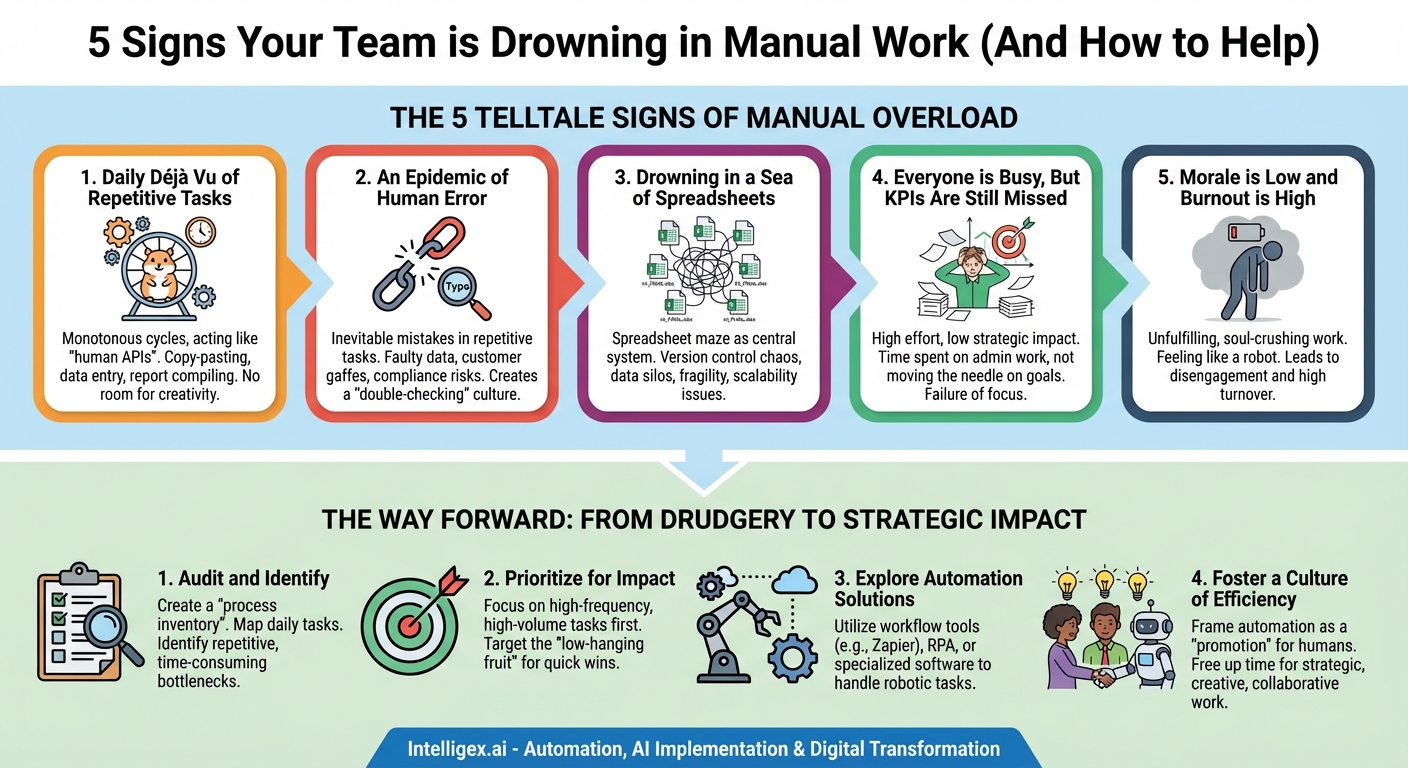
Your team is buzzing with activity. Keyboards are clacking, meetings are happening, and everyone looks busy. From the outside, it seems like a model of productivity. Yet, deadlines are slipping, key strategic projects are stalled, and a palpable sense of frustration hangs in the air. Team members feel like they’re running on a hamster wheel—working harder and harder but never actually moving forward. If this scenario sounds familiar, your organization might be suffering from a silent, insidious productivity killer: an over-reliance on manual work.
In today’s digital-first world, “manual work” isn’t about physical labor. It’s the endless cycle of digital drudgery—the copying and pasting, the manual data entry, the cross-referencing of spreadsheets, and the tedious compilation of reports. It’s any task that is repetitive, rule-based, and could theoretically be handled by a machine. This type of work is deceptive because it feels productive. After all, tasks are being completed. But in reality, it consumes your team’s most valuable resources—time, energy, and cognitive focus—that should be dedicated to innovation, problem-solving, and driving real business growth. Recognizing the signs that your team is drowning in these tasks is the first critical step toward reclaiming their potential.
The Telltale Signs of Manual Overload
Identifying the problem is half the battle. Manual work often becomes so ingrained in a company’s culture that it’s seen as “just the way things are done.” By learning to spot these red flags, you can begin to diagnose the issue and chart a course toward a more efficient, automated, and fulfilling work environment.
Sign 1: The Daily Déjà Vu of Repetitive Tasks
Listen closely to the conversations around your office. Do you hear your team members describing their days in terms of predictable, monotonous cycles? This is the most glaring sign of a manual work problem. When talented professionals spend a significant portion of their day acting like human APIs—manually moving information from one system to another—you have a major efficiency leak.
Consider these common examples:
- Report Generation: A marketing manager spends every Monday morning for three hours pulling data from Google Analytics, the company CRM, and a social media platform, then manually compiling it all into a single “Weekly Performance” spreadsheet to email to leadership.
- Data Entry: A sales representative has to manually copy a new lead’s contact information from an email or a web form and paste it into the company’s customer relationship management (CRM) software.
- Onboarding Processes: An HR coordinator onboards a new hire by manually creating their user account in ten different software applications, sending a series of templated emails, and updating a checklist in a shared document.
–
These tasks aren’t just time-consuming; they are soul-crushing. They offer no room for creativity or critical thinking, leading to boredom, disengagement, and the feeling that one’s skills are being wasted. If your team’s daily to-do list looks nearly identical from one day to the next, it’s a strong indicator that you’re paying for human ingenuity but only using their capacity for repetition.
Sign 2: An Epidemic of Human Error
Humans are brilliant at strategy, creativity, and empathy. What we are not brilliant at is performing the same monotonous task thousands of times with perfect accuracy. When a process relies heavily on manual steps, errors are not a possibility; they are an inevitability. A typo, a misplaced decimal point, or a copy-paste mistake can seem minor, but their cumulative impact can be enormous.
This “human error epidemic” manifests in several ways:
- Faulty Data: A financial analyst accidentally types a “6” instead of a “5” when transferring figures to a quarterly report, leading to flawed business decisions based on incorrect data.
- Customer Service Gaffes: An order fulfillment specialist misreads a customer’s address while manually creating a shipping label, resulting in a delayed delivery and a frustrated customer.
- Compliance Risks: A compliance officer misses a step in a manual data-handling checklist, leading to a potential breach of data privacy regulations like GDPR or CCPA.
The immediate cost is the time spent finding and fixing the mistake. But the secondary cost is far greater. It erodes trust in your data, damages your brand’s reputation, and can have direct financial consequences. Furthermore, it creates a culture of “double-checking,” where every manual task requires a second person to verify it, effectively doubling the time spent on an already inefficient process.
Sign 3: Drowning in a Sea of Spreadsheets
Spreadsheets are a powerful tool, but they were never meant to be the central nervous system of your business. If critical workflows depend on a labyrinth of interconnected, multi-tabbed Excel or Google Sheets files, you have a classic symptom of manual overload. This “spreadsheet maze” often starts as a simple solution but quickly spirals out of control.
Look for these warning signs:
- Version Control Chaos: Your team’s shared drive is littered with files named
Project_Plan_v3_FINAL.xlsx,Project_Plan_v4_FINAL_JanesEdits.xlsx, andProject_Plan_FINAL_USE_THIS_ONE.xlsx. No one is ever 100% sure they are working from the most recent version. - Data Silos: Information is trapped within individual spreadsheets, making it impossible to get a holistic view of business operations without a heroic, manual effort to consolidate data.
- Fragility and Scalability Issues: A single incorrect formula or a deleted row can break an entire report. As the volume of data grows, these sheets become slow, unwieldy, and prone to crashing.
–
When a spreadsheet is being used as a database, a project management tool, and a reporting dashboard all at once, it’s a clear sign that a manual process has outgrown its makeshift solution. You are forcing a tool to do a job it wasn’t designed for, and the resulting inefficiencies are holding your team back.
Sign 4: Everyone is Busy, But KPIs Are Still Being Missed
This is perhaps the most frustrating sign for leaders. The team is putting in the hours. Everyone is working diligently. Yet, at the end of the quarter, you’ve fallen short of your goals. Project deadlines are consistently pushed back, sales targets are narrowly missed, and customer satisfaction scores are stagnant.
This isn’t a failure of effort; it’s a failure of focus. When your team spends 10, 15, or even 20 hours per week on manual, administrative work, that’s time they can’t spend on the strategic activities that actually move the needle on your Key Performance Indicators (KPIs). The salesperson bogged down in data entry isn’t spending that time building relationships with high-value prospects. The marketing expert manually compiling reports isn’t using that time to devise a creative new campaign strategy. Your team is trapped in a cycle of being busy with work instead of being productive with work.
Sign 5: Morale is Low and Burnout is High
You hire bright, capable, and ambitious people for their problem-solving skills and creative thinking. Then, you chain them to a digital assembly line of copy-pasting and data entry. The result is predictable: burnout, disengagement, and turnover. Manual work is fundamentally unfulfilling. It provides no sense of accomplishment, no opportunity for growth, and no intellectual stimulation.
Phrases like, “I feel like a robot,” or “My job is such a grind,” are serious warning signs. When team members are consistently frustrated or apathetic, it’s time to examine their daily workflows. Are they being challenged, or are they being treated like organic processing units? High employee turnover is incredibly expensive, not just in recruitment costs but in the loss of institutional knowledge. Your best employees won’t stick around for a job that underutilizes their talents; they will seek out roles where they can make a genuine impact.
The Way Forward: From Manual Drudgery to Strategic Impact
Recognizing these signs is the essential first step. The next is to take decisive action. The goal is not to eliminate all manual work—some tasks will always require a human touch. The goal is to eliminate the unnecessary manual work that drains your team’s potential.
1. Audit and Identify: Begin by creating a “process inventory.” Work with your team to map out their core daily and weekly tasks. Ask them to identify which ones are the most repetitive, time-consuming, and frustrating. This collaborative approach not only gives you accurate data but also empowers your team by showing you value their input.
2. Prioritize for Impact: You can’t automate everything at once. Focus on the low-hanging fruit: tasks that are high-frequency and high-volume. Automating a process that takes 30 minutes and is done daily will deliver a much greater return on investment than automating a task that takes two hours but is only done once a quarter.
3. Explore Automation Solutions: The market for automation tools is vast and accessible. Solutions range from simple workflow automation platforms (like Zapier or Make) that connect your existing apps, to more powerful Robotic Process Automation (RPA) tools for complex tasks, to specialized software with built-in automation features. Start small and demonstrate value with a few key wins.
4. Foster a Culture of Efficiency: Frame automation not as a replacement for people, but as a promotion for them. Automation handles the robotic tasks, freeing up your human team members to focus on the strategic, creative, and collaborative work that they were hired to do. Encourage everyone on the team to constantly ask, “Could this be done a better way?”
Ultimately, the time your team spends on manual work is a direct tax on their innovation, morale, and productivity. By actively identifying and eliminating these drains on their capacity, you don’t just make your processes more efficient—you unlock the full potential of your people and create a more dynamic, impactful, and fulfilling workplace for everyone.
Your Next Read:
Category:
Get a FREE
Proof of Concept
& Consultation
No Cost, No Commitment!
