

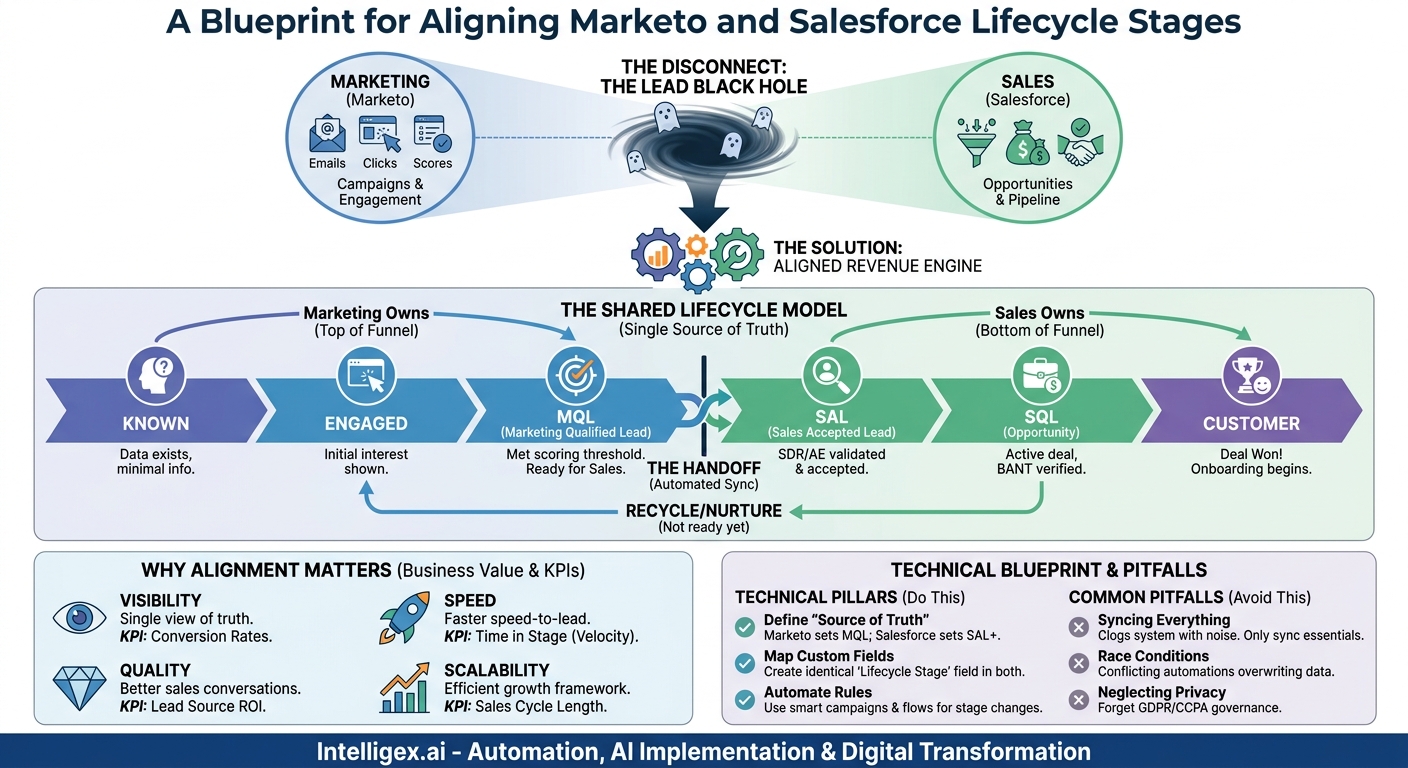
In many organizations, the marketing and sales teams operate on different planets. Marketing lives in a world of campaigns, clicks, and engagement scores inside Marketo. Sales lives in a world of opportunities, pipelines, and quotas inside Salesforce. The result? A black hole where leads disappear, sales cycles stretch, and marketing ROI remains a mystery. The disconnect stems from a fundamental problem: a lack of a shared language for a customer’s journey. When “qualified lead” means one thing to marketing and another to sales, you create friction, waste resources, and leave revenue on the table.
Aligning your Marketo and Salesforce lifecycle stages is not just a technical task; it is a strategic imperative. It creates a single, unbroken chain of data from a prospect’s first touchpoint to a closed deal and beyond. This unified view provides the visibility needed to optimize processes, the speed to engage customers faster, and the quality of data required to make smarter business decisions. It transforms two powerful platforms from siloed tools into a cohesive revenue engine that is built to scale.
Why Consistent Lifecycle Stages Matter More Than You Think
Establishing a unified lifecycle model across Marketo and Salesforce delivers tangible business value far beyond just cleaning up data. It directly impacts your company’s core operational metrics: speed, cost, quality, and visibility. This alignment is the foundation for predictable revenue growth and operational excellence.
First, consider visibility. With a shared lifecycle, every stakeholder, from a marketing specialist to the CFO, can see exactly where a prospect is in the funnel. There is no more guesswork. This single source of truth eliminates time-wasting debates about lead status and allows teams to focus on strategy. You can accurately track a contact’s journey, understanding how they moved from an anonymous website visitor to a marketing-qualified lead (MQL), then to a sales-accepted lead (SAL), and finally to a customer. This end-to-end view is critical for accurate attribution and reporting.
This visibility directly enhances speed. When a lead meets the MQL criteria in Marketo, automated rules can instantly sync it to Salesforce and assign it to the correct sales representative. This eliminates manual handoffs and lag time, ensuring sales engages with hot leads while they are still highly interested. Reducing this “speed to lead” time is one of the most effective ways to increase conversion rates.
Next is quality. A well-defined lifecycle ensures that sales only receives leads that meet pre-agreed qualification criteria. Marketing is no longer “throwing leads over the wall.” Instead, they are delivering prospects who have demonstrated specific behaviors and fit a target profile. This allows the sales team to spend their valuable time on high-potential opportunities, which improves morale, boosts close rates, and increases overall productivity. In turn, sales provides clear feedback into the system by dispositioning leads, giving marketing crucial data on which channels and campaigns produce the best results.
Finally, all of this contributes to reducing cost and enabling scalability. By focusing efforts on qualified leads and automating the handoff process, you minimize wasted spend on ineffective campaigns and reduce the manual labor required to manage the lead flow. As your business grows, this defined, automated system can handle a much higher volume of leads without breaking. It provides a stable framework that new team members can quickly learn, ensuring that your revenue operations can scale efficiently alongside your business growth.
Defining Your Shared Lifecycle: The Foundation of Integration
Before you touch any technology, you must build the human consensus that will guide it. The most critical step in this entire process is getting Marketing, Sales, and Operations leadership in the same room to agree on a single, unified customer lifecycle. This is not a marketing exercise or a sales exercise; it is a revenue exercise. The goal is to create unambiguous definitions for each stage, with clear entry and exit criteria that everyone understands and accepts.
The conversation should focus on defining the key milestones in the buyer’s journey from your company’s perspective. While the specific stages may vary based on your business model, a common and effective framework includes:
- Known: A person exists in your database with an email address, but little else is known.
- Engaged: The person has shown some initial interest, like visiting the website or downloading a top-of-funnel asset.
- Marketing Qualified Lead (MQL): The person has met a threshold of engagement and demographic/firmographic fit, indicating they are ready for a marketing-led conversation. This is typically determined by a lead scoring model.
- Sales Accepted Lead (SAL): A sales development representative (SDR) or account executive (AE) has reviewed the MQL and confirmed it is a legitimate, contactable prospect worth pursuing.
- Sales Qualified Lead (SQL) or Opportunity: The sales team has connected with the prospect and verified a legitimate need, budget, authority, and timeline (BANT) for a potential purchase. This is often the point where a new Opportunity record is created in Salesforce.
- Customer: The deal is won.
- Disqualified/Recycled: The lead is not a good fit at this time, is unresponsive, or has been lost to a competitor. These can be sent back to marketing for nurturing.
For each stage you define, your team must answer a few key questions. This clarity prevents confusion and ensures the system operates as intended.
Checklist for Defining Each Lifecycle Stage:
- What is the precise definition of this stage? Write it down in plain language.
- What are the exact entry criteria? For an MQL, this might be “Reaches a lead score of 100 AND has the title of Director or higher.”
- What are the exact exit criteria? A lead exits the SAL stage when a sales rep converts it into an Opportunity.
- Who owns this stage? Marketing typically owns the top of the funnel (Known to MQL), while Sales owns the bottom (SAL to Customer).
- What is the system of record? Marketo logic might create an MQL, but a human action in Salesforce is what promotes it to SAL.
Document these definitions in a shared location that serves as your official data dictionary. This document is the blueprint for your technical implementation and the training manual for your teams. Without this foundational agreement, any technical integration is destined to fail.
The Technical Blueprint: Mapping Fields and Logic
With your cross-functional definitions in place, you can translate that business logic into a technical reality within Marketo and Salesforce. The core of the integration is creating a single, authoritative field that tracks the lifecycle stage and ensuring it syncs perfectly between both systems. This requires a methodical approach to field creation, mapping, and automation.
A common mistake is to try and repurpose the default “Lead Status” field in Salesforce. This field is often used by sales reps for their own internal, fluid statuses (e.g., “Contacted,” “Left Voicemail”). Overloading it with official lifecycle stages creates conflict and confusion. Instead, you should create dedicated, custom fields in both platforms for this purpose.
Follow these steps to build a robust technical foundation:
- Create a Custom “Lifecycle Stage” Field in Salesforce. In Salesforce Setup, create a new custom picklist field on both the Lead and Contact objects. Name it something clear, like “Lifecycle Stage.” Populate the picklist values with the exact stage names you defined with your team (MQL, SAL, SQL, etc.). It is crucial that this field exists and has identical values on both Leads and Contacts to ensure a smooth journey when a lead is converted.
- Create a Corresponding Field in Marketo. In your Marketo Admin settings, create a new custom string field. Give it an identical name, such as “Lifecycle Stage.” While Salesforce uses a picklist to enforce values, Marketo will use a string field that you control strictly through automation.
- Map the Fields for Synchronization. Using the native Marketo-Salesforce connector, map your new Marketo “Lifecycle Stage” field to the Salesforce “Lifecycle Stage” field on both the Lead and Contact objects. This ensures that any update to the field in one system is reflected in the other.
- Establish the “Source of Truth” for Each Stage. This is the most critical part of the automation logic. You must define which system has the “right” to update the stage at any given point. A typical flow looks like this:
- MQL: Marketo owns this stage. A Smart Campaign in Marketo Engage triggers the change to “MQL” when a lead’s score and/or demographic data meet the defined threshold. This change then syncs to Salesforce.
- SAL and Onward: Salesforce owns these stages. Once a lead is an MQL, marketing automation should not be able to change its stage further. Only a user’s action within Salesforce (e.g., a rep clicking a “Accept Lead” button, converting a lead, or moving an opportunity stage) should advance the lifecycle stage. This change then syncs back to Marketo.
- Build and Test Your Automation. In Marketo, build the Smart Campaigns that listen for the triggers to set the MQL stage. In Salesforce, use Process Builder or Flow to automate stage changes based on user actions. For example, create a flow that automatically updates the Lifecycle Stage to “SQL” when an Opportunity is created from a lead. Thoroughly test every transition in a sandbox environment before deploying to production.
This “source of truth” methodology prevents conflicts where automated campaigns in Marketo might accidentally overwrite a status set by a sales representative in Salesforce, preserving the integrity of your funnel.
Common Pitfalls and How to Avoid Them
Integrating Marketo and Salesforce is powerful, but it’s easy to make mistakes that create data chaos, frustrate users, and undermine the entire project. Being aware of the common pitfalls beforehand allows you to design a system that is clean, efficient, and resilient.
Pitfall 1: The “Sync Everything” Mistake
When first setting up the sync, it can be tempting to map and sync every possible field between the two systems. This is a significant error. Syncing unnecessary fields clogs your system with noisy, irrelevant data, consumes valuable API calls (which are limited per day), and can slow down sync performance. Instead, be deliberate. Only sync the fields that are essential for segmentation, personalization, lead routing, scoring, and reporting. Work with sales and marketing stakeholders to identify this critical data set and leave the rest unsynced.
Pitfall 2: Conflicting Automation and Race Conditions
This is a classic problem. Imagine a Marketo Smart Campaign is designed to change a lead’s status based on a recent web activity. At the same time, a sales rep is updating that same lead’s record in Salesforce. When both systems try to update the same record at nearly the same time, you create a “race condition.” The last update wins, which can lead to incorrect data and broken processes. The solution is to establish clear “rules of engagement” as described earlier. Define which system is the master for specific fields or lifecycle stages. For lifecycle, Marketo can own the top of the funnel, but once Sales accepts a lead, Salesforce should become the exclusive source of truth for that field.
Pitfall 3: Neglecting Data Governance and Privacy
An integration is only as good as the data flowing through it. Without proper governance, your newly aligned system will quickly become cluttered and untrustworthy. It is vital to establish clear rules for data entry, manage user permissions carefully, and regularly clean your data to remove duplicates and outdated information. This is also where data privacy becomes paramount.
A Note on Data Privacy and Governance: When you sync data between Marketo and Salesforce, you are moving personal information. Ensure your integration complies with regulations like GDPR and CCPA. Implement the principle of least privilege: only give users and the integration itself access to the data necessary for their roles. For example, the sync user profile in Salesforce should have permissions limited to only the objects and fields it needs to read and write. Document all data flows and ensure you have processes in place to handle data subject requests, such as a contact’s request for deletion, across both systems. Human oversight is still important. Periodically audit the synced data and the automation rules to ensure they are operating as intended and protecting customer privacy.
Measuring Success: KPIs for a Healthy Lifecycle
A successful Marketo-Salesforce lifecycle integration is not just a technical achievement; it is a business asset that should generate measurable returns. To prove its value and identify areas for continuous improvement, you must track the right key performance indicators (KPIs). These metrics provide a clear view into the health, speed, and efficiency of your revenue engine.
Start by focusing on velocity metrics. These measure how quickly leads and opportunities move through your funnel. A key metric is Time in Stage. How many days, on average, does a lead spend as an MQL before being accepted by sales? How long does an opportunity sit in the “Proposal” stage? Tracking this helps you identify bottlenecks. If leads are languishing in the MQL stage for weeks, it might indicate a problem with your lead routing rules or a lack of SDR capacity.
Next, analyze your conversion rates between each stage. This is where the true power of a unified lifecycle becomes apparent. You can now reliably answer critical questions:
- What percentage of MQLs convert to SALs? A low rate could signal poor lead quality or a misalignment on the MQL definition.
- What percentage of SALs become SQLs (Opportunities)? A drop-off here might point to a need for better SDR training or qualification scripts.
- What is the ultimate lead-to-customer conversion rate? This is the master metric that tells you the overall efficiency of your funnel.
With clean, consistent data flowing from Marketo to a closed deal in Salesforce, you can finally achieve accurate Lead Source ROI. By connecting a closed-won opportunity’s revenue back to the original campaign and channel data stored in Marketo, you can definitively determine which marketing efforts are most profitable. This allows you to double down on what works and cut spending on underperforming channels, directly optimizing your marketing budget.
Finally, track the overall Sales Cycle Length. Measure the average time from when a lead is created to when the deal is closed. As you optimize your handoffs, improve lead quality, and identify bottlenecks, you should see this duration decrease over time. A shorter sales cycle means faster revenue recognition and a more efficient sales team.
Beyond the Basics: Advanced Lifecycle Management
Once your foundational lifecycle is running smoothly, you can evolve the model to handle more complex scenarios and drive even greater efficiency. A well-architected integration is not a static project; it is a platform for continuous improvement and deeper business alignment.
One of the most valuable advanced tactics is lead recycling. Not every lead that sales rejects is a lost cause. Often, the timing is just not right. Instead of letting these leads go dark, create a “Recycle” status in your lifecycle. When a sales rep disqualifies a lead for a reason like “Not ready to buy,” an automated workflow can change the lifecycle stage to “Recycle” and sync it back to Marketo. This triggers a long-term nurturing campaign designed to keep your brand top-of-mind. Marketo’s automation can then monitor the lead for renewed buying signals, and when they re-engage, it can be re-scored and routed back to sales as a fresh, warm MQL.
Your lifecycle can also be adapted for an Account-Based Marketing (ABM) model. In ABM, the focus shifts from individual leads to the overall engagement of a target account. You can augment your person-level lifecycle with an account-level lifecycle. This might involve tracking an account’s journey from “Aware” to “Engaged” to “Marketing Qualified Account (MQA)” based on the collective activities of multiple contacts within that company. This requires more sophisticated logic but provides your sales team with a powerful, holistic view of their most important accounts.
Furthermore, think about how the final “Customer” stage can trigger downstream processes. A successful integration shouldn’t end when a deal is won. The moment an Opportunity is marked “Closed-Won” in Salesforce, it can initiate a cascade of actions across the business. This can include:
- Notifying the finance team to begin the invoicing process in your ERP system.
- Creating a new project in a tool like Asana or Jira for the customer success and implementation teams.
- Enrolling the new customer in a specific onboarding and welcome journey in Marketo.
This extends the value of your integration beyond sales and marketing, turning it into a central nervous system for your entire customer onboarding process and a true example of digital transformation.
Your Next Steps: An Action Plan
Moving from disconnected systems to a unified revenue engine is a journey, not an overnight switch. By taking a structured, methodical approach, you can ensure a successful implementation that drives lasting value. The key is to prioritize alignment before automation and to build, test, and train with intention.
Here is a practical action plan to get you started:
1. Audit and Document Your Current State. Before you build the future, you need to understand the present. Map out your existing lead flow, however informal it may be. Interview sales and marketing team members to identify pain points, bottlenecks, and areas of confusion. Where are leads getting stuck? What data do people not trust?
2. Align Stakeholders and Define Your Stages. Schedule the critical workshop with leaders from Sales, Marketing, and Operations. Use this session to collaboratively define your unified lifecycle stages, complete with entry/exit criteria and ownership for each. Do not leave the room until you have a signed-off document that will serve as your project’s constitution.
3. Architect the Technical Solution. With your business logic defined, create a detailed technical blueprint. Specify the exact custom fields to be created, the direction of the data sync, and the precise logic for the automation rules in both Marketo and Salesforce. Plan this in a design document before a single component is built.
4. Implement and Test in a Sandbox. Always build and test your integration in a sandbox environment first. This allows you to work out any bugs and validate every stage transition without disrupting your live business operations. Run through dozens of test cases, from a lead’s creation to a closed deal, to ensure the logic holds up.
5. Train, Deploy, and Monitor. A new process is only effective if people use it correctly. Hold training sessions for all users, explaining what the new lifecycle stages mean and how their actions in the system impact the data. Once deployed, closely monitor your KPIs and dashboards to ensure the system is operating as expected and delivering the value you projected.
By following these steps, you can build more than just an integration. You can build a scalable foundation for growth, powered by data-driven alignment between your most critical revenue-generating teams.
Your Next Read:
Get a FREE
Proof of Concept
& Consultation
No Cost, No Commitment!
