

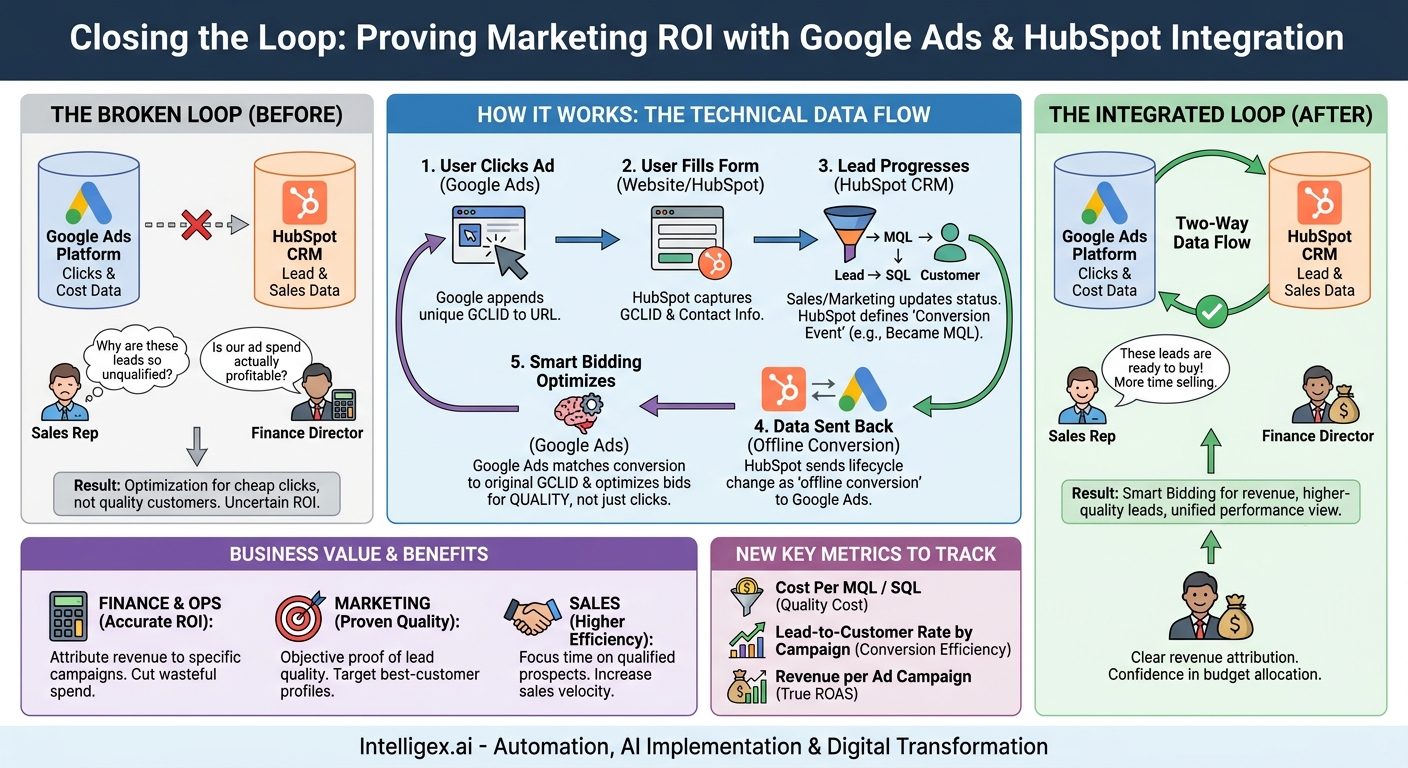
Your marketing team is celebrating a record-low Cost Per Lead from Google Ads. Your sales team is frustrated, spending half their day disqualifying those same leads. Meanwhile, your finance department sees a rising Customer Acquisition Cost and questions the value of your ad spend. This disconnect is more than just an operational headache. It’s a costly blind spot that prevents you from scaling efficiently.
The core of the problem is a broken feedback loop. Your advertising platform (Google Ads) knows what it costs to get a click and a form submission, but it has no idea what happens next. It doesn’t know which leads turned into qualified opportunities or, more importantly, which ones became profitable customers. To solve this, you need to connect the data from your marketing spend directly to your sales outcomes. By integrating Google Ads with your HubSpot CRM, you can finally close the loop, enabling smarter spending, higher-quality leads, and a unified view of performance across your entire business.
Why “Closing the Loop” Is a Business Imperative
“Closing the loop” means establishing a two-way data connection between your advertising platform and your customer relationship management (CRM) system. In this case, it’s about sending lead quality and sales data from HubSpot back to Google Ads. This transforms Google Ads from a simple traffic-driving tool into a business intelligence engine that optimizes for revenue, not just clicks.
The business value is clear and impacts multiple departments:
- For Finance and Operations: It provides true visibility into marketing return on investment (ROI). Instead of just seeing ad spend and lead volume, you can directly attribute revenue to specific campaigns, ad groups, and keywords. This means you can confidently allocate budget to proven performers and cut wasteful spending.
- For Marketing: It ends the debate over lead quality. The data provides objective proof of which campaigns generate leads that the sales team actually wants. It also unlocks more powerful optimization strategies within Google Ads, allowing you to target users who resemble your best customers, not just those who are likely to fill out a form.
- For Sales: It means a higher percentage of their time is spent with well-qualified prospects who are more likely to close. A better-optimized ad strategy, focused on quality, naturally improves the quality of inbound leads, increasing sales velocity and efficiency.
–
–
Consider a typical B2B technology company. They might spend thousands on the keyword “enterprise resource planning software.” Without an integration, they only know that this keyword generates 100 leads per month at $150 each. After integrating HubSpot, they discover that while “enterprise resource planning software” generates many leads, the keyword “manufacturing ERP for supply chain” generates only 10 leads, but 5 of them become sales-qualified opportunities that eventually close. This insight is impossible to get without closing the loop. It allows the marketing team to confidently bid more on the long-tail, high-intent keyword, attracting higher-quality prospects and dramatically improving the overall efficiency of the ad budget.
The Technical Foundation: How the Integration Works
Connecting HubSpot and Google Ads isn’t about magic; it’s about a logical flow of data designed to give Google’s algorithms the information they need to make better decisions. The process relies on a few key components working together.
First, when a user clicks on one of your Google Ads, Google appends a unique parameter to the end of your URL called a “Google Click ID” or GCLID. This happens automatically if you have auto-tagging enabled in your Google Ads account, which is a standard best practice.
When that user fills out a form on your website, your HubSpot tracking code captures this GCLID along with the rest of their contact information. Now, the new lead in your HubSpot portal is tagged with the unique identifier of the exact ad click that brought them to you.
As your sales and marketing teams work with this lead, its status changes within HubSpot. It might move from “Lead” to “Marketing Qualified Lead” (MQL), then to “Sales Qualified Lead” (SQL), and finally to “Customer.” This is where the integration creates its value. HubSpot can send these lifecycle stage changes back to Google Ads as “offline conversions.”
Google Ads then matches the conversion event to the original GCLID. Suddenly, Google knows that a specific click from a particular campaign, ad, and keyword didn’t just result in a form fill. It resulted in an MQL. This is a game-changer for optimization. Instead of using bidding strategies that optimize for cheap form fills, you can use Google’s Smart Bidding to optimize for what truly matters, like acquiring new SQLs or customers at a target cost.
A Step-by-Step Guide to Connecting HubSpot and Google Ads
While the strategic implications are vast, the initial technical setup is straightforward. Here is a high-level overview of the process to get the systems connected. Before you begin, ensure you have administrator-level access to both your HubSpot and Google Ads accounts.
- Check Your Prerequisites: First, confirm you have a compatible HubSpot subscription (typically Marketing Hub Professional or Enterprise) that includes the ads integration features. In Google Ads, navigate to your account settings and ensure that auto-tagging is turned on. This is essential for the GCLID to be passed correctly.
- Authorize the Connection in HubSpot: Log in to your HubSpot portal. Navigate to Settings (the gear icon), then go to Marketing, and select Ads. Here, you will see an option to connect an account. Choose Google Ads and follow the on-screen prompts to sign in and grant HubSpot the necessary permissions to manage your campaigns and send conversion data.
- Enable Conversion Tracking and Auto-Tagging: During the setup process within HubSpot, you will be prompted to enable Google Ads conversion tracking. Make sure this switch is toggled on. HubSpot will automatically add the necessary tracking code to your website pages. This step ensures that the GCLID is captured properly.
- Create Conversion Events from HubSpot Lifecycle Stages: This is the most critical strategic step. Instead of just tracking every new contact, you get to define what a “conversion” means to your business. In the HubSpot ads settings, you can create new conversion events based on your HubSpot lifecycle stages. For example, you can create an event called “Became an MQL” that fires every time a contact’s lifecycle stage is updated to “Marketing Qualified Lead.”
- Choose Your Primary Conversion Goal: Do not send every lifecycle stage to Google Ads. This creates noise and confuses the bidding algorithms. Start with one or two high-value stages. For many businesses, “Marketing Qualified Lead” or “Sales Qualified Lead” is the ideal starting point. It represents a significant milestone of quality but happens quickly enough for Google’s algorithms to learn efficiently. Sending “Customer” is also valuable, but long sales cycles can create a data lag that makes optimization difficult.
- Verify in Google Ads: After you create the conversion events in HubSpot, they will automatically be created in your Google Ads account. To check this, go to Google Ads and navigate to Tools & Settings > Measurement > Conversions. You should see your new HubSpot-powered conversion actions listed, with a category of “Imported from clicks.”
Once connected, data will begin to flow. It can take up to 48 hours for conversions to start appearing in your Google Ads reports, so be patient before you begin analyzing the results.
Beyond the Basics: Optimizing for True Business Impact
Simply connecting the two platforms is just the first step. The real value is unlocked when you use the new data to make smarter strategic decisions. This requires a shift in mindset, from focusing on top-of-funnel metrics to optimizing for bottom-line results.
Focus on the Right Metrics
With HubSpot data flowing into Google Ads, your team can move beyond vanity metrics like Click-Through Rate (CTR) and Cost Per Click (CPC). While these can be useful diagnostic tools, they don’t measure business impact. Your new key performance indicators (KPIs) should be:
- Cost Per MQL / Cost Per SQL: This tells you exactly how much ad spend is required to generate a lead that your sales team has deemed qualified. This is a far more powerful metric than a generic Cost Per Lead.
- Lead-to-Customer Rate by Campaign: Now you can see which campaigns, ad groups, or even specific keywords produce leads that are most likely to become paying customers.
- Revenue per Ad Campaign: By associating closed-won deals in HubSpot back to their original ad source, you can start to measure the direct revenue impact of your advertising efforts, paving the way for true Return on Ad Spend (ROAS) calculations.
Using Offline Data for Smarter Bidding
This integration directly fuels Google’s AI-powered Smart Bidding strategies. Previously, you might have used a Target Cost Per Acquisition (CPA) strategy focused on generating form fills for, say, $50. Now, you can change your campaign’s primary conversion goal to the “Became an MQL” event you created. You can then set a Target CPA for MQLs, telling Google you are willing to pay, for example, $200 for a marketing-qualified lead. The algorithm will now work to find users who not only click and convert but who also exhibit the characteristics of people who become MQLs. This automatically prioritizes lead quality over lead quantity in your campaign optimization.
Aligning Sales and Marketing
This shared data source creates a powerful alignment tool for your sales and marketing teams. When Sales says leads from a certain campaign are low quality, Marketing can look at the data and see the MQL-to-SQL conversion rate for that specific campaign. The conversation shifts from subjective opinions to an objective, data-driven discussion about what defines a good lead and how to get more of them. This requires a commitment from the sales team to diligently update lead statuses in HubSpot, as the success of the entire system relies on the accuracy of that CRM data.
Common Pitfalls and How to Avoid Them
While powerful, an integration is only as good as the process and strategy behind it. Here are some common mistakes teams make when connecting HubSpot and Google Ads.
- Tracking the Wrong Events. The most frequent error is to create a conversion event for every new contact created. This tells Google Ads to simply optimize for more form fills, which is what it was already doing. The Fix: Be selective. Choose a lifecycle stage that represents a genuine milestone of qualification, such as MQL or SQL. This is the signal that tells Google what quality looks like.
- Ignoring Data Lag. It takes time for a lead to be qualified and for that data to be sent from HubSpot to Google Ads. If you have a one-week sales qualification process, you can’t analyze campaign performance after just one day and expect to see accurate results. The Fix: Be patient. When analyzing data, use time frames that align with your sales cycle. In Google Ads, ensure your conversion window for the imported conversions matches the typical time it takes to qualify a lead.
- Inconsistent CRM Usage. The entire system breaks down if your sales team doesn’t consistently and accurately update lead statuses in HubSpot. If a great lead remains marked as “New” for weeks, Google Ads never gets the quality signal it needs. The Fix: This is a process challenge, not a technical one. Ensure your sales team understands why CRM hygiene is critical and implement processes to enforce it. The quality of your ad optimization is directly dependent on their diligence.
- Focusing Only on Conversion Volume. Don’t just look at which campaign generated the most SQLs. Dig deeper. Analyze the search terms, ad copy, and landing pages associated with your highest-quality conversions. The Fix: Use the data to learn about your ideal customers. The integration doesn’t just tell you what works; it provides clues as to why it works, allowing you to refine your messaging and targeting across all your marketing channels. For more on Google’s best practices, you can review their official documentation on offline conversion tracking.
Data Governance and Safe Implementation
Connecting any two powerful platforms requires a thoughtful approach to data security and governance. While this integration is standard and secure, it’s important to manage it responsibly.
Access Control: Limit who can configure the integration. The ability to create and modify conversion events that directly influence ad spend should be restricted to a small number of trained individuals in your marketing or operations teams. This prevents accidental changes that could derail your campaign performance.
Data Privacy: The data passed between systems primarily consists of the non-personally identifiable GCLID and the conversion event status (e.g., “MQL”). It does not involve exporting entire lists of personal contact information. However, it’s always critical to ensure your data handling processes comply with regulations like GDPR and CCPA and are clearly stated in your company’s privacy policy.
Human Oversight: Google’s Smart Bidding is a powerful form of machine learning, but it is not a replacement for human strategy. The algorithm is only as good as the data it receives and the goals you set for it. A human strategist must still monitor performance, provide the system with realistic targets, and make adjustments based on broader business context, such as changing market conditions or new product launches. Use this integration to augment your marketing team’s intelligence, not to abdicate responsibility for it.
Your Next Steps: An Action Plan
Moving from a disconnected system to a fully integrated, closed-loop reporting structure is a project that delivers compounding returns. It reduces waste, increases revenue, and aligns your teams around a single source of truth. Here’s how to get started.
- Audit Your Foundational Processes. Before you connect anything, review your internal processes. Do you have a clear, documented, and consistently used definition of a Marketing Qualified Lead and a Sales Qualified Lead in HubSpot? If not, start there. Agreement on these definitions is the bedrock of a successful integration.
- Secure Stakeholder Buy-in. Frame this project not as a “marketing task” but as a business intelligence initiative. Explain to leaders in Sales, Finance, and Operations how a clear view of ad performance will help them achieve their goals, whether it’s a higher sales quota, a lower CAC, or more predictable revenue forecasting.
- Implement the Technical Connection. Follow the steps to connect the accounts, starting with one clear, high-value conversion event. We recommend beginning with the MQL stage, as it typically provides the best balance of quality signal and data velocity.
- Monitor, Learn, and Iterate. Let the system run and collect data for at least 30 to 60 days. This gives the algorithms enough information to start learning. Then, begin analyzing performance through the lens of your new quality metrics. Start shifting budget toward campaigns that generate efficient SQLs and use the insights to refine your entire advertising strategy.
Related Posts
Get a FREE
Proof of Concept
& Consultation
No Cost, No Commitment!
