

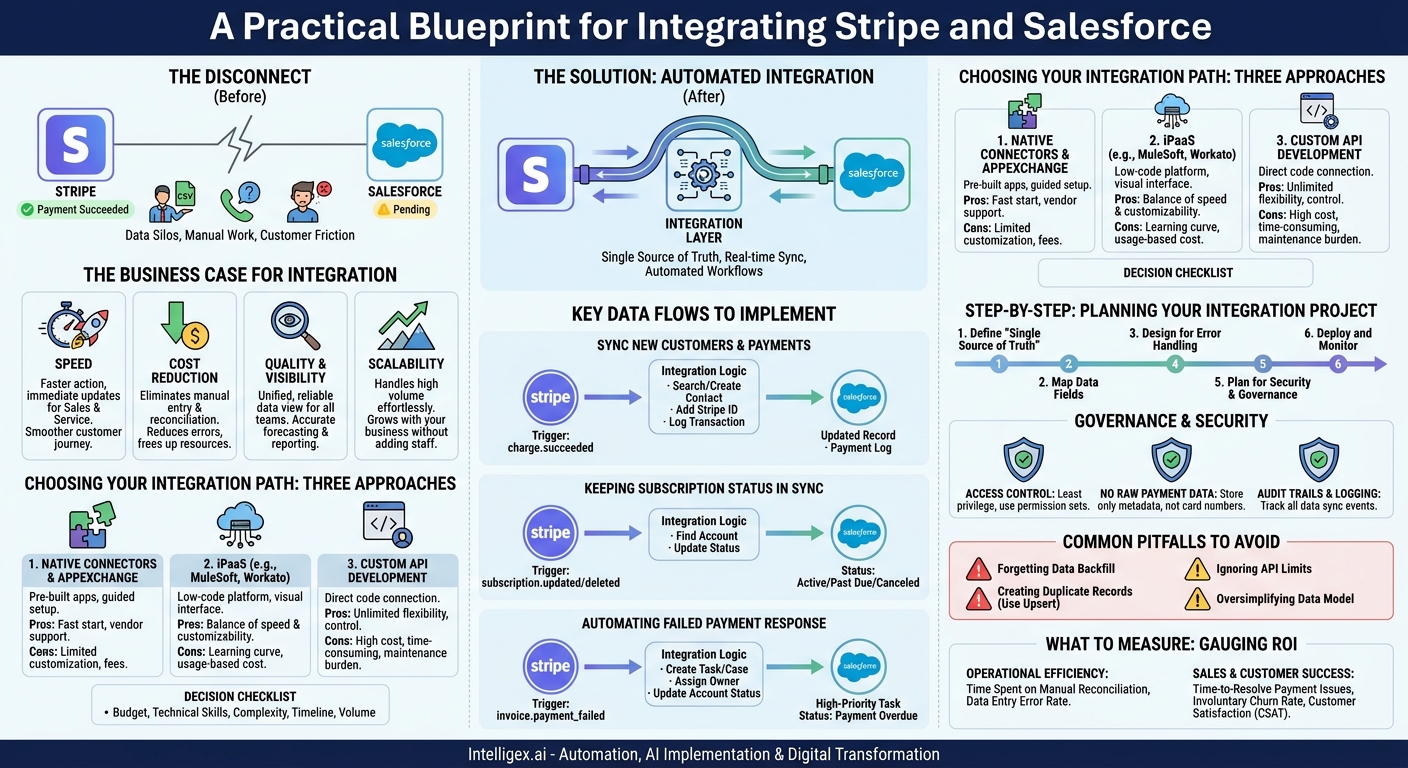
A customer’s payment succeeds in Stripe, but your Salesforce account record still says “Pending.” A sales representative, unaware of the payment, calls the customer to follow up on the “late” invoice. Meanwhile, your finance team spends the end of the month manually exporting CSV files from both systems, trying to reconcile who has paid what and when. This disconnect isn’t just inefficient; it creates frustrating customer experiences and introduces costly errors.
This data silo between your payment processor and your Customer Relationship Management (CRM) system is a common operational bottleneck. The solution is a direct, automated integration between Stripe and Salesforce. By synchronizing payment data with customer records, you create a single source of truth that empowers teams, automates workflows, and provides the visibility needed to scale your business effectively.
The Business Case for Integration
Connecting Stripe and Salesforce goes far beyond simply moving data from one box to another. It’s a strategic move that delivers tangible value across the business by improving speed, reducing costs, and increasing visibility.
Speed: When your sales and service teams have real-time payment information inside Salesforce, they can act faster and more intelligently. A sales representative can see that a prospect has just paid an initial setup fee and immediately trigger the onboarding process. A support agent can confirm an active subscription status without having to ask a colleague in finance to look it up in Stripe. This acceleration of internal processes translates directly to a faster, smoother customer journey.
Cost Reduction: Manual data entry and reconciliation are hidden costs that drain hours from your finance and operations teams. Every hour spent cross-referencing spreadsheets is an hour not spent on strategic analysis. Automation eliminates this repetitive work, reduces the risk of human error that can lead to misapplied payments or incorrect reporting, and allows your team to focus on higher-value activities.
Quality and Visibility: An integration establishes a reliable, single source of truth for customer financial data. When your sales, marketing, service, and finance departments all look at the same Salesforce record, they see the same story. This unified view ensures consistent communication with customers and enables more accurate forecasting and reporting. For example, a marketing team can build a campaign targeting customers with a specific subscription tier, confident that the data is up to date.
Scalability: Manual processes might work for a handful of customers, but they break under pressure. As your business grows, the volume of transactions and customer interactions increases exponentially. An automated integration scales effortlessly, allowing you to handle thousands of transactions per day without needing to hire a proportional number of administrative staff to manage the data flow.
Consider a subscription-based software company. When a customer’s recurring payment fails in Stripe, the integration can automatically create a case in Salesforce Service Cloud, update the account status to “At Risk,” and assign a task to the designated account manager. This proactive, automated workflow helps the team resolve the payment issue before the customer’s service is interrupted, preventing involuntary churn and protecting revenue.
Choosing Your Integration Path: Three Core Approaches
Once you’ve decided to connect Stripe and Salesforce, the next step is to choose how. There are three primary methods, each with its own balance of speed, flexibility, and resource requirements. The right choice depends on your team’s technical capabilities, budget, and the complexity of your business processes.
1. Native Connectors and AppExchange Solutions
These are pre-built applications designed to connect Stripe and Salesforce with minimal custom coding. You can find many of these on the Salesforce AppExchange. They typically offer a guided, point-and-click setup process to map standard objects and fields between the two systems.
Pros: They are often the fastest way to get started. The initial technical lift is low, and they come with vendor support, which is valuable for teams without dedicated developers.
Cons: Their simplicity can also be a limitation. They may not support your custom Salesforce objects, complex business logic (like unique revenue recognition rules), or high data volumes. They also usually involve ongoing subscription fees.
2. Integration Platform as a Service (iPaaS)
iPaaS platforms like MuleSoft, Workato, or Zapier act as a middle layer that helps different applications talk to each other. They provide pre-built connectors for systems like Stripe and Salesforce but give you a visual interface to build custom logic, transformations, and multi-step workflows without writing extensive code.
Pros: This approach offers a powerful balance between speed and customizability. You can handle complex scenarios that an off-the-shelf app can’t, while still benefiting from a managed platform that handles API authentication, error retries, and monitoring.
Cons: There is a learning curve, and costs are typically based on usage (the number of tasks or data volume), which can grow as your business scales. While they are “low-code,” some complex logic may still require technical expertise.
3. Custom API Development
This approach involves writing code to directly connect the Stripe and Salesforce APIs. Your development team builds the integration from the ground up, giving you complete control over every aspect of the data flow, logic, and user experience.
Pros: It offers unlimited flexibility. You can build for any custom object, implement any business rule, and optimize performance for your specific needs. There are no ongoing subscription fees for a middleware platform.
Cons: This is the most expensive and time-consuming option. It requires a significant upfront investment in development resources and places the entire burden of ongoing maintenance, updates, and error handling on your internal team.
Decision Checklist
Use these questions to guide your choice:
- Budget: Do we prefer a predictable monthly cost (AppExchange/iPaaS) or a larger upfront capital expense (Custom)?
- Technical Skills: Do we have experienced developers in-house who understand both APIs, or do we need a more user-friendly, low-code solution?
- Complexity: Are we syncing standard fields, or do we have complex logic involving custom objects, multi-currency transactions, or unique discounting rules?
- Timeline: How quickly do we need a solution in place? Can we afford a multi-month development project, or do we need something working in a few weeks?
- Volume: What is our expected transaction volume? Some platforms have pricing tiers based on volume that may become cost-prohibitive at scale.
A Practical Blueprint: Key Data Flows to Implement
Regardless of the method you choose, a successful integration focuses on automating the most critical business events. Here are three essential data flows that deliver immediate value.
Flow 1: Syncing New Customers and Payments
This is the foundational flow that creates a link between a paying customer in Stripe and their record in Salesforce.
- Trigger: A `charge.succeeded` event occurs in Stripe for a new customer.
- Action in Salesforce:
- The integration logic first searches for an existing Contact or Account in Salesforce using the customer’s email address.
- If a match is found, it updates the record by adding the unique Stripe Customer ID to a custom field. This ID is the key to linking all future transactions.
- If no match is found, it creates a new Account and Contact, populating them with the customer’s information from Stripe.
- Finally, it creates a related record (e.g., on a custom “Payment” or “Opportunity” object) to log the specific transaction details, like the amount, date, and invoice ID.
Flow 2: Keeping Subscription Status in Sync
For any recurring revenue business, knowing a customer’s subscription status is critical for sales and support teams.
- Trigger: A `customer.subscription.updated` or `customer.subscription.deleted` event occurs in Stripe.
- Action in Salesforce: The integration finds the corresponding Salesforce Account (using the stored Stripe Customer ID) and updates a “Subscription Status” picklist field. The status could change from “Active” to “Past Due,” “Canceled,” or “Trialing.”
- Business Impact: Your account managers can build reports of all customers in a “Past Due” state. Your support team can immediately verify a customer’s entitlement to premium support.
Flow 3: Automating a Response to Failed Payments
Involuntary churn from failed payments is a silent revenue killer. This flow turns a payment problem into a proactive retention opportunity.
- Trigger: An `invoice.payment_failed` event occurs in Stripe.
- Action in Salesforce:
- The integration immediately creates a high-priority Task or Case record.
- This record is automatically assigned to the Account owner or a dedicated collections queue.
- The Account’s status is updated to “Payment Overdue,” making the issue highly visible on dashboards and reports.
- Business Impact: This automates your dunning process. Instead of discovering the failed payment days later in a report, your team is notified instantly and can reach out to the customer to update their card information, saving the account.
Step-by-Step: Planning Your Integration Project
A successful integration is built on careful planning, not just code. Following a structured process ensures you meet business requirements, avoid common pitfalls, and deliver a reliable solution.
- Define Your “Single Source of Truth.” Before you sync anything, you must decide which system owns which piece of data. For example, Stripe is the definitive source for transaction data (amounts, dates, card types). Salesforce is the source of truth for customer relationship data (contact details, activity history, sales stage). Documenting this prevents conflicts where both systems might try to update the same field.
- Map Your Data Fields. Create a simple mapping document, such as a spreadsheet. List the Stripe API field in one column and the target Salesforce object and field in the next. Be meticulous. Include standard fields like `customer.email` to `Contact.Email`, as well as the crucial custom fields like the Stripe Customer ID that will link your records.
- Design for Error Handling. Integrations fail. The network can go down, an API may be temporarily unavailable, or data might be formatted incorrectly. A robust design anticipates this. Your logic should include automatic retries for temporary failures and a notification system (like an email to a system administrator) for persistent errors that require manual intervention.
- Build and Test in a Sandbox. Never, ever build an integration directly in your live production environments. Use a Salesforce sandbox and Stripe’s test mode. This allows you to safely simulate every possible scenario: successful payments, failed payments, new subscriptions, cancellations, and credit card updates. Rigorous testing is the key to a smooth rollout.
- Plan for Data Security and Governance. You are bringing sensitive financial data into your CRM. Before you go live, you must define who can see it. Use Salesforce’s security model, including profiles and permission sets, to control access. This is not an afterthought; it is a critical planning step.
- Deploy and Monitor. After thorough testing and a final data review, you can deploy the integration to your production environment. But the work isn’t over. Set up monitoring to track key performance indicators like API call usage (to stay within limits), data sync latency (how long it takes for data to appear), and the overall error rate.
Governance and Security: Handling Financial Data Safely
Bringing payment information into Salesforce centralizes customer data, but it also elevates the importance of security and governance. Financial data is sensitive, and protecting it is a top priority.
Access Control is Non-Negotiable: The principle of “least privilege” is paramount. Not every Salesforce user needs to see a customer’s complete payment history. Use Salesforce Profiles and Permission Sets to finely tune access. A sales development representative might only need to see the “Subscription Status” field, while a finance manager or account executive requires visibility into individual transactions. Define these roles and permissions before you sync a single record.
Avoid Storing Raw Payment Details: This cannot be stressed enough. Your integration should never sync or store raw, sensitive payment information like full credit card numbers or CVC codes in Salesforce. This would be a major violation of PCI compliance and a huge security risk. Your goal is to sync transaction metadata: the Stripe Customer ID, charge amounts, dates, and payment statuses. Let Stripe, a certified PCI Level 1 Service Provider, handle the secure storage of raw payment credentials.
Audit Trails and Logging: Your integration platform or custom code should produce clear, accessible logs. When data is created, updated, or fails to sync, you need a record of what happened, when it happened, and why. This audit trail is essential for troubleshooting problems, resolving data disputes, and demonstrating compliance during an audit.
Common Pitfalls and How to Avoid Them
Many organizations run into the same few problems when building this integration. Knowing them ahead of time can save you significant headaches.
- Forgetting the Data Backfill: Your new integration works perfectly for all new customers signing up tomorrow. But what about the thousands of customers already in Stripe? You must plan for a one-time data migration or “backfill” script to sync your existing Stripe customers and their payment histories to their corresponding Salesforce records. Without this, your historical data will be incomplete.
- Creating Duplicate Records: This is the most common integration failure. If your logic simply creates a new Salesforce contact for every new Stripe payment, you will quickly end up with duplicates. The solution is to always use “upsert” logic. Your code should first search for an existing record using a unique identifier (like email). If found, update it. Only if no match is found should it create a new record.
- Ignoring API Limits: Both Salesforce and Stripe enforce API rate limits, which restrict the number of calls you can make in a given period. A naive integration, especially during a large data backfill, can easily hit these limits and fail. Design your integration to be efficient. Use bulk processing methods where available and implement a “retry with exponential backoff” strategy for failed calls.
- Oversimplifying Your Data Model: A Stripe “Customer” may not neatly map to a Salesforce “Account” in your business. You might have a single company (the Account) with multiple departments or individuals making payments. Think through your specific data structure. You may need to link Stripe data to Contacts or even a custom “Billing” object rather than directly to the Account.
What to Measure: Gauging Your Integration’s ROI
To justify the investment and demonstrate success, you need to track metrics that show a clear before-and-after impact on the business.
Operational Efficiency Metrics
- Time Spent on Manual Reconciliation: Survey your finance and operations teams to benchmark how many hours per week or month they spend manually exporting and comparing Stripe and Salesforce data. Measure this again three months after the integration goes live.
- Data Entry Error Rate: Track the number of data errors discovered during month-end closing or audits that are attributable to manual entry. This number should drop close to zero for the automated data flows.
Sales and Customer Success Metrics
- Time-to-Resolve for Payment Issues: Measure the average time from when a payment fails in Stripe to when it is successfully resolved. Automation should dramatically reduce this window.
- Involuntary Churn Rate: This is a key metric for subscription businesses. Track the percentage of customers who cancel due to failed payments. A proactive workflow triggered by the integration should help you lower this rate over time.
- Customer Satisfaction (CSAT): While harder to attribute directly, consider tracking CSAT scores for billing-related support tickets. A smoother, more transparent process with fewer erroneous collection calls generally leads to happier customers.
Your Next Steps
Integrating Stripe and Salesforce transforms your operations from a reactive, manual process into a proactive, automated system. It provides the single view of the customer that is essential for delivering excellent experiences and scaling your business efficiently. The path forward is clear and manageable.
- Assemble a Cross-Functional Team: Bring stakeholders from Sales, Finance, Operations, and IT together to define requirements. Each department will have unique needs and insights.
- Choose Your Integration Path: Use the decision checklist to determine whether an AppExchange app, an iPaaS solution, or custom development is the right fit for your budget, timeline, and technical resources.
- Map Your Critical Data Flows: Start small. Prioritize the one or two flows that will solve the biggest pain point first, such as automating the response to failed payments.
- Plan, Test, and Monitor: Follow a structured project plan. Build and test everything in a sandbox environment before deploying, and have a monitoring strategy in place from day one.
By taking a deliberate and thoughtful approach, you can build a powerful connection between your financial and customer data that will serve as a foundation for growth for years to come.
Your Next Read:
Get a FREE
Proof of Concept
& Consultation
No Cost, No Commitment!
