

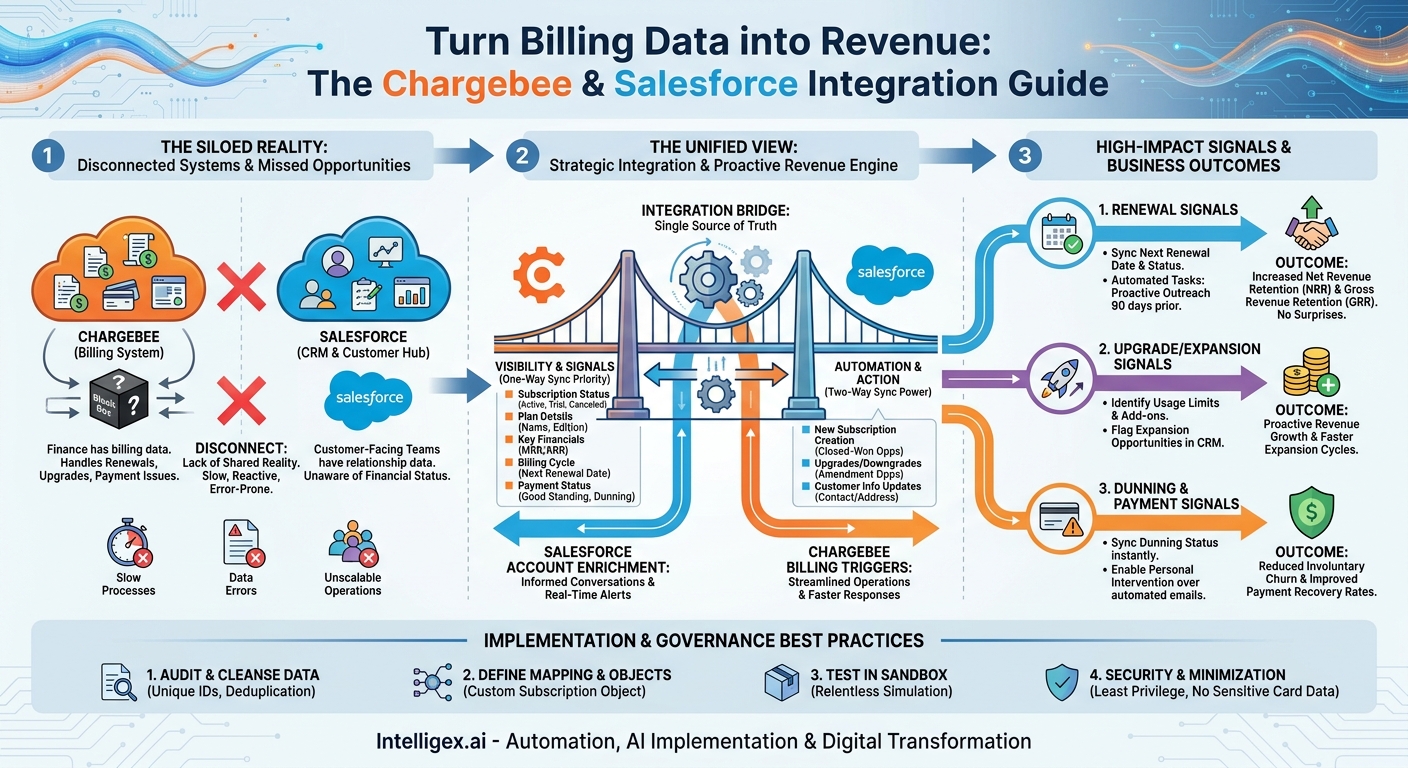
In a subscription business, the most critical customer events happen after the initial sale. Renewals, upgrades, and payment issues are the moments that define your long-term revenue and customer relationships. Yet for many companies, the data about these events lives in a billing system like Chargebee, completely disconnected from the customer relationship hub, Salesforce. This gap forces your customer-facing teams to fly blind. They either bother customers with questions the finance team already knows the answer to, or worse, they miss crucial signals entirely.
Closing this loop isn’t just a technical clean-up exercise. It’s a strategic move to transform reactive processes into a proactive, data-driven revenue engine. By integrating Chargebee and Salesforce, you equip your sales, customer success, and finance teams with the real-time subscription intelligence they need to retain customers, expand accounts, and resolve payment issues faster. The goal is to make your systems work together, so your teams can stop juggling spreadsheets and start delivering better customer experiences.
The Business Case for a Unified View
The core problem with siloed billing and CRM systems is a lack of shared reality. Your sales team sees an account as a “Closed-Won Opportunity” from last year, while your finance team sees it as an account in dunning for the last two weeks. This disconnect creates friction, erodes efficiency, and directly impacts the bottom line. A robust integration provides a single source of truth that delivers tangible business value across several key areas.
Visibility: When a Customer Success Manager (CSM) opens an account record in Salesforce, they should see the current subscription plan, the monthly recurring revenue (MRR), the next renewal date, and any outstanding payment issues. Without this, every conversation starts with a handicap. With it, they can have informed, relevant discussions about value and future needs.
Speed: Manual processes are slow. Manually exporting a list of at-risk accounts from Chargebee, cleaning the data, and assigning tasks in Salesforce can take days. By then, a customer might have already decided to churn. An automated integration can create a task for a CSM the moment a customer’s payment fails, turning a multi-day process into a real-time alert and response.
Quality: Manual data entry is a recipe for errors. A typo in an MRR field or an incorrect renewal date can lead to flawed forecasting and poor strategic decisions. An integration ensures that the data in your CRM is a reliable reflection of the financial reality in your billing system, improving the quality of your reporting and the trust your teams have in the data.
Scalability: Checking renewal dates and payment statuses manually might work when you have 50 customers. It completely breaks down at 500 or 5,000. As your business grows, you cannot hire people fast enough to keep up with the manual reconciliation. Automation is the only way to scale your customer operations efficiently without a linear increase in headcount.
Mapping Your Data Flow: The Foundation of a Successful Integration
Before you write a single line of code or configure any tool, you must map out exactly what information needs to move between the two systems. A poorly planned data flow is the number one reason integrations fail to deliver value or, in the worst cases, create a data mess. Start by deciding if you need a one-way or two-way sync.
A one-way sync, typically from Chargebee to Salesforce, is the perfect starting point. It prioritizes visibility, giving your customer-facing teams the data they need without the risk of them accidentally changing critical billing information. A two-way sync adds automation, allowing actions in Salesforce (like closing an upgrade opportunity) to trigger changes in Chargebee. It’s more powerful but also more complex and requires stricter governance.
Key Data from Chargebee to Salesforce
This flow is about enriching the Account and Contact records in Salesforce with live subscription data. Best practice is often to create a custom “Subscription” object in Salesforce to house this information, linked to the main Account. Essential fields to sync include:
- Subscription Status: Is the subscription Active, In Trial, Canceled, or Paused? This is the most fundamental piece of information.
- Plan Details: The name of the current plan or edition (e.g., “Pro Plan,” “Enterprise Tier”).
- Key Financials: MRR or Annual Recurring Revenue (ARR).
- Billing Cycle Information: The Next Renewal Date and the Billing Period (e.g., monthly, annually).
- Payment Status: A clear flag indicating if the account is in good standing or in a dunning (payment recovery) process.
Key Data from Salesforce to Chargebee
This flow is about automation, allowing your CRM to act as the trigger for billing events. This requires careful setup to avoid accidental changes.
- New Subscription Creation: When a sales rep marks an Opportunity as “Closed-Won,” the integration can automatically create a new customer and subscription in Chargebee, pulling the plan details and pricing from the Opportunity Products.
- Upgrades and Downgrades: An “Amendment” or “Expansion” Opportunity in Salesforce can trigger a plan change in Chargebee upon closing. This streamlines the upsell process.
- Customer Information Updates: Syncing changes to the billing contact or address from Salesforce to Chargebee ensures invoices go to the right place.
Key Integration Points for High-Impact Signals
Once your data map is clear, you can focus on building workflows around the three most valuable signals: renewals, upgrades, and dunning. These are the moments that have the biggest impact on revenue retention and expansion.
1. Renewal Signals
The most common cause of preventable churn is a lack of engagement leading up to the renewal date. An integration can make renewal management a proactive, systematic process.
What it is: Syncing the “Next Renewal Date” and “Subscription Status” from Chargebee to a custom Subscription object in Salesforce.
Why it matters: This data allows you to build automated workflows and reports. For example, you can automatically create a task for the CSM 90 days before an annual contract is up for renewal, prompting them to schedule a business review. This simple alert system ensures no renewal ever comes as a surprise, giving your team ample time to prove value and secure the contract extension.
Actionable Step: In Salesforce, create a new report for all Accounts with a “Next Renewal Date” in the current or next quarter. Add it to the main dashboard for your Customer Success team so they see their renewal pipeline every single day.
2. Upgrade and Expansion Signals
Your existing customers are your most likely source of new revenue. The data in your billing system can help you identify who is ready for an upgrade long before they ask for one.
What it is: Identifying customers who are outgrowing their current plan. This could be based on hitting usage limits, purchasing a specific combination of add-ons, or matching the profile of other customers who have successfully upgraded.
Why it matters: This turns your CSMs and Account Managers from reactive problem-solvers into proactive revenue drivers. Instead of waiting for a customer to complain about a feature they don’t have, the team can reach out with a tailored proposal for a higher-tier plan that meets their evolving needs.
Example Scenario: A customer on your “Standard” plan consistently pays overage fees for an extra feature. The integration flags this on their Salesforce Account record by setting a custom field like “Expansion Opportunity” to “True.” This triggers a notification to the account owner, who can then engage the customer with a proposal to move to the “Premium” plan, which includes that feature at a better value.
3. Dunning and Payment Failure Signals
Automated dunning emails are useful, but they are easy to ignore. Sometimes, a failed payment is due to a simple expired credit card, but the first person to notice is the customer, when their service is suddenly cut off. A personal touch from someone they know can make all the difference in recovering the payment and preserving the relationship.
What it is: Syncing the dunning status from Chargebee to a highly visible field on the Salesforce Account. When an account enters dunning, the integration immediately flags it in the CRM.
Why it matters: This gives the person with the strongest customer relationship, the CSM or Account Manager, visibility into the payment problem. They can reach out with a helpful, low-pressure message. This human touch is often far more effective than a generic “Your payment has failed” email, dramatically improving payment recovery rates and preventing involuntary churn.
A Step-by-Step Guide to Your Initial Sync
Getting started doesn’t have to be a massive, multi-quarter project. You can achieve significant value by following a phased approach, starting with a simple one-way sync for visibility. Here is a practical plan to get your first integration live.
- Audit and Cleanse Your Data: Garbage in, garbage out. Before you connect anything, ensure your core data is clean. The most important step is to establish a unique identifier that exists for each customer in both systems. This is often a custom “Salesforce Account ID” field in Chargebee. Run reports in both systems to find mismatched or duplicate accounts and resolve them first.
- Define Your Object Mapping: Decide where Chargebee data will live in Salesforce. The most scalable approach is to create a new custom object called “Subscription” or “Billing Account.” This object will be linked to the standard Salesforce Account object and will hold all the synced fields like MRR, plan type, and status. This keeps your main Account object clean and allows a single company to have multiple subscriptions.
- Choose Your Integration Method: You have three main options. First, a native connector provided by Chargebee or available on the Salesforce AppExchange. This is often the fastest way to get started. Second, an Integration Platform as a Service (iPaaS) tool like Zapier, Workato, or MuleSoft. These offer more flexibility and can connect many other apps. Third, custom API development, which provides the most control but is also the most expensive and time-consuming. For most businesses, a native connector or an iPaaS tool is the right choice.
- Configure Your Field Mappings: In the tool you’ve chosen, you will create a mapping for each data point. For example, you will tell the system: “Take the status field from the Subscription resource in Chargebee and put it into the CB_Status__c field on my Subscription object in Salesforce.” Be meticulous and map one field at a time.
- Test Relentlessly in a Sandbox: Never build or test an integration in your live production environments. Use a Salesforce Sandbox and a Chargebee test site to run your sync. Create test customers, change their plans, and simulate failed payments to ensure the data flows exactly as you designed it. Check for API call limit usage and processing times.
- Deploy and Monitor: Once you are confident in your testing, deploy the integration to your production environment. For the first few weeks, monitor it closely. Set up error notifications so you are alerted immediately if a sync fails. Run daily validation reports to spot-check records and ensure data integrity.
Measuring Success: What to Track After Integration
An integration project isn’t complete when the technology is deployed. Success is measured by the business outcomes it enables. You should define your key performance indicators (KPIs) before you begin and track them consistently after you go live. Focus on metrics that connect directly to revenue and customer health.
Retention and Churn Metrics
- Involuntary Churn Rate: Specifically, track the percentage of churn caused by payment failures. An effective dunning signal integration should noticeably decrease this number.
- Net Revenue Retention (NRR): By improving renewal conversations and identifying expansion opportunities sooner, the integration contributes directly to retaining and growing revenue from your existing customer base.
- Gross Revenue Retention (GRR): This measures your ability to keep existing revenue, not counting expansion. Better renewal visibility and dunning management are key levers for improving GRR.
Efficiency and Speed Metrics
- Time to Resolve Dunning: Measure the average number of days an account stays in a dunning state. The goal is to shorten this cycle with faster, more personal intervention.
- Time to Identify Expansion Opportunity: Track the time from when a customer shows an upgrade signal (e.g., usage spike) to when an Opportunity is created in Salesforce. Automation should make this near-instantaneous.
Governance and Data Security: A Non-Negotiable Step
Integrating systems that handle sensitive customer and financial data requires a thoughtful approach to security and governance. Moving fast is important, but moving safely is essential. A mistake here can lead to data breaches, compliance issues, and a loss of customer trust.
Principle of Least Privilege: The user accounts or API keys used for the integration must have the minimum permissions necessary to perform their tasks. The integration user in Salesforce should not be a full System Administrator. It should have a custom profile that only grants it create, read, and update permissions on the specific objects and fields defined in your data map.
Data Minimization: Only sync the data you absolutely need. You do not need to, and should not, sync sensitive payment information like full credit card numbers into Salesforce. Syncing the payment status, the card’s expiration month and year, and the card type is sufficient for your team to have an informed conversation without creating unnecessary security risks.
Robust Error Handling: Plan for failure. What happens if the Salesforce API is temporarily down or your integration tool encounters an error? The system should have a clear process for logging the error, alerting an administrator, and retrying the sync. A silent failure is dangerous, as it can lead to data drifting out of sync for days or weeks before anyone notices.
Human in the Loop: For high-stakes, irreversible actions initiated from Salesforce, such as canceling a subscription in Chargebee, consider implementing a “human in the loop” workflow. Instead of having a button that triggers an immediate, automated cancellation, have it trigger an approval request to a manager or a finance team member. This adds a layer of protection against accidental clicks or mistakes, blending the speed of automation with the safety of human judgment.
Next Steps: Your Action Plan
Moving from concept to execution requires a clear plan. This integration project delivers compounding value, so the sooner you start, the better. You can begin making progress today by focusing on three simple actions.
- Assemble Your Stakeholder Team: This is not just an IT project. Schedule a 60-minute meeting and invite key leaders from Sales Operations, Finance, and Customer Success. The goal is to get everyone to agree on the single biggest pain point the integration should solve first. Is it renewal visibility? Dunning recovery? Start with a narrow, high-value focus.
- Document Your Core Signals: On a whiteboard or in a shared document, define the first one or two signals you want to build around. Be specific. For example: “When a subscription’s status in Chargebee changes to in_dunning, create a high-priority Task on the corresponding Account in Salesforce assigned to the Account Owner.” This level of detail will make tool selection and configuration much easier.
- Evaluate Your Options with a Proof-of-Concept: Based on your requirements, begin evaluating the right tool for the job. Start with Chargebee’s native Salesforce integration, and if it doesn’t meet your needs, look at a user-friendly iPaaS tool. Don’t commit to a long-term contract. Instead, run a small, time-boxed proof-of-concept with a handful of test accounts to validate that the technology can deliver on your documented signals.
By connecting Chargebee and Salesforce, you are building more than just a technical bridge between two systems. You are creating a shared nervous system for your revenue teams, enabling them to act on critical customer signals with speed and intelligence. This foundation is crucial for scaling your business and turning your customer operations into a competitive advantage.
Your Next Read:
Get a FREE
Proof of Concept
& Consultation
No Cost, No Commitment!
