

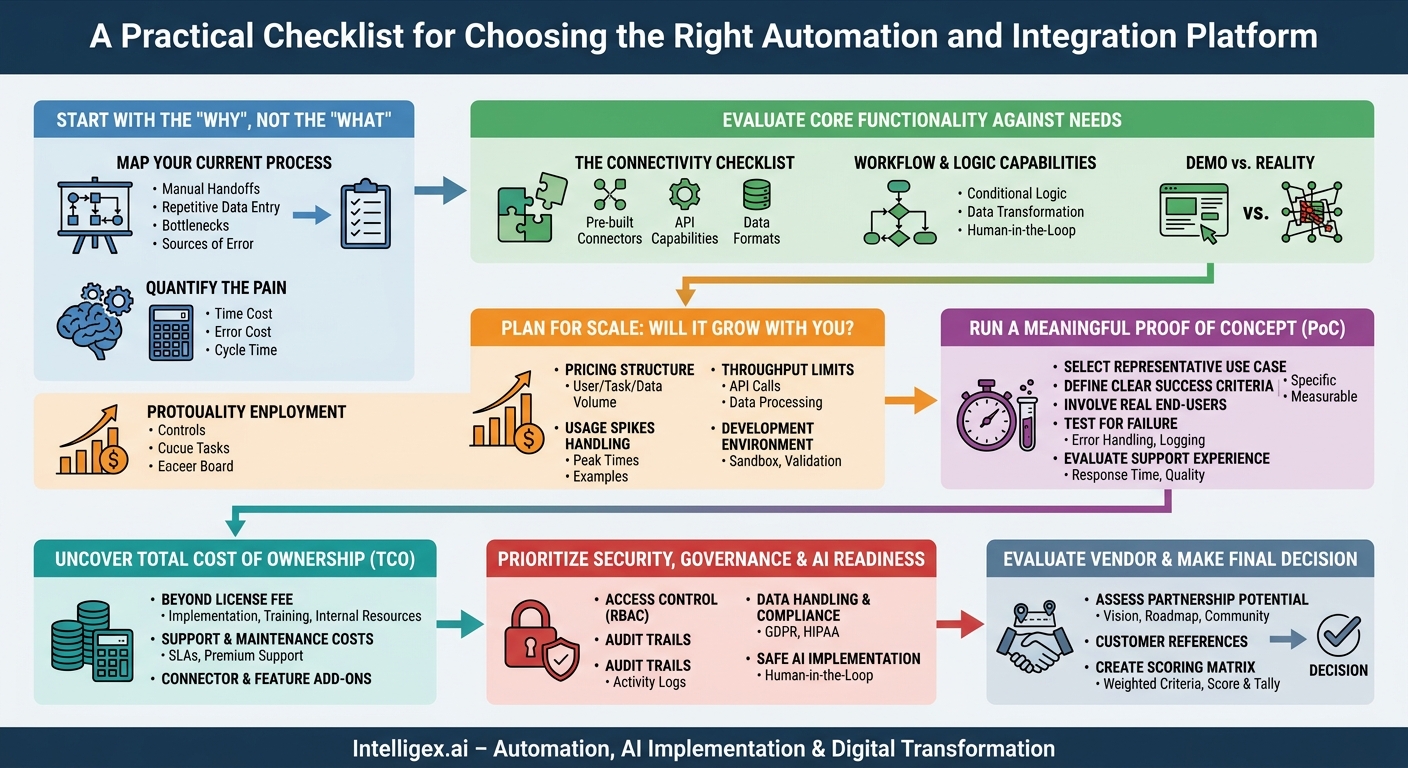
Choosing the right automation and integration platform is a high-stakes decision. The market is flooded with options, from niche workflow tools to enterprise-grade Integration Platform as a Service (iPaaS) solutions. The right choice can unlock immense value, accelerating business processes, reducing operational costs, and improving data quality. The wrong one, however, leads to wasted budget, frustrated teams, and failed projects that erode confidence in digital transformation itself.
A successful selection process isn’t about finding a tool with the longest feature list. It’s about methodically matching a vendor’s capabilities to your specific business problems. This guide provides a practical checklist to help you navigate the evaluation process, cut through the noise, and choose a partner that will enable, not hinder, your long-term growth.
Start with the “Why,” Not the “What”
Before you ever look at a single vendor website or book a demo, you must deeply understand the problem you are trying to solve. Technology is a tool, not a solution in itself. Jumping straight to vendor comparisons without a clear “why” is the most common path to a poor investment. Your first step is internal: map, measure, and define the business pain.
Map Your Current Process
Get the key stakeholders in a room (virtual or physical) and whiteboard the exact process you want to improve. Whether it’s onboarding a new employee, processing a sales order, or reconciling financial statements, document every single step. Identify:
- Manual handoffs: Where does information get emailed from one person to another?
- Repetitive data entry: Where are people copying and pasting information between systems?
- Bottlenecks: Where does work pile up waiting for approval or action?
- Sources of error: Which steps are most prone to human error?
For example, a marketing operations team might find their “lead to sales” process involves manually exporting a CSV file from their webinar platform, cleaning the data in a spreadsheet, and then uploading it to their CRM. This is a clear, mappable process ripe for automation.
Quantify the Pain
Once you have the map, attach numbers to it. This moves the conversation from anecdotal complaints to a solid business case. The goal is to establish a baseline so you can measure the future impact of your investment.
Key metrics to measure:
- Time Cost: Calculate the hours spent per week or month on the manual process. (e.g., 5 team members spend 4 hours each per month on invoice processing = 20 hours/month).
- Error Cost: What is the business impact of mistakes? This could be the cost of shipping to a wrong address, penalties for late compliance filings, or the sales opportunity cost of a delayed lead follow-up.
- Cycle Time: How long does it take from the start of the process to the end? Reducing the time it takes to close the books from ten days to two has a tangible impact on business agility.
Evaluate Core Functionality Against Your Real-World Needs
Every vendor will show you a polished demo that makes their product look effortless. Your job is to look past the presentation and determine if the tool’s core architecture can handle your specific, sometimes messy, reality. Create a “must-have” versus “nice-to-have” feature list based on the process you mapped earlier.
The Connectivity Checklist
At its heart, integration is about connecting systems. If a platform can’t easily talk to your critical applications, nothing else matters. Don’t take a vendor’s logo-filled slide at face value. Dig deeper.
- Pre-built Connectors: Does the platform have robust, officially supported connectors for your essential systems? Think about your ERP (like NetSuite or SAP), CRM (like Salesforce), HRIS (like Workday), and key departmental apps.
- API Capabilities: For any systems without a pre-built connector, how easy is it to connect via a REST API? Can your team configure API connections without needing a specialized developer?
- Data Formats: Can the tool handle the data you use? This includes everything from simple CSV files and JSON to more complex formats like XML or industry-specific standards.
Workflow and Logic Capabilities
A business process is more than just moving data from A to B. It involves rules, conditions, and sometimes, human judgment.
Assess the platform’s ability to:
- Handle Conditional Logic: Can you build rules like “If a purchase order is over $10,000, then route it to the finance director for approval”?
- Manage Data Transformation: How easily can you map and transform data between systems? For example, your CRM might list a customer’s name as a single field (“John Smith”), while your billing system requires separate fields (“First Name: John,” “Last Name: Smith”). Can a business user handle this, or does it require code?
- Incorporate Human-in-the-Loop: Can you pause an automation to wait for human approval or input? This is critical for processes that can’t be 100% automated, such as exception handling in accounts payable or final contract review.
Plan for Scale: Will It Grow with You?
The solution you choose today must be able to handle your business volume tomorrow, next quarter, and next year. A tool that works perfectly for 100 transactions per day might fail spectacularly at 10,000. Scalability isn’t just a technical concern; it’s a direct driver of business value, ensuring you can maintain performance during critical periods.
Questions to Ask Vendors About Performance and Pricing
- How is your pricing structured? Is it based on the number of users, tasks executed, or data volume? Understand how your costs will increase as your usage grows. Avoid models that penalize you for success.
- What are the platform’s throughput limits? Are you throttled on API calls per minute or data processed per hour? This is crucial for a supply chain team processing real-time inventory updates or a sales team synchronizing data during a major campaign.
- How does the platform handle usage spikes? Ask for examples of how they support clients during peak times like Black Friday, end-of-quarter reporting, or open enrollment for HR.
- What is the development environment like? Do they provide a sandbox or testing environment where you can build and validate automations without touching your live production data?
Run a Meaningful Proof of Concept (PoC)
Never buy an automation or integration platform based on a demo alone. A hands-on Proof of Concept is non-negotiable. This is where you validate a vendor’s claims against your real-world requirements. A well-structured PoC will give you more clarity than dozens of sales calls.
- Select a Representative Use Case: Choose one specific process from your initial discovery phase. It should be complex enough to test the tool’s key features but simple enough to be completed within the trial period (typically 2-4 weeks). A good example is automating the creation of a new project in your project management tool whenever a deal is marked “Closed-Won” in your CRM.
- Define Clear Success Criteria: Before you start, write down what success looks like. This should be specific and measurable. For example: “The workflow must automatically sync new customer data from the CRM to the ERP within 2 minutes of creation, with a data accuracy rate of 99.9%, and correctly flag any records with missing address information for manual review.”
- Involve the Real End-Users: The PoC team should include at least one person who does the manual work today. Their feedback on the user interface and the practical reality of the new workflow is more valuable than anyone else’s. An IT team member should also be involved to assess the technical and security aspects.
- Test for Failure: Don’t just test the “happy path.” Intentionally try to break the process. What happens if the source data is formatted incorrectly? What if a connected application’s API is temporarily unavailable? A robust platform will have clear error handling, logging, and alerting that makes it easy to diagnose and resolve issues. The quality of a tool is often best seen in how it handles failure.
- Evaluate the Support Experience: Use the PoC as a trial run of the vendor’s support team. When you have a question, submit a support ticket. How quickly do they respond? Is their advice helpful and clear? This is a preview of the partnership you will have after you sign the contract.
Uncover the Total Cost of Ownership (TCO)
The price on the quote is just one part of the total investment. A tool with a low initial license fee can quickly become expensive if it requires significant spending on implementation, training, and ongoing maintenance. To understand the true cost, you need to calculate the Total Cost of Ownership.
Beyond the License Fee
- Implementation and Training: Are these services included, or are they a separate, one-time cost? Will you need to hire a third-party implementation partner?
- Internal Resource Costs: Who will build and maintain these automations? A developer-centric platform requires hiring or allocating expensive technical talent. A low-code platform may empower your existing business analysts, but they will still need time for training and development, which has a cost.
- Support and Maintenance: Is premium support an extra fee? What are the Service Level Agreements (SLAs) for uptime and support response times?
- Connector and Feature Add-ons: Are all connectors included in your subscription tier? Some vendors charge extra for “premium” connectors to popular enterprise systems. Make sure all the capabilities you need are in the package you are quoted.
Prioritize Security, Governance, and AI Readiness
Automation and integration platforms are powerful. They hold the “keys to the kingdom” with credentials to your most critical business systems. Security cannot be an afterthought; it must be a primary evaluation criterion. This becomes even more critical as you begin to incorporate AI capabilities, which can introduce new risks if not governed properly.
A Plain-Language Security Checklist
- Access Control: Can the platform support role-based access control (RBAC)? You need to ensure that only authorized users can create or modify workflows that touch sensitive systems like your HRIS or financial ERP. A marketing intern should not be able to edit a payroll automation.
- Data Handling and Compliance: Ask where your data is processed and stored. Does the vendor meet key compliance standards relevant to your business, such as GDPR for European customer data or HIPAA for healthcare information? Reputable vendors will have their security posture well-documented. For foundational information on cloud security practices, you can refer to resources from major providers like Amazon Web Services.
- Audit Trails: The platform must provide a clear and unchangeable log of all activities. Who ran a workflow? When was it run? What data was changed? This is essential for both troubleshooting and security audits.
- Safe AI Implementation: If you plan to use AI components, such as for intelligent document processing or automated decision-making, look for human-in-the-loop capabilities. This allows you to insert a manual review step for AI-driven recommendations before they are finalized. Automating critical decisions without human oversight is a recipe for amplifying errors at a massive scale.
Evaluate the Vendor, Not Just the Product
When you select a platform, you are not just buying software. You are entering a multi-year partnership with the company that builds and supports it. A great product from a company with poor support or an uncertain future is a risky bet.
Assess Partnership Potential
- Product Vision and Roadmap: Where is the product headed? Does the vendor have a clear vision for the future, or are they struggling to keep up with the competition? Ask to see their product roadmap and how they incorporate customer feedback.
- Community and Ecosystem: Is there a thriving community of users and developers around the platform? An active community, online forums, and a marketplace of third-party templates can dramatically accelerate your success.
- Customer References: Ask for and speak to at least two customer references. Insist on talking to companies that are similar in size and industry to your own. Ask them about their experience with implementation, support, and the actual business value they’ve achieved.
Next Steps: Making Your Final Decision
By following this structured process, you will have gathered a wealth of quantitative and qualitative data on your top contenders. The final step is to bring it all together to make an informed, defensible decision.
Create a simple scoring matrix. List your key criteria, including core functionality, scalability, TCO, and security, down one column. List your top two or three vendors across the top. Assign a weight to each criterion based on its importance to your business. For example, connectivity to your specific ERP might be weighted higher than the user interface. Score each vendor on each criterion, multiply by the weight, and tally the results.
This data-driven approach removes personal bias and helps you present a clear recommendation to leadership. Choosing the right automation and integration partner is a foundational step in building a more efficient, agile, and resilient organization. A methodical, business-focused evaluation is your best strategy for ensuring that investment pays dividends for years to come.
Your Next Read:
Category:
Get a FREE
Proof of Concept
& Consultation
No Cost, No Commitment!
