

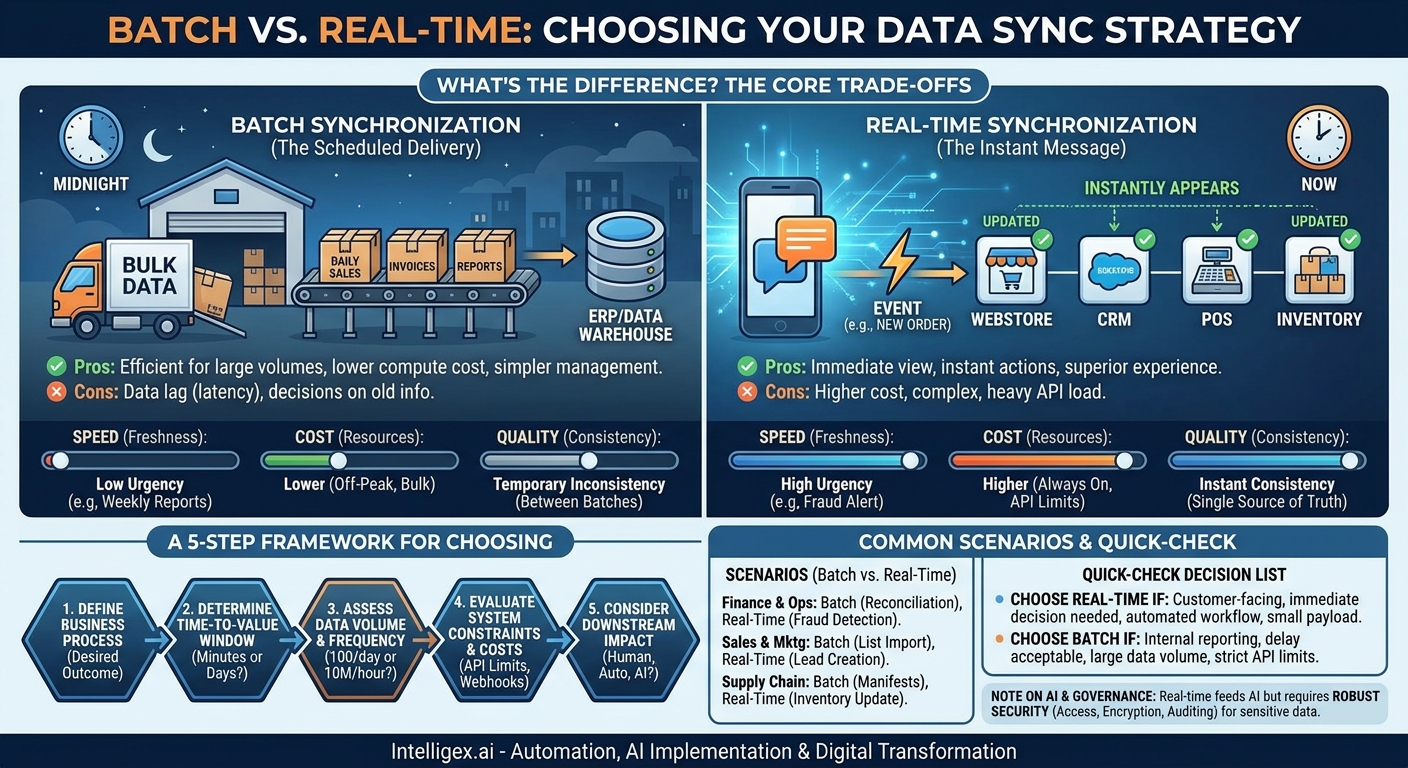
Your business runs on data. But when that data is locked away in different systems like your CRM, ERP, and marketing platform, it creates friction. Teams waste time manually copying information, decisions are made with outdated reports, and customer experiences suffer. The solution is to get your systems talking to each other through data synchronization. The first, most critical question you’ll face is: should we sync data in batches or in real time?
This isn’t just a technical decision. It’s a business strategy decision that directly impacts your costs, operational speed, and ability to compete. Choosing the wrong method can lead to bloated budgets and missed opportunities, while the right choice can unlock new levels of efficiency and customer satisfaction. This guide will help you navigate that choice by focusing on the practical business implications of each approach.
What’s the Difference? Batch vs. Real-Time in Plain English
Before diving into a complex analysis, it’s important to understand the fundamental difference between these two methods. Think of it as the difference between postal mail and a text message.
Batch Synchronization: The Scheduled Delivery
Batch synchronization works like a scheduled mail delivery service. It collects all the data changes that have occurred over a specific period (an hour, a day, a week), bundles them together into a “batch,” and then moves that entire package from one system to another at a predetermined time. This is often done during off-peak hours, like overnight, to minimize disruption.
A classic example: A retail company’s daily sales data from all its stores is collected throughout the day. At midnight, a single process runs to push all of those sales records from the point-of-sale (POS) systems into the central financial ERP. The finance team arrives the next morning to a complete, reconciled report of the previous day’s performance.
- Pros: Highly efficient for large data volumes, lower computational cost, simpler to build and manage, and less taxing on system APIs.
- Cons: Data is never fully up-to-date, creating a lag (or latency) between systems. Decisions made between batches are based on old information.
Real-Time Synchronization: The Instant Message
Real-time synchronization is like sending a text message. The moment a meaningful event happens in one system, the data is sent to the other system immediately, or within seconds. This is typically handled through technologies like webhooks or APIs that “listen” for changes and trigger the data transfer instantly.
A classic example: A customer buys the last pair of a specific shoe from your e-commerce website. A real-time sync immediately updates the inventory level in your inventory management system, your retail POS systems, and on the website itself, marking it as “out of stock.” This prevents another customer from buying an item you no longer have.
- Pros: Provides an immediate, up-to-the-minute view of your business, enables instant actions and superior customer experiences.
- Cons: More complex and expensive to implement, can create a heavy load on system APIs (sometimes exceeding rate limits), and requires more robust error handling.
The Core Trade-Offs: Speed, Cost, and Quality
The choice between batch and real-time is a balancing act between three critical business factors. Understanding these trade-offs is key to making a smart investment in your data infrastructure.
Speed (Data Freshness)
The most obvious difference is the speed at which data becomes available where it’s needed. This isn’t just about being fast for the sake of it; it’s about the “shelf life” of your data’s value. Ask yourself: How quickly does this piece of information need to be acted upon before it becomes irrelevant or, worse, misleading?
- High Urgency (Real-Time): A fraud detection system needs to know about a suspicious transaction now, not tomorrow morning. A sales representative needs to know a lead from your website has requested a demo within minutes, not hours.
- Low Urgency (Batch): A business intelligence dashboard showing monthly sales trends is perfectly useful even if it’s updated nightly. Consolidating employee expense reports for payroll can happen in a weekly batch process without issue.
Cost (Infrastructure and Operations)
Real-time sync often carries a higher price tag. It requires systems to be “always on” and ready to handle requests at any moment. This can lead to increased costs in several areas:
- API Usage: Many software-as-a-service (SaaS) platforms, like Salesforce, have limits on how many API calls you can make in a 24-hour period. High-frequency, real-time updates can quickly exhaust these limits, forcing you to purchase more expensive plans.
- Compute Resources: Processing data instantly requires more server capacity than scheduling a large job to run overnight when system usage is low.
- Development and Maintenance: Real-time integrations are more complex. They need sophisticated error handling to manage failed transfers and retries, which increases development and maintenance overhead.
Batch processing, on the other hand, is generally more cost-effective. It can be scheduled to use resources when they are cheap and available, and it moves data in bulk, which is a more efficient operation.
Quality (Data Consistency)
Data quality here refers to consistency across your systems. Real-time sync is the gold standard for maintaining a single, consistent source of truth. When a customer updates their shipping address in your customer portal, a real-time process ensures that the new address is instantly reflected in your CRM, your shipping software, and your billing system. This prevents packages from being sent to the wrong address.
With batch sync, a state of temporary inconsistency is the norm. Between the nightly syncs, your CRM might have a different customer address than your billing system. For many processes, this temporary gap is acceptable. But for critical, customer-facing functions, it can lead to costly errors and a poor experience.
A 5-Step Framework for Choosing the Right Sync Method
To move from theory to a concrete decision, follow this step-by-step process. This framework forces you to focus on the business process first, not the technology.
- Define the Business Process and Desired Outcome. Be specific. Don’t just say “we need to sync contacts.” Instead, say, “When a new lead fills out the ‘Contact Us’ form on our website, a new Lead record must be created in our CRM so a sales development representative (SDR) can call them.” The desired outcome is a faster lead response time.
- Determine the “Time-to-Value” Window. For the process you just defined, how much time can pass before the data loses its value? For the new lead, its value depreciates rapidly. A study once showed that responding within 5 minutes versus 30 minutes can dramatically change conversion rates. The time-to-value is minutes, pointing toward real-time. For a process like “syncing employee time-off requests to the HR system,” the time-to-value might be 24 hours, making batch a perfectly viable option.
- Assess the Data Volume and Frequency. How much data are you moving, and how often does it change? Are you syncing 100 new leads per day, or are you trying to sync 10 million sensor readings from IoT devices every hour? High-frequency, small-payload events (like a single lead creation) are well-suited for real-time. Extremely large data volumes (like a full product catalog update from a supplier) are often better handled in a batch process to avoid system overload.
- Evaluate System Constraints and Costs. Investigate the technical limitations of the systems you are connecting. Go to the developer documentation for your CRM, ERP, or marketing platform. What are their API rate limits? Do they offer webhooks for real-time event notifications? A system without a robust, real-time-capable API may force you into a batch or “mini-batch” approach. For example, if your HubSpot plan has an API call limit, you must factor that into your decision.
- Consider the Downstream Impact. Who or what consumes this data? The answer heavily influences your choice.
- Human Consumer (Internal): An analyst looking at a report can probably tolerate data that is a few hours old. (Batch)
- Human Consumer (External/Customer): A customer checking their order status on your website expects it to be accurate to the second. (Real-Time)
- Automated System: An automated workflow that re-orders stock when inventory drops below a certain threshold needs immediate data to prevent stockouts. (Real-Time)
- AI Model: A personalization engine that adjusts product recommendations based on a user’s real-time browsing activity needs an instant data feed. (Real-Time)
Common Scenarios: When to Use Batch vs. Real-Time
Let’s apply this thinking to common business departments and their typical integration needs.
Finance & Operations
This department often deals with large datasets and periodic reporting, making it a prime candidate for batch processing. However, critical transaction-based activities demand real-time speed.
- Use Batch for: End-of-day sales reconciliation, migrating financial data into a data warehouse for analytics, monthly payroll processing, and generating quarterly financial statements. These are large, non-urgent tasks where accuracy and completeness are more important than immediacy.
- Use Real-Time for: Credit card fraud detection, syncing a paid invoice from your CRM to your accounting software to trigger a “thank you” email, or updating project budget trackers as expenses are approved.
Sales & Marketing
Speed is a competitive advantage in sales and marketing. The ability to act on customer intent immediately often separates leaders from the laggards.
- Use Batch for: Importing a list of contacts from a trade show, updating customer segments in your marketing platform based on their last 3 months of purchase history, or syncing campaign performance metrics to an analytics dashboard weekly.
- Use Real-Time for: Creating a new lead in the CRM the moment a form is submitted on your website, sending a user’s browsing activity to a personalization engine, or updating a customer’s “unsubscribe” status across all marketing and communication tools instantly to ensure compliance.
Supply Chain & E-commerce
In the world of physical goods, a single source of truth about inventory is paramount. This makes real-time integration a necessity for many core operations.
- Use Batch for: Nightly transfer of all of the day’s shipping manifests to a third-party logistics (3PL) partner, bulk price list updates from a supplier, or archiving old order data.
- Use Real-Time for: Updating inventory levels across all sales channels (website, mobile app, in-store POS) the second an item is sold, sending an order confirmation and shipping notification to a customer, or tracking a package’s location via carrier APIs.
The Quick-Check Decision List
When in doubt, run your use case through this simple checklist. If you answer “yes” to one or more items in a category, it’s a strong indicator for that method.
Choose Real-Time if…
- The process is customer-facing and directly impacts their immediate experience.
- Decisions or actions based on this data must be made in seconds or minutes.
- Downstream automated workflows depend on the event happening now.
- Maintaining a single, perfectly consistent state across multiple systems is a critical business requirement.
- The data payload is small and event-driven (e.g., one new customer, one updated status).
Choose Batch if…
- The process is for internal reporting, analytics, or back-office functions.
- The data’s value does not degrade significantly over several hours or even a day.
- You are moving very large volumes of data and controlling costs is a primary concern.
- The source or destination system has strict API limits or is not built for high-frequency updates.
- The data requires complex validation, cleansing, or transformation steps that are best performed on a complete dataset.
A Note on AI, Governance, and Sensitive Data
The choice between batch and real-time has significant implications when AI and sensitive data are involved. Many modern AI applications, especially those that interact with customers, depend on real-time data to function effectively. A recommendation engine on an e-commerce site, for instance, is far more effective when it can react to what a user is clicking on right now, not what they clicked on yesterday.
However, this speed creates new governance challenges. Moving data, particularly Personally Identifiable Information (PII), instantly across system boundaries requires a mature security posture. When implementing any real-time integration involving sensitive data, it’s crucial to ensure you have:
- Robust Access Controls: Ensure only the necessary systems and services have permission to access and transfer the data.
- End-to-End Encryption: Data must be encrypted both in transit (as it moves between systems) and at rest (when it’s stored).
- Comprehensive Auditing: Keep detailed logs of every data transfer. This is essential for troubleshooting and for demonstrating compliance with regulations like GDPR and CCPA.
For high-stakes AI-driven decisions, like automated loan approvals or medical diagnoses, a purely real-time system can be risky. A safer approach is often a hybrid model: use real-time sync to gather all the necessary data for the AI model, but build in a “human-in-the-loop” review step to validate the AI’s recommendation before the final action is taken. This combines the speed of real-time data with the safety of human oversight.
Your Next Steps: Moving from Decision to Action
Choosing the right data synchronization strategy is a foundational step in building a more connected and efficient enterprise. It eliminates manual work, accelerates business processes, and provides the high-quality, timely data needed to make smart decisions. Don’t let the technical details paralyze you. The right path forward is a business-led one.
- Inventory Your Key Processes: Identify two or three critical business processes that are currently slowed down by data being in the wrong place at the wrong time. This could be lead follow-up, order fulfillment, or financial reporting.
- Apply the Framework: For each process, walk through the 5-step framework detailed above. Define the outcome, assess the time-to-value, and evaluate the technical and cost constraints. This will give you a clear, evidence-based recommendation.
- Start Small and Prove Value: You don’t need to overhaul everything at once. Select one high-impact process for a pilot project. For example, focus solely on implementing a real-time sync between your website lead form and your sales CRM.
- Measure the Impact: Before you begin, baseline your current performance. How long does it take for a new lead to be contacted? What is the conversion rate? After you implement the new integration, measure these same metrics again. Quantifying the improvement (e.g., “we reduced lead response time by 98% and increased conversion by 15%”) is the most powerful way to justify further investment in digital transformation.
By taking a structured, business-first approach, you can confidently choose the right synchronization method that delivers tangible value, reduces costs, and builds a solid foundation for a more agile and data-driven future.
Your Next Read:
Get a FREE
Proof of Concept
& Consultation
No Cost, No Commitment!
