

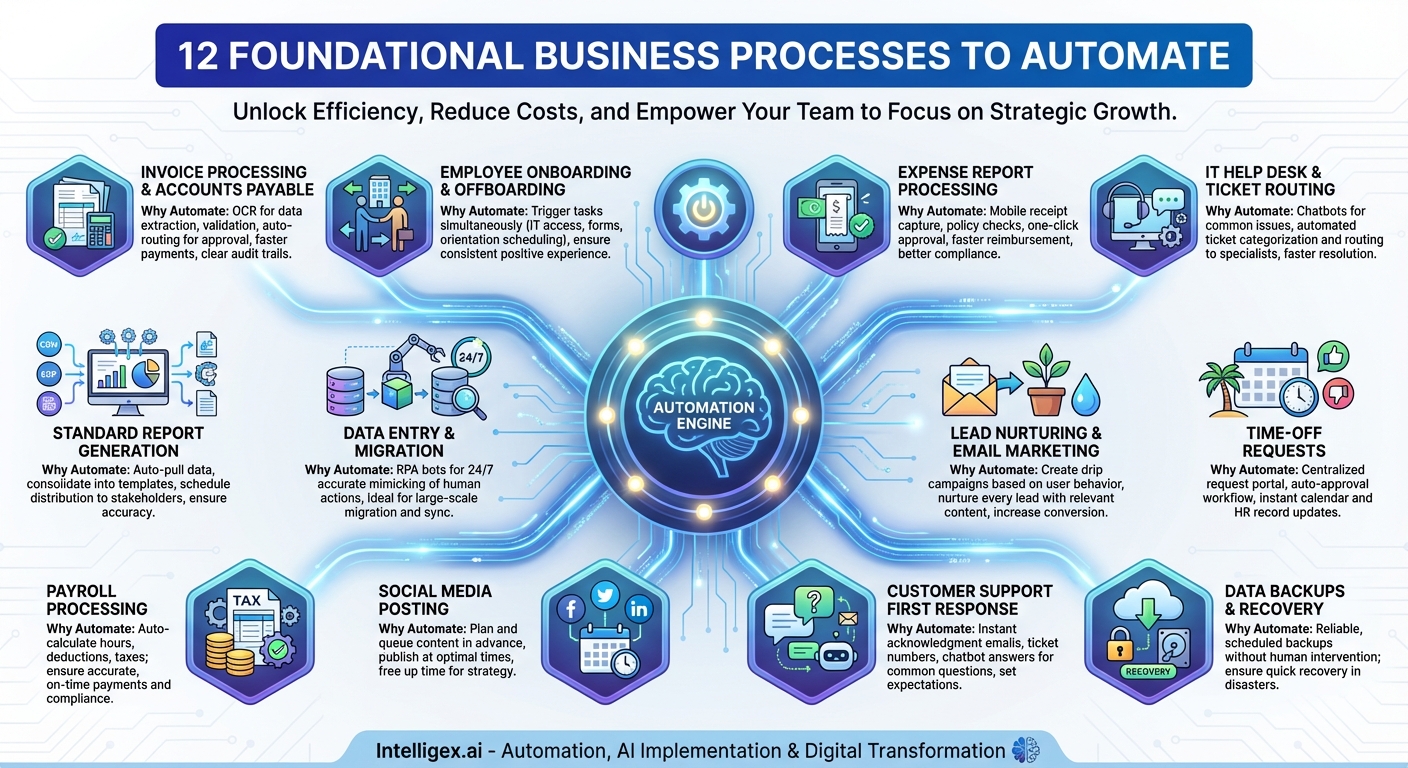
In today’s competitive landscape, “doing more with less” isn’t just a catchy phrase—it’s a survival strategy. Business process automation is the key to unlocking this new level of efficiency. It’s about taking the repetitive, rule-based, and time-consuming tasks that bog down your talented teams and handing them over to software. The result? Reduced errors, lower operational costs, faster turnaround times, and—most importantly—freed-up employees who can focus on strategic, high-value work that drives growth.
The promise of automation is alluring, but it often comes with a daunting question: Where do we even begin? The sheer number of processes in any given organization can lead to analysis paralysis. The secret is to start with tasks that offer the highest return on investment for the lowest implementation complexity. These are the “low-hanging fruit” of automation—processes that are high-volume, prone to human error, and follow predictable rules. By targeting these first, you can build momentum, prove the value of automation to stakeholders, and begin transforming your operations from the ground up.
To help you start your journey, we’ve identified 12 foundational processes that are prime candidates for your first automation initiative.
1. Invoice Processing and Accounts Payable
Perhaps the most classic example of business automation, managing invoices is a drain on any finance department. Manually entering data from invoices, matching them to purchase orders, routing them for approval, and processing payments is incredibly time-consuming and ripe for error. A misplaced decimal or a missed deadline can have significant financial consequences.
Why Automate It: Automation tools can use Optical Character Recognition (OCR) to extract data from invoices, validate it against your existing systems, flag discrepancies, and route it through a digital approval workflow. This drastically reduces manual data entry, accelerates payment cycles (potentially unlocking early payment discounts), and creates a clear, auditable trail for every transaction.
2. Employee Onboarding and Offboarding
Welcoming a new employee or managing a departure involves a complex checklist of tasks spanning HR, IT, and departmental managers. From setting up email accounts and system access to completing paperwork and scheduling training, it’s a process where steps can easily be missed. A poor onboarding experience can negatively impact new hire retention.
Why Automate It: An automated workflow can trigger all necessary tasks simultaneously. When HR marks a candidate as “hired,” the system can automatically create IT tickets for equipment and access, send welcome emails with necessary forms, and schedule orientation meetings. This ensures a consistent, efficient, and positive experience for every employee from day one.
3. Expense Report Processing
Few tasks are as universally disliked as filing and approving expense reports. Employees have to track receipts, managers have to chase down submissions, and finance has to manually verify each line item against company policy. The entire process is slow, frustrating, and prone to policy violations.
Why Automate It: Modern expense management tools allow employees to snap photos of receipts from their phones, automatically extracting the relevant data. The software can then check the expense against predefined policies, flag any issues, and route it for approval with a single click. This accelerates reimbursement times, improves employee satisfaction, and ensures greater compliance.
4. IT Help Desk and Ticket Routing
IT support teams are often overwhelmed with a high volume of repetitive requests, with password resets alone accounting for a significant portion of their workload. Manually triaging and assigning every ticket to the right person or team creates a bottleneck, leaving employees waiting for help with critical issues.
Why Automate It: Automation can handle the first line of defense. Chatbots can resolve common issues like password resets or software access requests instantly. For more complex problems, an automated system can categorize and route tickets to the appropriate specialist based on keywords, ensuring the right person gets the job done faster.
5. Standard Report Generation
How many hours a week does your team spend pulling data from different systems—CRMs, ERPs, marketing platforms—and compiling it into daily, weekly, or monthly reports? This manual process is not only tedious but also susceptible to copy-paste errors that can lead to flawed decision-making.
Why Automate It: You can automate the entire reporting pipeline. Schedule scripts or use business intelligence (BI) tools to automatically pull data from various sources, consolidate it into a predefined template, and distribute the finished report to stakeholders via email or a shared dashboard. This guarantees timely, accurate data without the manual grind.
6. Data Entry and Migration
Whether you’re moving data to a new CRM, updating customer records, or syncing information between two disconnected systems, manual data entry is a slow, mind-numbing task. It’s one of the leading causes of data quality issues, as human error is almost inevitable over thousands of entries.
Why Automate It: Robotic Process Automation (RPA) is perfect for this. “Bots” can be programmed to mimic human actions—logging into systems, copying data from one field, and pasting it into another—but they do it 24/7 with perfect accuracy and at a fraction of the speed. This is ideal for large-scale data migration projects or ongoing data synchronization tasks.
7. Lead Nurturing and Email Marketing
Effective marketing requires consistent and personalized communication. Manually sending follow-up emails to every new lead or customer segment is impossible at scale. Without automation, potential customers can fall through the cracks simply due to a lack of timely engagement.
Why Automate It: Marketing automation platforms allow you to create sophisticated “drip” campaigns that trigger based on user behavior. When a user downloads a whitepaper, they can automatically receive a series of relevant follow-up emails. This ensures every lead is nurtured with targeted content, increasing the likelihood of conversion.
8. Time-Off Requests
The old way of managing vacation and leave requests—emailing a manager, who then updates a shared spreadsheet, which HR then has to reconcile for payroll—is clunky and inefficient. It creates unnecessary administrative work and lacks a clear view of team availability.
Why Automate It: An automated workflow simplifies everything. An employee submits a request through a central portal, which is automatically sent to their manager for approval. Once approved, the system can instantly update the company calendar and HR records, providing a single source of truth for everyone.
9. Payroll Processing
Payroll is a high-stakes, rule-intensive process where accuracy is non-negotiable. Manually calculating hours, overtime, deductions, and taxes for every employee is a monumental task. A single error can lead to unhappy employees and serious compliance issues.
Why Automate It: Payroll automation software handles these complex calculations automatically, integrating with time-tracking systems and HR records. It ensures employees are paid accurately and on time, every time, while maintaining compliance with tax regulations and labor laws.
10. Social Media Posting
Maintaining an active and engaging social media presence requires a steady stream of content posted at optimal times. Manually logging into multiple platforms throughout the day to publish posts is an inefficient use of a social media manager’s time.
Why Automate It: Social media scheduling tools allow you to plan and queue up content for days, weeks, or even months in advance. You can batch-create your posts and let the automation platform publish them at the best times for engagement on each network, freeing your team to focus on strategy and community interaction.
11. Customer Support First Response
Customers today expect fast answers. When they submit a query via a web form or email, waiting hours for a simple acknowledgment can be frustrating. Your support team can’t possibly respond to every single query instantly, especially outside of business hours.
Why Automate It: Automate the initial response. A simple automated email can acknowledge receipt of the customer’s message, provide a ticket number, and set expectations for a response time. For common questions, chatbots or AI-powered knowledge bases can provide instant answers, deflecting a significant number of tickets from your human agents.
12. Data Backups and Recovery
Regularly backing up critical business data is a vital but easily overlooked task. Relying on a manual process means risking data loss due to human error—someone forgets to run the backup, or it’s done incorrectly. The consequences of data loss can be catastrophic.
Why Automate It: Automated backup solutions operate on a reliable schedule without any human intervention. They can back up your servers, databases, and critical files to a secure cloud or on-premise location. This “set it and forget it” approach provides peace of mind and ensures you can recover quickly in the event of a disaster.
Start Your Automation Journey
Automation is not about replacing your workforce; it’s about augmenting their capabilities. By starting with these 12 foundational processes, you can eliminate bottlenecks, reduce costs, and empower your team to focus on what they do best: innovate and grow your business. Pick one process from this list, map out its current state, and begin exploring the tools that can transform it. Your journey to a more efficient future starts with that single step.
Your Next Read:
Get a FREE
Proof of Concept
& Consultation
No Cost, No Commitment!
