

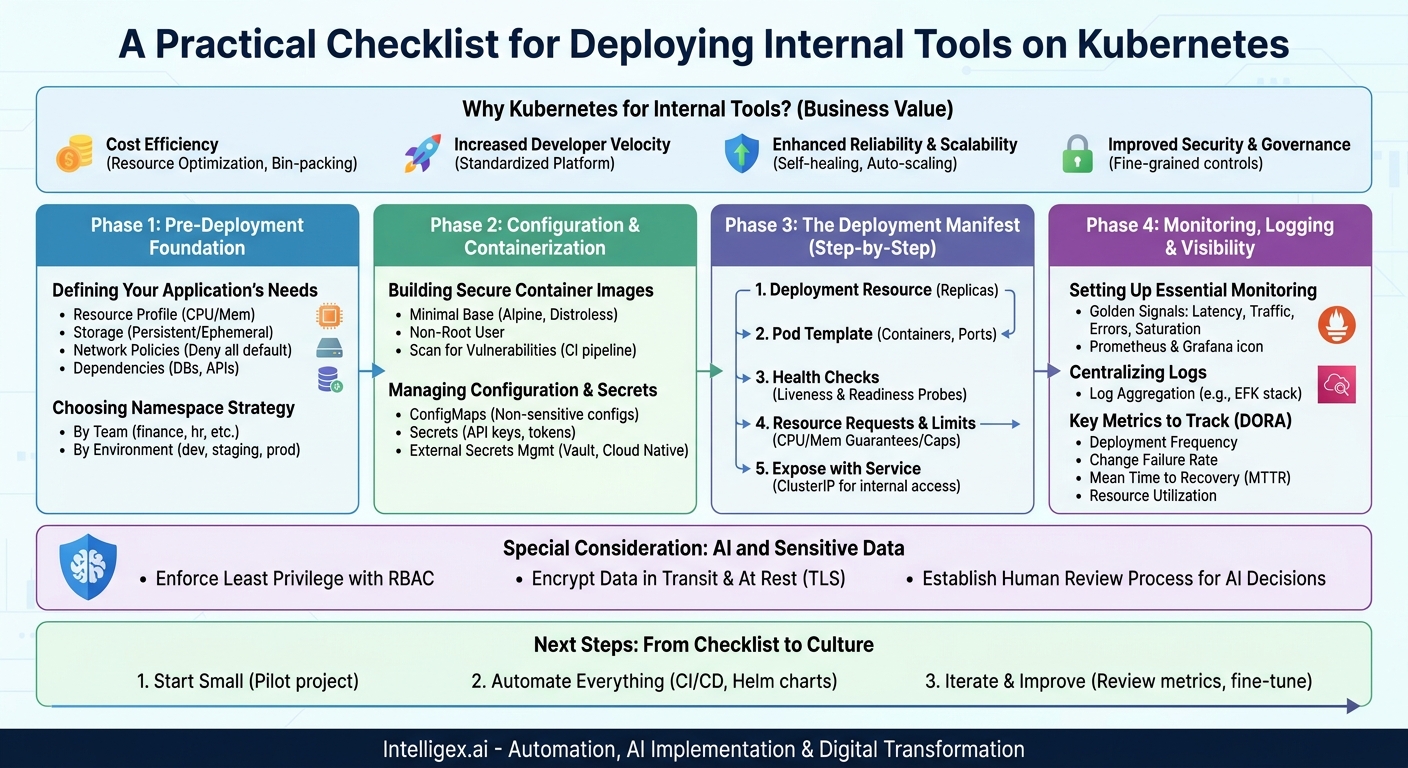
Internal tools are the unsung heroes of business operations. They are the custom dashboards for the finance team, the onboarding portals for HR, and the campaign trackers for marketing. As companies build more of these specialized applications, the challenge shifts from just building them to running them reliably, securely, and cost-effectively. This is where Kubernetes comes in. While often associated with large-scale, customer-facing applications, Kubernetes provides a powerful, standardized platform for internal tools that can significantly reduce operational overhead and accelerate development.
However, a successful Kubernetes deployment doesn’t happen by accident. It requires a methodical approach that balances technical rigor with business needs. Moving an internal logistics dashboard to Kubernetes without proper planning can lead to downtime, cost overruns, and frustrated developers. This guide provides a practical checklist, broken down into key phases, to help your team navigate the process and unlock the real value of running your internal applications on a modern infrastructure platform.
Why Kubernetes for Internal Tools? (The Business Case)
Before diving into the technical details, it’s crucial to understand why Kubernetes is a smart choice for internal applications. The benefits go far beyond technical elegance and tie directly to core business metrics like speed, cost, and quality.
- Cost Efficiency through Resource Optimization: Kubernetes excels at bin-packing applications onto a shared pool of servers. Instead of provisioning a separate virtual machine for every internal tool, you can run dozens of them on the same cluster. This dramatically improves hardware utilization and can lead to direct savings on your cloud bill. For a finance team’s reporting tool that only sees heavy use at the end of the month, Kubernetes can scale its resources down when idle, preventing waste.
- Increased Developer Velocity: By standardizing the deployment and operational model, Kubernetes creates a paved road for developers. They can focus on writing business logic for the sales team’s new lead-scoring tool instead of wrestling with server configurations. This common language between development and operations reduces friction and accelerates the delivery of new features.
- Enhanced Reliability and Scalability: Internal tools can be mission-critical. An outage in a supply chain management tool can halt operations. Kubernetes provides built-in self-healing, automatically restarting failed applications. It can also scale applications seamlessly to handle load spikes, ensuring the HR benefits portal remains responsive during open enrollment season without manual intervention.
- Improved Security and Governance: Kubernetes offers fine-grained controls for isolating applications and managing access. You can ensure that the marketing analytics tool cannot access sensitive customer data from the CRM, all within the same cluster. This simplifies auditing and helps enforce security policies consistently across all internal services.
Phase 1: Pre-Deployment Foundation
A successful deployment starts long before you write your first configuration file. Laying a solid foundation ensures that your application will be stable, secure, and easy to manage once it’s running in the cluster. Rushing this phase is a common cause of future operational headaches.
Defining Your Application’s Needs
First, document the specific requirements of your internal tool. This isn’t just a technical exercise; it’s about understanding its role in the business process. A high-frequency trading simulation for the finance team has vastly different needs than a simple wiki for the IT department. Use this checklist as a starting point:
- Resource Profile: What are the baseline and peak needs for CPU and memory? Over-provisioning is wasteful, while under-provisioning causes performance issues.
- Storage Requirements: Does the application need persistent storage (like a database) that survives restarts, or is its state ephemeral?
- Network Policies: Which other internal services does this tool need to communicate with? Define these connections explicitly. By default, it’s best to deny all traffic and only allow what is necessary.
- Dependencies: List all external dependencies, such as databases, message queues, or third-party APIs (e.g., Salesforce, Stripe). How will the application connect to them securely?
Choosing the Right Namespace Strategy
In Kubernetes, a namespace provides a scope for names and a way to divide cluster resources between multiple users and teams. Think of it as a virtual sub-cluster. A well-defined namespace strategy is critical for organization, security, and cost management.
Avoid deploying everything into the default namespace. Instead, consider a strategy that aligns with your organization’s structure. For example:
- By Team: Create namespaces like
finance,marketing, andhr. This allows each team to manage its own applications and provides a clear boundary for access control and resource quotas. - By Environment: Use namespaces to separate development, staging, and production workloads, such as
sales-tool-dev,sales-tool-staging, andsales-tool-prod. This is a fundamental practice for preventing development changes from impacting production systems.
A good namespace strategy makes it easier to track costs. You can quickly see how much compute and memory the marketing team’s tools are consuming, enabling better budget allocation and financial visibility.
Phase 2: Configuration and Containerization
With the foundational plan in place, the next step is to prepare the application itself. This involves packaging it into a standardized container and establishing a secure way to manage its configuration.
Building a Clean, Secure Container Image
The container image is the blueprint for your application. A poorly constructed image can introduce security vulnerabilities and slow down your deployments. Follow these best practices:
- Use Minimal Base Images: Start with a small, secure base image like Alpine Linux or a distroless image. These images contain only the essential libraries needed to run your application, which reduces the attack surface and results in faster image downloads.
- Run as a Non-Root User: By default, containers often run as the root user, which poses a significant security risk if the container is compromised. Explicitly create and switch to a non-privileged user within your Dockerfile.
- Scan for Vulnerabilities: Integrate an image scanning tool into your Continuous Integration (CI) pipeline. This automatically checks your application and its dependencies for known vulnerabilities before the image is ever pushed to a registry.
Managing Configuration and Secrets
Never hardcode configuration details like database URLs or API keys directly into your container image. This is a major security risk and makes the application inflexible. Kubernetes provides two primary resources for this:
- ConfigMaps: Use these for non-sensitive configuration data, such as application feature flags, endpoint URLs, or environment-specific settings. They can be mounted as files or exposed as environment variables to your application.
- Secrets: Use these for sensitive information like passwords, tokens, and API keys. Kubernetes stores them separately and provides mechanisms to control access.
For an even higher level of security, especially in regulated environments, consider using an external secrets management tool like HashiCorp Vault or a cloud provider’s native solution (e.g., AWS Secrets Manager, Google Secret Manager). These tools provide centralized management, auditing, and automatic rotation of secrets.
Phase 3: The Deployment Manifest (A Step-by-Step Guide)
The deployment manifest is a YAML file that tells Kubernetes how to run and manage your application. It defines the desired state, and Kubernetes works continuously to ensure the actual state matches it. Creating a robust manifest involves more than just specifying the container image.
- Define the Deployment Resource: This is the top-level object. You’ll specify the number of replicas (how many copies of your application should run) and a selector that links the Deployment to the application pods it manages. Starting with at least two replicas is a good practice for high availability.
- Specify the Pod Template: Inside the Deployment, you define the pod. This is where you list the containers that make up your application. You must specify the container image, the name, and the ports it will listen on.
- Configure Health Checks: This is one of the most critical steps for reliability. Kubernetes uses health checks, called probes, to know if your application is healthy.
- Liveness Probe: Checks if your application is running. If this probe fails, Kubernetes will restart the container.
- Readiness Probe: Checks if your application is ready to receive traffic. If this probe fails, Kubernetes will not send any new requests to it until it passes again. This prevents sending traffic to a pod that is still starting up or temporarily overloaded.
- Set Resource Requests and Limits: Tell Kubernetes how much CPU and memory your application needs.
- Requests: The amount of resources Kubernetes guarantees for your container. This is used for scheduling decisions.
- Limits: The maximum amount of resources your container can use. If it exceeds this limit, it may be terminated.
Setting these values is crucial for cluster stability. It prevents a single buggy application from consuming all cluster resources and impacting other critical internal tools.
- Expose the Application with a Service: A Deployment manages the pods, but a Service provides a stable network endpoint (a single IP address and DNS name) to access them. For internal tools, a `ClusterIP` service is often sufficient, making the tool accessible only from within the Kubernetes cluster. If users need to access it from outside, you might use an Ingress controller.
Phase 4: Monitoring, Logging, and Visibility
Once your internal tool is deployed, the work is not over. You need visibility into its performance, health, and resource consumption. Without this, you are flying blind. Effective monitoring and logging are essential for troubleshooting issues quickly, understanding usage patterns, and making informed decisions about scaling and costs.
Setting Up Essential Monitoring
You need a system to collect metrics from your applications and the cluster itself. The combination of Prometheus for metrics collection and Grafana for visualization is a powerful, open-source standard. Focus on tracking the “golden signals” for your service:
- Latency: The time it takes to serve a request.
- Traffic: The demand on your service, measured in requests per second.
- Errors: The rate of failed requests.
- Saturation: How “full” your service is, such as its CPU or memory usage.
This data gives your operations team immediate insight into the health of a tool. If the finance team reports that their expense approval app is slow, latency metrics can instantly confirm the problem and help pinpoint the cause.
Centralizing Your Logs
When an application fails, its logs are often the first place to look for clues. In a distributed system like Kubernetes, pods are constantly being created and destroyed. If you don’t centralize logs, they will be lost when a pod is deleted. A log aggregation system collects logs from all your containers and stores them in a central, searchable location. Common solutions include the EFK stack (Elasticsearch, Fluentd, Kibana) or cloud-native services like Amazon CloudWatch or Google Cloud Logging.
Key Metrics to Track
Beyond application performance, track metrics that reflect the health of your development and deployment process. These are often called DORA metrics and provide a clear link between technical execution and business value:
- Deployment Frequency: How often are you able to release new versions of your tool? A higher frequency indicates an agile and efficient process.
- Change Failure Rate: What percentage of your deployments result in a degraded service or require a rollback? This is a primary measure of quality and stability.
- Mean Time to Recovery (MTTR): When a failure occurs, how long does it take to restore service? A low MTTR is a sign of a resilient system and a well-practiced team.
- Resource Utilization: Are you paying for more infrastructure than you need? Tracking CPU and memory usage against your provisioned capacity helps optimize costs.
Special Consideration: AI and Sensitive Data
Many modern internal tools, from HR analytics dashboards to AI-powered sales forecasting systems, handle sensitive employee, customer, or financial data. When running these applications on a shared platform like Kubernetes, implementing strong security and governance controls is not optional.
Implementing a “Safe by Default” Policy
A proactive security posture is essential. Don’t wait for a data breach to implement best practices.
- Enforce Least Privilege with RBAC: Use Kubernetes Role-Based Access Control (RBAC) to strictly limit what each application and user can do. The HR reporting tool should have read-only access to its own database and no access to anything in the finance team’s namespace.
- Encrypt Data in Transit and at Rest: Use TLS for all network communication within the cluster and ensure that any persistent storage volumes are encrypted.
- Establish a Human Review Process for AI: If an internal tool uses an AI model to automate decisions (e.g., scoring support tickets or flagging fraudulent expense reports), establish a clear workflow for human oversight. Log the model’s inputs and outputs for every decision to ensure auditability and provide a feedback loop for improving the model. Transparency is key to building trust in these systems.
Next Steps: From Checklist to Culture
This checklist provides a technical roadmap, but the ultimate goal is to build a culture of operational excellence around your internal tools. A successful Kubernetes adoption is an ongoing process, not a one-time project.
Here is a simple action plan to get started:
- Start Small: Don’t try to migrate all your internal tools at once. Choose one well-understood, non-critical application as a pilot project. Use it to learn the process, build your manifests, and set up your monitoring dashboards.
- Automate Everything: The real power of Kubernetes is realized through automation. Use a CI/CD pipeline (like GitLab CI, GitHub Actions, or Jenkins) to automate the building, testing, scanning, and deployment of your applications. This makes the checklist an automated, repeatable workflow, not a manual gate. Package your application manifests using a tool like Helm to make deployments consistent and manageable.
- Iterate and Improve: Your first deployment won’t be perfect. Continuously review your application’s performance metrics and resource usage. Use this data to fine-tune your resource requests, adjust your scaling policies, and strengthen your security posture over time.
By following a structured approach, you can transform how you build and run internal tools, turning them from a source of operational drag into a strategic advantage that helps every department in your business move faster and more effectively.
Your Next Read:
Category:
Get a FREE
Proof of Concept
& Consultation
No Cost, No Commitment!
