

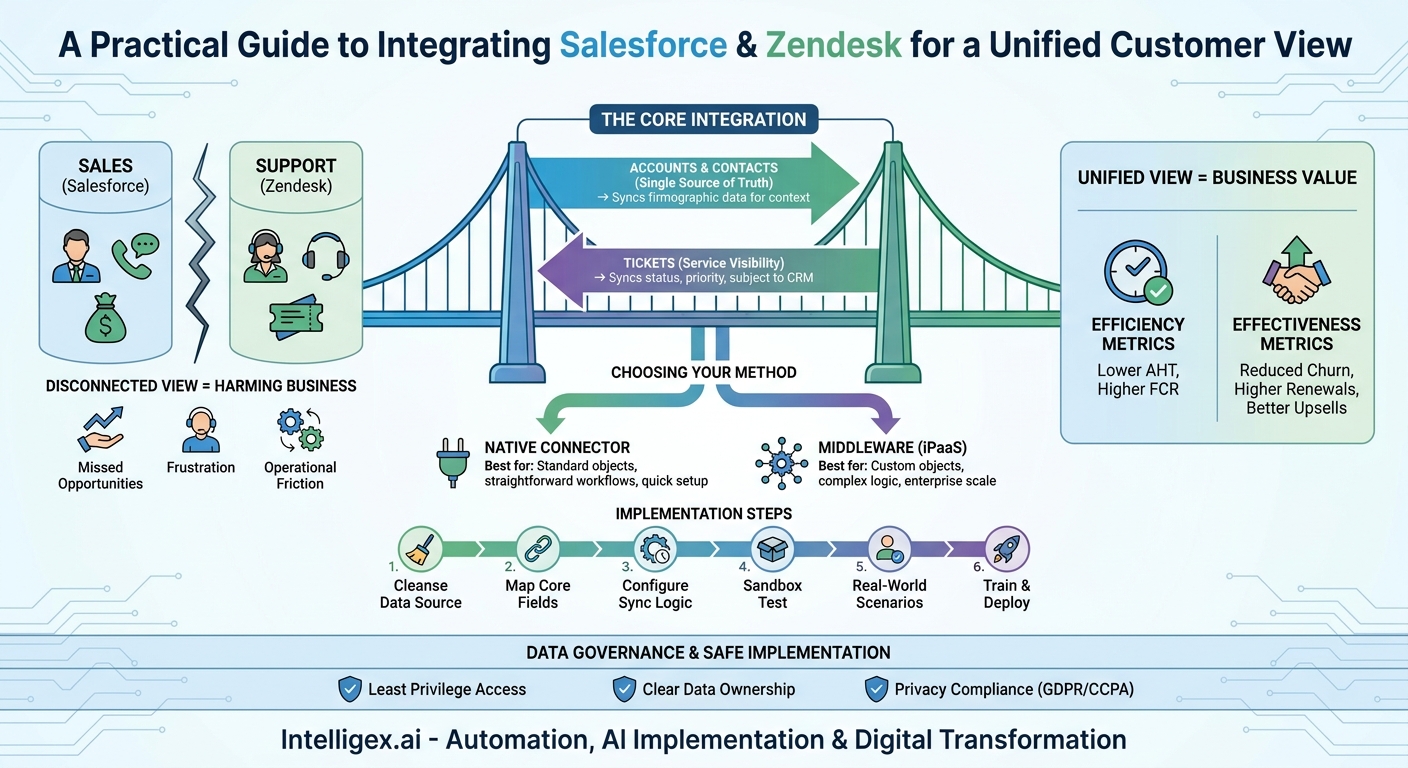
Your sales team lives in Salesforce. Your support team lives in Zendesk. In theory, they’re both working toward the same goal: creating happy, successful customers. In reality, they often operate in different worlds, looking at separate, incomplete pictures of the same customer relationship. This digital wall between your two most critical customer-facing platforms isn’t just an inconvenience; it’s a direct drain on efficiency, a source of customer frustration, and a barrier to growth.
When a sales representative calls a key account to discuss a renewal, they should know if that customer has an urgent, unresolved support ticket. When a support agent is handling a complex issue, they should know if the customer is a high-value, strategic partner. Without a direct line of communication between Salesforce and Zendesk, this vital context is lost. The result is disjointed customer experiences, missed opportunities, and operational friction. Integrating these two platforms is not a purely technical exercise. It is a fundamental business decision that directly improves visibility, speed, and the quality of every customer interaction.
Why a Disconnected Customer View Is Actively Harming Your Business
The gap between your CRM and your support desk creates daily, costly problems across multiple departments. These aren’t abstract issues; they manifest in real-world scenarios that damage relationships and revenue.
Consider the sales team. An enthusiastic account manager, guided by Salesforce data showing an upcoming renewal, makes a call to a key account. They are completely unaware that the customer has three high-priority tickets open in Zendesk related to a critical product bug. The conversation, intended to be about a strategic partnership, quickly sours. The account manager is caught off guard, the customer is frustrated at having to repeat their problems, and a simple renewal becomes a difficult “at-risk” negotiation. The opportunity is jeopardized not by a lack of effort, but by a lack of information.
Now look at it from the support perspective. A dedicated support agent is working with a frustrated user. The agent, seeing only the ticket history in Zendesk, treats it as a standard issue. They are unaware that this user belongs to a newly signed enterprise account worth six figures annually, a detail stored in Salesforce. The agent provides a correct but generic solution, missing a crucial opportunity to deliver a premium, white-glove experience that would have solidified the new relationship. The problem gets solved, but the chance to build loyalty is lost.
This disconnect extends to operations and leadership. When the finance team needs to calculate customer lifetime value or the operations team wants to analyze customer health, they are forced into a manual, error-prone process. They export CSV files from both systems, spend hours in spreadsheets trying to match records, and produce a report that is already out of date by the time it’s finished. Strategic decisions are made based on lagging, incomplete data, limiting your ability to be proactive and scalable.
The Core Integration: What to Sync and Why
A successful Salesforce-Zendesk integration is built on a clear strategy for what data moves between the systems. The goal is not to duplicate everything, but to sync the specific objects that provide the most context and value to each team. The primary focus should be on Accounts, Contacts, and Tickets.
Accounts and Contacts: The Single Source of Truth
Your customer data must have a single owner to prevent conflicts and ensure reliability. For most organizations, Salesforce should be the definitive source of truth for all Account and Contact information. When a new account is won or a new contact is added in Salesforce, this information should automatically create a corresponding Organization and User in Zendesk. This ensures that when a customer submits a ticket, their record is already in the support system and correctly associated with their company.
The data flow is typically one-way for creation (Salesforce to Zendesk) but can be bi-directional for updates if, for example, a customer updates their phone number through the Zendesk help portal. However, establishing clear rules is paramount. A common best practice is to make core firmographic data (company name, industry, address) read-only in Zendesk, with all changes managed in Salesforce to maintain data integrity.
Tickets: Bringing Service Data into the CRM
This is where the integration provides the most immediate value to the sales and account management teams. The goal is to give them a real-time window into service activity without them ever having to leave Salesforce. The sync should be configured to bring key ticket information from Zendesk into Salesforce and link it to the appropriate Account or Contact record.
Essential ticket fields to sync from Zendesk to Salesforce include:
- Ticket ID (with a link back to the ticket in Zendesk)
- Subject Line
- Creation Date
- Current Status (e.g., New, Open, Pending, Solved)
- Priority (e.g., Low, Normal, High, Urgent)
- Ticket Type (e.g., Question, Incident, Problem, Task)
This information can be displayed in Salesforce as a related list on the Account page. A sales rep can now, at a glance, see all open and recently closed tickets for a customer before they pick up the phone. This simple visibility transforms their ability to have relevant, context-aware conversations.
Choosing Your Integration Method: Native vs. Middleware
Once you have defined what you want to sync, you need to decide how to build the connection. There are two primary paths: using a pre-built native connector or employing a more powerful middleware platform. The right choice depends on your technical resources, budget, and the complexity of your business processes.
Native Connectors
Native connectors are applications designed specifically to connect two platforms. The most common option is the Zendesk for Salesforce app available on the Salesforce AppExchange. These tools are built and supported by the vendors, offering a guided, user-friendly setup process.
Pros:
- Faster Implementation: They are designed for a specific purpose and often require configuration rather than custom code.
- Lower Initial Cost: The licensing fees are typically lower than those for middleware platforms.
– Vendor Support: You have a direct line to vendor support if you encounter issues with the connector itself.
Cons:
- Limited Flexibility: They work best with standard Salesforce objects and workflows. If you rely heavily on custom objects or have complex data mapping needs, a native connector may not be sufficient.
- “Black Box” Functionality: You have less control over the specific sync logic, error handling, and API call management.
Integration Platforms (iPaaS)
Integration Platform as a Service (iPaaS), or middleware, solutions are powerful tools built for connecting multiple applications across an enterprise. Platforms like MuleSoft (owned by Salesforce), Workato, or Celigo act as a central hub for managing data flows, transformations, and complex business logic.
Pros:
- High Customization: Middleware gives you granular control to build any workflow you need, handle custom objects with ease, and transform data in transit.
- Scalability: These platforms are designed for high-volume, enterprise-grade integrations and can be the backbone of a broader digital transformation strategy.
- Centralized Management: You can manage and monitor all your enterprise integrations from a single place.
Cons:
- Higher Cost and Complexity: They require specialized skills to implement and maintain, and the licensing costs are significantly higher.
- Longer Implementation Time: Building a robust integration on an iPaaS platform is a development project that requires careful planning, development, and testing.
How to Decide
Use this checklist to guide your decision:
- Choose a native connector if: You use standard Account, Contact, and Case objects; your workflows are straightforward (e.g., “when a ticket is solved, update a field in Salesforce”); and your primary goal is simply to display Zendesk tickets inside Salesforce.
- Choose middleware if: You use custom Salesforce objects that need to be synced; you require complex business logic (e.g., “if a ticket from a VIP account is marked ‘Urgent,’ create a task for the Account Owner and post a Slack notification”); or this integration is part of a larger strategy to connect multiple systems like your ERP and marketing automation platform.
A Practical Guide to a Basic Integration Setup
Regardless of the tool you choose, the fundamental steps for setting up the integration follow a logical progression. This plan focuses on creating a reliable foundation you can build upon later.
- Define and Cleanse Your Data Source of Truth. Before you connect anything, agree that Salesforce will be the master system for Account and Contact data. This is also the perfect time to clean up your data. Archive old records, merge duplicates, and standardize naming conventions in Salesforce. Starting with clean data prevents countless problems down the line.
- Map Your Core Fields. Create a simple mapping document that clearly defines which field in Salesforce corresponds to which field in Zendesk. Don’t overcomplicate it initially. Start with the essentials. For example: Salesforce
Account.Namemaps to ZendeskOrganization.Name, and SalesforceContact.Emailmaps to ZendeskUser.Email. Include key identifiers like Account ID to ensure a stable link between records. - Configure the Sync Logic and Direction. Determine the triggers for data synchronization. For example, Account and Contact data should sync from Salesforce to Zendesk whenever a record is created or a mapped field is updated. Ticket data, on the other hand, should sync from Zendesk to Salesforce when a ticket is created or its status changes. Decide if the sync will be in real-time or run in batches (e.g., every 5 minutes).
- Install and Configure the Connection in a Sandbox. Never build an integration in your live production environment. Start in a Salesforce sandbox and a Zendesk sandbox. Install your chosen connector or configure your middleware endpoints here. This allows you to test the entire process without affecting live customer data or daily operations.
- Test Extensively with Real-World Scenarios. Go beyond a simple “did it work?” test. Simulate your actual business processes. Create a new lead in Salesforce, convert it to an Account and Contact, and verify it appears correctly as an Organization and User in Zendesk. Then, as that user, create a new ticket in Zendesk. Check that it appears in Salesforce linked to the correct Account. Test updates, status changes, and priority flags.
- Train Your Teams and Deploy. Technology is only half the solution. Before you go live, hold training sessions with both the sales and support teams. Show the sales reps where to find the Zendesk ticket data in Salesforce and how to interpret it. Show the support agents what new customer information from Salesforce is available to them in Zendesk. Once everyone is trained, schedule a maintenance window and deploy the integration to your production environments.
Measuring Success: Metrics That Matter
The success of your integration should be measured by its impact on the business, not just its technical performance. Track key metrics before and after the implementation to quantify its value.
Service and Operational Efficiency
- First Contact Resolution (FCR): With immediate access to customer history and value from Salesforce, are agents better equipped to solve issues on the first try? An increase in FCR indicates higher quality support and less customer effort.
- Average Handle Time (AHT): Measure the time agents spend actively working on tickets. Less time spent switching systems or asking colleagues for customer context should lead to a reduction in AHT.
- Ticket Escalation Rate: If front-line agents have more context, they may be able to solve more complex issues themselves, reducing the rate at which tickets are escalated to senior tiers.
Sales Effectiveness and Customer Retention
- Customer Churn Rate: Analyze churn rates, especially among accounts that had significant support interactions. A 360-degree view can help account managers proactively identify at-risk customers and intervene before it’s too late.
- Renewal Rate: For subscription-based businesses, a smoother support experience and more context-aware account management can directly contribute to higher renewal rates.
- Time to Upsell/Cross-sell: When a sales rep sees that a customer’s issues have been successfully resolved, it presents a perfect, well-timed opportunity to discuss new products or services.
Data Governance and Safe Implementation
Connecting systems that house sensitive customer data requires a thoughtful approach to security and governance. An integration is not a “set it and forget it” project; it creates an ongoing data relationship that must be managed responsibly.
First, implement the principle of least privilege. Not every sales team member needs to see the full, detailed content of every support ticket. Use Salesforce profiles and permission sets to control access. You might configure it so that account managers can see ticket subjects, priorities, and statuses, while only a sales manager can click through to view the full conversation in Zendesk. This protects customer privacy while still providing the necessary context.
Second, establish a clear data governance plan. Define who “owns” the integrated data and create a process for handling data discrepancies. What happens if a customer’s name is updated differently in both systems simultaneously? Your integration logic should have rules for this, and your team should have a process for resolving conflicts. This plan should also include a change management process. If a new custom field is added in Salesforce, the integration team needs to be notified so they can decide if it should be mapped and included in the sync.
Finally, respect data privacy regulations like GDPR and CCPA. Ensure your integration only syncs and stores data that is necessary for its business purpose. Document your data flows and be prepared to manage data deletion requests across both connected systems.
Your Next Steps to a Unified Customer View
Breaking down the wall between Salesforce and Zendesk is one of the highest-impact projects you can undertake to improve both customer experience and operational efficiency. Moving from concept to reality requires a clear, methodical approach.
- Audit Your Current Process: Before you build, you must understand. Map out exactly how your sales and support teams exchange information today. Use sticky notes, a whiteboard, or a simple document. Identify every manual step, every email chain, and every moment of friction.
- Define Your Ideal Future State: Ask your teams a simple question: “In a perfect world, what information would you have at your fingertips?” The sales team might want to see open ticket priorities. The support team might want to see a customer’s lifetime value. Use these answers to define the goals of your integration.
- Evaluate Your Tools: Based on your future state requirements and the complexity of your current systems, make an informed decision between a native connector and a middleware platform. If in doubt, start with the simplest option that meets your core needs.
- Start Small and Iterate: Don’t try to build the entire solution at once. Launch a pilot project focused on the most critical data points: syncing Accounts and displaying open Ticket statuses. Get this right, gather feedback from your teams, and then build upon that solid foundation with more advanced workflows. If you need help architecting a solution that scales, partnering with integration specialists at Salesforce, Zendesk, or a trusted consultancy can accelerate your progress and help you avoid common pitfalls.
Your Next Read:
Get a FREE
Proof of Concept
& Consultation
No Cost, No Commitment!
