

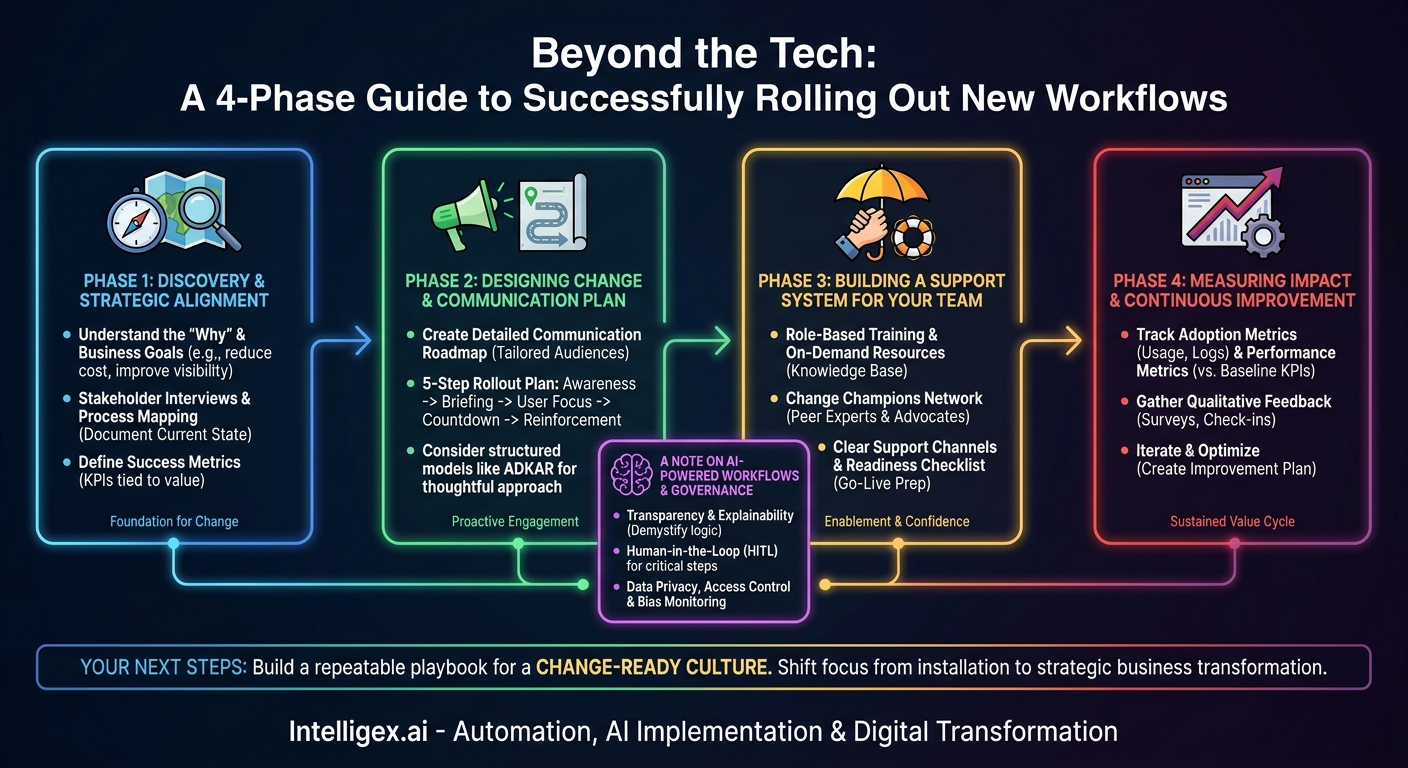
A new workflow, powered by smarter technology, holds immense promise. It can accelerate processes, reduce costs, improve data quality, and provide unprecedented visibility into your operations. But the world’s best technology is useless if your team doesn’t adopt it. The bridge between a powerful new tool and its promised business value is not built with code; it is built with a deliberate, human-centric approach to change management. Skipping this step is like building a state-of-the-art factory with no roads leading to it. Your investment sits idle, and frustration grows.
Effective change management isn’t about sending a few emails and hoping for the best. It’s a strategic discipline that de-risks your technology investment by ensuring the new workflow is not just implemented, but truly embedded into the daily habits of your organization. It transforms resistance into acceptance and, eventually, into advocacy. This guide breaks down the essential phases for rolling out a new workflow, ensuring you capture the return on your investment and empower your team for success.
Phase 1: Discovery and Strategic Alignment
Before a single line of code is written or a new software license is purchased, the foundation for change must be laid. This initial phase is about understanding the “why” behind the new workflow and aligning it directly with tangible business goals. Jumping straight to a solution without this groundwork often leads to solving the wrong problem or building a tool that doesn’t fit the real-world needs of its users.
The goal here is to move beyond a surface-level problem statement like “we need to automate invoicing” and get to the core business drivers. Is the primary goal to reduce the cost per invoice? To shorten the payment cycle to capture early payment discounts? Or to improve visibility for better cash flow forecasting? Each of these goals requires a different emphasis in the workflow design and will shape how you measure success.
Key Activities for Discovery:
- Stakeholder Interviews: Talk to everyone the change will touch. This includes the executive sponsor who is funding the project, the managers who will oversee the new process, and, most importantly, the end-users who will live in the new workflow every day. Ask them about their current pain points, what works well now, and what their fears are about the new system. A sales manager might worry a new CRM workflow will add administrative burden, while an accounts payable clerk might fear their job is being automated away. Addressing these concerns starts with listening to them first.
- Process Mapping: Document the current state. Use simple flowcharts to visualize how work gets done today, including all the informal workarounds and exceptions. This map becomes your baseline, highlighting the specific bottlenecks, redundant steps, and error-prone tasks the new workflow is meant to fix. This visual proof is powerful for demonstrating the value of the change later on.
- Define Success Metrics: How will you know if the new workflow is successful? Establish clear, measurable Key Performance Indicators (KPIs) from the start. These should be directly tied to business value.
Examples of Success Metrics by Department:
- Finance: Reduction in invoice processing time, decrease in data entry error rate, increase in percentage of early payment discounts captured.
- Sales: Increase in lead conversion rate, reduction in time spent on administrative tasks, improvement in forecast accuracy.
- Supply Chain: Decrease in order fulfillment time, reduction in inventory carrying costs, improvement in on-time delivery rates.
- HR: Reduction in time-to-hire, increased employee satisfaction with onboarding, lower volume of routine inquiries to HR staff.
This phase is not about slowing things down. It’s about building momentum in the right direction. A clear understanding of the goals, risks, and stakeholder perspectives allows you to design a better solution and a more effective rollout strategy, ultimately accelerating your time to value.
Phase 2: Designing the Change and Communication Plan
With a clear understanding of your goals, you can now design the plan for how to get there. This phase is about creating a detailed roadmap for communication, training, and support. The most common point of failure in any new rollout is poor communication. When employees don’t understand why a change is happening, what’s in it for them, or how it will work, they naturally resist. A proactive communication plan addresses these questions before they become sources of friction.
Your plan should be tailored to different audiences. The message for a CFO (focusing on ROI and financial controls) will be very different from the message for a frontline user (focusing on how it makes their daily job easier). This is not about manipulation; it is about making the message relevant and respectful of each person’s role and concerns.
A 5-Step Communication Rollout Plan:
- Step 1: Initial Awareness (The “Why”). Long before launch, start with high-level communication from a senior leader. This initial message should explain the business problem being solved and the vision for the future state. It’s not about technical details. It is about setting the context and showing executive commitment. For example, a VP of Operations might announce an initiative to modernize warehouse management to improve customer delivery speed.
- Step 2: Manager Briefing (The “How We’ll Manage”). Equip managers with the information they need to answer their team’s questions. Provide them with a detailed FAQ, key talking points, and a timeline. Managers are your most critical communication channel. If they are not on board and informed, they cannot effectively lead their teams through the change.
- Step 3: User-Focused Information (The “What’s In It for Me”). Now, begin communicating directly with end-users. Focus on the benefits that matter to them. Will this new workflow eliminate a tedious manual report they hate doing? Will it give them faster access to the information they need? Use demonstrations, short videos, and Q&A sessions to make it real for them.
- Step 4: Pre-Launch Countdown (The “When”). In the two weeks leading up to launch, increase the frequency of communication. Send reminders about training sessions, confirm the go-live date, and provide links to quick reference guides and support channels. The goal is to build anticipation and ensure no one is surprised on launch day.
- Step 5: Post-Launch Reinforcement (The “What’s Next”). Communication doesn’t stop at launch. In the first few weeks, share early wins and success stories. Highlight teams or individuals who are using the new workflow effectively. Continue to provide tips and tricks, and be transparent about any bugs you are fixing. This reinforces the company’s commitment and encourages continued adoption.
Many organizations follow structured methodologies like the ADKAR model from Prosci, which focuses on Awareness, Desire, Knowledge, Ability, and Reinforcement. Regardless of the specific framework, the principle is the same: a thoughtful, phased approach to communication is essential for building trust and momentum.
Phase 3: Building a Support System for Your Team
Communication tells people about the change; your support system enables them to make the change. This phase is about providing the training, resources, and human support network necessary for your team to feel confident and competent in the new workflow. A single, one-size-fits-all training session is rarely enough. People learn in different ways and at different paces. A robust support system anticipates these needs.
Components of a Strong Support System:
- Role-Based Training: Instead of training everyone on every feature, create tailored sessions based on how different roles will interact with the system. A sales representative needs to master lead and opportunity management in a new CRM like Salesforce, while a sales manager needs to focus on dashboard and reporting features. This makes the training more relevant and efficient.
- On-Demand Resources: People forget things. A central, easy-to-search knowledge base with short video tutorials, step-by-step guides, and FAQs is critical. This empowers users to find answers to their own questions 24/7 without needing to file a support ticket for simple issues.
- Change Champions Network: Identify enthusiastic, respected employees from different departments to act as “Change Champions” or super-users. Give them early access to the new workflow and extra training. They become the go-to peer experts in their teams, providing informal support, gathering real-world feedback, and advocating for the change in a way that feels more authentic than a top-down mandate.
- Clear Support Channels: When users do run into a problem they can’t solve, they need to know exactly where to go. Establish a clear, simple process for getting help. This could be a dedicated email address, a specific Slack channel, or a formal ticketing system. The key is to respond quickly and effectively, especially in the early days after launch.
Launch Readiness Checklist:
Before you go live, run through this final checklist to ensure your support system is ready:
- Have all user-facing documentation and training materials been reviewed and approved?
- Has the Change Champions network been trained and briefed on their role?
- Are the help desk and IT support teams trained on the new workflow and prepared for an initial spike in tickets?
- Is there a clear “rollback” plan in case of a critical system failure at launch?
- Have all stakeholders signed off on the launch date and communication plan?
Investing in a comprehensive support system sends a clear message to your team: “We are invested in your success.” This builds goodwill and dramatically increases the likelihood of a smooth transition.
A Note on AI-Powered Workflows and Governance
When the new workflow involves artificial intelligence, an extra layer of care is required. AI can feel like a “black box” to users, which can create distrust and resistance if not managed properly. Furthermore, AI introduces specific considerations around data, privacy, and decision-making that demand clear governance.
The principles of change management remain the same, but they must be applied with a focus on transparency and safety. The goal is to build trust not just in the process, but in the technology’s recommendations and outputs.
Key Governance Considerations for AI Workflows:
- Transparency and Explainability: Users need to understand, at a high level, how the AI works. For a lead-scoring model, you should be able to explain the key factors it considers (e.g., job title, company size, website activity). You don’t need to explain the complex math, but you must demystify the logic. This helps users trust the output and provide better inputs.
- Human-in-the-Loop (HITL): For critical processes, especially in the early stages, implement a human review step. For example, an AI that suggests which invoices are candidates for automated payment should have its suggestions reviewed by an AP clerk before money is sent. This builds confidence, provides a crucial quality check, and creates a valuable feedback loop for improving the AI model over time.
- Data Privacy and Access Control: Be explicit about what data the AI is using and who has access to it. New workflows might consolidate information in ways that create new privacy risks. Ensure that access controls are robust and that the system complies with all relevant regulations like GDPR or CCPA. Clearly communicate these safeguards to your team.
- Bias and Fairness Monitoring: AI models learn from the data they are trained on. If historical data contains biases, the AI can perpetuate or even amplify them. For an AI-powered resume screening tool, for instance, it is crucial to audit the system regularly to ensure it is not unfairly filtering out candidates from certain demographic groups.
Integrating AI is not just a technical challenge; it’s a cultural one. By addressing these governance issues proactively and transparently, you can build the psychological safety needed for your team to embrace these powerful new tools.
Phase 4: Measuring Impact and Continuous Improvement
The rollout is not the finish line. The period after launch is your greatest opportunity to learn, adapt, and maximize the value of your new workflow. This final phase is about measuring your performance against the success metrics you defined in Phase 1 and creating a cycle of continuous improvement.
Without measurement, you are flying blind. You won’t know if the workflow is truly being adopted, if it’s delivering the promised efficiencies, or where users are still struggling. Consistent data collection and feedback loops are essential for optimizing the system and proving its ROI to the organization.
What to Measure and How:
- Adoption Metrics: This is the most fundamental measure of success. Use system logs to track metrics like daily active users, the percentage of transactions processed through the new workflow versus the old one, and feature usage rates. If a key feature is being ignored, it may indicate a need for more training or a flaw in the design.
- Performance Metrics: Revisit the business-value KPIs you set at the start. Is invoice processing time actually decreasing? Has the lead-to-opportunity conversion rate improved? Compare post-launch data to the baseline you established during discovery. Share these results widely to demonstrate progress and reinforce the value of the change.
- Qualitative Feedback: Data tells you *what* is happening, but user feedback tells you *why*. Use short pulse surveys, conversations with your Change Champions, and manager check-ins to gather qualitative insights. Ask questions like: “What is the most frustrating part of the new workflow?” and “What one thing would you change to make it better?”
Use this information to create an iterative improvement plan. You might discover that a simple change to the user interface could save everyone five clicks per task. You might identify a need for a new report or dashboard that managers are asking for. By showing your team that you are listening and responding to their feedback, you transform them from passive users into active partners in the process. This builds a culture where change is not seen as a threat, but as a continuous, collaborative effort to work smarter.
Your Next Steps: Building a Change-Ready Culture
Successfully rolling out a new workflow is a significant achievement. It delivers immediate value by improving speed, quality, and visibility for a specific process. But the long-term benefit is even greater. Each successful change initiative builds your organization’s “change muscle,” making it more agile, resilient, and prepared for the future.
Don’t let the momentum fade after one project. Use the lessons from your rollout to create a repeatable playbook for change management in your organization. The steps and principles outlined here are not a one-time checklist; they are the foundation for a culture that embraces improvement and technology as catalysts for growth.
Your immediate next step is to look at your next planned technology or process initiative. Start by asking the questions from Phase 1:
- What specific business value are we trying to achieve?
- Who will this change impact, and have we listened to their perspective?
- How will we measure success a month, a quarter, and a year from now?
By starting with these questions, you shift the focus from a simple technology installation to a strategic business transformation. And that is the key to unlocking the full potential of any new workflow.
Your Next Read:
Get a FREE
Proof of Concept
& Consultation
No Cost, No Commitment!
