

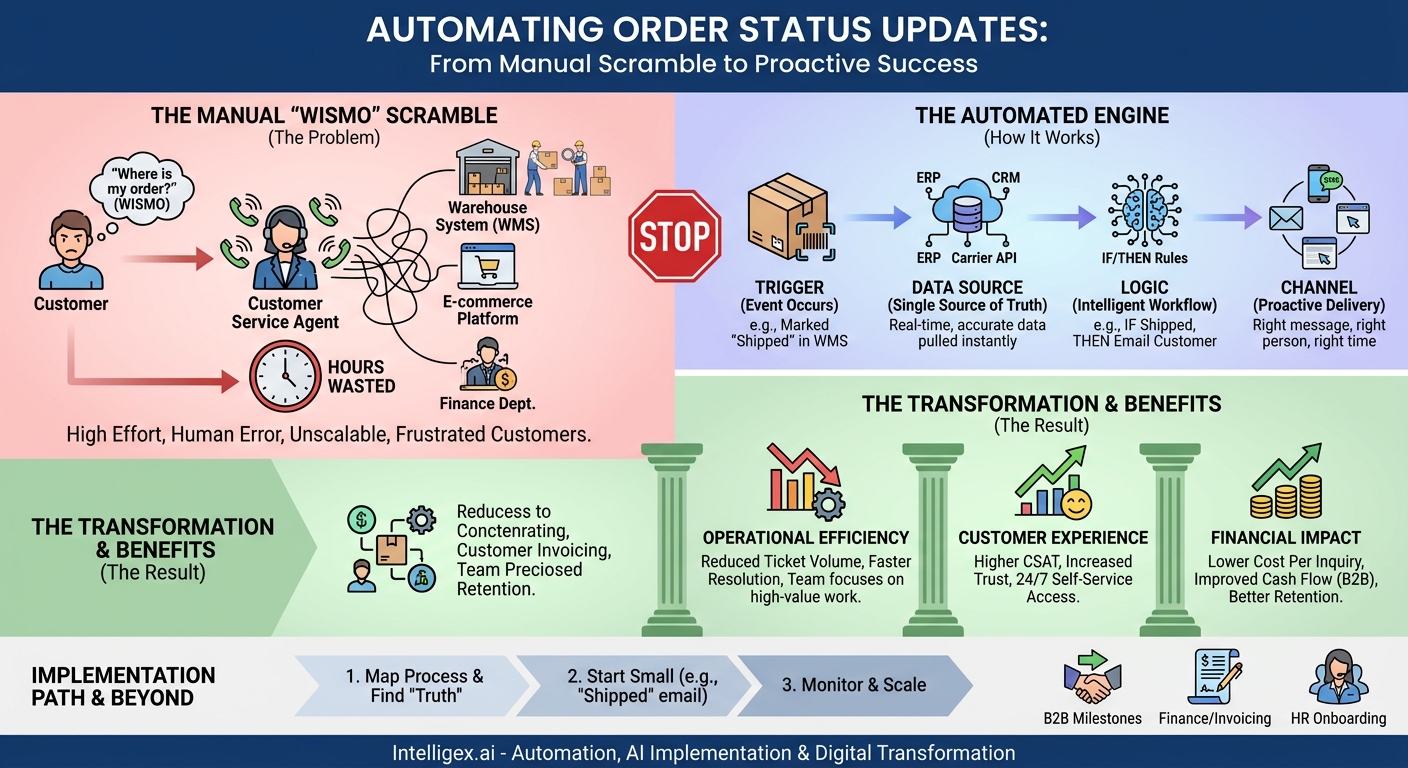
The question is simple, but the answer is often a scramble: “Where is my order?” For the customer, it’s a reasonable inquiry. For your business, it kicks off a chain reaction of manual work. A customer service agent opens a ticket, logs into the e-commerce platform, cross-references an order number in the warehouse system, and maybe even emails the shipping department to get a straight answer. Hours later, the customer gets a reply. This single, repetitive question consumes time, introduces opportunities for error, and creates a reactive, frustrating experience for everyone involved.
This process is more than just inefficient; it’s a silent brake on your company’s growth. Every minute an employee spends manually tracking down a status is a minute they aren’t spending on higher-value work like solving complex problems or improving customer relationships. Shifting from manual lookups to proactive, automated updates is not just a technical upgrade. It is a fundamental operational improvement that directly impacts your bottom line through increased speed, reduced costs, and a vastly better customer experience.
The Hidden Costs of Manual Order Tracking
The most obvious cost of manual status updates is the labor required to answer customer questions. But that’s just the tip of the iceberg. The true expense is spread across multiple departments and manifests in ways that are harder to track but far more damaging to your business.
Operational Drain Across Teams
Manual tracking isn’t just a customer service problem; it’s a company-wide resource sink. Consider how it affects different departments:
- Operations and Supply Chain: This team is frequently interrupted with requests for information they’ve already processed. They are pulled away from critical tasks like inventory management and logistics planning to look up tracking numbers or confirm shipment dates that exist within their systems.
- Finance: The accounts receivable team often needs to confirm shipment or delivery before an invoice can be sent or a payment milestone is met, especially in B2B transactions. Manual lookups delay invoicing, which in turn impacts cash flow.
– Customer Service and Sales: These teams are on the front lines, spending a significant portion of their day acting as human middleware. They relay information between customers and backend systems, handling a high volume of repetitive, low-value inquiries that could easily be automated. This leads to agent burnout and less time for complex, relationship-building conversations.
The High Price of Human Error and Delay
When a human is the bridge between data systems, errors are inevitable. A mistyped tracking number can send a customer down a rabbit hole of confusion. Inconsistent answers from different agents erode trust. Even a small delay in responding can create anxiety for a customer waiting on a critical delivery. These seemingly minor issues accumulate, creating a perception of an unreliable and disorganized company. Proactive communication, even about a delay, is almost always better than reactive silence.
The Inability to Scale
Perhaps the most significant cost is the opportunity cost. A manual process is inherently unscalable. During a peak season like Black Friday or a major product launch, the volume of “Where is my order?” (WISMO) inquiries can increase tenfold. You can’t hire and train temporary staff fast enough to handle the surge, leading to long response times, frustrated customers, and a damaged reputation at the most critical time for your business.
What “Automated Order Updates” Really Means
Automation isn’t about replacing humans with robots or sending a single, generic “your order has shipped” email. True automation is about creating an intelligent, event-driven communication system that keeps stakeholders informed proactively. It’s about connecting your existing systems so they can talk to each other, triggering the right message to the right person at the right time.
A robust automated update system consists of four key components:
- Triggers: These are the specific events in the order lifecycle that initiate a communication. A trigger isn’t just “shipped.” It could be “Payment Confirmed,” “Awaiting Carrier Pickup,” “In Transit,” “Out for Delivery,” or even “Delivery Exception: Address Not Found.”
- Data Sources: This is where the information lives. Your system needs a single source of truth for each piece of data. The order details might come from your e-commerce platform like Shopify, inventory levels from your ERP, and the real-time shipping status from a carrier’s API.
- Logic: These are the rules that govern the workflow. The logic dictates what happens after a trigger. For example: IF the trigger is “Delivery Exception,” THEN send an email to the customer with a link to update their address AND create a high-priority ticket in the customer service queue.
- Channels: This is how the message is delivered. The most effective strategies use multiple channels based on urgency and customer preference. Standard updates might go via email, an urgent “Out for Delivery” notification might be an SMS, and detailed order history is best housed in a self-service customer portal.
For example, when a warehouse employee scans a package and marks the order as “Fulfilled” in your Warehouse Management System (WMS), it acts as a trigger. An automation platform sees this status change, pulls the customer’s email and the tracking number from your CRM, and sends a branded “Your Order is on its Way!” email. The customer is informed instantly, without anyone on your team lifting a finger.
A Step-by-Step Guide to Your First Automation
Getting started with automation can feel overwhelming, but you don’t need a massive, complex project. The key is to start small with a high-impact process. The most common and valuable first step is automating the “order shipped” notification, as it answers the most frequent customer question.
Follow these steps to build your first workflow:
- Map Your Current Manual Process. Before you automate anything, you must understand what you’re doing now. Grab a pen and paper or a whiteboard. Document every single step, from the moment a customer asks for a status update to the moment they get an answer. Who does what? Which systems do they check? How long does it take? This map will immediately reveal the most obvious bottlenecks and pain points.
- Identify the “Lowest-Hanging Fruit”. Look at your map and your support ticket data. What is the single most common, repetitive question your team answers? For most businesses that ship physical goods, it’s confirming that an order has shipped and providing the tracking number. This is your ideal first target because it’s high-volume, low-complexity, and delivers immediate value.
- Pinpoint Your Single Source of Truth. This is the most critical step. Where does the definitive, 100% reliable status for “shipped” live? Is it when an order is marked “fulfilled” in your e-commerce platform? Is it when a shipping label is created in your shipping software? Or is it when your WMS confirms the package has left the building? Your automation must be triggered by this single source of truth to avoid sending inaccurate or premature information.
- Choose Your Automation Tool. You may already have the tools you need. Many modern e-commerce platforms have built-in capabilities for basic email triggers. For more advanced logic that connects multiple systems (e.g., your ERP and your CRM), you might use a dedicated integration platform (iPaaS) or a workflow automation tool like Zapier. Start with the simplest tool that can accomplish the goal.
- Build and Test the Workflow. Configure the automation based on your decisions. Set the trigger (e.g., “Order status in System X changes to Fulfilled”). Define the action (e.g., “Send Email Template Y to the customer”). Before going live, test it rigorously with internal or dummy orders. Check that the right data (like the customer’s name and tracking number) is pulling correctly and that the formatting looks right on both desktop and mobile.
- Monitor and Measure. Once live, your job isn’t done. Keep a close eye on the workflow to ensure it’s running correctly. More importantly, measure its impact. Is the volume of WISMO tickets going down? This data will be your proof point for justifying further investment in automation.
Key Metrics to Measure Success
To prove the value of automation and make the case for future projects, you need to track the right metrics. These should go beyond simple activity counts and focus on tangible business outcomes.
Operational Efficiency Metrics
These metrics show how automation is saving your team time and reducing operational friction.
- Ticket Volume Reduction: The most direct measure. Track the percentage decrease in tickets with tags like “order status,” “shipping,” or “WISMO.” This is a clear indicator of deflecting manual work.
- First Contact Resolution (FCR): With simple, repetitive inquiries handled by automation, your agents can focus on more complex issues. This should lead to a higher FCR rate, as agents have more time to fully resolve the unique problems that require a human touch.
- Time Per Inquiry: For the status inquiries that still require manual intervention, measure the average handle time. With better data accessibility from integrated systems, even these manual lookups should become faster.
Customer Experience Metrics
These metrics gauge how proactive communication is improving the customer journey.
- Customer Satisfaction (CSAT): After a purchase, survey customers about their experience with your communication throughout the order process. A high CSAT score for communication is a strong signal that your automation is working.
- Self-Service Portal Usage: If your automation directs customers to a portal to track their orders, measure the adoption rate. Increased usage means customers are successfully finding the information they need without contacting you.
Financial Impact Metrics
Ultimately, automation must connect to financial health. These metrics help bridge that gap.
- Cost Per Inquiry: Calculate the fully-loaded cost of a manual inquiry (agent time plus overhead). As you deflect more inquiries through automation, your average cost per inquiry will drop significantly.
- Repeat Purchase Rate: This is a lagging indicator, but it’s a powerful one. A smooth, transparent post-purchase experience builds trust and loyalty, which often translates into a higher likelihood of future purchases.
Beyond Shipping: Proactive Updates Across the Business
The principles of automating status updates are not limited to e-commerce shipping. This same “trigger-logic-channel” model can be applied across the entire organization to streamline communication and improve visibility.
B2B Supply Chain and Manufacturing
In a B2B context, order status is far more complex than just “shipped.” Automated updates can provide critical visibility into long production cycles. Imagine a client receiving automated notifications for key milestones:
- “Your purchase order #PO123 has been accepted.”
- “Raw materials for your order have been received.”
- “Production on your custom components has begun.”
- “Your freight shipment has cleared customs.”
This level of proactive visibility allows your business customers to manage their own operations and inventory more effectively, transforming you from a simple vendor into a strategic partner.
Finance and Invoicing
The accounts receivable process is often filled with manual follow-ups. Automation can streamline this by sending triggered notifications for:
- Invoice Generation: “Your invoice for order #S456 is now available.”
- Payment Reminders: “A friendly reminder that your invoice is due in 7 days.”
- Payment Confirmation: “We’ve received your payment. Thank you!”
This reduces the administrative burden on your finance team and can help improve your days sales outstanding (DSO) by ensuring timely payments.
HR and Employee Onboarding
A new hire’s first impression is formed long before their first day. A disjointed onboarding process can be stressful. Automation can create a seamless experience by providing updates on critical steps:
- “Your background check has been initiated.”
- “Your laptop and equipment have shipped! Here is the tracking number.”
- “Your IT accounts have been created. Look for a separate email with login details.”
This keeps new employees engaged and ensures they have everything they need to be productive from day one, while freeing up HR and IT to focus on the human elements of onboarding.
Implementation Pitfalls and How to Avoid Them
While the benefits of automation are clear, a poorly planned implementation can create more problems than it solves. Awareness of common pitfalls is the first step toward avoiding them.
Common Mistakes to Watch For
Many organizations stumble by making one of these four mistakes:
- Using Unreliable Data: The most common failure point is triggering an update from the wrong data source. If you send a “shipped” notification when a shipping label is created, but the package doesn’t actually leave the warehouse for another day, you’ve created confusion and broken trust.
- Over-Communicating: More is not always better. Sending a notification for every minor internal status change will overwhelm and annoy your customers. Focus on communicating only the most meaningful milestones.
- Ignoring Exceptions: Automation is for the 80% of routine cases. You must have a clearly defined process for the 20% of exceptions. What happens when a shipment is lost or a payment fails? Your workflow must be able to identify these exceptions and escalate them to a human for resolution.
- “Set It and Forget It” Mentality: Systems change. Carrier APIs get updated, and internal processes evolve. Your automated workflows need to be monitored and maintained. A workflow that runs perfectly today might fail silently tomorrow if a connected system is altered.
Governance and Data Privacy in Automated Communications
As you connect systems and automate communications, you are handling customer and company data. Implementing this technology safely and responsibly is not optional; it is a core requirement.
Establish Clear Guardrails
Before you build complex workflows, establish clear governance rules:
- Access Control: Not everyone in the company should be able to create or modify automation that touches sensitive systems like your ERP or CRM, such as Salesforce. Define roles and permissions, ensuring that only trained and authorized individuals can build workflows that handle customer data.
- Data Minimization: Adhere to the principle of least privilege. A workflow designed to send a shipping notification only needs the customer’s name, email/phone number, and a tracking number. It does not need access to their full payment history or personal details. Limit data access to only what is strictly necessary for the task.
- Human in the Loop: For high-value or particularly sensitive communications, build in a human review step. For instance, an automated alert about a significant delay on a large B2B order shouldn’t go directly to the client. Instead, it should first route to the dedicated account manager, who can review it, add personal context, and then forward it to the client. This combines the speed of automation with the judgment of a human.
- Compliance: Be mindful of communication regulations. If you plan to send SMS notifications, you must have explicit consent from the user to contact them on that channel to comply with regulations like the TCPA in the United States. Ensure your opt-in and opt-out processes are clear and easy to use.
Your Next Steps to Automation
Moving from a manual, reactive process to a proactive, automated one is a journey. You don’t have to do it all at once. By taking a methodical, step-by-step approach, you can build momentum and demonstrate value quickly, creating a foundation for wider digital transformation.
Here is a simple action plan to get started:
- This Week: Identify the Pain. Schedule a one-hour meeting with one person from Customer Service and one from Operations. Your only goal is to map the current process for answering the question, “Where is my order?” on a whiteboard. Identify the steps, the systems involved, and how long it takes.
- This Month: Plan Your First Win. Using your process map, choose the single most impactful update to automate. For most, this will be the “order shipped” notification. Confirm the absolute source of truth for this event. Investigate the tools you already have (in your e-commerce platform or email service) to see if you can build this first workflow with your existing tech stack.
- This Quarter: Launch, Measure, and Share. Build and test your first automated workflow. Go live and closely monitor its performance and, most importantly, its impact. Track the reduction in WISMO tickets and share this success story with leadership. This small, tangible win will be your most powerful tool for securing the support and resources needed to tackle the next, more complex automation project.
Related Posts
Get a FREE
Proof of Concept
& Consultation
No Cost, No Commitment!
