

In the world of Human Resources, data is more than just information; it’s the lifeblood of the organization’s most valuable asset—its people. From the first resume submitted to the final exit interview, HR teams are the primary custodians of a vast and sensitive collection of Personally Identifiable Information (PII). This unique position carries immense responsibility. A minor lapse in data handling can escalate into a major security incident, causing irreparable harm to employees, significant financial penalties for the company, and a devastating loss of trust. Understanding the fundamentals of PII safety is no longer a best practice for HR; it is a core, non-negotiable competency.
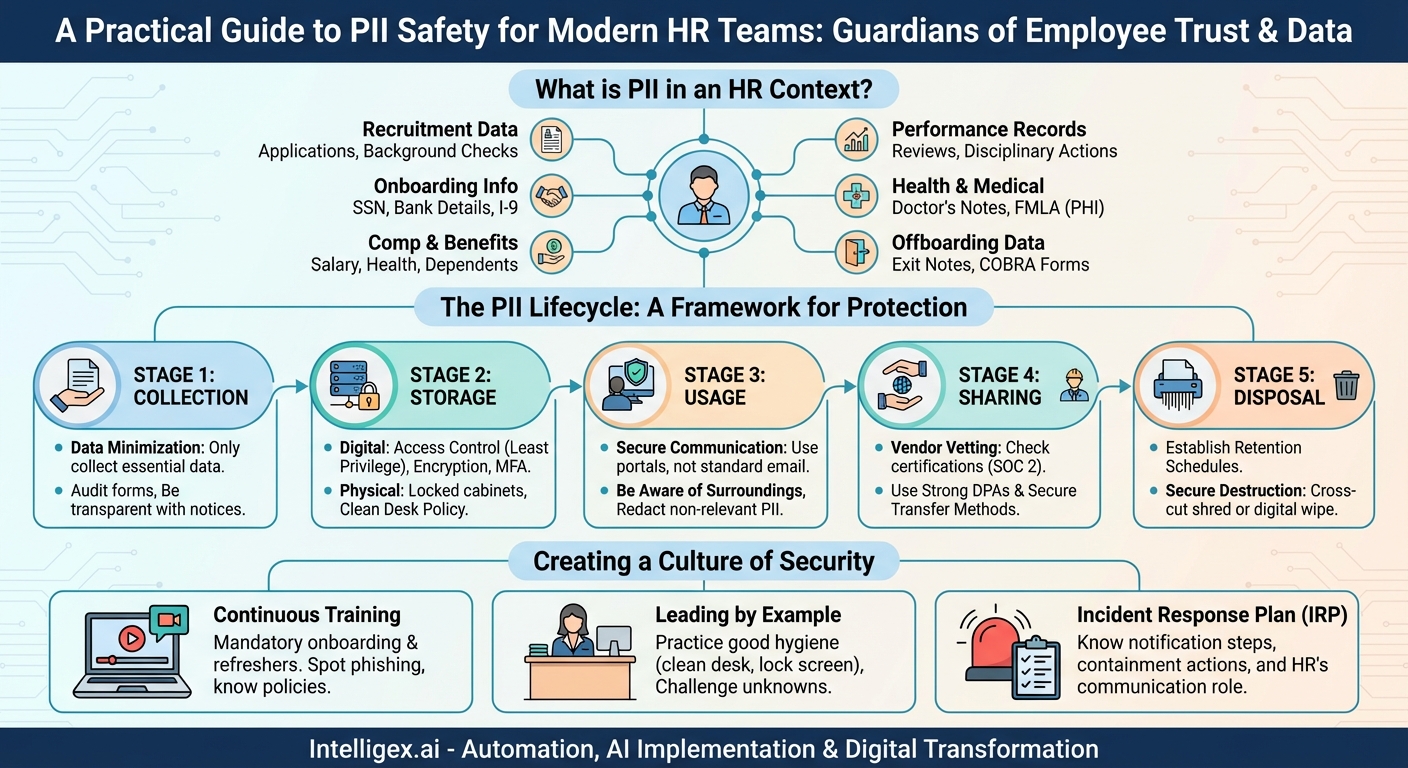
What Exactly is PII in an HR Context?
Personally Identifiable Information (PII) is any data that can be used to identify a specific individual. While some PII is obvious, other pieces of information can become identifying when combined. For HR professionals, the scope of PII is exceptionally broad. It’s not just about a name and an email address; it’s about the entire lifecycle of an employee’s journey with the company.
Think about the data points your team handles daily:
- Recruitment Data: Resumes, cover letters, applications (containing home addresses, phone numbers, personal emails), interview notes, and background check results.
- Onboarding Information: Social Security numbers, driver’s license or passport details, bank account information for direct deposit, and I-9 form data.
- Compensation and Benefits Data: Salary details, bonus structures, stock options, health insurance selections, dependent information (including children’s names and birth dates), and retirement account details.
- Performance and Employment Records: Performance reviews, disciplinary actions, promotion records, leave of absence requests (often containing sensitive medical information), and grievances.
- Health and Medical Information: Doctor’s notes, FMLA paperwork, workers’ compensation claims, and disability accommodation requests. This is often categorized as Protected Health Information (PHI), which carries even stricter legal protections.
- Offboarding Data: Exit interview notes, final pay information, and COBRA enrollment forms.
When you see it all listed, the gravity of HR’s role as a data steward becomes crystal clear. Each data point represents a piece of a person’s life. In the wrong hands, this information can be used for identity theft, financial fraud, or personal harassment. Therefore, protecting it is a fundamental duty of care.
The PII Lifecycle: A Framework for Protection
To effectively protect PII, it’s helpful to think about its journey through your department—from creation to deletion. This is known as the data lifecycle. By applying security principles at each stage, you can build a robust defense against breaches.
Stage 1: Collection
Protection starts the moment you ask for information. The guiding principle here should be data minimization. Only collect what is absolutely necessary for a legitimate business purpose. Do you really need a candidate’s home address on the initial application, or can that wait until an offer is made? Does a manager need to know the specific medical reason for an employee’s leave, or just the approved dates?
Actionable Steps:
- Audit Your Forms: Review all application forms, onboarding packets, and internal request forms. Remove any fields that collect non-essential PII.
- Be Transparent: Provide clear privacy notices to candidates and employees explaining what data you are collecting, why you are collecting it, and how it will be used and protected.
Stage 2: Storage
Once collected, PII must be stored securely, whether it’s in a physical filing cabinet or a cloud-based HRIS platform. The threats are different for each, but the need for security is the same.
For Digital Storage:
- Access Control: This is paramount. Employ the Principle of Least Privilege, meaning individuals should only have access to the specific data they need to perform their job. An HR generalist may need access to performance reviews, but they likely don’t need access to the entire C-suite’s salary information.
- Encryption: Ensure that all stored PII is encrypted “at rest” (on the server) and “in transit” (when being sent over a network). Work with your IT department to confirm that your HRIS and other systems meet this standard.
- Password Hygiene: Enforce strong, unique passwords for all HR systems and enable multi-factor authentication (MFA) wherever possible. MFA adds a critical layer of security that can stop an attacker even if they manage to steal a password.
For Physical Storage:
- Locked and Secured: All paper files containing PII must be kept in locked filing cabinets, in locked offices. Access to these areas should be restricted.
- Clean Desk Policy: Sensitive documents should never be left unattended on desks, in printer trays, or on conference room tables.
Stage 3: Usage
How your team uses PII day-to-day is one of the most common areas for accidental exposure. This stage is all about mindful handling.
Actionable Steps:
- Secure Communication: Avoid sending sensitive PII, like spreadsheets with employee salaries or Social Security numbers, via standard email. Email is not a secure communication channel. Use a secure file-sharing portal or encrypted email services for transmitting this data.
- Be Aware of Your Surroundings: Don’t discuss sensitive employee information in open office areas, hallways, or public spaces where it can be overheard. Verify the identity of anyone requesting PII over the phone before providing it.
- Redaction: When sharing a document, redact or remove any PII that is not relevant to the recipient. For example, if a manager needs to see an employee’s attendance record, they don’t need to see their bank account details.
Stage 4: Sharing
HR often needs to share PII with third-party vendors, such as payroll processors, benefits administrators, or background check companies. This introduces a new layer of risk.
Actionable Steps:
- Vendor Vetting: Before signing a contract, thoroughly vet the security and privacy practices of any vendor who will handle your employees’ PII. Ask for their security certifications (like SOC 2) and data breach history.
- Data Processing Agreements (DPAs): Ensure your contracts include strong DPAs that legally obligate the vendor to protect your data to a specific standard and notify you in the event of a breach.
- Secure Transfer Methods: Never email data to a vendor. Always use their secure file upload portal or another encrypted transfer method.
Stage 5: Disposal
You can’t protect data you no longer have. Holding onto PII longer than necessary increases your risk profile. A robust data disposal policy is a critical component of PII safety.
Actionable Steps:
- Establish Retention Schedules: Work with legal counsel to create a clear data retention policy that outlines how long different types of PII must be kept to comply with federal and state laws (e.g., I-9 forms, payroll records, hiring records).
- Secure Destruction: Once the retention period expires, data must be securely destroyed. For paper records, this means using a cross-cut shredder or a certified document destruction service. For digital records, it means working with IT to ensure files are permanently deleted and “wiped,” not just moved to a recycle bin.
Creating a Culture of Security: The HR Team’s Role as Champions
Technology and policies are essential, but the strongest defense is a well-trained, security-conscious team. Human error remains a leading cause of data breaches, making ongoing education your most powerful tool.
Mandatory and Continuous Training
PII safety training should be a mandatory part of onboarding for every new HR team member. However, it cannot be a one-time event. Conduct annual refresher courses and provide regular updates on new threats, such as sophisticated phishing scams targeting HR professionals for payroll or W-2 information.
Training should cover:
- How to identify PII.
- The company’s specific policies for handling, storing, and disposing of data.
- How to spot and report phishing emails.
- The protocol for reporting a suspected data breach or security incident.
Leading by Example
The HR team sets the tone for the entire organization. When HR professionals meticulously follow the clean desk policy, lock their computers when they step away, and challenge unknown individuals in secure areas, they demonstrate a commitment to security that permeates the company culture. By championing these behaviors, you encourage all employees to take data privacy seriously.
Preparing for the Worst: The Incident Response Plan
Even with the best defenses, breaches can happen. Your ability to respond quickly and effectively can significantly mitigate the damage. HR must have a seat at the table in the development of the company’s Incident Response Plan (IRP).
Your team needs to know the immediate steps to take if a breach is suspected:
- Who do you notify immediately? (e.g., the head of IT, your general counsel, the CEO).
- How do you contain the breach? (e.g., disconnecting a compromised computer from the network).
- What is HR’s role in the investigation and communication? (e.g., determining which employees were affected, preparing internal communications, and managing employee concerns).
Having a clear, practiced plan turns panic into a measured, effective response.
Conclusion: The Guardians of Trust
For HR teams, PII safety is not an abstract IT concept; it is the practical, daily expression of the trust that employees place in their employer. Every security measure, from enabling MFA to shredding an old document, is an act of protecting a colleague. By understanding the nature of the data you hold, implementing safeguards across the entire data lifecycle, and fostering a relentless culture of security, you do more than just comply with regulations. You build a foundation of psychological safety and trust that is essential for a thriving, resilient, and respectful workplace.
Your Next Read:
Category:
Get a FREE
Proof of Concept
& Consultation
No Cost, No Commitment!
