

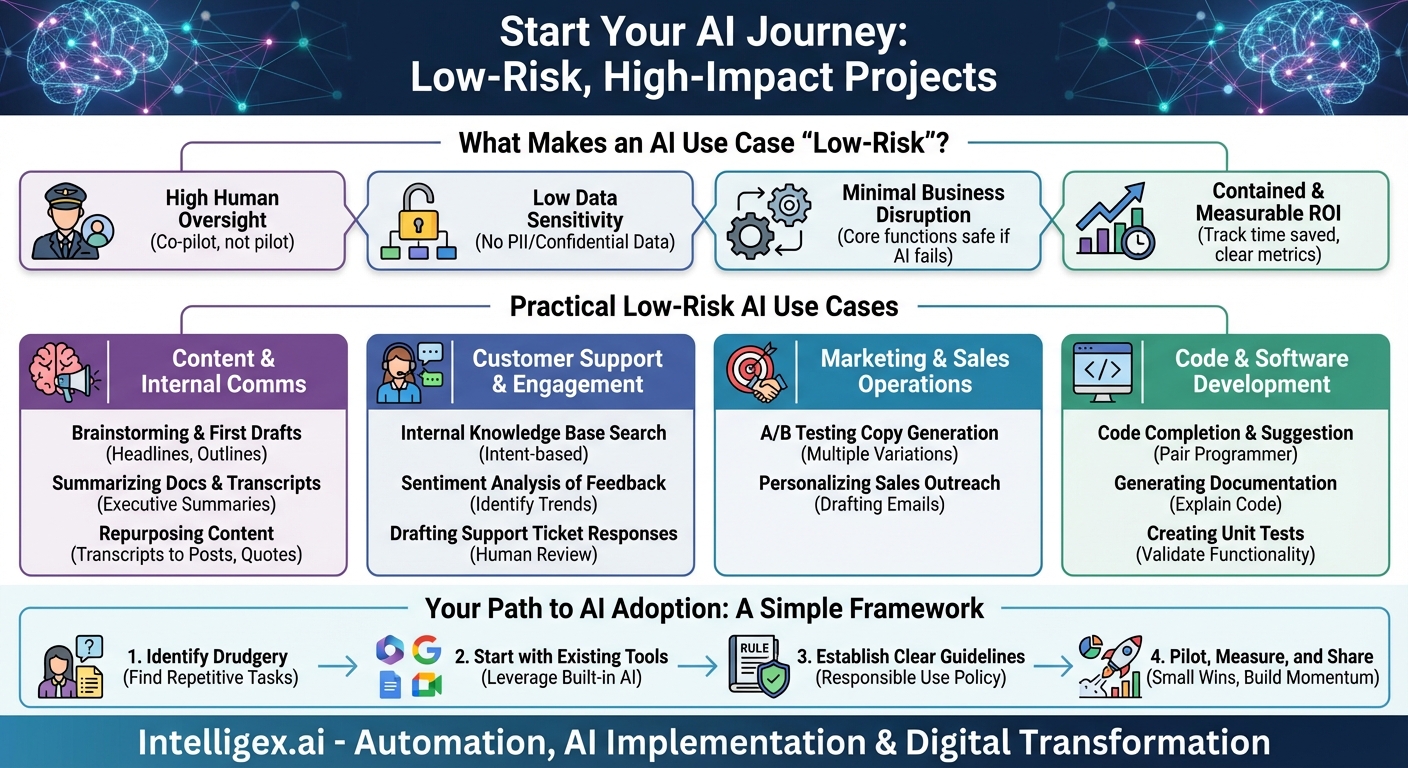
The conversation around Artificial Intelligence in the business world is a whirlwind of massive potential and palpable anxiety. On one hand, you hear about revolutionary breakthroughs and unprecedented efficiency gains. On the other, there are cautionary tales of complex implementations, exorbitant costs, and the daunting challenge of navigating data privacy and security. It’s easy for business leaders to feel caught in the middle, wanting to innovate without betting the entire company on a high-risk, unproven project. The good news? You don’t have to. The smartest way to begin your AI journey isn’t with a moonshot project, but with a series of small, calculated steps. By focusing on low-risk, high-impact use cases, you can build momentum, demonstrate value, and foster an AI-ready culture without causing major disruption.
This approach is about demystifying AI and treating it not as a monolithic, all-or-nothing investment, but as a new category of tools designed to augment your team’s capabilities. It’s about finding the friction in your daily operations—the tedious, the repetitive, the time-consuming—and applying a targeted AI solution to smooth it out. Let’s explore the criteria for what makes a use case “low-risk” and then dive into a host of practical examples you can start implementing today.
What Makes an AI Use Case “Low-Risk”?
Before jumping into specific applications, it’s crucial to have a framework for evaluating risk. A low-risk AI initiative isn’t just about the technology; it’s about the context of its deployment. These projects typically share four key characteristics:
- High Human Oversight: The AI acts as a co-pilot, not the pilot. It generates suggestions, summarizes information, or automates a preliminary step, but a human is always in the loop to review, edit, and give the final approval. This “human-in-the-loop” model is the single most important factor in mitigating risk, ensuring quality control, and maintaining accountability.
- Low Data Sensitivity: These use cases do not require feeding the AI with sensitive Personally Identifiable Information (PII), proprietary financial data, or confidential intellectual property. Instead, they often leverage public information, anonymized data sets, or non-sensitive internal documents like marketing copy or public-facing knowledge base articles.
- Minimal Business Disruption: If the AI tool were to fail or produce a poor result, the core business function would not grind to a halt. For example, if an AI tool for brainstorming blog titles goes offline, your content marketing efforts can still proceed. This is in stark contrast to a high-risk scenario where a core system, like an automated inventory management AI, fails and shuts down your supply chain.
- Contained and Measurable ROI: The impact of a low-risk project is easy to measure within a specific team or workflow. You can clearly track metrics like time saved on a task, an increase in the number of creative variations produced, or a reduction in repetitive support inquiries. This allows you to prove the value of AI with concrete data before seeking buy-in for larger projects.
Practical Low-Risk AI Use Cases to Implement Now
With this framework in mind, let’s look at specific, actionable ways to integrate AI into your daily operations across different departments. These are the perfect starting points for building your organization’s AI muscle.
1. Supercharging Content Creation and Internal Communications
This is arguably the easiest and safest place to start. The stakes are low because every output is reviewed by a human before it ever sees the light of day. The AI is a powerful assistant that can break through creative blocks and handle tedious formatting tasks.
- Brainstorming and First Drafts: Stuck on a headline for a new blog post? Need five different subject lines for an email campaign? Ask an AI. Use generative AI tools to create outlines for presentations, generate a list of potential social media posts from a recent press release, or draft a preliminary version of an internal announcement. Why it’s low-risk: The AI’s output is just a starting point. Your marketing team’s expertise is still required to refine the messaging, ensure brand alignment, and make the final selection.
- Summarizing Long Documents and Transcripts: Nobody has time to read every word of a 60-minute meeting transcript or a 50-page research report. AI tools can ingest these documents and provide concise, bulleted summaries in seconds. This is a massive productivity booster for keeping teams aligned and informed. Why it’s low-risk: This is a purely internal efficiency tool. The original document is still available for anyone who needs to dive into the details. The AI simply provides the “executive summary” on demand.
- Repurposing and Reformatting Content: You just finished a fantastic webinar. Now, you can use AI to transform that content. Ask it to pull out key quotes for social media, structure the transcript into a Q&A-style blog post, or rewrite the core concepts into a script for a short video. Why it’s low-risk: You are working with your own pre-approved content. The AI is simply a powerful formatting and adaptation engine, saving your team hours of manual work.
2. Enhancing Customer Support and Engagement
You must be careful when placing AI in front of customers, but there are incredibly safe and effective ways to use it to support your human agents, making them faster, more consistent, and better informed.
- Internal Knowledge Base Search: Your support agents often need to find the right help article or internal procedure to solve a customer’s issue. Instead of a clunky keyword search, an AI-powered semantic search can understand the *intent* behind an agent’s query (“a customer’s subscription renewal failed”) and instantly pull up the most relevant documents. Why it’s low-risk: The AI is an internal tool for your support team. It never interacts with the customer directly. It simply empowers your agents to find information more efficiently.
- Sentiment Analysis of Feedback: You can feed customer support tickets, survey responses, and product reviews into an AI model to automatically classify them as positive, negative, or neutral. This allows you to quickly spot trends in customer satisfaction and identify recurring issues without manually reading through thousands of entries. Why it’s low-risk: The AI is providing an analytical overview. It’s not making decisions or responding to customers. It’s a data-processing tool that gives your product and support managers a high-level view of customer sentiment.
- Drafting Support Ticket Responses: When a support ticket comes in, an AI can analyze the query and suggest a response based on your existing knowledge base and past ticket resolutions. The human agent then reviews, personalizes, and sends the final response. Why it’s low-risk: The human-in-the-loop model is paramount here. The AI provides a high-quality first draft, ensuring consistency and speed, but the agent provides the essential empathy, critical thinking, and final sign-off.
3. Optimizing Marketing and Sales Operations
AI can be a salesperson’s or marketer’s best friend, taking on the repetitive tasks of data analysis and content personalization, freeing them up to focus on strategy and building relationships.
- A/B Testing Copy Generation: Instead of a marketer trying to come up with two or three variations of ad copy or a landing page headline, an AI can generate twenty in a matter of seconds. This allows for more robust and creative A/B testing, leading to better-optimized campaigns. Why it’s low-risk: The market is the ultimate judge. You are simply using AI to broaden the pool of ideas to test. The tool isn’t making any strategic decisions; it’s just providing more creative fodder for your existing optimization processes.
- Personalizing Sales Outreach at Scale: A salesperson can use an AI assistant to quickly research a prospect on LinkedIn and draft a personalized opening line for an email, referencing a recent post or a shared connection. “I saw your recent post on supply chain logistics and wanted to reach out…” Why it’s low-risk: The salesperson reviews and customizes every single email before it’s sent. The AI is a research and drafting assistant, not an automated spam machine. It helps make human-to-human outreach more relevant and effective.
4. Assisting in Code and Software Development
For organizations with development teams, AI coding assistants are a game-changer for productivity and code quality, all while keeping the developer firmly in control.
- Code Completion and Suggestion: Tools like GitHub Copilot act as an expert pair programmer, suggesting entire lines or blocks of code as a developer types. It can significantly speed up the development process by handling boilerplate code and common functions. Why it’s low-risk: The developer is the ultimate authority. They must review, test, and understand every line of suggested code before committing it. The AI accelerates the process but doesn’t remove the need for expert human judgment.
- Generating Documentation: Writing clear documentation and comments for code is a critical but often-neglected task. Developers can now highlight a function and ask an AI to “explain what this code does” or “write the documentation for this function,” producing clear, well-structured explanations in seconds. Why it’s low-risk: This automates a tedious and time-consuming task. The developer can quickly review the AI-generated text for accuracy, saving immense amounts of time that can be better spent on coding.
- Creating Unit Tests: Writing tests to ensure code works as expected is another essential but laborious part of development. AI can analyze a piece of code and automatically generate a suite of unit tests to validate its functionality. Why it’s low-risk: This directly improves code quality and stability. The developer is still responsible for ensuring the tests are comprehensive, but the AI does the heavy lifting of writing the initial test framework.
Your Path to AI Adoption: A Simple Framework
Feeling inspired? Getting started is simpler than you think. Follow these steps:
- Identify the Drudgery: Talk to your teams. Ask them: “What are the most repetitive, time-consuming parts of your job? Where do you feel bogged down by manual tasks?” Look for pain points related to writing, summarizing, searching, or formatting.
- Start with Existing Tools: You may not even need a new piece of software. AI is being baked into the tools you already use. Look for the AI features within Microsoft 365, Google Workspace, Slack, Salesforce, and other core platforms. This dramatically lowers the barrier to entry.
- Establish Clear Guidelines: Create a simple one-page document on the responsible use of AI. Emphasize the importance of human review and explicitly forbid the use of sensitive company or customer data in public AI models.
- Pilot, Measure, and Share: Pick one of the use cases above and run a small pilot with an enthusiastic team. Measure the outcome—did it save three hours per week per team member? Did it help increase marketing engagement by 5%? Share these small wins to build excitement and momentum across the organization.
The journey into AI doesn’t have to start with a giant leap of faith. It can begin with a single, confident step. By focusing on low-risk, human-centric applications, you can start reaping the benefits of this transformative technology immediately. You’ll not only improve efficiency and productivity but also begin building the most important asset of all: an organizational culture that is curious, confident, and ready for the future of work.
Your Next Read:
Category:
Get a FREE
Proof of Concept
& Consultation
No Cost, No Commitment!
