

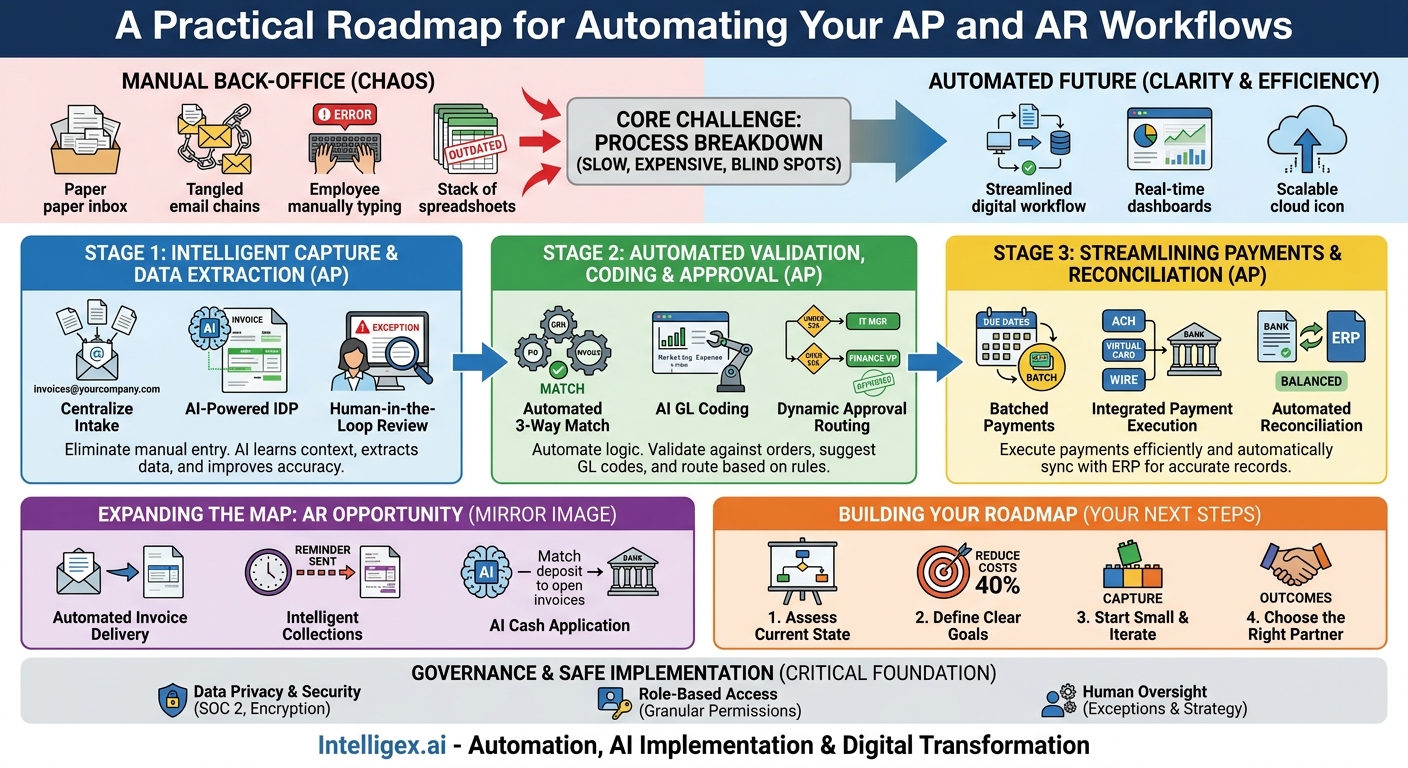
The flow of money in and out of a business is its lifeblood. Yet for many organizations, the processes governing this flow, Accounts Payable (AP) and Accounts Receivable (AR), are stuck in the past. They rely on manual data entry, endless email chains, and spreadsheets that are outdated the moment they are saved. This isn’t just inefficient; it’s a strategic liability. Manual processes are slow, expensive, prone to error, and create blind spots in your cash flow visibility.
Automating your AP and AR workflows is no longer a luxury reserved for massive enterprises. It is a foundational step in building a resilient, scalable, and data-driven finance function. By strategically applying automation, you can transform these cost centers into engines of operational excellence. This guide provides a practical map for that journey, breaking down the process from invoice receipt to final reconciliation into manageable stages, complete with actionable steps and key considerations.
The Core Challenge: Why Manual AP and AR Processes Break Down
Before diving into solutions, it is critical to understand the specific points of failure in a traditional finance back-office. These problems are not isolated to the finance team; they ripple across the entire organization, impacting everything from vendor relationships to strategic planning.
For Accounts Payable (AP), the common failure points include:
- Chaotic Invoice Intake: Invoices arrive from every direction as paper mail, PDF attachments to various employee inboxes, and through vendor portals. There is no single source of truth, making it easy for invoices to get lost, processed late, or paid twice.
- Tedious Data Entry: An AP clerk spends hours manually keying in data from each invoice into an accounting system. This work is repetitive, demoralizing, and a major source of costly errors. A misplaced decimal or incorrect vendor code can lead to significant overpayments or compliance issues.
- Approval Bottlenecks: An invoice for a marketing campaign sits in a manager’s inbox for a week, awaiting approval. The manager is busy, overlooks the email, and the payment is delayed. This scenario, repeated across dozens of departments, damages vendor relationships and puts the company at risk of late payment fees.
- Lack of Visibility: When the CFO asks for an accurate, up-to-the-minute view of outstanding liabilities, the finance team has to manually compile data from multiple sources. This process can take days, making agile cash flow forecasting nearly impossible.
For Accounts Receivable (AR), the challenges are the mirror image:
- Delayed Invoicing: Creating and sending customer invoices manually takes time, especially for businesses with complex billing structures. The longer it takes to send an invoice, the longer it takes to get paid, directly impacting Days Sales Outstanding (DSO).
- Payment Application Puzzles: A customer sends a single lump-sum payment for a dozen different invoices, but with no remittance advice. The AR team must then engage in time-consuming detective work to figure out which invoices to close out, delaying the recognition of revenue.
- Inefficient Collections: The collections process is often reactive. Team members follow a static list to chase overdue payments, with no way to prioritize accounts that are most likely to pay if contacted, or those at the highest risk of default.
These manual workflows create a system that cannot scale. As your business grows, you are forced to hire more people to handle the increasing volume of paper, a linear and unsustainable model for growth.
Stage 1: Intelligent Invoice Capture and Data Extraction
The first step toward automation is to digitize the front door of your AP process: how you receive and understand invoices. The goal is to eliminate manual data entry by teaching a system to read and extract information just like a human would, only much faster and more accurately.
This is accomplished using Intelligent Document Processing (IDP), an evolution of basic Optical Character Recognition (OCR). While OCR simply turns a picture of text into machine-readable text, IDP uses AI models to understand the context of the document. It can identify the vendor’s name, invoice number, line items, and total amount, regardless of the invoice layout or format.
Here is a step-by-step process for implementing intelligent capture:
- Centralize Your Intake Channel: The first rule is to stop the chaos. Designate a single, dedicated email address, such as [email protected], as the exclusive channel for all vendors to submit their invoices. Communicate this change clearly and consistently. This ensures all incoming documents are funneled directly into your automation platform.
- Select and Configure Your Capture Tool: Choose an IDP solution that can handle the variety of invoice formats you receive. Modern platforms require minimal setup. You connect your new central email inbox, and the AI begins analyzing incoming documents. It learns from different vendor layouts over time, improving its accuracy with each invoice it processes.
- Define Key Data Fields: Work with your finance and operations teams to determine the critical data points you need to capture from every invoice. The essentials typically include Vendor Name, Invoice Number, PO Number, Invoice Date, Due Date, Subtotal, Tax, and Total Amount. You may also need to capture line-item details for more granular cost tracking.
- Establish a Human-in-the-Loop Review: No AI is perfect. Your system should be configured to flag any invoices where it has low confidence in the extracted data. This sends the document to a queue for a human AP specialist to quickly verify or correct the information. This not only ensures accuracy but also provides valuable feedback that helps train the AI model to perform better in the future.
The Business Value of Stage 1
- Speed: Data entry time per invoice is reduced from several minutes to mere seconds.
- Accuracy: Eliminates over 90% of the data entry errors associated with manual keying.
- Cost Savings: Frees your AP team from low-value data entry to focus on exception handling, vendor analysis, and strategic financial tasks.
Stage 2: Automated Validation, Coding, and Approval Workflows
Once the invoice data is accurately captured, the next stage is to automate the business logic that governs it. This involves validating the invoice, assigning it to the right cost center, and routing it for approval without anyone having to send a single email.
Automated Validation and Matching
For many businesses, especially in manufacturing, retail, or logistics, the “three-way match” is a critical but labor-intensive control. This process involves manually comparing the invoice against the corresponding Purchase Order (PO) and the Goods Receipt Note (GRN) to ensure the company is only paying for what it ordered and received.
An automated system can perform this check instantly. If the quantities, prices, and items on all three documents align, the invoice is passed straight through for payment. If there is a mismatch, the system automatically flags the exception and notifies the appropriate person in procurement or the warehouse to investigate. This “straight-through processing” is a massive efficiency gain.
AI-Powered General Ledger (GL) Coding
Assigning the correct GL code to each invoice line item is essential for accurate financial reporting. Instead of having AP clerks manually select codes from a complex chart of accounts, an AI-powered system can suggest the correct codes based on historical data. For example, it will learn that invoices from a specific creative agency are always coded to the “Marketing Expense” account. The AP specialist simply reviews and confirms the suggestion, turning a research task into a quick validation step.
Dynamic Approval Routing
This is where you can finally eliminate the “where is that invoice?” email chain. You can build approval workflows based on a clear set of business rules. The system automatically routes the invoice to the right person or group for approval.
Consider these examples:
- An invoice for IT software under $2,000 is routed directly to the IT Manager.
- An invoice for office supplies over $5,000 for the Sales department requires approval from both the Head of Sales and the VP of Finance.
- Any invoice without a corresponding PO is automatically routed to the department head for initial review and justification.
Approvers are notified via email or a mobile app and can approve or reject the invoice with a single click, dramatically accelerating the entire cycle.
Metrics to Measure Success
To quantify the impact of this stage, track these key performance indicators (KPIs):
- Invoice Processing Time: The average time from invoice receipt to final approval.
- Straight-Through Processing Rate: The percentage of invoices that are processed without any manual intervention.
- Approval Cycle Time: The average time an invoice spends waiting for approval.
Stage 3: Streamlining Payments and Reconciliation
With a fully coded and approved invoice, the final steps are executing the payment and reconciling the transaction in your accounting system. Automation here provides control, security, and a clean audit trail.
Instead of manually preparing payment runs, an automated system groups all approved invoices into payment batches based on their due dates. This ensures you can take advantage of early payment discounts while avoiding late fees. The finance manager can review the proposed batch, make any necessary adjustments, and approve it for execution.
The system then integrates directly with your bank or a payment provider to execute the payments through the preferred method for each vendor, whether it is ACH, virtual card, or wire transfer. This eliminates the need to manually upload payment files and reduces the risk of payment fraud.
The Final Step: Automated Reconciliation
Once payments are sent, the loop is closed. The system automatically ingests bank statement data and matches the outgoing payments to the corresponding invoices in your Enterprise Resource Planning (ERP) or accounting software. This creates a seamless, two-way sync that ensures your financial records are always accurate and up to date, drastically simplifying your month-end close process.
A Checklist for Successful Payment Automation
- Prioritize ERP Integration: Ensure your AP automation platform has a robust, pre-built integration with your core accounting system (e.g., NetSuite, SAP, Oracle, QuickBooks).
- Define Payment Policies: Establish clear business rules for payment methods, such as using high-rebate virtual cards for specific vendor categories.
- Automate Notifications: The system should automatically send remittance advice to your vendors once payment is made, reducing inquiries to your AP team.
- Plan for Exceptions: Have a clear, documented process for handling payment failures or rejections.
A Note on AI, Governance, and Safe Implementation
Implementing an AI-driven automation platform involves handling sensitive financial data. It is crucial to approach this with a strong governance framework. This is not about complex legal documents; it is about common-sense rules to ensure security and trust in the system.
Data Privacy and Security: Your chosen platform must have strong security credentials. Look for vendors who are transparent about their security practices, such as SOC 2 compliance, and who encrypt your data both at rest and in transit. Invoice and payment data is confidential and must be protected accordingly.
Role-Based Access Control: Not everyone in the company should be able to see, approve, or pay invoices. A core feature of any good system is the ability to configure granular permissions. An AP clerk may be able to enter and code invoices, while only a finance manager can approve a payment batch over $50,000.
Maintain Human Oversight: The goal of automation is to empower your team, not replace their judgment. The “human-in-the-loop” workflow is essential. The system should handle the 95% of routine transactions, freeing up your skilled finance professionals to focus on the 5% of exceptions that require critical thinking, vendor negotiation, and strategic analysis.
Expanding the Map: The Accounts Receivable (AR) Opportunity
Automating AP is a powerful step, but it is only half of the cash flow equation. The same principles and technologies can be applied to your AR process to accelerate cash collection and improve your financial health.
- Automated Invoice Delivery: Generate and send customer invoices automatically from your ERP or billing system as soon as a service is rendered or a product is shipped.
- Intelligent Collections: Use automation to manage your collections process. The system can send a series of polite, escalating payment reminders to customers as their invoice due date approaches and passes. This frees your AR team from manual follow-up and ensures a consistent collections cadence.
- AI-Powered Cash Application: For AR, the biggest reconciliation challenge is matching incoming payments to open invoices. AI can analyze bank feeds and remittance information (even from unstructured email text) to automatically match payments to the correct invoices, clearing receivables in seconds instead of hours.
By automating both AP and AR, you gain a holistic, real-time view of your company’s complete cash conversion cycle.
Your Next Steps: Building Your Automation Roadmap
Embarking on an AP/AR automation project may seem daunting, but a structured, phased approach makes it manageable and ensures a high return on investment. You do not need to boil the ocean; you just need to take the first step.
- Assess Your Current State: Before you can build a map to your destination, you need to know where you are. Sit down with your finance and operations teams. Whiteboard your current process from invoice arrival to payment. Identify the most significant bottlenecks, the most error-prone steps, and the tasks that consume the most manual effort.
- Define Clear, Measurable Goals: What does success look like for your organization? Is it reducing invoice processing costs by 40%? Is it cutting the month-end close process from five days to two? Is it capturing 90% of available early payment discounts? Setting specific, quantifiable goals will guide your project and help you demonstrate its value.
- Start Small and Iterate: A “big bang” implementation is risky. Instead, begin with the area of highest pain and highest potential return. For most companies, this is Stage 1: Intelligent Invoice Capture. By eliminating manual data entry first, you deliver a quick win that builds momentum and secures buy-in for further automation. Once that is successful, move on to automating approval workflows, and then payments.
- Choose the Right Partner, Not Just a Product: The market is full of software vendors. Look for a partner who takes the time to understand your specific business processes, challenges, and goals. The best partner will focus on seamless integration with your existing systems and be committed to helping you achieve measurable business outcomes, not just deploying technology.
By following this map, you can methodically transform your AP and AR functions from manual, reactive cost centers into streamlined, strategic assets that provide the visibility and efficiency needed to drive your business forward.
Your Next Read:
Get a FREE
Proof of Concept
& Consultation
No Cost, No Commitment!
