

A customer calls your support line, frustrated. They updated their shipping address in their online portal yesterday, but the package they just received a shipping notification for is heading to their old address. Your support agent looks in the helpdesk system and sees the new address. Your fulfillment team, however, is looking at the warehouse management system, which still has the old one. Somewhere between the customer portal, the CRM, the helpdesk, and the warehouse, the truth got lost. This is a synchronization conflict, and it costs more than just a rerouted package. It costs customer trust, employee time, and operational efficiency.
These data disagreements are silent productivity killers. They create friction in every process, from marketing campaigns targeting the wrong people to finance teams chasing down incorrect billing information. The good news is that these conflicts are not random acts of digital chaos. They have clear causes and, more importantly, clear solutions. By understanding why your systems disagree, you can build a reliable, coherent data backbone that accelerates your business instead of slowing it down.
What is a Sync Conflict and Why Does It Matter?
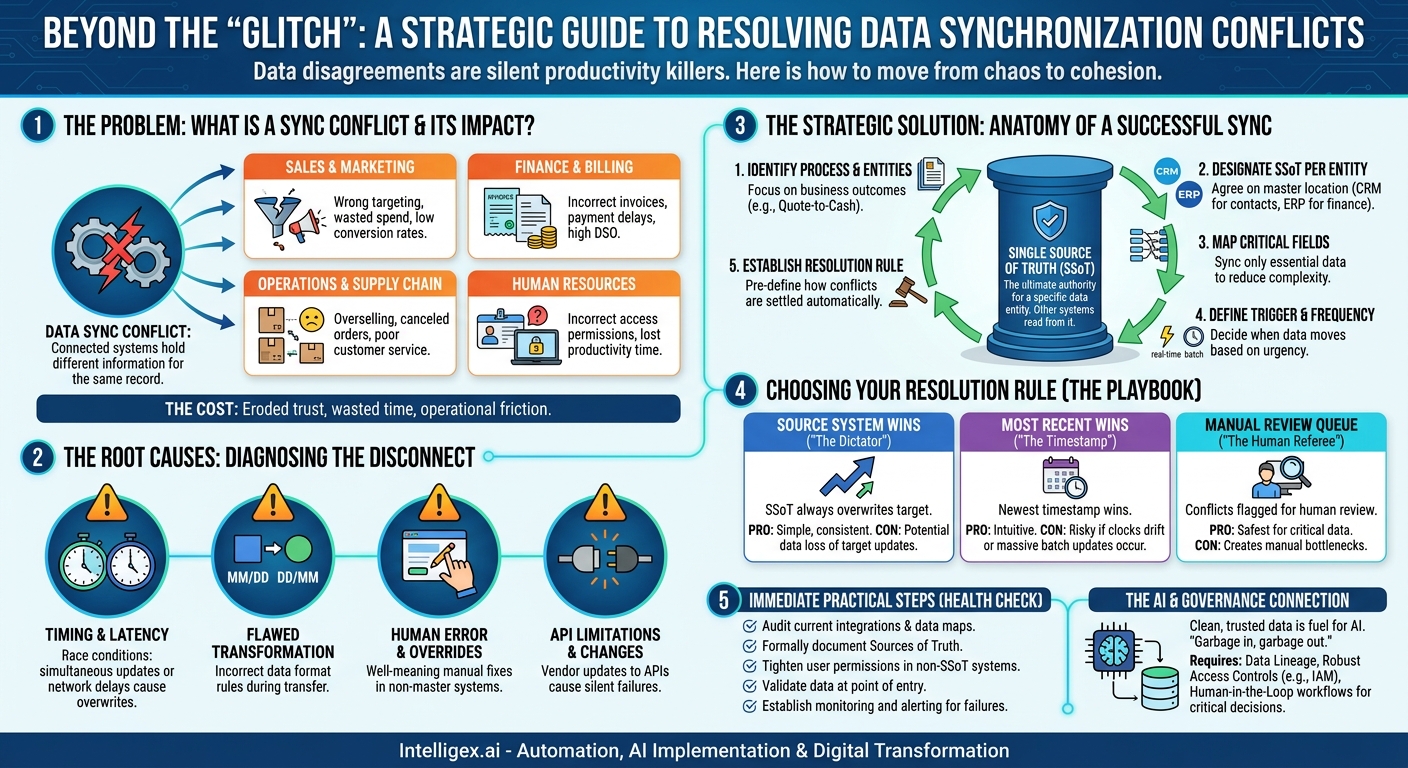
A synchronization conflict, or sync conflict, occurs when two or more connected systems hold different information for the same record. Think of it as two people having different versions of the same contact in their phones. When your software systems do this, the downstream effects ripple across the entire organization, impacting core business value drivers like speed, cost, and quality.
The impact is not just a technical nuisance; it’s a direct hit to your bottom line and operational health. Let’s look at how this plays out in different departments:
- Sales and Marketing: A salesperson logs a conversation in their CRM, noting a lead is now a hot prospect. But if that status doesn’t sync correctly to the marketing automation platform, the lead might receive a generic, top-of-funnel email instead of a targeted demo offer. This directly impacts lead conversion rates and wastes marketing spend.
- Finance and Billing: A customer upgrades their subscription plan. If the new tier and price don’t sync from the sales system to the billing system, you send an incorrect invoice. This leads to payment delays, manual reconciliation work for your finance team, and a poor customer experience, hurting your days sales outstanding (DSO) metric.
- Operations and Supply Chain: An e-commerce platform shows 10 units of a product in stock, while the warehouse inventory system (the true source of data) shows only two. This conflict leads to overselling, followed by canceled orders and disappointed customers. This damages brand reputation and increases the cost of customer service.
- Human Resources: An employee’s new role and title are updated in the core HRIS but fail to sync to the IT provisioning system. This means they might not get the correct access permissions for software they need to do their job, leading to days of lost productivity while tickets are filed and resolved.
In every case, sync conflicts force your teams to stop their real work and become data detectives. They spend valuable time manually comparing records, making phone calls, and sending emails to figure out which system is right. This manual effort is a hidden cost that erodes margins and slows down the entire business.
The Root Causes: Beyond a Simple “Glitch”
It’s tempting to dismiss a sync error as a one-off “glitch,” but these conflicts are usually symptoms of deeper issues in your integration architecture. Understanding the root cause is the first step toward building a more resilient system. The most common culprits fall into a few key categories.
Timing, Latency, and Race Conditions
This is one of the most frequent causes. A “race condition” occurs when two operations happen in an order the system didn’t anticipate. For example, a user updates a customer’s phone number in System A. At almost the same moment, an automated process in System B reads the old phone number from System A. The process in System B then performs an action and writes its results back to System A, overwriting the user’s recent update. Both actions were valid, but their timing caused a data integrity issue. This is especially common in high-volume environments or when syncing across systems with significant network latency.
Flawed Transformation Logic
Data rarely moves between systems in the exact same format. The rules that govern this change are called transformation logic. A simple error here can cause widespread problems. A classic example is date formats. System A might store dates as MM/DD/YYYY (common in the US), while System B expects DD/MM/YYYY. If the integration logic doesn’t correctly transform the date, “April 10, 2024” (04/10/2024) could be misinterpreted as “October 4, 2024” (10/04/2024), causing major issues for anything time-sensitive, like contract renewal dates or delivery schedules.
Human Error and Manual Overrides
Your processes are just as important as your technology. Many sync conflicts are introduced when a well-meaning employee “fixes” data in one system without understanding its downstream connections. A support agent might manually correct a typo in a customer’s name in their ticketing software. However, if the CRM is the designated “source of truth” for customer names, the next automated sync will likely see the discrepancy and overwrite the agent’s fix, or worse, the fix might remain isolated, creating two different versions of the customer’s identity within your ecosystem.
API Limitations and Version Changes
The systems you integrate are not static. They are constantly being updated by their vendors. When a vendor updates their Application Programming Interface (API), they might change a field name, remove a field entirely, or alter the way you have to request data. If your integration isn’t updated to reflect these changes, it can start failing silently. Data that was once syncing perfectly might suddenly start being dropped, leading to incomplete records and sync conflicts that are difficult to diagnose until a business user notices something is wrong.
The Anatomy of a Successful Synchronization Strategy
Preventing sync conflicts isn’t about buying a single magic tool. It’s about designing your data flows with intention. A robust strategy is proactive, not reactive. It involves defining clear rules of the road for your data before you ever connect two systems. This approach provides clarity, reduces ambiguity, and dramatically lowers the chances of conflict.
The cornerstone of any good integration strategy is the concept of a Single Source of Truth (SSoT). For any given piece of data, one system must be designated as the ultimate authority. Other systems can read from it or subscribe to its updates, but only the SSoT holds the master record. A customer’s billing address might live in the ERP, while their marketing preferences live in the CRM. The SSoT is not always one system for everything; it’s assigned on a per-entity or even per-attribute basis.
Here is a step-by-step process for designing a conflict-resistant integration:
- Identify the Business Process and Data Entities. Start with the business outcome you want to achieve, not the technology. Are you streamlining the “quote-to-cash” process? The data entities involved are likely Customers, Quotes, Orders, and Invoices. Be specific about the data that needs to flow to make the process seamless.
- Designate the Single Source of Truth (SSoT) for Each Entity. This is the most critical step and often requires a discussion between business and IT stakeholders. Where should the “master” customer record be created and maintained? For many B2B companies, the CRM, like Salesforce, is the SSoT for customer contact information. The ERP, however, is almost always the SSoT for financial data like invoices and payments. Document these decisions clearly.
- Map the Critical Fields. You rarely need to sync every single field between two systems. Doing so creates unnecessary complexity and increases the risk of conflicts. For each entity, identify only the essential fields. For an “Order” sync, you might need `OrderID`, `CustomerID`, `OrderDate`, `ShippingAddress`, and a list of `LineItems`. Map them precisely: `SystemA.cust_id` maps to `SystemB.customer_identifier`.
- Define the Sync Trigger and Frequency. How and when should the data move? A real-time sync (triggered by an event, often called a webhook) is great for urgent updates, like an inventory change. A scheduled batch sync (e.g., every 15 minutes or once a night) is better for less critical data and can reduce the load on your systems. The choice impacts the potential for timing conflicts.
- Establish a Clear Conflict Resolution Rule. No matter how well you design your system, a conflict may eventually occur. You must decide ahead of time how it will be resolved automatically. Will the source of truth always win? Will the most recently updated record win? Leaving this undefined means the conflict will be resolved randomly or require manual intervention every time.
Choosing Your Conflict Resolution Rule
Deciding what to do when a conflict happens is a crucial design decision. There is no single best answer; the right choice depends on your data’s criticality and your tolerance for risk. Here are the most common strategies.
“Source System Wins” (The Dictator)
This is the simplest and most common rule. If a discrepancy is detected, the data from the designated Single Source of Truth (SSoT) automatically overwrites the data in the target system.
- Pros: It’s simple to implement and ensures consistency with your master record. It’s very predictable.
- Cons: It can cause data loss. If a legitimate, important update was made in the target system (for example, by a user who didn’t have access to the SSoT), it will be wiped out during the next sync.
- Best for: Data that is truly mastered in one place and should not be modified elsewhere, like product pricing pushed from an ERP to an e-commerce site.
“Most Recently Updated Wins” (The Timestamp)
In this model, the system compares the “last modified” timestamp on both records and declares the newest one the winner.
- Pros: Seems intuitive and democratic. It allows for updates to happen in multiple systems.
- Cons: This can be very dangerous. System clocks can be slightly out of sync. More importantly, a large, automated batch update in one system could have a newer timestamp than a critical, manual change made by a user just moments before, causing the manual change to be overwritten.
- Best for: Scenarios where users are actively working in both systems and the most recent change is highly likely to be the correct one, such as collaborative documents. Use with caution for transactional data.
“Manual Review Queue” (The Human Referee)
When a conflict is detected, the integration stops and flags the conflicting records. They are then placed in a special queue or report for a human data steward to review and resolve manually.
- Pros: This is by far the safest option for preventing data loss, especially for critical data like financial records or customer identity information.
- Cons: It breaks the automation and creates a manual bottleneck. If conflicts are frequent, the queue can become a significant operational burden.
- Best for: High-stakes data where the cost of an error is very high. It is often used for things like merging duplicate customer accounts.
Practical Steps to Prevent Sync Conflicts Today
While designing new integrations thoughtfully is the best long-term strategy, there are immediate, practical steps you can take to reduce the frequency and impact of sync conflicts in your existing environment. This isn’t just about technology; it’s about good data governance.
Use this checklist to perform a quick health check on your current data flows:
- Audit your current integrations. Do you have a central inventory of all the connections between your key systems? For each connection, is it clear what data is moving, in which direction, and how often? If you don’t have this map, creating one is the first step.
- Formally document your Sources of Truth. Get stakeholders from IT, Finance, Sales, and Ops in a room (virtual or physical) and formally agree on which system is the master for key data points like customer records, product information, and sales orders. Write it down in a shared location.
- Review and tighten user permissions. Limit the ability to edit critical data fields in non-SSoT systems. If your CRM is the SSoT for addresses, perhaps the billing system should only have read-only access to that field, preventing manual overrides at the wrong point in the process.
- Implement data validation at the point of entry. The best way to fix bad data is to prevent it from being entered in the first place. Use built-in tools in your software to enforce rules, like requiring a valid email format or ensuring a postal code has the correct number of digits.
- Establish monitoring and alerting. Your integration platform should not be a “black box.” Set up alerts that notify your IT or operations team immediately when a sync job fails or generates a high number of errors. The faster you know about a problem, the smaller its blast radius will be.
A Note on AI, Automation, and Data Governance
As businesses increasingly look to AI and machine learning for everything from sales forecasting to inventory optimization, the quality of your underlying data becomes paramount. An AI model is only as good as the data it’s trained on. If your AI is learning from a dataset riddled with sync conflicts, its conclusions will be unreliable at best and dangerously wrong at worst. The principle of “garbage in, garbage out” has never been more relevant.
Clean, consistent, and trustworthy data is the fuel for effective AI. Before you can leverage advanced automation, you must get the fundamentals of data governance right. This involves a few key practices:
- Data Lineage: You must be able to trace your data’s journey. When an AI model produces a surprising recommendation, you need the ability to track the data it used back to its source system to verify its accuracy and context.
- Robust Access Controls: As more processes become automated, it’s crucial to control which systems (and people) can write data to your designated Sources of Truth. Your SSoT should be a well-guarded fortress, not a public square. Many cloud platforms like AWS provide detailed identity and access management tools to enforce these policies. See their documentation for services like AWS IAM.
- Human-in-the-Loop (HITL) Workflows: For critical, automated decisions based on synced data, build in a human review step. For instance, if an automated system flags a customer for fraud based on conflicting payment and shipping information, the final action (like suspending the account) should be validated by a person. This balances the speed of automation with the judgment of human oversight.
Your Next Steps: From Chaos to Cohesion
Sync conflicts are more than a technical headache. They are a tax on your business’s speed, efficiency, and growth. Every hour your team spends reconciling data between two spreadsheets or arguing about which system has the right customer address is an hour they are not spending on high-value work. Tackling this problem is a direct investment in your operational backbone.
The path forward is not about finding and fixing every single conflict reactively. It’s about building a proactive strategy based on clarity, ownership, and smart design. The goal is to create a data ecosystem where every system has access to the same, trusted information, allowing your teams and your automated processes to operate with confidence.
Here’s how to get started this week:
- Pick one critical business process. Don’t try to boil the ocean. Choose one high-value, cross-functional process, like lead-to-opportunity or order-to-fulfillment.
- Map its data flow. On a simple whiteboard or document, draw the systems involved and the key pieces of information that pass between them. Ask the people who do the work every day to help you.
- Identify the Source of Truth. For each piece of data in your map, ask the tough question: “If this information exists in two places, which one is the master?” Get the owners of the systems to agree, and write it down. This simple act of creating clarity is the most powerful first step you can take.
Starting small and building momentum with one well-designed, reliable data flow will provide a blueprint for creating a truly connected and efficient enterprise.
Your Next Read:
Get a FREE
Proof of Concept
& Consultation
No Cost, No Commitment!
