

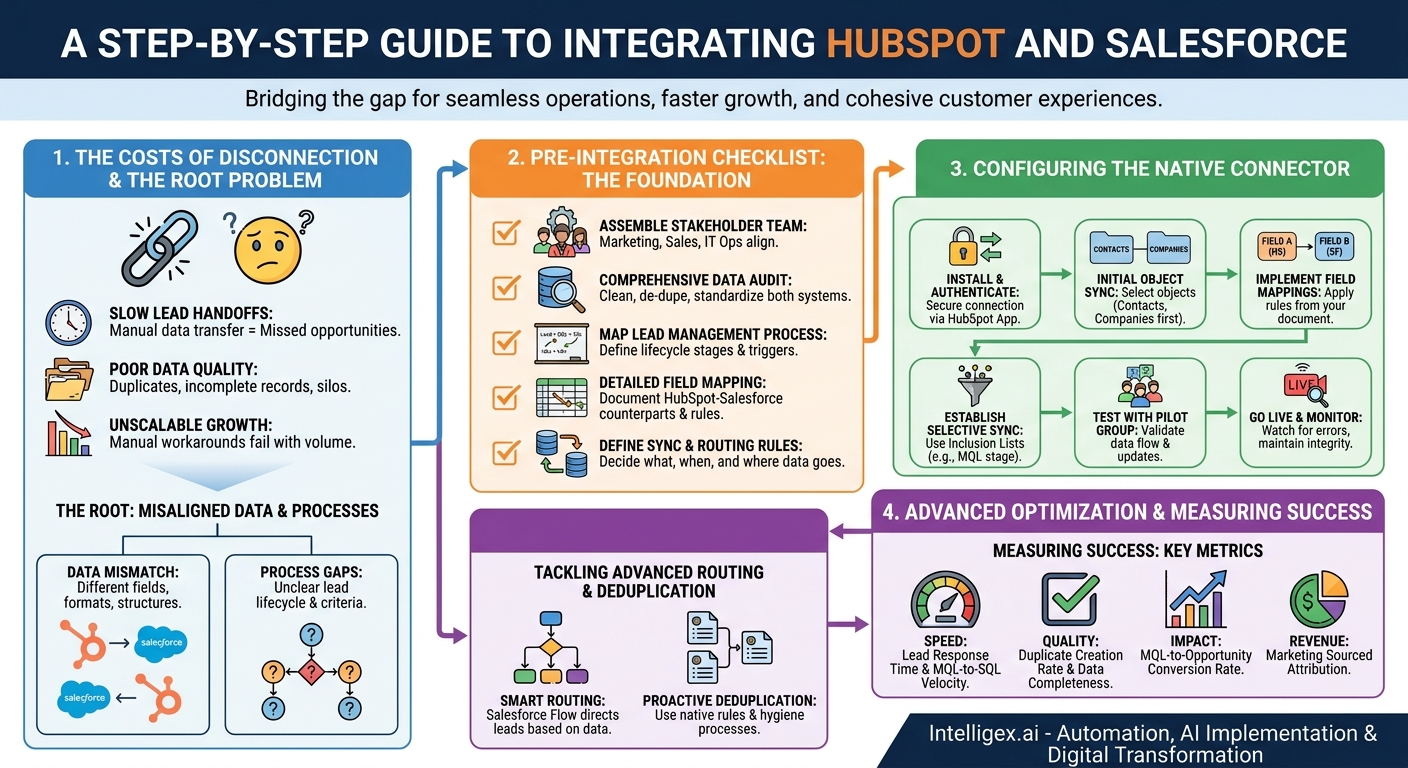
A seamless flow of information between your marketing and sales teams is not a luxury, it is the engine of your revenue operations. Yet for many organizations, the gap between their marketing automation platform, like HubSpot, and their CRM, like Salesforce, is a source of constant friction. This disconnect manifests as slow lead handoffs, frustrated sales reps chasing bad data, and a marketing team unable to prove its value. The result is a system that leaks revenue, erodes team morale, and actively hinders growth.
Integrating these two powerhouses is more than a technical fix. It is a strategic imperative that directly impacts your operational speed, data quality, and ability to scale. By creating a single, reliable channel for customer data, you empower your teams to work faster, make smarter decisions, and deliver a more cohesive customer experience from the first click to the final close.
Why a Disconnected System Costs More Than You Think
The manual processes and data silos created by disconnected HubSpot and Salesforce instances introduce hidden costs that quietly drain resources and opportunities. Understanding these costs is the first step toward building a business case for integration.
First, consider the direct impact on speed. In sales, speed to lead is a critical performance indicator. A lead’s interest cools by the minute. When a marketing qualified lead (MQL) from a HubSpot form has to be manually exported, cleaned, and imported into Salesforce, the delay can be hours or even days. By the time a sales rep makes contact, the prospect may have already engaged with a competitor. An automated sync closes this gap, ensuring hot leads land in a sales rep’s queue almost instantly, dramatically increasing the odds of a meaningful conversation.
Second is the staggering cost of poor data quality. Duplicate records are the most obvious symptom. Imagine a key contact at a target account is already in Salesforce, owned by a senior account executive. That same person downloads an ebook, creating a new lead in HubSpot. Without a proper integration, this new lead gets synced to Salesforce as a duplicate and is routed to a junior sales development rep (SDR). The SDR, unaware of the existing relationship, reaches out with a generic message. This not only wastes the SDR’s time but also presents a fragmented and unprofessional face to a valuable prospect. These duplicates split the customer’s history across multiple records, making it impossible for anyone to get a complete view of their engagement.
Finally, a lack of integration makes scalable growth impossible. The manual workarounds that are manageable with 50 leads a month completely collapse at 500 or 5,000. As you increase marketing spend and generate more leads, the data problems multiply. Your sales operations team spends more time on data cleanup than on strategic tasks, your sales forecasts become unreliable, and your marketing team cannot accurately calculate campaign ROI. You end up flying blind, making critical business decisions based on incomplete and untrustworthy data.
The Root of the Problem: Misaligned Data and Processes
A failed or ineffective integration is rarely due to a technical limitation of the tools themselves. The true challenge lies in the misaligned data models and business processes that exist before a single line of code is written or a connector is installed. If you don’t address these foundational issues, the integration will only automate the chaos.
The most common issue is a data mismatch. HubSpot and Salesforce were built independently and have different default fields and data structures. For example, marketing may use a free-text field in HubSpot for “Job Function,” while sales uses a standardized picklist in Salesforce for “Role.” If you try to sync these, you will create messy, unusable data. Similarly, address formats, industry classifications, and even simple state abbreviations can differ. Without a clear data dictionary and a plan to standardize these values, your integrated system will be polluted from day one.
Process gaps are just as dangerous. A successful integration requires a formal, universally accepted definition of your lead lifecycle. Your sales and marketing leaders must agree on the exact criteria that turn a visitor into a lead, a lead into an MQL, and an MQL into a sales qualified lead (SQL). What specific actions, demographic data, or engagement scores trigger a stage change? When, precisely, does ownership of the record transfer from the marketing team to the sales team?
Without these clear rules of engagement, you create ambiguity. For instance, a lead might sync to Salesforce based on a simple form fill, but marketing continues to update its score and properties in HubSpot. If these subsequent updates do not sync back to Salesforce, the sales rep is working with outdated information. Defining the “source of truth” for each data point at each lifecycle stage is non-negotiable.
Pre-Integration Checklist: Your Foundation for Success
Before you even think about installing the connector, you must do the foundational work to ensure a smooth and valuable integration. Rushing this stage is the number one cause of integration failure. Use this checklist to guide your preparation and align your teams.
- Assemble Your Stakeholder Team. Get the key players from Marketing Operations, Sales Operations, and IT in the same room. This team is responsible for defining the project’s goals, creating the process maps, and making decisions about data ownership. Without cross-functional buy-in, the project is doomed to fail.
- Conduct a Comprehensive Data Audit. You cannot connect two messy houses and expect a clean one. Analyze the data in both HubSpot and Salesforce. Identify and merge existing duplicates, purge old and irrelevant contacts, and standardize key fields like country, state, and job titles. Decide which system will be the “source of truth” for core information like email address and company name.
- Map Your Lead Management Process. Whiteboard the entire customer journey, from the first website visit to a closed-won deal. Clearly document the definition of each lifecycle stage (e.g., Lead, MQL, SQL) and the specific, measurable triggers for moving between stages. This map will become the blueprint for your integration’s logic.
- Create a Detailed Field Mapping Document. Build a simple spreadsheet with three columns: HubSpot Property, Salesforce Field, and Notes. Go through every piece of data you want to sync and map it to its counterpart in the other system. In the “Notes” column, identify any discrepancies in field types (e.g., text vs. picklist) or naming conventions that need to be resolved before the integration begins.
- Define Your Sync and Routing Rules. Decide precisely what data should sync, when it should sync, and where it should go. A common best practice is to not sync all contacts, but only those that reach the MQL stage. This prevents flooding Salesforce with unqualified leads. Document the logic for your lead routing (e.g., based on territory, company size, or product interest).
Step-by-Step: Configuring the Native HubSpot-Salesforce Connector
With your foundational work complete, you are ready to configure the technology. The native connector provided by HubSpot is powerful, but it requires thoughtful setup. The following steps provide a high-level overview of the process, focusing on the key decision points.
- Install and Authenticate the Connector. Begin by installing the Salesforce integration app from the HubSpot App Marketplace. This process involves logging into both platforms with administrator credentials to establish a secure, authenticated connection.
- Configure Initial Object Sync Settings. The connector will ask which objects you want to sync between the two systems. The standard objects are Contacts, Companies (Accounts), and Deals (Opportunities). It is wise to start simple. Begin by syncing only Contacts and Companies. You can enable Deal syncing later once you have confirmed the core data is flowing correctly.
- Implement Your Field Mappings. This is where your field mapping document becomes invaluable. In the connector settings, you will create mappings for each property. For every mapping, you must choose an “update rule.” The most common choices are “Prefer Salesforce unless blank” or “Always use the most recently updated record.” Your choice depends on your “source of truth” decisions made during the planning phase.
- Establish Selective Sync Criteria. This is the most critical step for preventing data chaos. Do not sync your entire HubSpot database. Instead, create an “inclusion list” in HubSpot. This is a dynamic list that acts as a gatekeeper. A common rule is to only add a contact to the inclusion list when their “Lifecycle Stage” becomes “Marketing Qualified Lead.” This ensures only sales-ready leads are created in Salesforce, keeping the database clean and focused.
- Test with a Controlled Pilot Group. Before enabling the sync for all MQLs, update your inclusion list criteria to only include a small number of test records, preferably internal employees. Trigger the conditions, watch them sync to Salesforce, and then make updates in both systems. Verify that data flows as expected, field mappings are correct, and update rules are working.
- Go Live and Monitor Closely. Once testing is successful, update your inclusion list to your real MQL criteria. For the first few weeks, closely monitor the sync status in the HubSpot integration settings. Check for any sync errors, which often highlight a data mismatch (like a picklist value that doesn’t exist in the other system). Address these errors promptly to maintain data integrity and user trust.
Tackling Advanced Lead Routing and Deduplication
A basic integration gets data from point A to point B. A great integration automates complex business processes and actively protects data quality. This means going beyond the connector’s default settings to handle advanced routing and prevent duplicate records.
Sophisticated lead routing logic typically resides in Salesforce, using tools like Flow or assignment rules. The integration’s job is to provide the data triggers for this logic. For example, a hidden field on a HubSpot form can capture a prospect’s self-identified industry or company size. When that lead syncs to Salesforce, a Flow can read this field and instantly assign the lead to the correct specialist team. A “Request a Demo” submission might trigger a high-priority task for the assigned rep, while an ebook download enters a long-term nurture cadence. The key is to use HubSpot to capture critical intent and qualification data, and use Salesforce to execute the resulting sales motion.
A Proactive Approach to Duplicates
Even with a perfect sync, duplicates can still happen through other channels like list imports or manual creation. Your integration strategy must include both prevention and remediation.
For prevention, activate and configure Salesforce’s native duplicate and matching rules. These rules can be set to alert users or even block the creation of a record that matches an existing one based on email, name, or other criteria. Tune these rules to match your business’s tolerance for false positives. It is better to have a rep occasionally merge a record than to allow hundreds of duplicates to pollute the system.
For remediation, establish a regular data hygiene process. Both platforms have built-in merging tools. Dedicate time for your operations team to review and merge duplicates identified by system reports. For organizations with very large or complex databases, investing in a specialized third-party data cleansing tool that integrates with Salesforce can provide a significant return by automating much of this process.
Data Governance and Secure Implementation
Integrating systems centralizes your data, which is powerful but also increases the importance of strong governance and security. A well-planned integration should enhance, not compromise, your data privacy and control measures.
The principle of least privilege is paramount. Use Salesforce profiles and permission sets, along with HubSpot user permissions, to ensure employees can only see and edit the data they need to perform their jobs. For example, a marketing user might need to see that a lead became a customer, but they likely do not need access to the detailed financial information on the final Salesforce Opportunity. Limiting data visibility reduces the risk of accidental data modification and unauthorized access.
Your data handling must also align with compliance requirements like GDPR and CCPA. The integration can make this easier by creating a single, authoritative view of a contact, simplifying the process of managing communication consent or processing a “right to be forgotten” request. However, this requires that consent fields (e.g., “Opt-in to Marketing Email”) are properly mapped and that your processes for handling these requests are clearly defined and tested.
Finally, remember that automation is not infallible. Always design with a “human in the loop.” Create a clear process for handling exceptions. What happens when a lead is routed to the wrong person? Who is responsible for monitoring sync errors? Designating a person or team, typically in a Sales or Revenue Operations role, to be the steward of the system is essential for long-term success. This person acts as the final checkpoint, ensuring the automated processes are working as intended and maintaining the trust of the end-users in the sales and marketing teams.
Measuring Success: The Metrics That Matter
The ultimate goal of this integration is to drive measurable business results. To prove its value and identify areas for improvement, you need to track the right key performance indicators (KPIs). Focus on metrics that reflect improvements in speed, quality, and overall business impact.
Speed and Efficiency
- Lead Response Time: This is the time from a form submission in HubSpot to the first logged sales activity (call or email) in Salesforce. This metric should see a dramatic and immediate decrease.
- MQL-to-SQL Velocity: Measure the average time it takes for a lead marked as an MQL in HubSpot to be accepted as an SQL by the sales team. A faster velocity indicates a smoother, lower-friction handoff.
Data Quality
- Duplicate Creation Rate: Track the number of new duplicate records being created each week or month. With proper rules in place, this number should decline significantly over time.
- Data Completeness Score: Run reports in Salesforce on the percentage of new lead and contact records that have key fields populated, such as phone number, job title, and industry. Better data from marketing should lead to more complete records for sales.
Business Impact
- MQL-to-Opportunity Conversion Rate: With higher quality leads being delivered to the right reps faster, you should see an increase in the percentage of MQLs that ultimately convert into pipeline.
- Marketing Sourced Revenue Attribution: The holy grail. With a clean, bi-directional sync, you can finally build reliable Salesforce dashboards that tie closed-won revenue directly back to the HubSpot campaigns that generated the initial lead.
Your Path Forward: An Action Plan
Moving from a disconnected, chaotic environment to a streamlined, integrated system is a journey. It requires careful planning and a phased approach. Here is a practical action plan to get you started.
Short-Term (This Quarter)
Focus on discovery and planning. The goal is to build the foundation for a successful project.
- Assemble your cross-functional stakeholder team and hold a kickoff meeting to align on the primary goals, such as reducing lead response time or improving marketing ROI reporting.
- Conduct a data audit on your 10 most critical fields in both systems. Identify inconsistencies and create a plan for standardization.
- Map your current lead lifecycle process on a whiteboard. Identify the biggest bottleneck or point of friction in the current state.
Mid-Term (Next 6 Months)
Move into implementation and controlled deployment.
- Complete the full pre-integration checklist, including the detailed field mapping document and documented sync rules.
- If you have a Salesforce sandbox, configure and test the integration there first. This provides a safe environment to work out any issues without impacting your live production data.
- Go live with the integration using a phased approach. Start by syncing only new MQLs from a specific campaign to limit the initial scope and make monitoring easier.
Long-Term (Ongoing)
Focus on optimization and governance to ensure lasting value.
- Establish a data governance council with your stakeholders that meets quarterly to review system performance, discuss necessary changes, and maintain process documentation.
- Continuously monitor your key metrics. Build Salesforce dashboards to track lead velocity, conversion rates, and sync error logs.
- Iterate and refine. Gather feedback from sales and marketing users to identify opportunities to improve routing rules, add new data mappings, and further streamline the process.
Your Next Read:
Get a FREE
Proof of Concept
& Consultation
No Cost, No Commitment!
