

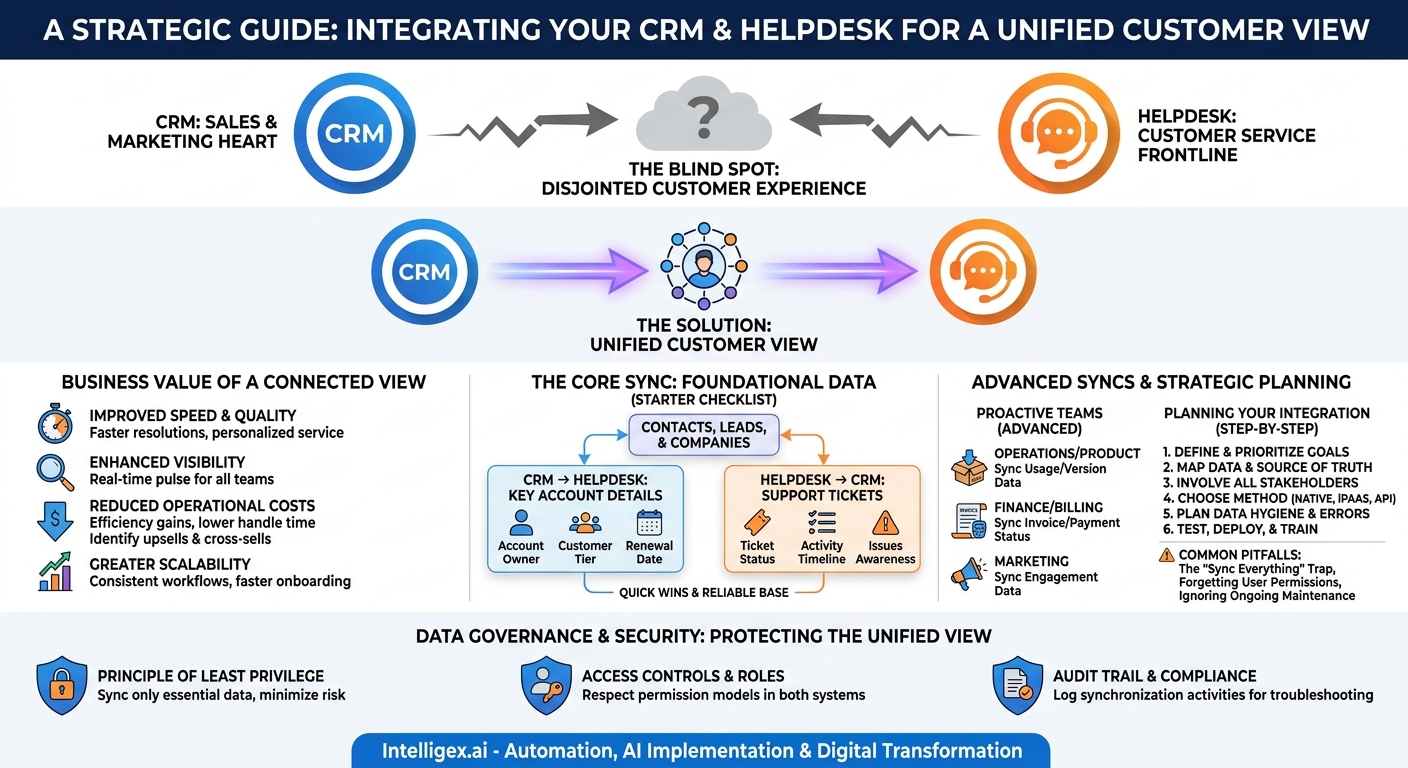
Your Customer Relationship Management (CRM) platform is the heart of your sales and marketing efforts. Your helpdesk is the frontline of customer service. When these two systems operate in separate silos, you create a blind spot right in the middle of your customer journey. Support agents lack the context to deliver personalized service, and sales teams miss critical insights into customer health. The result is friction, inefficiency, and a disjointed customer experience.
Integrating your CRM and helpdesk is not just a technical task; it’s a strategic move to create a single, unified view of your customer. This connection transforms siloed data into actionable intelligence, empowering your teams to work faster, smarter, and more collaboratively. The goal is to move from reactive problem-solving to proactive relationship-building, and it starts with syncing the right data for the right reasons.
The Business Value of a Connected Customer View
Before diving into the “what” and “how” of data synchronization, it’s crucial to understand the “why.” A well-executed integration delivers tangible business benefits across several key areas, turning a technical project into a driver of growth and efficiency.
- Improved Speed and Quality of Service: When a support agent can see a customer’s entire history directly within their helpdesk ticket, the need to switch tabs and hunt for information disappears. They instantly know who the customer is, what they’ve purchased, their support history, and even their value to the business. This context allows for faster resolutions (lower Average Handle Time) and more personalized, effective solutions (higher Customer Satisfaction scores).
- Enhanced Visibility for All Teams: Integration is a two-way street. When support tickets are visible in the CRM, your sales and account management teams gain a real-time pulse on customer health. They can see recurring issues, understand service-level agreement (SLA) performance, and avoid awkward sales calls to an unhappy customer. This 360-degree view breaks down departmental walls and fosters a shared sense of customer ownership.
- Reduced Operational Costs: Efficiency gains translate directly to cost savings. By reducing the manual effort of searching for data, agents can handle more tickets and focus on higher-value tasks. Furthermore, by identifying trends in support requests, your product and operations teams can address root causes, reducing overall ticket volume over time.
- Increased Revenue Opportunities: A support interaction is more than just a cost center; it’s an opportunity. An agent who understands a customer’s usage patterns and business goals can identify upsell or cross-sell opportunities. A seamless handoff from a support ticket to a sales lead in the CRM ensures these opportunities are never dropped.
- Greater Scalability: As your business grows, manual processes and data silos become unsustainable. An integrated system establishes a scalable foundation for customer operations. New hires can get up to speed faster with a single source of truth, and standardized workflows ensure a consistent customer experience, no matter how large your team becomes.
The Core Sync: Foundational Data Every Business Needs
If you’re just starting, don’t try to sync everything at once. This “boil the ocean” approach often leads to complex, noisy systems that are difficult to manage. Instead, begin with a core set of data points that provide the most immediate value. Think of this as the essential foundation for your integrated customer view.
What to Sync First: A Starter Checklist
- Contacts, Leads, and Companies: This is the most fundamental connection. Syncing your customer and account records ensures that every support ticket can be automatically associated with the correct entity in your CRM. This simple link is the key that unlocks all other contextual data. Without it, your systems remain effectively disconnected.
- Key Account Details to the Helpdesk: Not all customers are the same. Syncing a few critical fields from your CRM to your helpdesk allows your support team to prioritize and personalize their efforts. Good starting points include:
- Account Owner: So agents know who to contact internally for commercial questions.
- Customer Tier or Status: (e.g., “Enterprise,” “VIP,” “Trial”) to drive ticket routing and SLA rules.
- Contract Renewal Date: To flag time-sensitive interactions for at-risk accounts.
- Support Tickets to the CRM: Pushing ticket creation and status updates from the helpdesk into the CRM’s activity timeline is a game-changer for sales and account management. It provides them with passive, real-time awareness of customer issues. They no longer have to ask, “Is everything going okay with this account?” They can see the answer for themselves before they pick up the phone.
Focusing on these core elements first will deliver quick wins and build a solid, reliable base. You can solve the majority of cross-departmental communication issues with just these three synchronization points.
Advanced Syncs for Proactive and Specialized Teams
Once your foundational integration is stable, you can layer on more specialized data flows to solve specific business challenges. These advanced syncs move you from a reactive support model to a proactive, data-driven operation that involves teams beyond just Sales and Support.
For Operations and Product Teams
Syncing product usage or subscription data allows support to be more effective. If an agent knows exactly which product version a customer is on or which features they use most, they can skip basic diagnostic questions and get straight to the solution. This data, when aggregated, also provides the Product team with invaluable feedback, linking specific product areas to support ticket volume.
For Finance and Billing Teams
Integrating financial data can streamline a common source of support requests. Syncing information like invoice status, last payment date, or credit balance into the helpdesk gives agents the ability to answer basic billing questions without escalating to the Finance team. Conversely, flagging accounts with overdue payments in the helpdesk can inform the support provided. A support agent can gently remind a customer with a pending invoice, turning a support touchpoint into a collections opportunity.
For Marketing Teams
Imagine a support agent knowing that a customer has just downloaded a whitepaper about a new product feature. Syncing marketing engagement data, such as recent email clicks or content downloads, provides this context. It helps the agent understand the customer’s interests and tailor their communication, potentially leading to a conversation about the new feature and creating a warm lead for the Sales team.
A Step-by-Step Guide to Planning Your Integration
A successful integration project is built on careful planning, not just technical execution. Rushing into development without a clear strategy is a recipe for scope creep, budget overruns, and a system that doesn’t meet business needs. Follow these steps to lay the groundwork for success.
- Define and Prioritize Your Goals: Start with the business problem. What do you want to achieve? Don’t just say “we want to integrate Salesforce and Zendesk.” Instead, define a measurable outcome, such as, “We want to reduce agent time spent searching for customer data by 20%” or “We want to ensure our Account Managers are aware of any critical support issues within one hour.” Prioritize one or two key goals for your initial phase.
- Map Your Data and Define the Source of Truth: For every piece of data you plan to sync, you must designate a single “master” system. For example, your CRM (like Salesforce) is almost always the source of truth for customer contact and firmographic data. Your helpdesk (like Zendesk) is the source of truth for ticket status. Documenting this prevents data conflicts where systems overwrite each other with outdated information. Create a simple spreadsheet listing each data field, its purpose, and its master system.
- Involve All Stakeholders: An integration impacts multiple teams. Bring representatives from Sales, Support, Operations, and IT into the planning process early. Ask them: “What information do you wish you had from the other system?” and “What does your ideal workflow look like?” This collaborative approach ensures the final solution is practical and gets adopted by the users.
- Choose Your Integration Method: You generally have three options:
- Native Connectors: Many major CRM and helpdesk platforms offer pre-built integrations. These are often the fastest and easiest to set up but may lack flexibility for custom needs.
- Third-Party Integration Platforms (iPaaS): Tools like MuleSoft, Zapier, or Workato offer powerful, flexible connectors that can handle complex logic and custom data mapping without extensive coding.
- Custom API Development: For highly unique requirements, you can build a custom integration using the platforms’ APIs. This offers maximum flexibility but requires significant development resources and ongoing maintenance.
- Plan for Data Hygiene and Error Handling: What happens when data doesn’t match? What if a record is a duplicate? Plan your rules for data validation, cleaning, and merging. Decide how the system should handle errors. Should it halt the sync and send an alert, or should it log the error and continue? A solid error-handling plan is critical for a resilient integration.
- Test, Deploy, and Train: Never launch an integration to your entire company at once. Start with a small pilot group of power users. Let them test the workflows, provide feedback, and identify bugs. Use this feedback to refine the integration before a full rollout. Finally, create clear documentation and training sessions to ensure everyone knows how to use the new, connected system effectively.
Common Pitfalls and How to Avoid Them
Even with a solid plan, integration projects can go awry. Being aware of common mistakes can help you navigate the process more smoothly and avoid costly rework.
- The “Sync Everything” Trap: The temptation to sync every possible field is strong, but it’s a mistake. Over-syncing creates “data noise,” overwhelming users with irrelevant information and potentially slowing down system performance. Be ruthless in your prioritization. If a data field doesn’t support a specific goal you defined in the planning phase, don’t sync it.
- Forgetting User Permissions: Your CRM likely contains sensitive commercial information that not every support agent should see. A proper integration respects the permission models of both systems. Ensure that your synced data view in the helpdesk adheres to the principle of least privilege, showing agents only the information they need to do their jobs.
- Ignoring Ongoing Maintenance: An integration is not a one-time project. It’s a living connection that requires care. Software-as-a-Service (SaaS) platforms update their APIs, business processes change, and new custom fields are added. Assign clear ownership for monitoring the integration’s health and budget for periodic maintenance to keep it running smoothly.
Data Governance and Security in an Integrated World
Connecting systems that hold sensitive customer data demands a thoughtful approach to security and governance. As you increase the flow of information, you also increase the need for robust controls to protect that data and comply with regulations like GDPR and CCPA.
First, strictly enforce the principle of least privilege. Before syncing any data set, ask if the receiving team absolutely needs it. Does a Tier 1 support agent need to see the entire sales pipeline for an account, or do they just need to know the customer’s support tier and account owner? Syncing only essential data minimizes your risk exposure.
Second, ensure your integration logic respects access control lists (ACLs) and user roles in both systems. The integration user or service account should not have blanket administrator privileges. Configure its permissions carefully to only read and write the specific data objects required for the sync. This prevents a potential vulnerability in one system from compromising the other.
Finally, maintain a clear audit trail. Your integration platform or custom solution should log all synchronization activities. This is critical for troubleshooting issues and for demonstrating compliance. If an AI tool is used to automate actions based on synced data (for example, automatically closing a ticket when a CRM field is updated), it’s vital to have a human-reviewable log of why that action was taken.
Your Next Steps: From Plan to Action
Integrating your CRM and helpdesk is one of the highest-impact digital transformation projects you can undertake. It breaks down silos, empowers your teams with context, and places the customer at the center of your operations. By starting with a clear strategy and focusing on tangible business outcomes, you can build a connected ecosystem that drives efficiency, improves service quality, and uncovers new growth opportunities.
Ready to get started? Here’s a simple action plan:
- Assemble Your Team: Schedule a kickoff meeting with key stakeholders from your Support, Sales, and IT departments. Present the business case and get their input on the biggest pain points the integration could solve.
- Conduct a Data Audit: Work with your team to complete the data mapping exercise. Identify your core customer data points and formally designate the source of truth for each one.
- Define a Pilot Project: Choose one high-value, low-complexity data flow to start with. A great first step is often syncing key account details from the CRM to the helpdesk to enable smarter ticket routing. This delivers immediate value and builds momentum for the project.
- Evaluate Your Tools: Investigate the native connectors offered by your CRM (such as Salesforce) and helpdesk (such as Zendesk). Determine if they meet the needs of your pilot project or if a more flexible third-party platform is required.
By taking a measured, strategic approach, you can unlock the immense value of a truly unified customer view.
Your Next Read:
Get a FREE
Proof of Concept
& Consultation
No Cost, No Commitment!
