

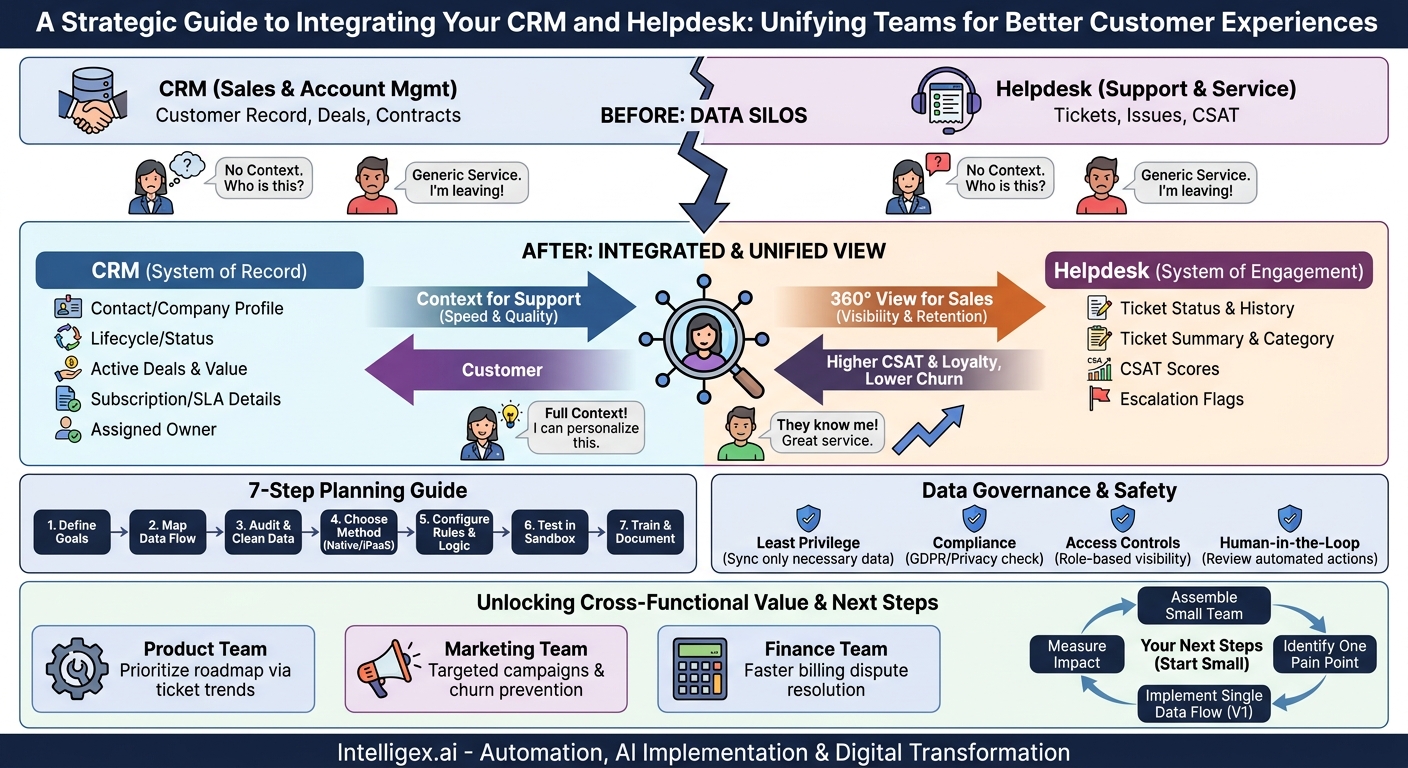
Your support agent picks up a call. A frustrated customer is on the line, but the agent has no context. They don’t know if this is a brand new user, a key decision-maker at a flagship account, or someone whose multi-year contract is up for renewal next week. The agent treats the interaction as just another ticket, providing a generic solution. The customer, feeling unheard and undervalued, hangs up and starts looking at your competitors. This scenario is costly, preventable, and all too common when your core business systems operate in silos.
The solution lies in a strategic integration between your Customer Relationship Management (CRM) platform and your helpdesk software. This isn’t just a technical task for your IT department. It’s a fundamental business transformation that connects your revenue-generating teams with your customer-facing support teams. When done correctly, this integration creates a unified view of the customer, driving significant improvements in speed, service quality, and operational visibility.
Why Bother? The Core Business Value of Integration
Connecting your CRM and helpdesk isn’t about simply moving data around. It’s about empowering your teams with the context they need to make smarter decisions, faster. The value manifests across several key business areas.
- Drastically Improved Speed: Agents spend less time toggling between screens and searching for customer information. With key CRM data embedded directly in their helpdesk view, they can understand a customer’s history in seconds, not minutes. This directly reduces average handle time (AHT) and increases the number of tickets an agent can resolve per day.
- Higher Quality Interactions: Context is king. When an agent sees that a ticket is from a high-value customer in the middle of a major expansion deal, their approach changes. They can provide a more personalized, empathetic, and strategic response. This leads to higher customer satisfaction (CSAT) scores and builds long-term loyalty.
- Complete Customer Visibility: The integration creates a two-way street. Your sales and account management teams gain a real-time window into the support experience of their clients. They can see open tickets, satisfaction scores, and recurring issues directly within the CRM. This prevents them from being blindsided on a sales call and allows them to proactively address problems before they escalate.
- Reduced Operational Cost: Efficiency gains translate directly to cost savings. Faster resolution times mean you can handle more support volume without increasing headcount. Furthermore, by retaining customers through better service, you reduce churn, which is almost always more expensive to combat than it is to prevent.
- Foundation for Scalability: As your business grows, the volume of customer interactions explodes. A manual, copy-and-paste workflow between systems will break. An automated, integrated system ensures that your processes can scale efficiently, maintaining a high quality of service even as you add more customers and agents.
The Foundation: What to Sync from CRM to Helpdesk
The first and most critical flow of information is from your system of record for customer relationships (the CRM) to your system of engagement (the helpdesk). This equips your support team with the essential context they need to do their jobs effectively. Pushing too much data can be overwhelming, so focus on syncing information that enables agents to answer three key questions: Who is this person? What is their relationship with our company? Why does it matter?
Key Data to Sync from CRM: A Checklist
- Contact and Company Information: This is the non-negotiable baseline. Sync the contact’s name, email, phone number, and title, as well as the associated company name, size, and industry. Without this, you can’t even be sure you’re talking to the right person.
- Lifecycle Stage or Account Status: Is this a new lead, a prospect in an active sales cycle, a long-term customer, or a former customer? This single field provides immense context and helps agents tailor their language and solutions appropriately.
- Deal and Opportunity Data: For B2B companies, this is a game-changer. Sync the name, stage, and value of any open opportunities associated with the contact or their company. An agent seeing an open “deal worth six figures” will handle the support ticket with a different level of urgency and care.
- Contract and Subscription Details: Provide visibility into the customer’s business value. Sync key fields like their current subscription plan (e.g., Basic, Pro, Enterprise), the contract renewal date, and key service-level agreement (SLA) entitlements. This ensures you meet your contractual obligations and prioritize support for premium-tier customers.
- Assigned Owner: Who is the Account Manager or Sales Representative responsible for this relationship? Syncing this allows the support agent to easily identify and loop in the right internal stakeholder if an issue needs to be escalated or has commercial implications.
Practical Scenario: A support ticket arrives from “[email protected].” Without integration, the agent sees only an email address. With integration, their helpdesk view is immediately enriched. They see Jane is the VP of Operations at Acme Corp, a customer on your Enterprise plan with a contract renewal in two months. They also see an open opportunity for a major upsell being managed by their colleague, Bob. The agent now understands this is a critical interaction. They can resolve the issue quickly and add an internal note for Bob in the CRM, letting him know they provided a positive support experience ahead of his next call.
Closing the Loop: What to Sync from Helpdesk to CRM
An integration is not a one-way street. Pushing support data back into the CRM is what transforms it from a sales tool into a true customer relationship platform. This gives your entire organization, especially sales and account management, a 360-degree view of the customer’s health and history.
Syncing this data prevents situations where a salesperson calls a “happy” customer to discuss an upgrade, only to be met with anger about a long-unresolved support issue. Visibility closes these communication gaps and protects your revenue.
Essential Data to Sync from Helpdesk:
- Ticket Creation and Status: When a customer creates a new ticket, this event should appear in the activity timeline of the corresponding contact or account in the CRM. Key status changes (e.g., “Awaiting Customer Response,” “Resolved”) should also be synced to provide a real-time pulse on support activity.
- Ticket Details (Summary Level): You don’t need to sync every single comment. Focus on the most important metadata: the ticket subject line, priority level (e.g., Low, High, Urgent), and the ticket type or category (e.g., “Billing Inquiry,” “Technical Bug,” “Feature Request”).
- Customer Satisfaction (CSAT) Scores: When a customer rates their support interaction, that score is a vital piece of health data. Sync the CSAT score (and any comments) back to a field on the contact or account record in the CRM. This allows you to build reports and dashboards on customer sentiment over time.
- Escalation Flags: If a ticket is escalated to a higher support tier or a manager, that’s a significant event. A simple checkbox field in the CRM, “Recent Support Escalation,” can act as a powerful warning sign for account managers to investigate further.
Practical Scenario: An account manager is preparing for their quarterly business review (QBR) with a key client. They open the account record in their CRM, which is their primary workspace. Instead of having to log into the helpdesk, they see a dashboard directly on the account page showing that this client has submitted 15 tickets in the last quarter, with 5 related to a specific product feature and an average CSAT score that has been trending downward. Armed with this data, the account manager can now proactively address these service issues during the QBR, demonstrating that the company is listening and turning a potential negative into a relationship-building positive.
A Step-by-Step Guide to Planning Your Integration
A successful integration project is built on a clear plan, not just technical prowess. Rushing into development without a strategy often leads to syncing the wrong data, creating confusing workflows, and ultimately, low adoption by your teams. Follow these steps to lay a solid foundation.
- Define and Prioritize Your Goals: Start with the “why.” What specific business problem are you trying to solve? Write it down. Is your primary goal to reduce agent handle time? To give sales visibility into support escalations? To automate ticket creation from a web form? Choose one or two high-impact goals to tackle first. Trying to do everything at once is a recipe for failure.
- Map the Data Flow: Get stakeholders from sales, support, and operations in a room (virtual or physical) with a whiteboard. For each goal, map out exactly what information needs to move, where it comes from, and where it needs to go. For example: “When a deal in the CRM (like Salesforce) moves to the ‘Closed Won’ stage, a new account onboarding ticket should be created in the helpdesk (like Zendesk) and assigned to the Onboarding team.” Be this specific.
- Audit and Clean Your Data: Garbage in, garbage out. Before you connect the pipes, make sure the water is clean. Do you have a consistent way of naming accounts in both systems? Are your contact email addresses up to date? Do you have custom fields that contain the same information but have different names? Identify these discrepancies and create a plan to standardize them. This is often the most time-consuming but most important step.
- Choose Your Integration Method: You generally have two options. First, check if your CRM and helpdesk offer a native, pre-built connector. These are often the easiest to set up for basic use cases. For more complex logic and multi-system workflows, you may need an Integration Platform as a Service (iPaaS) tool. These platforms act as a central hub for connecting many applications and allow for more customization.
- Configure Sync Rules and Logic: This is where you define the behavior. Will the data sync in real-time or on a schedule (e.g., every 15 minutes)? Is the sync one-way or two-way? If it’s two-way, which system is the “source of truth” in case of a conflict? What events trigger the sync (e.g., a field is updated, a new record is created)?
- Test in a Sandbox Environment: Never build and test an integration in your live production environment. Use developer sandboxes to connect the systems and run through every possible scenario. Test with new contacts, existing contacts, and edge cases. Have actual sales and support reps use the test environment to ensure the new data is useful and appears where they expect it.
- Train Your Teams and Document Everything: Don’t just turn on the integration and expect people to use it. Hold short training sessions to show your teams the new information available to them and, crucially, how it should change their daily workflow. Provide simple documentation that explains the data mappings and rules for future reference.
Beyond Sales and Support: Unlocking Cross-Functional Value
While the most immediate benefits of a CRM and helpdesk integration are for sales and support, the true power is realized when other departments tap into this newly unified data stream. This breaks down departmental silos and allows the entire organization to operate from a single source of customer truth.
- Product Teams: By categorizing and syncing ticket data into the CRM, product managers can build reports to see which features are generating the most confusion or bug reports. When this data is overlaid with CRM data like company size or subscription level, they can prioritize roadmap items that will have the biggest impact on high-value customer segments.
- Marketing Teams: Imagine being able to build a marketing list of every customer who has submitted a feature request for “dark mode.” When the feature is launched, marketing can send them a highly targeted and relevant announcement, driving adoption and goodwill. They can also use support data to identify customers at risk of churning and enroll them in targeted retention campaigns.
- Finance Teams: When a customer submits a billing-related ticket, syncing that information to the CRM account record gives the finance and collections team immediate context. They can see the nature of the dispute without having to ask the support team, streamlining the resolution of invoicing issues.
Data Governance and Safe Implementation
Connecting systems that hold sensitive customer data requires a thoughtful approach to governance and security. With great data visibility comes great responsibility. The goal is to empower teams, not to create a data free-for-all that introduces privacy risks or compliance violations.
Practice the Principle of Least Privilege: Do not sync all data by default. Just because you can sync a field doesn’t mean you should. A frontline support agent likely needs to see a customer’s subscription tier, but they probably do not need to see the detailed financial history or private notes from the sales team. Configure your integration to push only the data that is necessary for each role to perform its function. This minimizes exposure of sensitive information.
Ensure Data Privacy and Compliance: Be mindful of regulations like GDPR and CCPA. When syncing data across platforms, especially if they are hosted in different regions, ensure you are compliant with data residency and privacy rules. Always have a clear understanding of what personal data is being moved and why. This is especially important for helpdesk tickets, which can sometimes contain sensitive user information in the comments.
Maintain Access Controls: The integration itself moves the data, but the permissions within each application control who can see it. Double-check the role-based access controls in both your CRM (such as HubSpot or Salesforce) and your helpdesk. Ensure that the new, synced data is only visible to the appropriate user profiles.
Plan for a Human in the Loop: Be cautious with automations that take action based on synced data. For example, automatically flagging an account for non-renewal in the CRM just because of one low CSAT score could be an overreaction. It is often safer to use the synced data to create a “task” or “notification” for a human (like an account manager) to review the situation and decide on the appropriate next step.
Your Next Steps: From Plan to Action
Understanding the “what” and “why” of CRM and helpdesk integration is the first step. Turning that knowledge into a business asset requires a deliberate, focused effort. Instead of aiming for a massive, all-encompassing project, start with small, high-impact wins to build momentum and prove the value.
Here is a simple plan to get started:
- Assemble a small, cross-functional team. Invite one key stakeholder from Sales, one from Customer Support, and one from IT or Operations. This core team will be responsible for defining the initial goals.
- Identify one critical pain point. In your first meeting, focus on a single, shared problem. A great starting point is often: “Our support agents don’t know who our most important customers are.”
- Implement a single data flow. Based on that pain point, scope your first integration to solve only that problem. For instance, your entire Version 1 project could be to simply sync the “Account Tier” and “Account Owner” fields from your CRM to your helpdesk.
- Measure the impact. Before you launch, baseline a relevant metric, like average handle time or CSAT for your top-tier customers. After a month, measure it again. Use this data to justify expanding the integration to the next prioritized use case.
By following this iterative approach, you transform a potentially overwhelming technical project into a series of manageable, value-driven business improvements. You will build a more cohesive, customer-centric organization one data point at a time.
Your Next Read:
Get a FREE
Proof of Concept
& Consultation
No Cost, No Commitment!
