

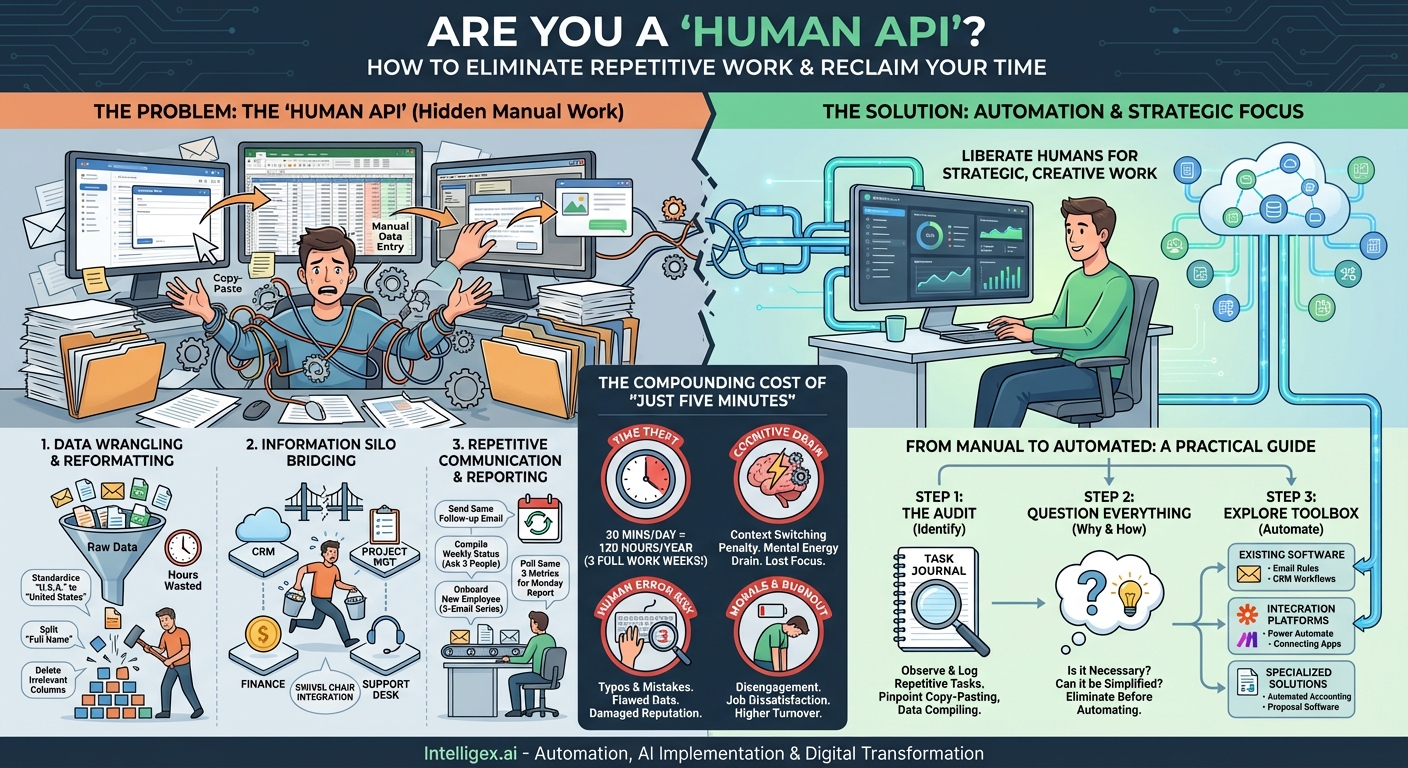
We’ve all been there. It’s the end of the month, and the dreaded performance report is due. Your morning ritual transforms from a strategic planning session into a chaotic scramble. You open three different browser tabs, a clunky desktop application, and at least two oversized spreadsheets. The next hour is a blur of clicks and keystrokes: download a CSV from the sales portal, copy and paste columns A, D, and F into your master Excel file. Then, jump over to the marketing analytics platform, filter by date range, and manually type the key metrics into a PowerPoint slide. You meticulously check for formatting errors, align the decimals, and pray you didn’t transpose any numbers. Finally, you attach the finished product to an email and hit send, letting out a sigh of relief. You’ve been productive, right? You’ve completed a critical task.
But have you? Or have you just completed several hours of high-stakes, low-value manual labor? This is the digital equivalent of working on an assembly line, yet it’s a reality woven into the fabric of nearly every “knowledge worker” role. This is the hidden manual work of the modern office—the repetitive, non-strategic, and soul-crushing tasks that masquerade as a normal part of our jobs. They are the silent productivity killers, the unseen drains on our time, energy, and creativity. They are the tasks we do simply because “that’s how it’s always been done.”
What Does This Hidden Work Look Like?
This invisible workload isn’t confined to a single department or role. It’s a universal phenomenon, manifesting in slightly different ways across an organization. Once you start looking for it, you’ll see it everywhere. These tasks typically fall into a few key categories.
Data Wrangling and Reformatting
This is perhaps the most common form of hidden manual work. It’s the process of taking data from one source and manually manipulating it to be usable in another. Think about every time you’ve had to:
- Copy and paste information from an email into a spreadsheet.
- Download a CSV file and manually delete irrelevant columns or rows before uploading it to another system.
- Standardize data entries, such as changing “United States,” “USA,” and “U.S.A.” to a single, consistent format.
- Split a “Full Name” column into separate “First Name” and “Last Name” columns in Excel.
Each of these actions seems small in isolation, but they are incredibly time-consuming and prone to error. You become a human data processor, performing a task that a simple script could do in milliseconds, flawlessly, every single time.
Information Silo Bridging
In the modern workplace, we use a vast ecosystem of specialized software—a CRM for sales, a project management tool for operations, an accounting platform for finance, and a support desk for customer service. The problem is, these systems often don’t communicate with each other. The bridge between them? You.
This is what’s known as being the “human API.” You manually carry information from one system to another. Examples include:
- Copying a new customer’s details from your CRM into your invoicing software to create their first bill.
- Taking notes during a client call and then re-typing those same notes into the project management tool for the delivery team.
- Screen-shotting a performance dashboard in one tool and pasting it into a Slack channel to update the team.
This “swivel chair integration”—physically or digitally turning from one screen to another—is a massive source of inefficiency. It’s the digital equivalent of carrying buckets of water from a well instead of building a pipe.
Repetitive Communication and Reporting
Communication is vital, but a significant portion of it can be manual and repetitive. This isn’t about crafting a thoughtful, strategic email. It’s about the recurring, formulaic messages and reports that consume our days.
- Sending the same follow-up email to a list of clients who haven’t responded.
- Compiling a weekly status update by asking three different people for their inputs and then consolidating them into a single email or document.
- Onboarding a new employee or client by sending a series of five pre-written emails over the course of two weeks, a process you manage from your own calendar.
- Manually pulling the same three metrics from the same three sources every Monday morning to create a report that you then email to the same list of stakeholders.
While templates can help, the act of initiating, tracking, and executing these communications is still a manual process that occupies valuable mental real estate.
The Compounding Cost of “Just Five Minutes”
The insidious nature of this hidden work is that each individual task often feels trivial. “Oh, it only takes five minutes to update that spreadsheet.” “It’s just a quick copy-paste job.” But this “five-minute” mindset masks a devastating cumulative effect on individuals and the organization as a whole. The cost is far greater than just the lost time.
Time Theft and Lost Opportunity: Let’s do some simple math. If you spend just 30 minutes a day on these kinds of manual tasks—a very conservative estimate for most office workers—that adds up to 2.5 hours per week. Over a 48-week work year, that’s 120 hours, or three full work weeks, dedicated to being a human robot. What could you or your team accomplish with an extra three weeks? That’s time that could be spent on strategic planning, creative problem-solving, customer relationship building, or professional development—the very activities that drive growth and innovation.
Cognitive Drain and Context Switching: Our brains are not designed for rapid-fire switching between deep, focused work and shallow, repetitive tasks. Every time you have to stop writing a strategic proposal to go copy-paste data for a report, you incur a “context switching” penalty. It shatters your concentration and drains your mental energy. Getting back into a state of deep focus can take upwards of 20 minutes. This constant interruption from manual tasks ensures that you spend your day feeling busy and exhausted, but without making significant progress on your most important goals.
Increased Risk of Human Error: Humans are not machines. When we perform repetitive tasks, our minds wander, we get tired, and we make mistakes. A single misplaced decimal, a transposed number, or a missed row during a copy-paste operation can have significant consequences. It can lead to incorrect financial reporting, flawed business decisions based on bad data, and a damaged reputation with clients. Automating these tasks doesn’t just make them faster; it makes them infinitely more reliable.
Employee Morale and Burnout: You hired intelligent, capable, and ambitious people for their skills and expertise. Forcing them to spend a significant portion of their day on mind-numbing, manual work is a recipe for disengagement. It’s demoralizing and sends a clear message that their time and talent are not valued. Over time, this leads to burnout, job dissatisfaction, and ultimately, higher employee turnover. The best and brightest won’t stick around in a role where their primary function is to act as a bridge between two software systems.
From Manual To Automated: A Practical Guide
Recognizing the problem is the first step, but the real transformation comes from actively seeking out and eliminating this hidden manual work. The goal is not to replace humans, but to liberate them to do the work that only humans can do. Here’s a practical framework to get started.
Step 1: The Audit – Identify the Repetitive
You can’t fix what you can’t see. For one week, become a meticulous observer of your own work. Keep a simple log or “task journal.” Every time you find yourself doing something that feels repetitive, tedious, or involves moving data between applications, write it down. Ask yourself questions like:
- What tasks do I perform every single day or every single week without fail?
- Which parts of my job involve copy-pasting?
- Where am I manually compiling information from multiple sources?
- What tasks do I dread the most because they are so boring?
At the end of the week, review your list. You will likely be shocked at the sheer volume of hidden manual labor you perform. Prioritize the list based on frequency and time consumed.
Step 2: Question Everything – The “Why” and “How”
Before jumping to automation, take a critical look at the process itself. It’s crucial not to simply automate a broken or unnecessary process. For each task on your list, ask:
- Why are we doing this at all? Sometimes, reports and processes exist out of pure inertia. Is the information still valuable? Is anyone actually reading this report? The best way to eliminate manual work is to eliminate the work itself.
- Can this process be simplified? Is there a more direct way to achieve the same outcome? Can we simplify the data we collect or reduce the number of steps involved before we even consider automation?
Simplification before automation is key. Paving a cow path just gives you a smoother cow path; it doesn’t get you a highway.
Step 3: Explore Your Automation Toolbox
Once you’ve identified and simplified your repetitive tasks, it’s time to find the right tool to automate them. The good news is that powerful automation tools are more accessible and user-friendly than ever before.
- Start with Your Existing Software: Many of the applications you already use have powerful automation features built-in. Think email rules and templates in Outlook or Gmail, macros in Microsoft Excel, or workflow automation features within modern CRMs like HubSpot or Salesforce. Explore the settings and features of your most-used tools first.
- Embrace Integration Platforms (No-Code/Low-Code): This is where the real magic happens. Tools like Zapier, Make (formerly Integromat), and Microsoft Power Automate are designed to act as that missing pipe between your applications. They allow you to create “if this, then that” workflows without writing a single line of code. For example: “When a new entry is submitted in a Google Form, then create a new card in Trello and send a notification to a specific Slack channel.” These platforms can eliminate nearly all “human API” work.
- Look for Specialized Solutions: For more complex, department-specific tasks, there might be a dedicated piece of software. For example, accounting software that automatically pulls transactions from bank accounts, or proposal software that auto-populates client data from your CRM.
The journey away from hidden manual work is a shift in mindset. It’s about moving from being a passive operator of processes to an active designer of more efficient systems. It’s about cultivating a healthy intolerance for repetitive work and constantly asking, “Can this be done better?” By shining a light on these hidden tasks and systematically eliminating them, we don’t just become more productive. We reclaim our time, our focus, and our capacity for the creative, strategic, and deeply human work that truly drives value and provides professional fulfillment.
Related Posts
Category:
Get a FREE
Proof of Concept
& Consultation
No Cost, No Commitment!
