

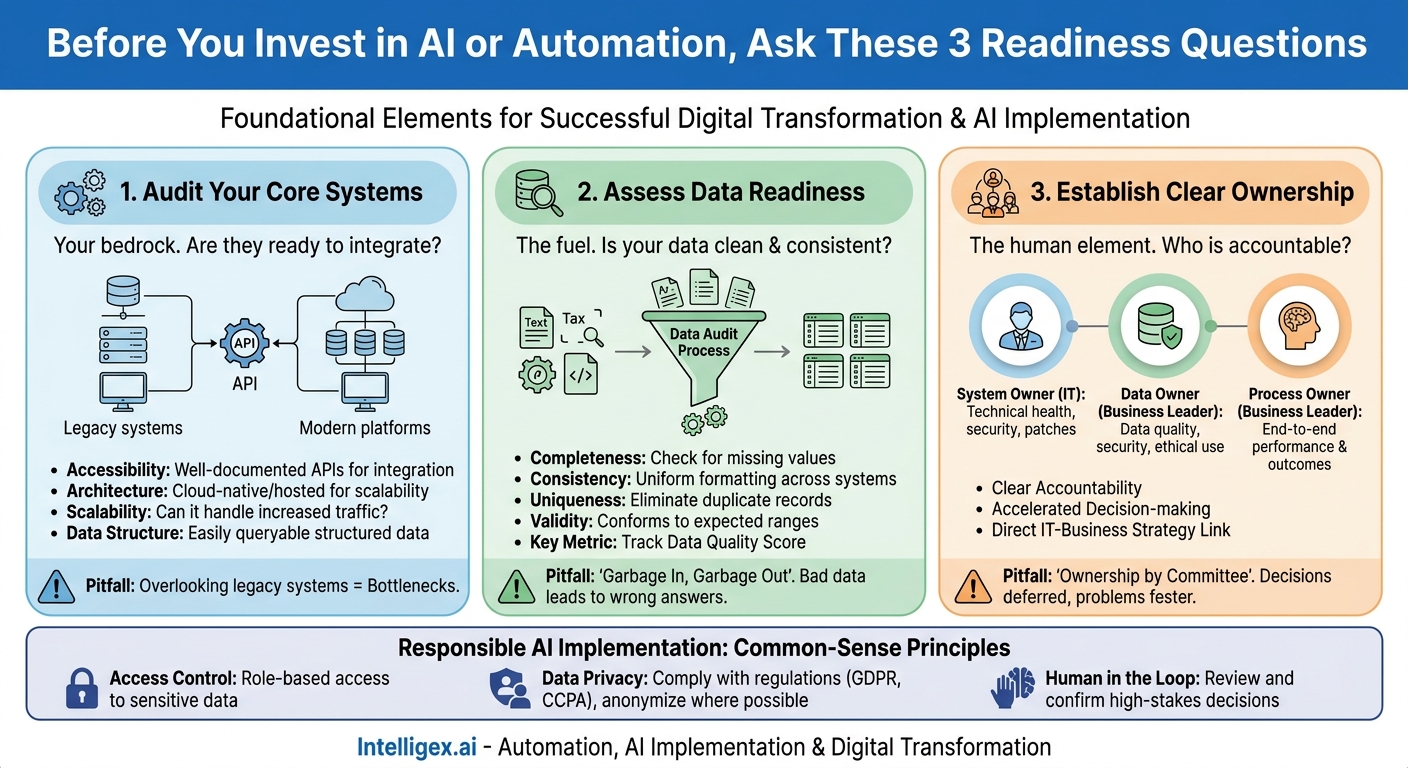
Digital transformation is not a single event. It is a fundamental rewiring of how a business operates, driven by technology and data. Yet many initiatives stumble, not because the technology is flawed, but because the foundational elements were never properly assessed. Before you invest in a new AI-powered platform or an ambitious automation project, you must ask a critical question: is your organization truly ready? True readiness isn’t about having the biggest budget or the latest software. It’s about having the right systems, clean data, and clear ownership in place. Without this trifecta, even the most promising technology will fail to deliver its expected value.
This readiness check is your practical guide to evaluating these three pillars. It moves beyond abstract concepts and provides actionable steps to diagnose your current state, identify risks, and build a solid foundation for successful transformation. By focusing on these core components, you can significantly increase the probability of projects that deliver tangible business outcomes, such as increased speed, lower operational costs, and higher quality outputs.
Auditing Your Core Systems: The Foundation of Change
Your existing systems are the bedrock of any transformation. These are the platforms that run your daily operations, from your CRM and ERP to your custom-built internal applications. Introducing new technology, especially AI and automation, requires these systems to communicate and share data effectively. A legacy system that operates in a silo can become a major bottleneck, undermining the entire project.
The goal of a systems audit is not to find fault, but to create a realistic map of your current technology landscape. You need to understand what you have, how it works, and what it’s capable of. The key is to evaluate systems based on their ability to integrate with modern tools. A system’s age is less important than its accessibility. An older, on-premise application with a well-documented API can be more valuable than a new cloud application with a closed ecosystem.
For example, a marketing team looking to implement an AI-driven personalization engine needs to know if their CRM, email platform, and customer data platform can exchange information in near real-time. If the CRM only allows a manual data export once a day, the personalization project is hamstrung from the start. This simple discovery saves months of development effort and misplaced budget.
Key Questions for Your Systems Audit
When evaluating each critical system, use this checklist to guide your assessment. This exercise should involve both IT and the business teams who use the software daily.
- Accessibility and Integration: Does the system have a modern, well-documented API (Application Programming Interface)? An API is the digital doorway that allows other software to connect and interact with it. Without one, integration becomes complex and expensive.
- Architecture: Is the system cloud-native, cloud-hosted, or on-premise? Cloud-based systems, like those running on Amazon Web Services, often offer greater scalability and easier integration points than on-premise counterparts.
- Scalability: Can the system handle a significant increase in data volume or user traffic? An automation project that triples the number of transactions a system processes could cause a poorly scaled system to crash.
- Administrative Overhead: Who supports the system? Is it a third-party vendor or an internal team? Understanding the support model is crucial for planning changes and troubleshooting issues.
- Data Structure: Is the data within the system structured and easily queryable? Unstructured data or a convoluted database schema can make it nearly impossible for new tools to extract meaningful information.
The primary pitfall here is overlooking the “non-critical” or legacy systems. Often, crucial business knowledge and data are locked away in an old Access database or a forgotten mainframe application. A thorough audit uncovers these hidden dependencies before they become project-derailing roadblocks.
Assessing Data Readiness: From Raw Input to Actionable Insight
AI and automation tools are powerful, but they are not magic. Their performance is entirely dependent on the quality of the data they are given. Feeding a sophisticated algorithm with incomplete, inconsistent, or inaccurate data will only get you to the wrong answer faster. A rigorous data readiness assessment is non-negotiable.
Think of it in terms of a simple business process, like sales forecasting. If your sales team enters customer data into your CRM inconsistently (e.g., “Intelligex Inc.”, “Intelligex”, “Intelligex, Inc.”), a forecasting model will treat these as three separate companies, leading to a wildly inaccurate forecast. The problem isn’t the model; it’s the data. This principle applies everywhere, from supply chain optimization to financial reporting.
True data readiness goes beyond just fixing typos. It involves ensuring data is clean, consistent, and has the necessary context to be useful. This is where many organizations discover the hidden “data debt” they have accumulated over years of inconsistent processes and system migrations.
A 4-Step Process for a Mini Data Audit
You don’t need a massive, company-wide data cleansing initiative to get started. Begin by focusing on the specific data required for a single, high-value transformation project. Follow these steps:
- Identify Key Data Entities: For your chosen project, what are the most critical pieces of information? For a customer churn prediction model, this would be customer demographics, purchase history, support ticket records, and website activity logs. List every data source.
- Profile the Data: Use simple tools (even spreadsheets can work for small datasets) to analyze the data from each source. Look for common quality issues:
- Completeness: Are there a lot of missing values or null fields?
- Consistency: Are units of measure, dates, and names formatted the same way across systems?
- Uniqueness: Are there duplicate records for customers, products, or transactions?
- Validity: Does the data conform to expected ranges? (e.g., no negative values for order quantities).
- Validate with Business Users: Data quality is defined by its fitness for a specific purpose. Share your findings with the people who work with this data every day. They can provide crucial context. For example, they might know that a “null” value in a specific field actually means “N/A” and is not a quality issue.
- Document Data Lineage: Create a simple map that shows where the data originates, how it travels between systems, and what transformations it undergoes. This helps identify where quality issues are being introduced and is essential for governance and troubleshooting later. Adhering to established data quality standards, such as those outlined by the International Organization for Standardization (ISO), can provide a formal framework for this process.
The key metric to track here is your data quality score, which can be as simple as the “percentage of complete and valid records” for a critical dataset. Watching this number improve over time is a tangible measure of progress.
Establishing Clear Ownership: The Human Element of Transformation
Technology and data are inert without people to manage and take responsibility for them. One of the most common reasons for failure in digital transformation is ambiguous or non-existent ownership. When a new automated process breaks, who is responsible for fixing it? When a data feed is discovered to be inaccurate, who is accountable for its quality? If the answer is “everyone” or “the project team,” the real answer is “no one.”
Clear ownership ensures accountability, accelerates decision-making, and creates a direct line of communication between technology and business strategy. It transforms technology from a passive tool into an actively managed asset. This requires defining and assigning three distinct roles for any major process or system.
The Three Essential Owner Roles
- System Owner: This person, typically from IT, is responsible for the technical health and maintenance of a specific application or platform. They manage uptime, security, patches, and technical integrations. They ensure the system is running, but they are not responsible for how it is used by the business.
- Data Owner: This individual, usually a senior leader from a business function, is accountable for the quality, security, and ethical use of a specific data domain. The Head of Sales might be the Data Owner for all customer data in the CRM. The CFO would be the Data Owner for financial data in the ERP. They define the rules for data entry and usage.
- Process Owner: This is the business leader accountable for the end-to-end performance of a business process. The Director of Supply Chain is the Process Owner for the “order-to-cash” process. They are responsible for the business outcomes, such as efficiency and customer satisfaction, that the process generates. They are the ultimate customer of the systems and data.
A classic pitfall is “ownership by committee.” While collaboration is vital, a single person must be the final decision-maker for each of these roles. Without a named individual, crucial decisions are deferred, and problems fester.
Putting It All Together: A Practical Scenario
Let’s apply this framework to a common business challenge: automating the Accounts Payable (AP) invoice processing system. The goal is to reduce manual data entry, speed up payment cycles, and minimize costly errors.
The Readiness Checklist in Action
Before launching the project, the team conducts a readiness check:
1. Systems Audit:
- The company’s ERP is a cloud-based version of NetSuite. The team confirms it has a robust API for creating vendor bills automatically. (Readiness: High)
- Invoices arrive as PDF attachments in a shared email inbox. A new AI tool will need access to this inbox to read the files. (Readiness: Medium – requires configuration but is feasible).
- Vendor information is stored in the ERP, but the procurement team also uses a separate legacy application for vendor contracts that has no API. This is identified as a risk. (Readiness: Low – a plan is needed to migrate or integrate this data).
2. Data Readiness:
- A sample of 100 invoices is reviewed. The team finds that 15% are missing a valid Purchase Order (PO) number, which is required for automated matching. This is a major data quality issue.
- Vendor names on invoices are often slightly different from the names in the ERP (e.g., “ACME Corp” vs. “ACME Corporation LLC”). This will cause matching failures.
- The team decides to measure “First-Pass Match Rate,” the percentage of invoices processed automatically without human intervention. The initial baseline is estimated to be low due to the data issues.
3. Ownership:
- Process Owner: The Controller is assigned as the Process Owner. She is responsible for the overall “invoice-to-pay” cycle time and accuracy.
- System Owner: An IT applications manager is named the System Owner for the ERP.
- Data Owner: The AP Manager is designated the Data Owner for vendor master data within the ERP. Her first task is to launch a project to clean up vendor names and enforce the policy that all new vendors must be entered correctly.
By doing this upfront work, the team has a clear picture of the real challenges. They can now build a project plan that includes tasks for data cleanup and addressing the legacy contract system, dramatically increasing the chances of success and delivering on the promised business value: faster processing, fewer errors, and better visibility into cash flow.
A Note on AI and Responsible Implementation
When your transformation involves AI, readiness takes on an additional layer of responsibility. AI models learn from your data, and their decisions can have real-world impacts on your customers, employees, and finances. Implementing these tools safely is not just a technical requirement; it is a business imperative for maintaining trust and managing risk.
Responsible implementation doesn’t need to be complex. It boils down to three common-sense principles:
- Access Control: Not everyone in your organization should have access to sensitive data or powerful AI tools. Implement role-based access controls to ensure that employees can only see the data and use the models relevant to their jobs. This is a fundamental security practice that becomes even more critical with AI.
- Data Privacy: Be mindful of the data you are using, especially if it includes personally identifiable information (PII) of customers or employees. Ensure your data handling practices comply with regulations like GDPR or CCPA. Where possible, use anonymized or aggregated data for training models to minimize privacy risks.
- Human in the Loop: For high-stakes decisions, never allow an AI to operate with full autonomy. A “human in the loop” approach ensures that a person reviews and confirms the AI’s recommendations before they are finalized. For example, an AI might recommend an invoice for payment, but a human must give the final approval. This builds trust, catches edge-case errors, and keeps accountability where it belongs: with people.
Your Immediate Next Steps
Assessing your organization’s readiness for transformation can feel like a monumental task. The key is to start small and build momentum. Do not try to boil the ocean by auditing every system and dataset at once. Instead, take a focused, iterative approach.
Here is a simple action plan you can execute next week:
- Select One Process: Choose a single, high-impact business process that is a candidate for improvement. Good options are often found in Finance, HR, or Operations, where repetitive, rules-based tasks are common.
- Assemble a Small Team: Gather a representative from the business (who feels the pain), an IT contact (who knows the systems), and someone from your data or analytics team. This could be a 60-minute meeting.
- Conduct a Rapid Assessment: Use the core questions from this article to guide your discussion. Focus on identifying the biggest potential roadblocks across systems, data, and ownership for that one process.
- Create a One-Page Summary: Document your findings. This is not a 50-page report. It is a concise summary of the current state, the identified risks, and a high-level recommendation. This single page is a powerful tool for communicating with leadership and securing buy-in for a more formal deep-dive.
By taking these pragmatic steps, you shift the conversation from “what new technology should we buy?” to “what must we do to be ready to succeed with new technology?” This foundational work is the single most important investment you can make in the success of your digital transformation journey.
Your Next Read:
Category:
Get a FREE
Proof of Concept
& Consultation
No Cost, No Commitment!
