

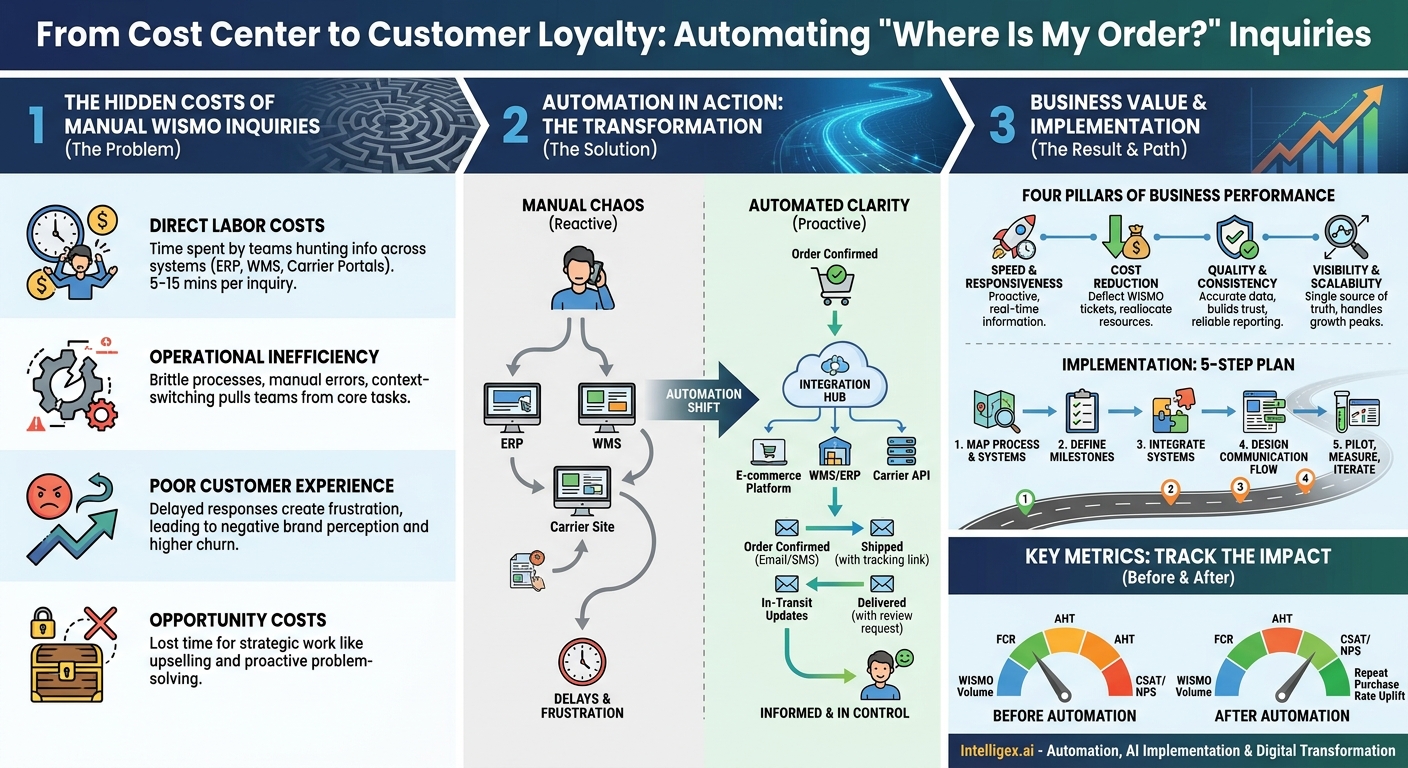
The question seems simple: “Where is my order?” Yet for many businesses, answering it is a complex, time-consuming, and expensive ordeal. This single touchpoint, often an afterthought in the sales cycle, has a disproportionate impact on customer satisfaction, operational efficiency, and ultimately, your bottom line. While teams manually chase down tracking numbers and stitch together updates from different systems, they are pulled away from strategic work. The cost isn’t just in wasted hours; it’s in lost customers, frustrated employees, and missed opportunities for growth.
Shifting from a manual, reactive approach to a proactive, automated order status system is more than a technical upgrade. It’s a fundamental business transformation. It turns a major cost center into a powerful tool for building customer loyalty and creating a more resilient, scalable operation. This change impacts every department, from the front-line support agent to the supply chain analyst and the finance team forecasting revenue.
The Hidden Costs of Manual Order Tracking
The expense of manually handling “Where is my order?” (WISMO) inquiries goes far beyond the salary of a customer service representative. The true cost is a web of direct and indirect drains on your business, creating friction for customers and employees alike. Understanding these hidden costs is the first step toward building a business case for automation.
Direct Labor Costs
The most obvious cost is the time your teams spend finding and relaying information. Consider a typical manual workflow. A customer emails support. An agent creates a ticket, logs into the e-commerce platform to find the order number, then pivots to the ERP or Warehouse Management System (WMS) to see if it has shipped. If it has, they then log into a carrier portal like FedEx or UPS to get the tracking status. Finally, they consolidate this information and reply to the customer. This multi-system, copy-and-paste process can take anywhere from 5 to 15 minutes per inquiry. Multiplied by hundreds or thousands of inquiries a month, the labor cost quickly adds up.
Operational Inefficiency and Errors
Manual processes are inherently brittle and prone to error. A transposed digit in a tracking number can send a customer the wrong information, leading to more confusion and another support ticket. These manual lookups also interrupt your operations team, pulling them away from core tasks like inventory management and fulfillment planning to answer one-off questions from the sales or service departments. This constant context-switching reduces the efficiency of your entire supply chain.
Poor Customer Experience and Churn
In an age of instant gratification, a delayed or unclear response is a recipe for customer frustration. When customers have to work to get a simple status update, their perception of your brand suffers. This negative experience directly impacts retention. A customer who has a poor post-purchase experience is significantly less likely to buy from you again. The cost of acquiring a new customer is almost always higher than retaining an existing one, making churn a major financial drain.
Opportunity Costs
Every minute an employee spends on a low-value, repetitive task is a minute they are not spending on high-value activities. Your customer service team could be identifying upsell opportunities or proactively solving complex customer issues instead of acting as human VLOOKUPs. Your sales team could be closing new deals instead of chasing down order information for an anxious client. Manual tracking doesn’t just cost you money; it costs you growth.
Automation in Action: A Tale of Two Workflows
To truly grasp the impact of automation, let’s compare two common scenarios: a B2B industrial supplier handling a complex order manually and a direct-to-consumer (D2C) brand using an automated system during a holiday rush.
Scenario 1: The Manual B2B Workflow
A construction company places a large, multi-part order for critical components. Two days later, the project manager calls their sales rep to check the status.
- The Inquiry: The sales rep doesn’t have the information. They promise to find out and call back.
- The Hunt: The rep emails the operations team. An operations coordinator stops their work, logs into the company’s ERP, and finds the order. They see that one part shipped from Warehouse A via UPS and another is scheduled to ship from Warehouse B via a freight carrier tomorrow.
- The Chase: The coordinator goes to the UPS website to track the first part. For the freight shipment, they have to call the carrier directly.
- The Relay: After 30 minutes of work, the coordinator emails the details back to the sales rep. The rep then calls the project manager back, nearly an hour after the initial inquiry. The information is already slightly out of date.
The result is a slow, frustrating process for the customer and a significant time sink for two employees. If any detail is wrong, the entire cycle starts over.
Scenario 2: The Automated D2C Workflow
A customer orders a gift during the busy Black Friday weekend from a popular online store running on a platform like Shopify.
- Order Confirmation: Immediately after purchase, an automated email and SMS message are sent confirming the order and providing a link to a branded tracking page.
- Shipment Notification: When the warehouse team packs the order and generates a shipping label, the system integration automatically triggers a “Your order has shipped!” notification. This message includes the tracking number, which is already a live link to the carrier’s site.
- In-Transit Updates: The system monitors the carrier’s API for key updates. When the package is “Out for Delivery,” another automated notification is sent.
- Delivery Confirmation: Upon delivery, a final “Your package has arrived!” message is sent, often including a request for a product review.
The customer never needs to contact support. They feel informed and in control throughout the entire process. The company, meanwhile, handles a massive spike in order volume without a corresponding spike in support tickets, allowing their team to focus on true exceptions, like a lost or damaged package.
The Business Value: More Than Just Answering a Question
Automating order status updates delivers tangible returns across the organization by improving four key pillars of business performance: speed, cost, quality, and visibility. This allows the business to scale effectively without compromising the customer experience.
Speed and Responsiveness
Automation transforms communication from reactive to proactive. Instead of waiting for a customer to ask, you provide information in near real-time as events happen. This speed not only satisfies customer expectations but also allows your teams to identify and address potential issues, like a shipment stalled in transit, before the customer is even aware of a problem.
Cost Reduction
The primary cost savings come from a dramatic reduction in WISMO inquiries. By empowering customers with self-service tools and proactive notifications, you can deflect a significant percentage of inbound support tickets and calls. This allows you to either reduce support overhead or, more strategically, reallocate your support team to focus on more complex, value-adding conversations that build loyalty and drive revenue.
Quality and Consistency
Manual processes introduce the risk of human error. Automated workflows pull data directly from source systems like your ERP or WMS, ensuring the information sent to the customer is accurate and consistent every time. This reliability builds trust. Customers learn they can depend on your communications, which strengthens their relationship with your brand. This consistency is also crucial for internal reporting, ensuring everyone from finance to marketing is working from the same set of facts.
Visibility for All Stakeholders
A centralized, automated system for order tracking creates a single source of truth that benefits the entire organization.
- Sales teams can confidently answer customer questions without derailing the operations team.
- Operations and Supply Chain teams gain a clearer view of the entire fulfillment lifecycle, helping them spot bottlenecks and improve processes.
- Finance teams can use accurate delivery data to forecast revenue and manage cash flow more effectively.
- Marketing teams can use delivery confirmation as a trigger for post-purchase campaigns, such as review requests or cross-sell offers.
Scalability
Manual processes break under pressure. A system that works for 100 orders a day will collapse during a seasonal peak of 1,000 orders a day. Automation allows your business to handle significant growth in volume without a linear increase in headcount. This elasticity is critical for sustainable growth, enabling you to capitalize on busy periods without overwhelming your team or degrading the customer experience.
Implementing Your Automated Update System: A 5-Step Plan
Transitioning to an automated system requires a structured approach. It’s not just about buying software; it’s about redesigning a core business process. Following a clear plan ensures your implementation aligns with business goals and delivers a clear return on investment.
- Map Your Current Process and Systems
Before you can automate, you must understand what you do now. Document every step, every person, and every tool involved in answering a WISMO inquiry. Where does the information live? Is it in an ERP like NetSuite, a CRM like Salesforce, or a spreadsheet? Identify the primary sources of truth for order data, customer data, and shipping data. This map will reveal the biggest bottlenecks and integration points. - Define Key Communication Milestones
Don’t just replicate your old process. Decide which points in the order journey are most critical to communicate to the customer. Over-communicating can be as bad as under-communicating. A good starting point often includes:- Order Confirmed
- Awaiting Shipment / In Production
- Shipped (with tracking link)
- In Transit (optional, for high-value goods)
- Out for Delivery
- Delivered
- Return Received / Refund Processed (for reverse logistics)
- Integrate Your Core Systems
This is the technical heart of the project. Your automation platform needs to connect to your key systems via APIs (Application Programming Interfaces). The goal is to create a seamless flow of data. For example, when an order status is changed to “shipped” in your WMS, that event should automatically trigger the “shipped” notification workflow. Common integration points include your e-commerce platform, ERP, WMS, and shipping carrier systems (often managed through an aggregator like ShipStation). - Design the Communication Flow and Channels
Decide how you will communicate with your customers. Email is standard, but SMS can be highly effective for urgent updates like “Out for Delivery.” You should also consider a self-service customer portal or a branded tracking page. Design clear, concise, and on-brand templates for each message. Ensure the most important information, like the tracking number or expected delivery date, is easy to find. - Pilot, Measure, and Iterate
Don’t try to switch everything at once. Start with a pilot program for a specific product line, customer segment, or geographic region. Before you launch, establish the key metrics you will use to measure success. After the pilot runs for a set period, analyze the results. Did WISMO tickets decrease? Did customer satisfaction scores improve? Use this data to refine your workflows, messaging, and triggers before rolling out the solution to the entire business.
Key Metrics to Track Before and After Automation
To justify the investment and measure the success of your automation project, you need to track the right metrics. Establish a baseline for these metrics before you begin implementation so you can demonstrate a clear “before and after” impact.
Customer Service Metrics
- Volume of WISMO Tickets/Calls: This is the most direct measure of success. Your goal is a significant reduction in inquiries related to order status.
- First Contact Resolution (FCR): With fewer simple, repetitive questions, your agents can focus on solving more complex issues on the first try, which should increase your FCR rate.
- Average Handle Time (AHT): For the few WISMO inquiries that still come in, the AHT should decrease because the agent can find the information in one centralized place instead of hunting through multiple systems.
Business and Customer Experience Metrics
- Customer Satisfaction (CSAT) / Net Promoter Score (NPS): A smooth, proactive post-purchase experience is a key driver of customer happiness. Monitor these scores for an uplift after implementation.
- Repeat Purchase Rate: Happy customers are more likely to buy again. Tracking this metric can show the long-term revenue impact of an improved experience.
- Time Spent on Tracking Page: If you implement a branded tracking page, analytics can show you how engaged customers are. This page also presents a new opportunity to market other products.
Governance and Security in a Connected System
Connecting multiple systems to automate communications requires a thoughtful approach to data governance and security. While this process is not typically “AI” in the sense of predictive models, it relies on the same principles of good data management that are foundational to any advanced automation.
Protecting Customer Data
Order updates involve transmitting Personally Identifiable Information (PII) such as names, shipping addresses, and contact details. Ensure that any platform or integration you use complies with data privacy regulations like GDPR or CCPA. Data should be encrypted both in transit (as it moves between systems) and at rest (when it’s stored). Limit the data shared between systems to only what is absolutely necessary to perform the function.
Implementing Access Controls
Not everyone in your organization needs access to all customer order information. Use Role-Based Access Control (RBAC) to ensure that employees can only view and edit the data relevant to their jobs. A marketing team member might need to see aggregated delivery data, but they should not have access to an individual customer’s full order history.
The Human in the Loop
Automation excels at handling standard scenarios, but you must have a clear process for managing exceptions. What happens when a package is lost, damaged, or significantly delayed? Your system should be able to flag these exceptions and route them to a human agent for proactive intervention. This combination of automated efficiency for the majority and skilled human empathy for the exceptions creates a truly superior customer experience.
Your Next Steps: Moving from Manual to Automated
The journey from manual chaos to automated clarity is a powerful driver of digital transformation. It frees your most valuable resource, your people, to focus on complex problem-solving and customer relationship building. By providing clear, proactive communication, you build trust and turn a routine operational process into a competitive advantage.
Ready to begin? Start with these three practical steps:
- Calculate the Cost: Spend one week tracking the time your customer service and operations teams spend on WISMO inquiries. Multiply that time by their hourly cost to find your baseline “cost of manual.”
- Identify the Bottleneck: Using the process map you created, pinpoint the single biggest delay or point of friction in your current workflow. Is it getting data from the warehouse? Is it logging into multiple carrier sites? This is your first target for improvement.
- Explore Your Tightly-Coupled Systems: What are the core systems that run your business? Is it a combination of an e-commerce platform, an inventory management system, and an accounting package? Understanding how they currently (or could) talk to each other is the first step in designing an integrated solution.
Answering “Where is my order?” shouldn’t be a burden. It should be an opportunity. By automating it, you take control of the post-purchase experience and build a more efficient, scalable, and customer-centric business.
Your Next Read:
Get a FREE
Proof of Concept
& Consultation
No Cost, No Commitment!
