

In today’s hyper-connected IT landscape, automation is no longer a luxury; it’s the engine of efficiency. From CI/CD pipelines deploying code to cloud infrastructure, to HR workflows that provision user accounts across a dozen SaaS applications, automated processes form the digital nervous system of the modern enterprise. These automations are powerful, fast, and relentless. But with this great power comes an equally great and often-overlooked responsibility: securing them. When an automation spans multiple systems—your CRM, your cloud provider, and your internal ticketing system, for instance—the potential blast radius of a single security misconfiguration becomes enormous.
The traditional approach of creating a generic “service_account” with broad, often administrative, permissions is a ticking time bomb. It’s the easy path, the one you take when a deadline is looming and the goal is just to “make it work.” However, this single, over-privileged account becomes a skeleton key for your entire infrastructure. If its credentials are leaked—and they often are, from forgotten config files or public code repositories—an attacker doesn’t just gain access to one system; they gain access to a pre-built, high-speed vehicle for wreaking havoc across your entire ecosystem. This is where a meticulously designed Role-Based Access Control (RBAC) model becomes not just a best practice, but an absolute necessity.
Rethinking “Users”: Why Automations Are a Different Beast
Before diving into the solution, we must first understand why securing automations is fundamentally different from securing human users. Human access patterns are often interactive and varied. They are subject to multi-factor authentication (MFA), session timeouts, and behavioral analytics that can detect anomalies. Automations, on the other hand, are non-interactive, predictable, and operate on a machine-to-machine (M2M) basis.
Key Challenges of Securing Automations:
- Static, Long-Lived Credentials: Automations typically rely on API keys, OAuth tokens, or service account credentials that are generated once and rarely rotated. These secrets are often stored in configuration files, environment variables, or CI/CD platform secret stores, making them a prime target for exfiltration.
- The “Super User” Trap: The path of least resistance is to grant an automation script admin-level permissions to avoid an endless cycle of debugging permission-denied errors. This violates the Principle of Least Privilege (PoLP) in the most dangerous way possible.
- A Sprawling Blast Radius: A compromised human account might be used to exfiltrate data from one system. A compromised automation account, designed to interact with ten systems, can be weaponized to simultaneously disable infrastructure, delete data, and provision malicious resources across all ten.
- Lack of Interactive Context: You can’t prompt a script for an MFA code. Security must be baked into the identity and permissions of the automation itself, operating without the possibility of interactive verification.
Recognizing these unique challenges is the first step. The solution lies in treating each automation not as a background task, but as a first-class “principal” or “identity” within your security framework, with its own purpose-built set of permissions managed through a robust RBAC model.
Building Your RBAC Model for Cross-System Automation
A successful RBAC model for automation isn’t about simply creating a few roles. It’s a strategic process that involves identifying actors, defining granular permissions, constructing purpose-built roles, and managing the lifecycle of both the roles and the credentials they use.
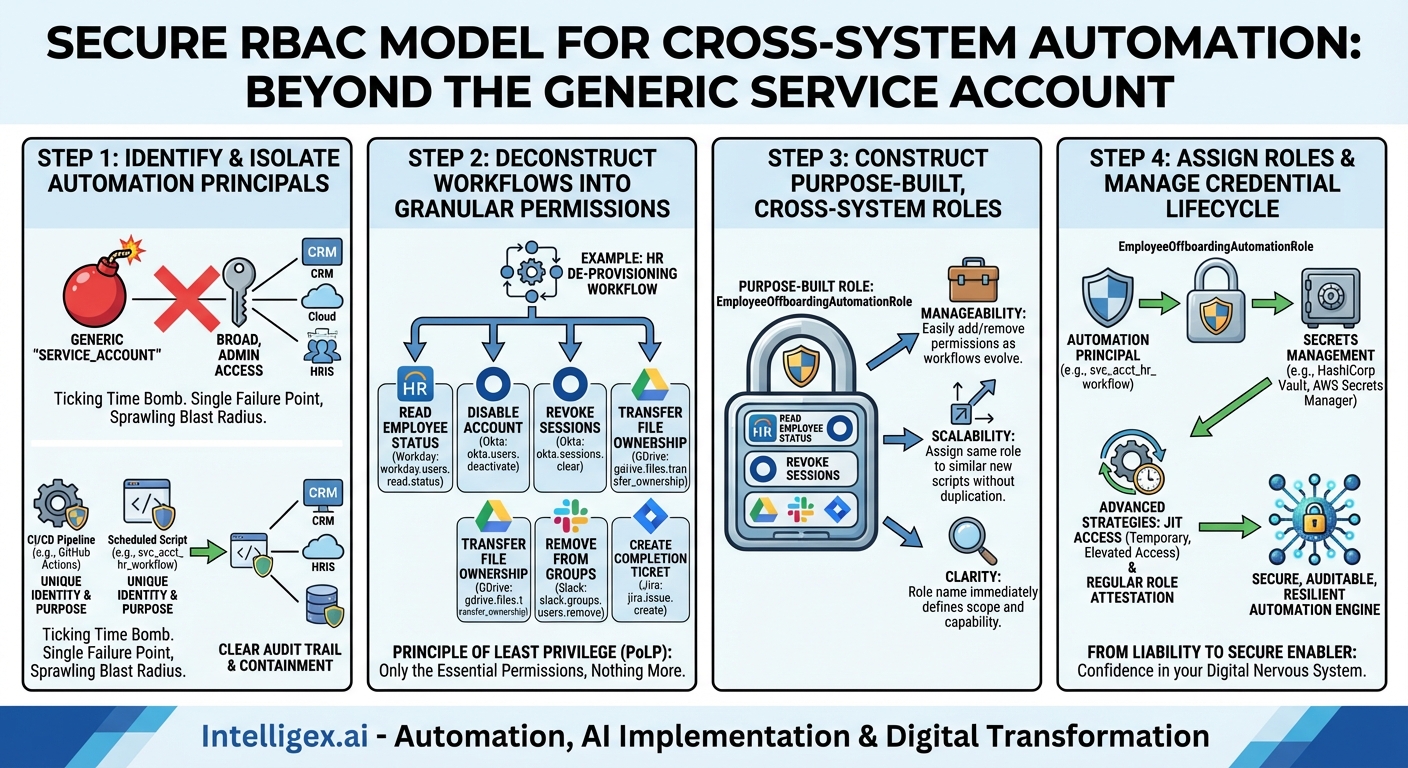
Step 1: Identify and Isolate Automation Principals
First, abandon the concept of a single, shared service account. Every distinct automation workflow should have its own unique identity. This is the foundation of accountability and containment.
- For a CI/CD Pipeline: Treat the pipeline itself as the principal. In platforms like GitHub Actions or GitLab CI, this can be achieved through workload identity federation (e.g., OIDC), which allows the pipeline to assume a role in a cloud provider without storing a long-lived secret.
- For a Scheduled Script: Create a dedicated Service Account in your identity provider (like Active Directory, Google Cloud IAM, or AWS IAM). Name it descriptively, such as
svc_acct_hr_onboarding_workflow. - For an Application Integration: If one application needs to call another’s API, it should use a dedicated client ID and secret (part of an OAuth 2.0 flow) that represents its specific function.
By giving each automation a unique identity, you immediately gain a clear audit trail. If a malicious action occurs, you know exactly which automation was compromised, rather than having to investigate everything that used the generic automation_admin account.
Step 2: Deconstruct Workflows into Granular Permissions
The Principle of Least Privilege dictates that an identity should have only the permissions essential to perform its intended function. To apply this to automations, you must break down the workflow into its constituent actions across all target systems.
Instead of thinking in broad terms like “Admin” or “Editor,” think in terms of specific API calls or actions. Let’s take an HR user de-provisioning workflow as an example. When an employee leaves the company, the automation needs to:
- Read the employee’s status from the HRIS (e.g., Workday).
- Permission Needed:
workday.users.read.status
- Permission Needed:
- Disable the user’s account in the identity provider (e.g., Okta/Azure AD).
- Permission Needed:
okta.users.deactivate
- Permission Needed:
- Revoke all active sessions for that user.
- Permission Needed:
okta.sessions.clear
- Permission Needed:
- Transfer ownership of their files in a cloud storage service (e.g., Google Drive) to their manager.
- Permission Needed:
gdrive.files.transfer_ownership
- Permission Needed:
- Remove the user from specific groups in a collaboration tool (e.g., Slack).
- Permission Needed:
slack.groups.users.remove
- Permission Needed:
- Create a final ticket in a service desk (e.g., Jira) to confirm completion.
- Permission Needed:
jira.issue.create
- Permission Needed:
Notice the specificity. The automation does not need permission to delete users, reset passwords for other users, or read files in Google Drive. It only needs the bare minimum set of permissions required to complete its de-provisioning task, and nothing more.
Step 3: Construct Purpose-Built, Cross-System Roles
With your granular permissions defined, you can now bundle them into a coherent role. This is the core of RBAC. A role is a collection of permissions that represents a specific job function. In our case, the “job function” belongs to the automation.
Using our example, we would create a role named EmployeeOffboardingAutomationRole. This single role would contain all the specific permissions we listed in Step 2 from Workday, Okta, Google Drive, Slack, and Jira.
This approach has several powerful benefits:
- Manageability: If you need to add a new step to the offboarding process (e.g., removing the user from a sales CRM), you don’t modify the service account directly. You simply add the new permission (e.g.,
salesforce.users.disable) to theEmployeeOffboardingAutomationRole. Every automation principal assigned that role instantly and consistently inherits the new permission. - Scalability: If you build a second, more advanced offboarding script, you can simply assign it the same role. You don’t have to manually replicate permissions, which is a process fraught with human error.
- Clarity: Anyone auditing your system can look at the
svc_acct_hr_offboarding_workflowprincipal, see that it is assigned theEmployeeOffboardingAutomationRole, and immediately understand its intended purpose and capabilities without having to inspect dozens of individual permissions across multiple platforms.
Step 4: Assign Roles and Manage the Credential Lifecycle
The final step is to connect the dots: assign your newly created, purpose-built role to the unique automation principal you identified in Step 1.
But the work doesn’t stop there. Securing the credentials used by that principal is paramount. This is where a mature security posture moves beyond basic RBAC into advanced practices:
A Note on Secrets Management: Never, ever hardcode credentials, API keys, or tokens directly in your code or configuration files. Always use a dedicated secrets management solution like HashiCorp Vault, AWS Secrets Manager, or Azure Key Vault. Your automation script should be given an identity that allows it to securely retrieve its necessary secrets from the vault at runtime. This centralizes control and auditing of your most sensitive assets.
Advanced Strategies for a World-Class Model
For organizations seeking the highest level of security, the RBAC model can be enhanced with time-based and dynamic access controls.
Just-in-Time (JIT) Access
The gold standard for securing automations is to grant them no standing permissions at all. Instead of having a role permanently assigned, the automation principal requests temporary, elevated access to a role just before it needs to run. A broker system (like a Privileged Access Management solution) validates the request, grants access for a very short duration (e.g., 15 minutes), and automatically revokes it once the task is complete. This reduces the window of opportunity for a compromised credential to be used from “forever” to mere minutes.
Regular Role Attestation and Review
Roles should not be static. Set up a mandatory quarterly or semi-annual review process for all automation roles. System owners and security teams should attest that the role is still necessary and that its permissions still adhere to the Principle of Least Privilege. Automations evolve, and a permission that was necessary six months ago may now be obsolete, representing unnecessary risk.
Conclusion: From Liability to Secure Enabler
In the world of cross-system automation, security cannot be an afterthought. An RBAC model designed specifically for the unique challenges of machine-to-machine interaction is the bedrock of a secure and scalable automation strategy. By treating each automation as a unique identity, deconstructing workflows into granular permissions, building purpose-built roles, and meticulously managing the credential lifecycle, you transform your automations from a potential security liability into a resilient, auditable, and powerful engine for business growth.
Moving away from the “super user” service account requires a shift in mindset and a commitment to upfront design, but the payoff is immense. It provides the control needed to unleash the full potential of automation with confidence, knowing that your digital nervous system is protected by a framework of precision, clarity, and least privilege.
Your Next Read:
Category:
Get a FREE
Proof of Concept
& Consultation
No Cost, No Commitment!
