

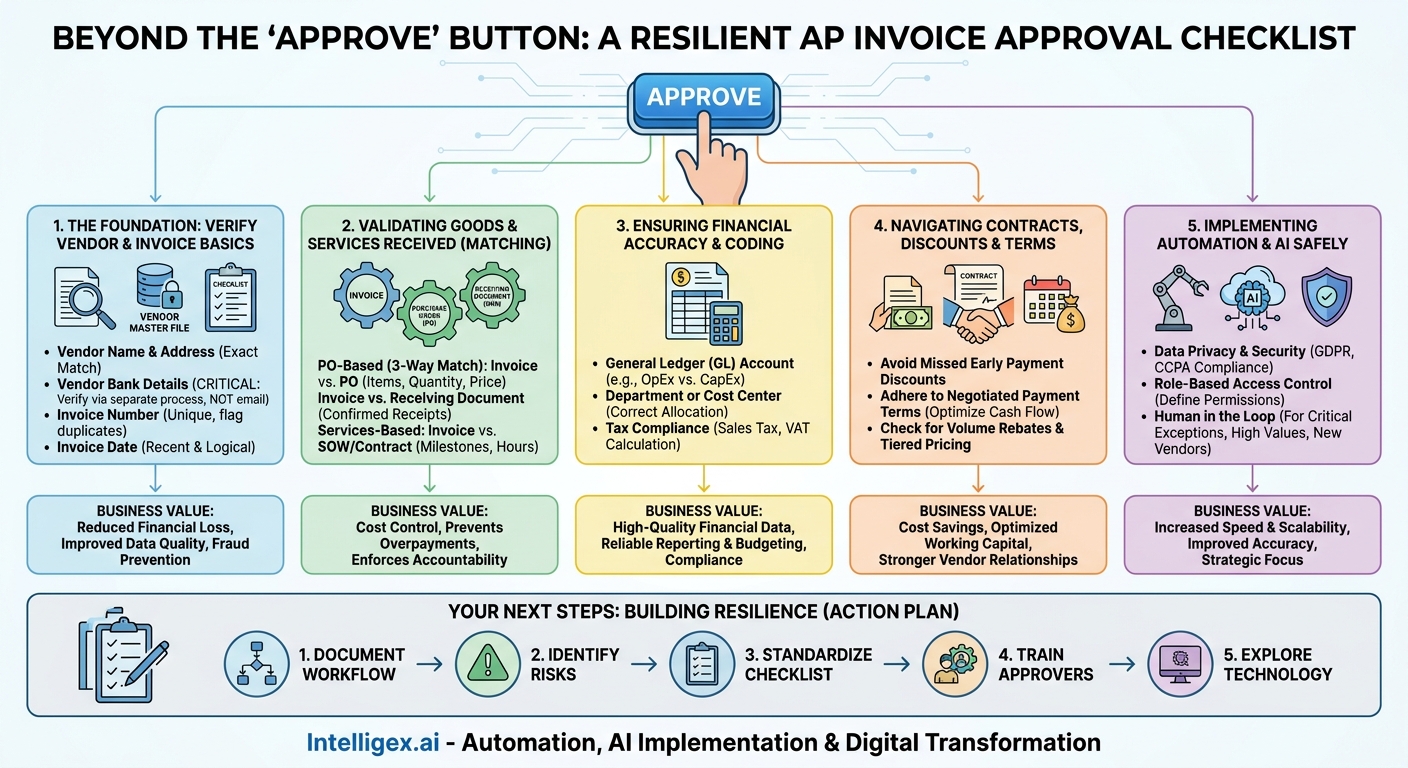
The “Approve” button in your accounts payable system is more than just a click. It’s the final gateway in a process that directly impacts your company’s cash flow, financial accuracy, and vendor relationships. A rushed or careless approval can lead to costly errors, from duplicate payments and missed discounts to outright fraud. Conversely, a robust, well-defined approval process transforms AP from a cost center into a strategic function that protects assets and provides critical business intelligence.
In today’s fast-paced environment, finance and operations teams are under pressure to do more with less. They need to pay vendors on time to maintain good relationships and secure supply chains, but they also need to scrutinize every dollar spent. This is where a clear, consistent approval checklist becomes essential. It’s not about adding bureaucracy; it’s about creating clarity and control, enabling your team to make confident decisions quickly. By systemizing verification, you build a resilient process that scales with your business, enhances visibility into spending, and ultimately improves the quality of your financial data.
The Foundation: Verifying Vendor and Invoice Basics
Before you even consider the substance of an invoice, you must confirm its origin and integrity. This first layer of verification is your primary defense against common fraud schemes and simple administrative errors. Rushing this step can lead to paying the wrong entity, paying the same bill twice, or falling victim to a phishing attack where a bad actor impersonates a legitimate vendor.
The goal is to anchor every invoice to a trusted, verified source in your system: your vendor master file. This file should be the single source of truth for all vendor information, with strict controls over who can add or modify records. When an invoice arrives, your first action is to ensure it aligns perfectly with this trusted data.
Core Verification Checklist
- Vendor Name and Address: Does the name and address on the invoice exactly match the information in your vendor master file? A slight variation could be a typo or a red flag for a fraudulent “copycat” vendor.
- Vendor Bank Details: This is a critical control point. Any request to change bank information on an invoice must be rejected. Changes to banking details should only be made through a separate, multi-step verification process that involves direct communication with a known contact at the vendor company, never through email alone.
- Invoice Number: Is the invoice number unique? Your AP system should automatically flag any duplicates. A repeated number often means an invoice was submitted twice by mistake, but it can also be a fraud indicator.
- Invoice Date: Is the date recent and logical? An invoice dated many months in the past could indicate a processing backlog or an attempt to resubmit an old, paid bill.
Business Value: A meticulous approach here directly reduces the risk of financial loss. It improves the quality of your vendor data, which is crucial for spend analysis and procurement strategy. By preventing duplicate payments, you immediately protect your cash. The key metric to track here is your duplicate payment rate. A consistently low or zero rate indicates that this foundational control is working effectively.
Validating Goods and Services Received
Once you’ve confirmed the invoice is from a legitimate vendor and is unique, the next question is: did we actually receive what we are being billed for? This step connects the financial document (the invoice) to the operational reality (the delivery of goods or services). Without this connection, you risk paying for items that never arrived, services that weren’t rendered, or quantities that don’t match what was ordered.
This process is often called “matching.” For businesses that use purchase orders (POs), the standard is a three-way match. For services-based expenses, the principle is the same but relies on different documentation.
The Three-Way Matching Process (for PO-based invoices)
- Invoice vs. Purchase Order (PO): The first match is between the invoice and the PO that authorized the purchase. Check that the item descriptions, quantities, and unit prices on the invoice align with what was specified on the PO. Any discrepancy, such as a price increase, should be investigated. It may be legitimate, but it requires verification against the contract or a formal change order.
- Invoice vs. Receiving Document: The second match involves the goods receipt note (GRN), packing slip, or other proof of delivery. This document, signed by someone in your warehouse or operations team, confirms what was physically received. The quantity on the invoice should not exceed the quantity on the receiving document.
- Investigate Mismatches: If the invoice, PO, and receiving document do not align, the payment should be blocked until the discrepancy is resolved. Common issues include being billed for back-ordered items that haven’t shipped yet or receiving a partial shipment but being invoiced for the full order.
Scenario (Services): For non-PO invoices, such as a marketing agency’s monthly retainer or a consulting project, the validation process is similar. Instead of a PO and GRN, you would verify the invoice against the Statement of Work (SOW) or contract. For example, a project manager approving a consultant’s invoice should confirm that the billed milestone was actually completed and accepted, or that the hours billed are within the project’s budget as outlined in the SOW.
Business Value: This step provides powerful cost control. It ensures you only pay for what you’ve ordered and received, preventing overpayments that directly erode profit margins. It also enforces accountability with vendors and internal teams. The key metrics here are the first-pass match rate (the percentage of invoices that match without manual intervention) and the rate of invoice exceptions, which highlights vendors or processes that need improvement.
Ensuring Financial Accuracy and Coding
An invoice can be from the right vendor and for the right goods, but if the cost is recorded incorrectly in your financial system, it can lead to flawed reporting, poor budgeting, and bad business decisions. Correctly coding an invoice is about assigning the expense to the right bucket, ensuring that your financial statements reflect the true nature of the company’s operations.
This is where the approver’s business knowledge is critical. They are often the person who best understands the context of the expense and can ensure it is categorized properly.
Key Financial Coding Checks
- General Ledger (GL) Account: Is the expense coded to the correct account? This is fundamental for accurate financial reporting. For instance, a subscription to a cloud-based software platform (like Salesforce) is an operating expense (OpEx) and should be coded as such, whereas the purchase of new servers for your data center is a capital expense (CapEx) and must be recorded on the balance sheet. A miscategorization can distort your company’s profitability and asset base.
- Department or Cost Center: Is the cost allocated to the team that incurred it? If the IT department buys laptops for the sales team, the cost should be allocated to the Sales department’s budget. Proper allocation is essential for holding department heads accountable for their budgets and for understanding the true cost of running each part of the business.
- Tax Compliance: Has sales tax, Value-Added Tax (VAT), or other relevant tax been calculated and applied correctly? Tax rules can be complex, and errors on invoices are common. Verifying tax helps ensure you are paying the correct amount and can reclaim any input credits you are entitled to, preventing overpayment and ensuring compliance during an audit.
Business Value: Accurate coding leads to high-quality financial data, which is the bedrock of strategic decision-making. It enables reliable budgeting and forecasting, provides clear visibility into departmental spending, and ensures tax compliance. The key metrics to monitor are the rate of GL code corrections after an invoice is posted and the accuracy of budget vs. actual reports at the department level.
Navigating Contracts, Discounts, and Payment Terms
The details of your vendor agreements contain opportunities for significant cost savings and cash flow optimization. However, these benefits are only realized if the people approving invoices are aware of them and actively verify them. Failing to check invoices against contract terms is a common way that businesses leave money on the table.
An approver should see themselves not just as a gatekeeper, but as a steward of the company’s financial resources. This means looking beyond the surface-level numbers on the invoice and comparing them to the negotiated terms in the underlying contract or master service agreement (MSA).
Common Pitfalls to Avoid
- Missing Early Payment Discounts: Many vendors offer a discount (e.g., 2% off) for paying an invoice within a shorter timeframe (e.g., 10 days instead of the standard 30). A slow approval process can cause you to miss this deadline. While 2% may seem small, it adds up to substantial savings over thousands of invoices.
- Ignoring Negotiated Payment Terms: If you negotiated Net 60 terms with a vendor to optimize your cash flow, paying their invoice in 15 days defeats the purpose. The approval workflow should be timed to allow payment on the optimal date, not necessarily the earliest possible one.
- Overlooking Volume Rebates and Tiered Pricing: Your contract might specify lower prices once your cumulative spending with a vendor crosses a certain threshold for the year. The approver should be aware of these terms and check if the invoice reflects the correct pricing tier.
Scenario (IT Department): An IT manager is approving an invoice from a major cloud provider like Amazon Web Services. They shouldn’t just approve the total amount. They should verify that any pre-paid reserved instance discounts are being applied correctly and that the rates for on-demand services match the company’s enterprise agreement. This level of scrutiny can prevent significant budget overruns.
Business Value: Diligence here directly improves your bottom line through cost savings and optimizes working capital by managing cash flow effectively. It also strengthens vendor relationships by ensuring you are both adhering to the agreed-upon terms. Important metrics include the value of early payment discounts captured vs. missed and the Days Payable Outstanding (DPO), which measures how long it takes you to pay your vendors.
Implementing Automation and AI Safely
As invoice volume grows, manual verification becomes a significant bottleneck. It’s slow, prone to human error, and doesn’t scale without adding more staff. This is where technology, including AI-powered automation, offers a powerful solution. Modern AP platforms can automate the most repetitive and time-consuming checks, freeing your team to focus on resolving exceptions and performing higher-value analysis.
However, adopting automation requires a thoughtful approach to governance and security. The goal is to build a system that is both efficient and secure, leveraging technology to enhance human oversight, not replace it.
A Practical, Safe Approach to AP Automation
Instead of thinking of AI as a magic box, view it as a highly efficient assistant that can perform rule-based tasks at scale. For example, an automated system can ingest an invoice, extract all the key data (vendor, date, amounts, line items), perform the three-way match against POs and goods receipts in your ERP (like SAP or NetSuite), and flag any discrepancies instantly. It can also check for duplicates and even suggest the correct GL code based on past invoices from that vendor.
When implementing such a system, focus on these three pillars:
- Data Privacy and Security: Invoices often contain sensitive data. Ensure any automation tool you use has robust security controls and complies with data protection regulations relevant to your business (like GDPR or CCPA). Your vendor data, especially bank account information, must be encrypted and protected by strict access controls.
- Role-Based Access Control: Not everyone in the company needs to see every invoice or have the ability to approve payments. Implement role-based permissions to ensure that employees can only view and act on invoices relevant to their job function and within their designated approval limits.
- The Human in the Loop: Automation should not mean blind trust. Your process must include a “human in the loop” for critical decisions. Configure rules that automatically route certain invoices for mandatory manual review. For instance, all invoices over a certain dollar amount, all invoices from a brand new vendor, or any invoice where a vendor’s bank details have changed should be flagged for a senior-level human approver. The final decision to release funds should always rest with an authorized person.
Business Value: Automation dramatically increases the speed and scalability of your AP process. It reduces the cost per invoice processed and significantly improves data accuracy by minimizing manual entry errors. This allows your finance team to shift from transactional work to strategic analysis, providing better insights to the business.
Your Next Steps: Building a Resilient Approval Process
Strengthening your AP approval process is an ongoing effort, not a one-time project. It requires a combination of clear documentation, team training, and the right technology. By taking a structured approach, you can build a system that is efficient, secure, and adds strategic value to the organization.
Here is a simple action plan to get you started:
- Document Your Current Workflow: Before you can improve your process, you must understand it. Map out every step, from the moment an invoice is received to the moment payment is sent. Identify who is involved, what systems are used, and how approvals are currently handled.
- Identify Bottlenecks and Risks: Using your process map, pinpoint areas of weakness. Where do invoices get stuck waiting for approval? Which verification steps are frequently skipped? Where is the risk of fraud or error the highest? Talk to your team to get their on-the-ground perspective.
- Standardize and Formalize Your Checklist: Use the points discussed here to create a formal, standardized approval checklist for your organization. Make it clear what needs to be verified for different types of invoices (e.g., PO vs. non-PO, high-value vs. low-value).
- Train Your Approvers: An approval checklist is only effective if people use it. Train everyone involved in the AP process on the importance of each check. Ensure they understand their role in protecting the company’s assets and how to use the tools and systems provided.
- Explore Technology to Enforce and Simplify: Investigate how modern AP automation platforms can help. The right solution can automatically enforce your business rules, provide a clear digital audit trail for every invoice, and make the approval process faster and easier for everyone involved.
By implementing a robust checklist and supporting it with clear processes and smart technology, you can transform your AP approvals from a potential liability into a powerful strategic asset. You’ll gain speed, improve quality, and create the visibility needed to make better financial decisions across the entire business.
Your Next Read:
Category:
Get a FREE
Proof of Concept
& Consultation
No Cost, No Commitment!
