

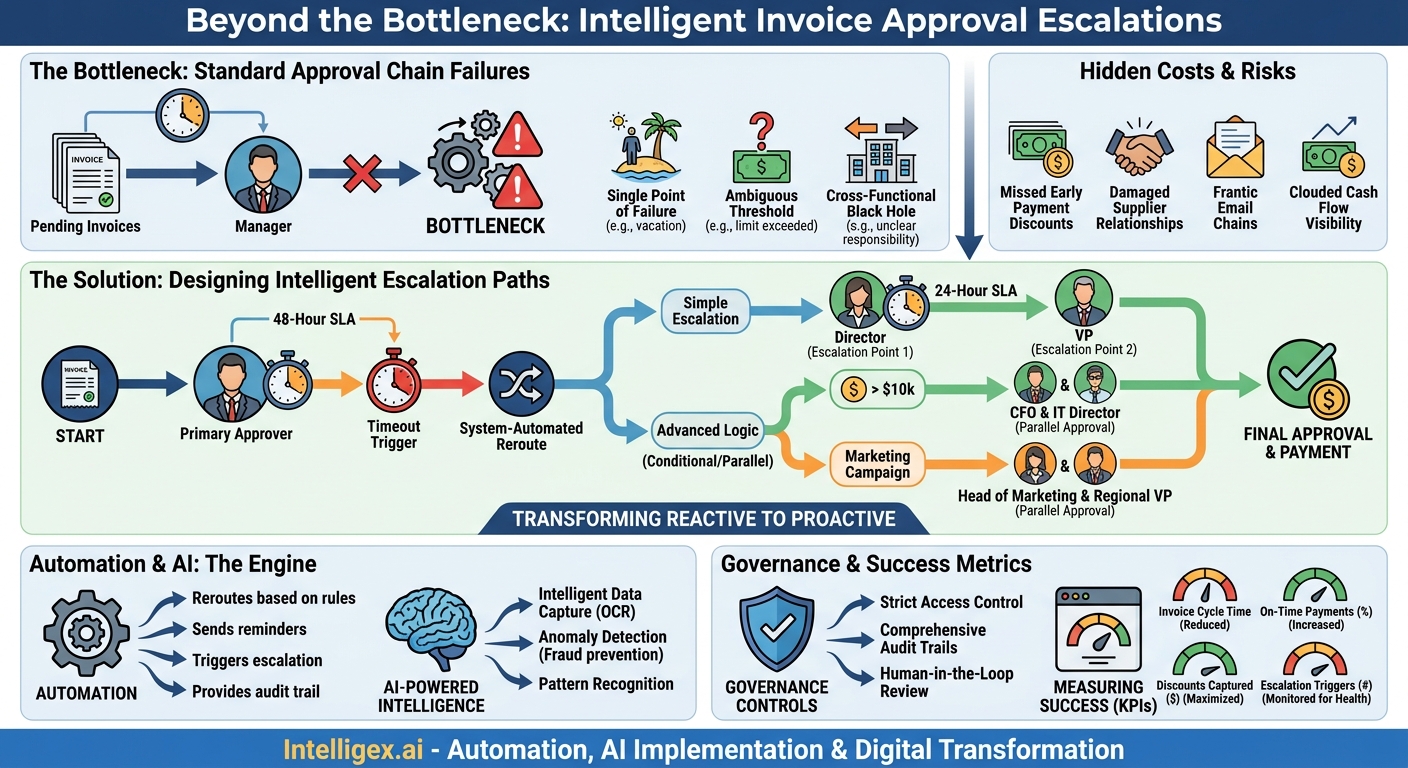
A single late invoice payment seems like a small problem. But it’s rarely just one. It’s a cascade of hidden costs: missed early payment discounts, damaged supplier relationships, frantic email chains chasing approvals, and a clouded view of your true cash flow. The root cause is often not a lack of diligence, but a lack of design. When an invoice gets stuck, where does it go? If the answer is “an angry email from the vendor,” your approval process needs more than a flowchart; it needs intelligent escalation paths.
A well-designed escalation path is an automated safety net for your accounts payable process. It ensures that time-sensitive documents are never left sitting in an inactive inbox. Instead of relying on manual follow-ups, the system automatically reroutes approvals to the right person at the right time. This isn’t just about paying bills faster. It’s about building a more resilient, transparent, and cost-effective financial operation.
Why Your Standard Approval Chain Is a Bottleneck
Most companies start with a simple, linear approval chain: an invoice is assigned to a manager, who approves it and sends it on. This works perfectly until it doesn’t. The moment reality intrudes, the linear chain breaks down, creating delays that ripple across the business.
Consider these common failure points:
- The Single Point of Failure: The primary approver is on vacation, out sick, or simply buried in other priorities. The invoice sits, untouched, aging past its due date. There is no designated backup, so the process grinds to a halt.
- The Ambiguous Threshold: An invoice for $25,500 arrives, but the department head’s approval limit is $25,000. It gets rejected, but the system doesn’t automatically send it to the VP of Finance. Instead, it lands back in the AP clerk’s queue, who now has to manually investigate the correct approver, wasting valuable time.
- The Cross-Functional Black Hole: A marketing campaign invoice includes costs for event space (Ops), creative services (Marketing), and sales collateral (Sales). Who gives the final sign-off? Without a clear, pre-defined rule, it bounces between departments, with each manager assuming someone else is responsible.
These bottlenecks do more than just delay payments. They directly impact business value. Late fees are a direct hit to your bottom line (cost). Strained vendor relationships can lead to less favorable terms or slower service in the future (quality). And when AP teams spend their time chasing approvals instead of analyzing spend, the business loses financial visibility.
Designing Your First Escalation Path: A Step-by-Step Guide
Building an effective escalation strategy doesn’t require a complete operational overhaul. It starts with mapping your existing process and layering in simple, time-based logic. The goal is to create a predictable, automated response for when an approval is delayed.
Follow these steps to create a foundational escalation workflow:
- Map the Current State and Identify Bottlenecks: Before you can fix the process, you must understand it. Document your primary approval workflows for different invoice types (e.g., PO-based, non-PO, utilities). Talk to your AP team and ask them: “Where do invoices get stuck most often?” and “Who do you spend the most time chasing?” This will reveal your most critical bottlenecks.
- Define Your Time Thresholds: How long is too long for an invoice to sit pending approval? Establish clear Service Level Agreements (SLAs) for your team. For example, a standard invoice might have a 48-hour approval window, while an urgent utility bill might have a 24-hour window. These thresholds become the triggers for escalation.
- Identify and Empower Escalation Points: For each primary approver, designate a specific escalation point. This should not be a vague “their manager.” It needs to be an explicit rule. For a department manager, the escalation point is the director. For a director, it’s the VP. This creates a clear chain of command that the system can follow automatically. Ensure these escalation points understand and agree to their role.
- Codify the Rules in Your System: This is where theory becomes practice. Work with your IT team or AP automation provider to translate your documented paths into system rules. A simple rule might look like this: “IF Invoice is assigned to ‘Manager A’ AND status is ‘Pending Approval’ for more than 48 hours, THEN reassign to ‘Director B’.”
- Communicate the New Process: Change management is crucial. Announce the new automated escalation process to all stakeholders. Explain that this is not about micromanaging but about ensuring business continuity and timely payments. Clear communication prevents confusion and ensures that when an invoice is escalated, the recipient understands why they are receiving it.
By implementing this basic time-based escalation, you move from a reactive, manual follow-up process to a proactive, automated system that keeps invoices moving.
Advanced Escalation Logic for Complex Operations
Once you have basic time-based escalations in place, you can build more sophisticated logic to handle the nuances of a growing business. Modern operations are rarely linear. Invoices often require input from multiple stakeholders based on their value, type, or associated project. Advanced logic ensures that even the most complex invoices are routed efficiently.
Key concepts for advanced escalation include:
- Conditional Routing: The approval path changes based on data within the invoice itself. For example, an IT hardware invoice over $10,000 might require approval from both the IT Director (for technical validation) and the CFO (for budget approval). The system automatically adds the CFO to the workflow only when that dollar threshold is met.
- Parallel Approvals: Instead of a sequential chain, some invoices can be sent to multiple approvers at the same time. A large marketing campaign invoice might need simultaneous sign-off from the Head of Marketing and the regional VP of Sales. This cuts the approval time in half compared to a one-after-the-other process.
- Dynamic Role-Based Escalation: Instead of escalating to a named individual (e.g., “Jane Doe”), the system can escalate to a role (e.g., “VP of Operations”). This makes the process resilient to organizational changes. If someone leaves the company, you only need to update the person assigned to that role, not every single workflow rule they were a part of.
Checklist: Designing Your Advanced Paths
When building these workflows, ask your team the following questions to cover all bases:
- What happens if an invoice is rejected? Should it go back to the submitter, the AP team, or a purchasing manager for correction?
- Does this purchase type require a review from other departments like Legal or Compliance? (e.g., all new software subscriptions).
- How will we handle delegation for planned absences? Your system should allow approvers to set up a delegate who can approve on their behalf while they are out of the office.
- Do we need a separate, expedited path for emergency purchases to prevent them from getting stuck in the standard queue?
This level of detailed planning transforms your AP process from a simple payment mechanism into a strategic asset that supports complex, cross-functional business operations at scale.
The Role of Automation and AI in Smart Escalation
Designing these complex rules on paper is one thing; implementing and managing them is another. This is where modern AP automation platforms, often enhanced with artificial intelligence, provide immense value. They handle the execution, monitoring, and enforcement of your escalation paths, freeing your team to focus on higher-value work.
Automation is the engine that drives the process. It is the software that physically reroutes an invoice from one approver to the next based on your predefined rules. It sends the automated reminders, triggers the escalation after the time threshold is breached, and provides a full audit trail of every action. This eliminates the need for AP clerks to manually track invoice statuses in spreadsheets and send countless follow-up emails.
Artificial Intelligence (AI) adds a layer of intelligence that makes the process faster and more accurate from the very beginning. Here’s how:
- Intelligent Data Capture: Before any approval workflow can begin, data must be entered from the invoice. AI-powered optical character recognition (OCR) can read an invoice, identify key information like the vendor, PO number, line-item details, and total amount, and then use that data to automatically trigger the correct, multi-step approval workflow. This prevents the manual data entry errors that often send an invoice down the wrong path.
- Anomaly Detection: AI can be trained to recognize patterns in your invoice data. It can automatically flag anomalies for a higher level of review, such as a duplicate invoice number from the same vendor, or a sudden, unexplained price increase for a recurring service. This acts as a preliminary fraud detection layer, routing suspicious invoices to a senior finance manager for scrutiny before they enter the standard approval flow.
By combining rule-based automation with the pattern recognition of AI, you create a system that is not only efficient but also intelligent, adding a layer of risk management to your financial operations.
Governance and Control: Implementing Escalations Safely
Automating escalations introduces powerful efficiencies, but it also requires strong governance to prevent misuse and ensure compliance. When a system can automatically reroute documents that authorize payments, you need clear controls over who can define those rules and a transparent record of every action taken.
Focus on these three pillars of safe implementation:
- Strict Access Control: The ability to create or modify approval and escalation workflows should be restricted to a very small number of trusted administrators, typically within senior finance and IT. A standard approver should be able to approve or reject an invoice, but never change the rules of where it goes next. This principle of least privilege is fundamental to preventing unauthorized changes.
- Comprehensive Audit Trails: Every touchpoint in an invoice’s lifecycle must be logged. Your AP automation system should provide an immutable audit trail that answers: When was the invoice received? Who was it assigned to? How many reminders were sent? When was it escalated? Who was it escalated to? And who gave the final approval? This level of detail is non-negotiable for internal audits and regulatory compliance.
- Keeping a Human in the Loop: It is critical to remember that automation and escalation are designed to get an invoice to the right person, not to approve it for them. The system routes the document, but the human approver is still responsible for the final review and decision. The goal is to eliminate administrative delays, not to bypass essential human oversight.
By building these controls into your process from the start, you can leverage the speed of automation without sacrificing the security and accountability your business demands.
Measuring Success: Metrics That Matter
How do you know if your new escalation paths are actually working? You need to move beyond anecdotal evidence and track concrete metrics that demonstrate improvements in speed, cost, and efficiency. By monitoring the right Key Performance Indicators (KPIs), you can prove the value of your new process and identify areas for further refinement.
Focus your measurement on these key areas:
- Invoice Cycle Time: This is the average time from when an invoice is received by your company to when it is fully approved and scheduled for payment. A primary goal of escalation paths is to reduce this number significantly.
- Percentage of Invoices Paid On Time: This is a direct measure of your success. Tracking this helps quantify your improved reliability and its positive impact on vendor relationships.
- Early Payment Discounts Captured: By accelerating approvals, you create more opportunities to capture early payment discounts offered by vendors. This metric translates directly into cost savings and provides a clear ROI for your process improvements.
- Number of Automated Escalations Triggered: This metric serves as a health check for your process. A consistently high number of escalations in one department may indicate that the primary approvers are overloaded, or that the initial time thresholds are too aggressive. Use this data to fine-tune your workflows.
Tracking these metrics provides a clear, data-driven picture of your AP performance. It allows you to celebrate wins, justify further investment in automation, and continuously optimize your financial operations.
Your Next Steps: From Plan to Action
Designing and implementing automated escalation paths is one of the highest-impact changes you can make to your accounts payable process. It replaces manual chasing with systematic efficiency, builds resilience against common bottlenecks, and provides a clear, auditable trail for every transaction. The key is to start small, prove the concept, and build from there.
Here is a simple plan to get started:
- Audit Your Current Process: Spend a week identifying your top three approval bottlenecks. Is it a specific department, a certain invoice value, or a particular approver? Use data, not guesswork.
- Define a Pilot Program: Choose one of those bottleneck areas for a pilot. For example, you could target all marketing invoices over $5,000. Design a simple, time-based escalation path for this specific group.
- Document and Communicate: Create a one-page summary of the pilot process. Clearly explain the time thresholds and the escalation path to everyone involved. Ensure they understand their roles and the purpose of the pilot.
- Measure and Refine: Run the pilot for 30-60 days, tracking the relevant metrics. At the end of the period, review the results and gather feedback from the team. Use these learnings to refine the process before rolling it out to other departments.
By taking a structured, iterative approach, you can transform your AP approvals from a source of frustration and delay into a streamlined, strategic advantage for your business.
Your Next Read:
Category:
Get a FREE
Proof of Concept
& Consultation
No Cost, No Commitment!
