

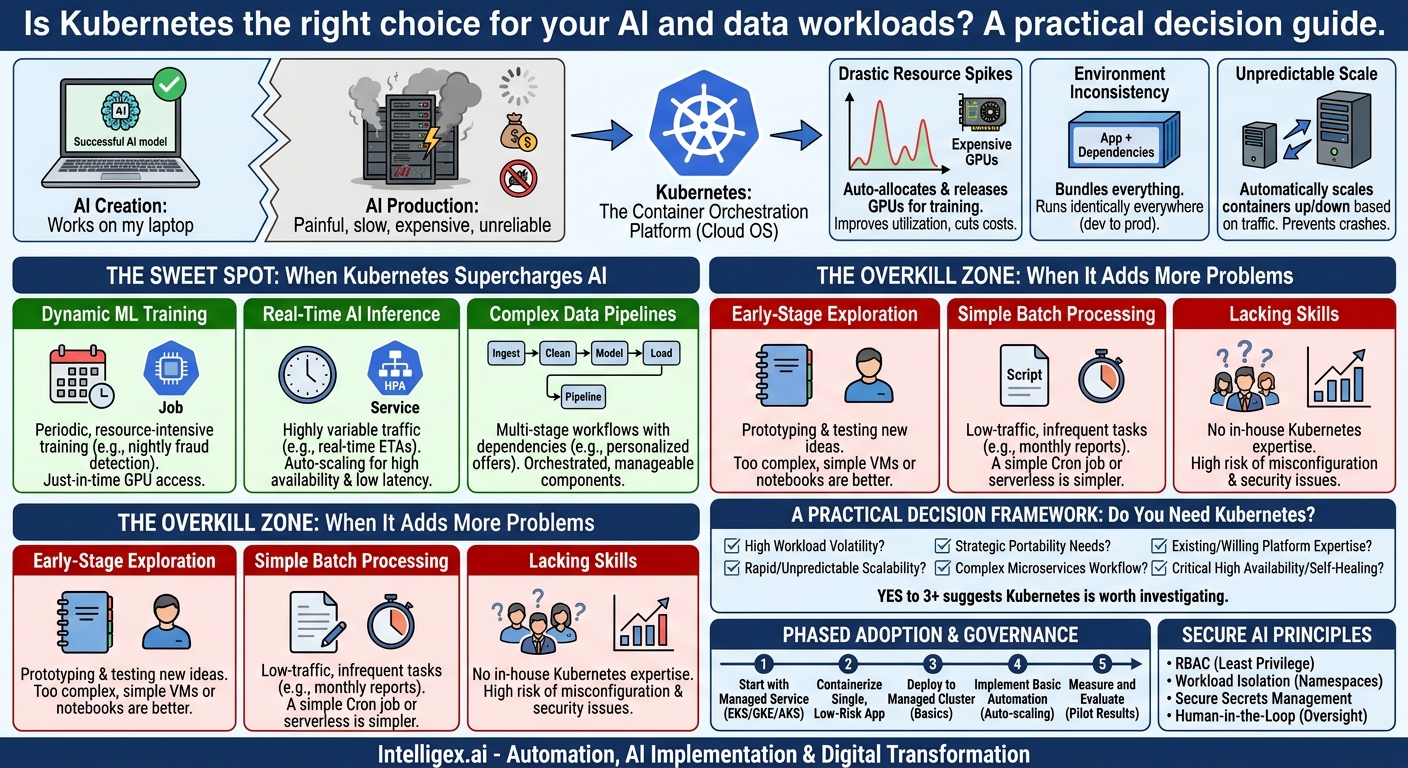
Your data science team builds a breakthrough AI model. It works perfectly on a laptop, but getting it into production is a painful, six-month ordeal of manual configurations and resource conflicts. When it finally launches, it’s slow, expensive to run, and crashes during traffic spikes. This story is all too common. It highlights a critical gap between creating AI and delivering its value to the business. This is where Kubernetes, an open-source container orchestration platform, enters the conversation. But it’s not a silver bullet.
Many organizations hear about Kubernetes and assume it’s the default solution for any modern application. The reality is more nuanced. For some AI and data workloads, Kubernetes is a powerful enabler, unlocking speed, cost savings, and scalability. For others, it’s a sledgehammer to crack a nut, introducing unnecessary complexity and slowing you down. The key is knowing the difference. This guide will walk you through the specific scenarios where Kubernetes shines for data and AI, where it’s overkill, and how to make a smart decision for your business.
What is Kubernetes, and Why Do AI Teams Care?
Think of Kubernetes (often shortened to K8s) as an operating system for your cloud infrastructure. You have applications, and you have a pool of computing resources (servers, memory, GPUs). Instead of manually assigning each application to a specific server, you tell Kubernetes what you need, and it handles the rest. It automates deploying, scaling, and managing your applications, which are packaged in standardized units called “containers.”
This automation directly addresses three major pain points for data and AI teams:
- Drastic Resource Spikes: Training a machine learning model is incredibly resource-intensive. You might need eight powerful GPUs running at 100% for twelve hours straight. But once the training is done, those expensive resources sit idle. Kubernetes can dynamically allocate those GPUs for the job and then release them back into the pool for other tasks, drastically improving utilization and reducing costs.
- Environment Inconsistency: The classic “it worked on my machine” problem plagues AI projects. A data scientist builds a model using a specific version of Python and a dozen libraries. When the IT team tries to deploy it, they use slightly different versions, and the model fails. Containers solve this by bundling the application with all its dependencies. Kubernetes ensures this container runs identically everywhere, from testing to production.
- Unpredictable Scale: Imagine your marketing team launches an AI-powered product recommendation engine. On day one, it gets 100 requests per minute. After a successful ad campaign, it suddenly gets 10,000 requests per minute. Without Kubernetes, your system would crash. With it, the system can automatically scale up the number of running containers to meet demand, then scale back down when traffic subsides.
For the business, these technical benefits translate into tangible value: lower cloud bills through efficient resource use, faster time-to-market for new AI features, and higher-quality, more reliable services for your customers.
The Sweet Spot: When Kubernetes Supercharges Your AI Initiatives
Kubernetes provides the most value when your workloads are dynamic, complex, or need to operate at a significant scale. Here are three common scenarios where it is a strategic advantage.
Scenario 1: Dynamic Machine Learning Model Training
Business Case: A financial services company needs to retrain its credit card fraud detection model every night using the latest transaction data. This training process is short but requires immense, burstable computing power (specifically, expensive GPUs). Leaving a fleet of GPU-enabled servers running 24/7 would be prohibitively expensive.
How Kubernetes Helps: The team can define the training process as a “Job” in Kubernetes. Every night, a scheduler kicks off the job. Kubernetes finds available GPU nodes in the cluster, runs the training containers, and once the job is complete, it terminates the containers and releases the GPUs. This “just-in-time” resource allocation means the company only pays for high-end compute resources for the few hours they are actually needed.
What to Measure:
- GPU Utilization Rate: The percentage of time your expensive GPU resources are actively processing work.
- Cost Per Training Job: Track the cloud cost associated with a single model retraining run.
- Time to Retrain: How long it takes from starting the job to having a new, validated model ready for deployment.
Scenario 2: Real-Time AI Inference at Scale
Business Case: A logistics company uses an AI model to provide real-time shipping ETAs to its customers. The demand is highly variable. It peaks during business hours in different time zones and is very low overnight. The application must be highly available and respond to requests within milliseconds, as this data feeds customer-facing portals and internal planning systems.
How Kubernetes Helps: The AI model is deployed as a “Service” in Kubernetes. Using a Horizontal Pod Autoscaler (HPA), the company sets rules based on CPU usage or the number of incoming requests. When traffic surges, Kubernetes automatically adds more copies (replicas) of the model’s container to distribute the load. When traffic subsides, it removes them. It also handles health checks; if one container becomes unresponsive, Kubernetes automatically replaces it with a healthy one, ensuring high availability without manual intervention.
What to Measure:
- API Response Latency (p95/p99): The time it takes for 95% or 99% of requests to get a response. This measures the user experience.
- Endpoint Error Rate: The percentage of requests that fail. This is a key indicator of service reliability.
- Cost Per 1,000 Inferences: A metric to ensure that as you scale, your costs remain efficient and predictable.
Scenario 3: Complex, Multi-Stage Data Pipelines
Business Case: A retail company builds a pipeline to generate personalized customer offers. This involves multiple steps: ingesting sales data from stores, cleaning and transforming it, running a customer segmentation algorithm, applying a machine learning model to predict purchase intent, and finally, loading the offers into a marketing database. Each step is a distinct application, and a failure in one step can jeopardize the entire process.
How Kubernetes Helps: This entire workflow can be orchestrated on Kubernetes using tools like Kubeflow or Airflow. Each step in the pipeline is a separate container. Kubernetes manages the dependencies, ensuring that the cleaning step doesn’t start until ingestion is complete. It can automatically retry a step if it fails temporarily. This component-based approach makes the pipeline easier to manage, update, and debug. For example, the data science team can update just the machine learning model component without having to redeploy the entire data ingestion and cleaning system.
What to Measure:
- Pipeline Success Rate: The percentage of pipeline runs that complete successfully without manual intervention.
- End-to-End Pipeline Duration: The total time it takes to get from raw data to actionable output.
- Time to Debug Failures: How quickly can the team identify and resolve an issue in a specific stage of the pipeline?
The Overkill Zone: When Kubernetes Adds More Problems Than It Solves
Adopting Kubernetes comes with significant operational overhead. It has a steep learning curve and requires specialized skills to manage effectively. Forcing it into the wrong situation can slow projects down, frustrate your team, and increase costs.
Scenario 1: Early-Stage Exploration and Prototyping
When a single data scientist is exploring a new dataset in a Jupyter notebook, their primary need is a simple, flexible environment. They are testing hypotheses, visualizing data, and trying out different algorithms. The workload is small, self-contained, and changes constantly. Setting up a Kubernetes cluster, defining container images, and writing deployment files for this kind of exploratory work is a massive distraction. A managed notebook service or a simple virtual machine is far more efficient.
Scenario 2: Simple, Low-Traffic Batch Processing
An HR team has a Python script that runs once a month to analyze employee survey data and generate a PDF report. The script takes 30 minutes to run on a standard server and has no scalability or high-availability requirements. Using Kubernetes here is like using a cargo ship to deliver a single letter. A simple scheduled task (like a Cron job on a server or a basic serverless function) is a much simpler, cheaper, and more appropriate solution.
Scenario 3: Your Team Lacks the Necessary Skills
This is the most critical factor. Kubernetes is not a “set it and forget it” tool. It requires a solid understanding of networking, storage, security, and container concepts. If your IT and DevOps teams have no experience with it, mandating its use will likely lead to misconfigurations, security vulnerabilities, and endless troubleshooting. While managed Kubernetes services from cloud providers like Amazon EKS, Google GKE, and Azure AKS reduce the burden, they do not eliminate the need for in-house expertise. The cost of hiring or training for these skills, and the project delays incurred during the learning curve, must be factored into the decision.
A Practical Decision Framework: Do You Need Kubernetes?
Before you commit to Kubernetes, gather your technical and business stakeholders and work through this checklist. A “yes” to three or more of these questions suggests that Kubernetes is a strong candidate worth investigating further.
Key Questions to Ask Your Team
- Workload Volatility: Do your resource needs (CPU, GPU, memory) fluctuate dramatically throughout the day or week? Are you paying for idle resources?
- Scalability Requirements: Do you expect the application to serve a rapidly growing or unpredictable number of users? Does it need to scale up and down automatically?
- Portability Needs: Is there a strategic need to avoid being locked into a single cloud provider? Do you need to run the same application on-premise and in multiple clouds?
- Workflow Complexity: Is your application built as a set of multiple, interdependent services (microservices) that need to be managed and scaled together?
- Team Expertise: Do you have, or are you prepared to invest in, the platform engineering or DevOps skills required to manage a Kubernetes environment successfully?
- Cost of Downtime: Is this a business-critical application where high availability and automatic self-healing are non-negotiable?
Getting Started: A Phased Approach to Kubernetes for AI
If you’ve decided Kubernetes is the right fit, don’t try to migrate everything at once. A gradual, phased adoption is the key to success. This approach minimizes risk and allows your team to build skills and confidence over time.
- Start with a Managed Service. Do not attempt to build and manage a Kubernetes cluster from scratch on day one. This is a massive undertaking. Instead, use a managed offering from your cloud provider (like EKS, GKE, or AKS). They handle the underlying complexity of the control plane, allowing your team to focus on deploying applications, not managing infrastructure.
- Containerize a Single, Low-Risk Application. Pick one well-understood part of your AI workflow. A good candidate might be a data preprocessing script or a single model serving endpoint that isn’t yet customer-facing. The first goal is simply to learn how to package this application and its dependencies into a standard container (like a Docker image).
- Deploy to the Managed Cluster. Work through the basics of deploying your container onto the cluster. Focus on fundamental concepts: creating a deployment, exposing it as a service so it can be reached, and checking its logs and health status. Keep it simple.
- Implement Basic Automation. The “magic” of Kubernetes comes from automation. Set up a simple auto-scaling rule. For example, configure a Horizontal Pod Autoscaler to automatically add another copy of your container if its CPU usage goes above 70%. Seeing this work in practice is a powerful way to demonstrate the core value proposition.
- Measure and Evaluate. Before expanding to more critical workloads, pause and assess the results of your pilot project. Compare it to the old way of doing things. Was deployment faster? Is resource utilization better? What was the “cost” in terms of your team’s time and effort? Use this data to build a stronger business case for wider adoption.
A Note on Governance and Safe AI Implementation
As you deploy more sophisticated AI workloads, especially those handling sensitive customer or financial data, security and governance become paramount. Kubernetes provides powerful tools to enforce good practices, but they must be implemented intentionally.
Core Principles for Secure AI on Kubernetes
- Use Role-Based Access Control (RBAC): The principle of least privilege is critical. Define specific roles to control who can do what within the cluster. A data scientist might need permission to deploy a model in a specific “namespace” (a virtual workspace), but they should not have cluster-wide administrative rights.
- Isolate Your Workloads: Use Kubernetes namespaces to create logical boundaries between different teams, projects, or environments (e.g., development, staging, production). This prevents a problem in one application from affecting another and helps contain security breaches.
- Manage Secrets Securely: Your application code will need sensitive information like API keys, database passwords, and access tokens. Never hard-code these into your container images. Use built-in Kubernetes Secrets or integrate with a dedicated secrets management tool to store and inject this information securely at runtime.
- Plan for Human-in-the-Loop: For high-stakes AI systems, such as those involved in medical analysis or financial decisions, automation must be balanced with human oversight. Design your applications so that their predictions and the data used to make them are logged and auditable. Create clear processes for a human expert to review, validate, or override the AI’s decisions when necessary.
The Bottom Line: From Technical Tool to Business Enabler
Ultimately, the decision to use Kubernetes is not a purely technical one. It’s a strategic choice about how you want to build and deliver AI-powered products. When applied to the right problems, it stops being an infrastructure detail and becomes a true business enabler.
By automating away the complex and error-prone tasks of deployment and scaling, Kubernetes frees your highly skilled data scientists and engineers to focus on what they do best: building innovative models and applications that create value. The result is a more agile, efficient, and resilient organization capable of turning data into a competitive advantage.
Your Next Steps
Moving from theory to practice requires focused action. Instead of launching a massive, multi-year “Kubernetes initiative,” start with small, deliberate steps to evaluate if it’s right for you.
Immediate Actions for Your Team:
- Audit a Current AI Project: Select one of your existing data science or AI projects. Use the decision framework in this post to have an honest discussion. Is it a genuine candidate for Kubernetes, or are simpler tools sufficient?
- Calculate the “Cost of Doing Nothing”: Quantify the pain points of your current process. How many hours are spent on manual deployments? What is the cloud cost of your idle, over-provisioned servers? What was the business impact of your last AI application outage? This data builds a powerful business case for change.
- Commission a Small-Scale Pilot: Empower a small, cross-functional team to follow the 5-step “Getting Started” plan. The primary goal is learning and data gathering, not a full production migration.
- Consult an Expert Partner: The learning curve for Kubernetes and cloud-native AI is real. If your team is new to these concepts, engaging with a partner who has navigated these technical and strategic decisions can accelerate your progress and help you avoid common pitfalls.
