

Every growing business eventually hits a crossroads. A manual process becomes too slow, a legacy system can’t keep up with demand, or a new market opportunity requires a capability you don’t have. The question that follows is fundamental: should we build a custom solution, buy an off-the-shelf product, or integrate our existing systems to create something new? This isn’t just a technical question for your IT department. It’s a strategic business decision with long-term consequences for your budget, agility, and competitive edge.
Making the wrong choice can lead to bloated budgets, frustrated teams, and technology that hinders rather than helps. Choosing correctly, however, can unlock new levels of efficiency and create a powerful platform for growth. This guide breaks down the “Build vs. Buy vs. Integrate” decision into a practical framework, helping you evaluate the trade-offs based on core business drivers: speed, cost, quality, and scalability.
The Three Paths: A Practical Definition
Before diving into the decision matrix, let’s establish a clear and simple definition for each option, moving beyond technical jargon to focus on business outcomes.
Build: Crafting a Custom Solution
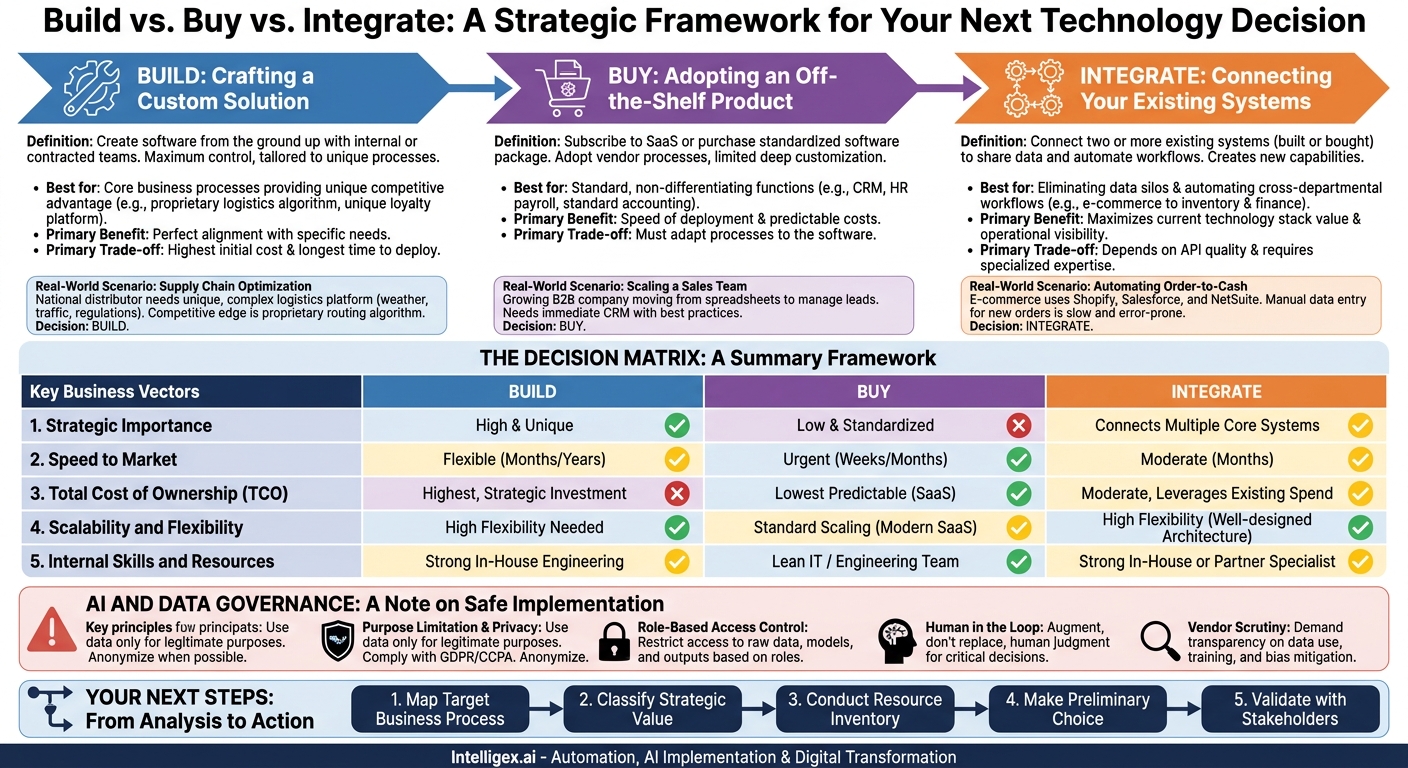
Building means creating a software application from the ground up. Your internal team or a contracted development partner writes the code, designs the user interface, and manages the entire lifecycle of the application. This path gives you maximum control and results in a solution perfectly tailored to your unique processes.
- Best for: Core business processes that provide a unique competitive advantage. Think of a proprietary logistics algorithm, a unique customer loyalty platform, or a specialized financial modeling tool.
- Primary Benefit: Perfect alignment with your specific needs.
- Primary Trade-off: Highest initial cost and longest time to deploy.
Buy: Adopting an Off-the-Shelf Product
Buying means subscribing to a Software as a Service (SaaS) product or purchasing a license for a ready-made software package. You are adopting the vendor’s standardized processes and workflows. Configuration is possible, but deep customization is typically limited.
- Best for: Standard, non-differentiating business functions. This includes areas like customer relationship management (CRM), human resources (HR) payroll systems, and standard accounting software.
- Primary Benefit: Speed of deployment and predictable costs.
- Primary Trade-off: You must adapt your processes to the software, not the other way around.
Integrate: Connecting Your Existing Systems
Integrating is the hybrid approach. It involves connecting two or more separate systems (which you may have built or bought) so they can share data and automate workflows. This creates new capabilities by leveraging your existing technology investments, creating a whole that is greater than the sum of its parts.
- Best for: Eliminating data silos and automating cross-departmental workflows. For example, connecting your e-commerce platform to your inventory and finance systems to automate order processing and reconciliation.
- Primary Benefit: Maximizes the value of your current technology stack and improves operational visibility.
- Primary Trade-off: Depends on the quality of the systems being connected (e.g., their APIs) and requires specialized expertise to build and maintain the connections.
When to Build: Protecting Your Secret Sauce
The decision to build is the most resource-intensive, so it should be reserved for situations where the investment creates a significant and defensible business advantage. You don’t build to replicate a common function; you build to do something no one else can, or to do it in a way that is uniquely efficient for your business model.
A Real-World Scenario: Supply Chain Optimization
Imagine a national distributor of perishable goods. Their success depends on a complex logistics network that must account for weather, traffic, vehicle capacity, and hundreds of hyperlocal delivery regulations. A generic fleet management tool can’t handle this complexity. The company’s competitive edge is its ability to optimize routes in real time to minimize spoilage and fuel costs. This proprietary routing algorithm is their “secret sauce.”
In this case, building a custom logistics platform is the right choice. The process is unique, core to their value proposition, and a commercial product that meets their exact needs simply doesn’t exist. The high upfront cost is justified by the long-term competitive moat it creates.
The Build Litmus Test: Questions to Ask
- Is this process a core competitive differentiator for our business? If the answer is yes, building should be a strong consideration.
- Does a viable off-the-shelf solution exist? If so, what critical features is it missing that justify a multi-month development project? Be specific and honest.
- Do we have the in-house talent to not only build but maintain and secure this application? The total cost of ownership (TCO) for a custom build includes ongoing bug fixes, security patching, feature updates, and infrastructure costs.
- What is the opportunity cost? While your best engineers are building this tool, what other projects are they not working on?
What to Measure: When you build, track the project’s long-term value. Key metrics include the Total Cost of Ownership (development + maintenance + infrastructure), user adoption rates within the organization, and the direct impact on the business KPI it was designed to improve (e.g., reduction in shipping costs, increase in production throughput).
When to Buy: Don’t Reinvent the Wheel
For most standard business operations, a custom-built solution is a waste of resources. These are the solved problems of the business world. Your company likely doesn’t have a unique, game-changing way of processing payroll or managing sales contacts. Adopting a market-leading SaaS product is faster, cheaper, and less risky.
A Real-World Scenario: Scaling a Sales Team
A B2B company’s sales team is growing from 5 to 25 people. They have been managing leads in spreadsheets, which is now causing chaos. Deals are falling through the cracks, there is no visibility into the sales pipeline for leadership, and forecasting is pure guesswork. The team needs a CRM.
Building a custom CRM would be a disastrous decision. It would take months, cost a fortune, and the final product would likely have fewer features and more bugs than an established platform like Salesforce or HubSpot. The right choice is to buy a subscription to an existing CRM. This provides immediate value, a predictable monthly cost, and a wealth of features built on industry best practices.
A 5-Step Process for Buying Software Wisely
Buying is often the right choice, but it still requires a disciplined process to avoid selecting the wrong tool.
- Document Your Core Requirements: Before looking at any vendors, meet with the end-users (the sales team in our example) and leadership. Create a simple document that lists “must-have” features (e.g., pipeline tracking, contact management) and “nice-to-have” features (e.g., AI-powered lead scoring). This prevents you from being distracted by flashy demos of features you don’t need.
- Shortlist 2-3 Vendors: Research the market and select a few reputable vendors that cater to your company size and industry. Don’t get overwhelmed with too many options.
- Conduct Use-Case-Driven Demos: Don’t let the vendor give you their standard presentation. Provide them with 2-3 of your specific, real-world scenarios and ask them to show you exactly how their product would handle them.
- Verify Technical and Support Requirements: Ask the hard questions. How does the product handle data security? What are their compliance certifications (e.g., SOC 2, GDPR)? What does their support service level agreement (SLA) promise for response times?
- Calculate the True Total Cost: The sticker price is just the beginning. Factor in costs for implementation, data migration, user training, and any required add-ons or per-user fees.
What to Measure: The success of a “buy” decision is measured by speed and adoption. Track the Time to Value (from purchase to active use by the team) and the user adoption rate. Also, monitor the impact on the target business metric, such as an increase in sales pipeline velocity or a reduction in time spent on manual administrative tasks.
When to Integrate: The Best of Both Worlds
The “integrate” strategy recognizes a modern reality: most companies don’t operate on a single, monolithic platform. They have a collection of powerful, specialized applications. You have an ERP for finance, a CRM for sales, a marketing automation platform, and a separate system for inventory. The problem is that these systems often don’t communicate, forcing your teams into soul-crushing manual data entry and creating a fragmented view of the business.
Integration is the art and science of connecting these systems to automate workflows and create a single source of truth.
A Real-World Scenario: Automating Order-to-Cash
An e-commerce company uses Shopify for its online store, Salesforce for its sales and customer service, and NetSuite for its finance and inventory management. When a new order is placed on Shopify, a staff member has to manually:
1. Create a new customer record in Salesforce if one doesn’t exist.
2. Create a sales order in NetSuite.
3. Manually decrement the inventory in NetSuite.
This process is slow, error-prone, and doesn’t scale.
The solution is not to build a new all-in-one platform or to force everyone to work inside NetSuite. The best choice is to integrate the three systems. An automated workflow can be built so that when a Shopify order is confirmed, it automatically triggers actions in the other systems: the customer is created or updated in Salesforce, the sales order is generated in NetSuite, and inventory levels are adjusted in real time. This single integration saves hundreds of hours per year, eliminates costly data entry errors, and gives leadership a real-time view of sales and inventory.
Integration Readiness Checklist
Before embarking on an integration project, ensure you have a solid foundation.
- API Availability: Do the systems you want to connect have well-documented and robust Application Programming Interfaces (APIs)? This is the primary mechanism for systems to talk to each other.
- Data Governance: Who owns the data in each system? When data is synced, which system is the “source of truth”? You need a clear policy to prevent data conflicts.
- Process Mapping: Have you clearly mapped the entire business process you are trying to automate, including every step, decision point, and exception?
- Error Handling: What happens if an API is temporarily down or sends back bad data? A good integration plan includes logic for retries, notifications for failures, and a manual override process.
- Scalability: Will the integration handle a 10x increase in data volume? Consider the capacity of your APIs and the integration platform itself.
What to Measure: The value of integration is in efficiency and visibility. Key metrics include the reduction in hours spent on manual data transfer, the decrease in data error rates, and the acceleration of the business process cycle time (e.g., from days to minutes for order processing).
AI and Data Governance: A Note on Safe Implementation
Whether you are building, buying, or integrating a solution that uses AI, you are introducing a new layer of complexity around data handling. An AI model is only as good and as safe as the data it’s trained on and the governance rules that surround it. Ignoring this can expose your business to significant security, privacy, and reputational risks.
Keep these principles at the forefront of any AI-related project:
- Purpose Limitation and Data Privacy: Only use data for the specific, legitimate purpose for which it was collected. Be especially careful with personally identifiable information (PII). Ensure your data handling practices comply with regulations like GDPR and CCPA. When possible, use anonymized or synthetic data for model training.
- Role-Based Access Control: Not everyone in the company needs access to the raw data, the AI model, or its outputs. Implement strict access controls to ensure that employees can only view and interact with the data and tools necessary for their roles.
- Human in the Loop: For critical business decisions, an AI should augment, not replace, human judgment. For processes like credit approval, medical diagnostics, or final candidate selection in hiring, design the workflow to include a mandatory human review and sign-off step. This prevents “black box” algorithms from making high-stakes decisions without oversight.
- Vendor Scrutiny: If you are buying an AI-powered tool, demand transparency from the vendor. Ask how their model was trained, what data they use, and how they mitigate bias. Be wary of vendors who cannot provide clear answers.
The Decision Matrix: A Summary Framework
To make a final decision, evaluate your project against these five key business vectors. Your answers will point you toward the most logical path.
1. Strategic Importance
Is this process a core part of what makes your business unique and competitive?
High Importance & Unique -> Lean towards Build.
Low Importance & Standardized -> Lean towards Buy.
Connects Multiple Core Systems -> Lean towards Integrate.
2. Speed to Market
How quickly do you need this capability to be operational?
Urgent (Weeks/Months) -> Lean towards Buy.
Moderate (Months) -> Lean towards Integrate.
Flexible (Many Months/Years) -> Can consider Build.
3. Total Cost of Ownership (TCO)
What is the full long-term cost, including maintenance, support, upgrades, and internal resources?
Lowest Predictable Cost -> Lean towards Buy (SaaS).
Moderate Cost, Leverages Existing Spend -> Lean towards Integrate.
Highest Cost, Strategic Investment -> Lean towards Build.
4. Scalability and Flexibility
How much will your processes or data volume change over the next 3-5 years?
High Flexibility Needed -> Lean towards Build or a well-designed Integrate architecture.
Standard Scaling -> Buy (most modern SaaS scales well).
5. Internal Skills and Resources
Do you have an experienced and available technical team to manage the project?
Strong In-House Engineering -> Can support Build or Integrate.
Lean IT / Engineering Team -> Lean towards Buy, or partner with a specialist for Integrate.
For context on the technical resources required for a build, exploring the documentation for a major cloud platform like Amazon Web Services can provide a sense of the scope and complexity involved in building scalable, secure applications from scratch.
Your Next Steps: From Analysis to Action
Moving from theory to a confident decision requires a structured approach. Don’t make this choice in a vacuum. A successful technology strategy is a team sport, requiring input from the people who will build, pay for, and use the solution.
Here is a simple action plan to guide your next steps:
- Map the Target Business Process: Before discussing any technology, create a clear, simple diagram of the business workflow you are trying to improve. Identify the current pain points, bottlenecks, and manual steps.
- Classify its Strategic Value: Using the framework above, have an honest conversation with business leaders. Is this process a “cost of doing business” or a “source of competitive advantage”?
- Conduct a Resource Inventory: Evaluate your internal resources. What is your realistic budget? Who is on your technical team, and what is their current workload and skill set?
- Make a Preliminary Choice: Based on the first three steps, select your initial path: Build, Buy, or Integrate. This serves as your primary hypothesis.
- Validate with Stakeholders: Present your preliminary choice and the reasoning behind it to a small group of key stakeholders from IT, Finance, and the affected business unit. Use their feedback to challenge your assumptions and refine your plan.
The “Build vs. Buy vs. Integrate” decision is one you will face repeatedly as your business evolves. By replacing gut feelings with a structured, business-driven framework, you can turn these critical inflection points into catalysts for sustainable growth and operational excellence. When the path points toward connecting your existing systems, a strategic integration partner can help you navigate the complexity and unlock the full value of your technology stack.
Related Posts
Category:
Get a FREE
Proof of Concept
& Consultation
No Cost, No Commitment!
