

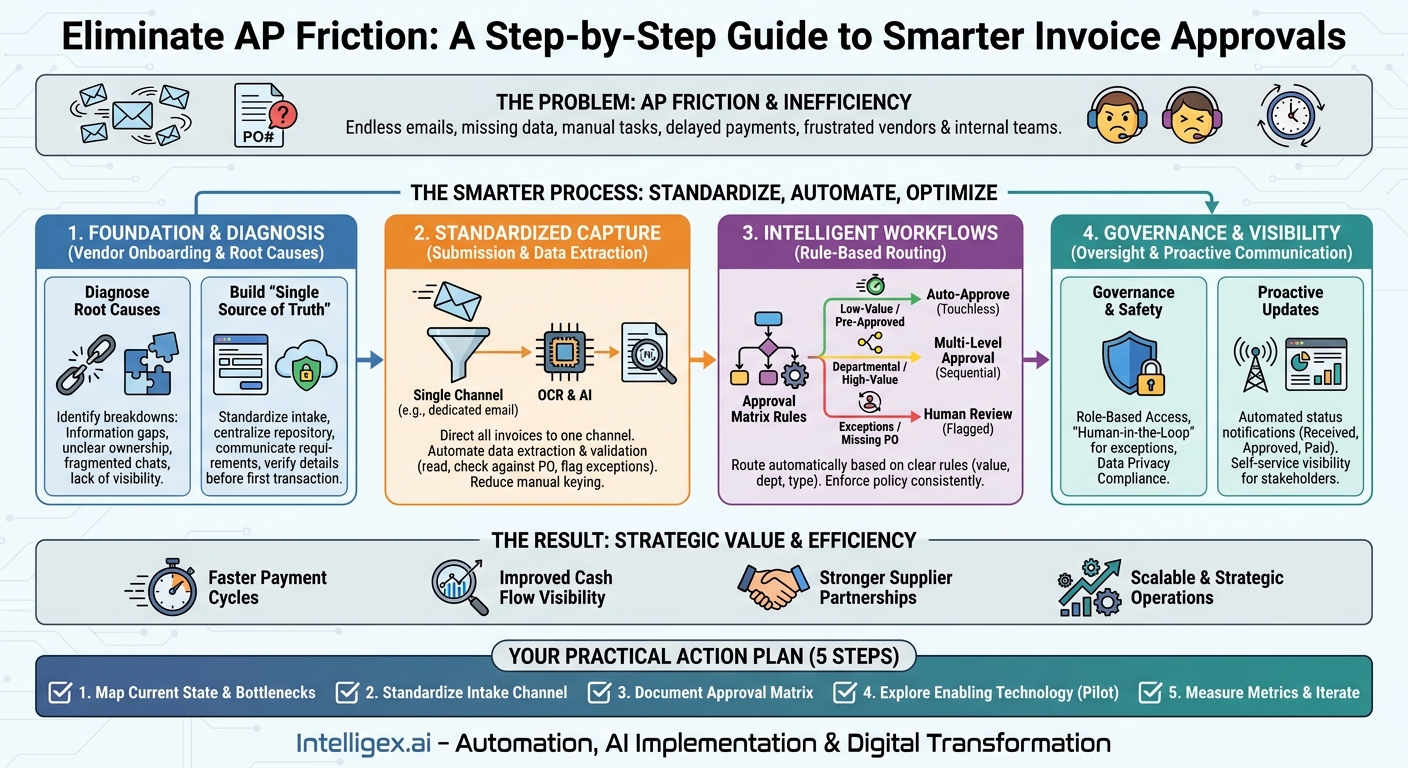
The endless email chain. The missing PO number. The frantic Slack message from a vendor asking, “Has my invoice been paid?” This isn’t just an administrative headache. It’s a costly, inefficient cycle that ties up your accounts payable (AP) team, frustrates your vendors, and delays critical projects. Every moment spent tracking down an approver or clarifying a line item is a moment not spent on strategic financial planning or business growth. The friction in your AP approval process is a hidden tax on your entire organization, affecting everything from operational agility to vendor relationships.
Reducing this back-and-forth isn’t about working harder. It’s about working smarter by building a clear, standardized, and partially automated process. By addressing the root causes of confusion and delay, you can transform AP from a reactive cost center into a streamlined, strategic function. This creates tangible business value through faster payment cycles, improved cash flow visibility, stronger supplier partnerships, and more scalable operations.
Diagnosing the Root Cause: Why AP Cycles Get Stuck
Before you can fix the problem, you need to understand precisely where the breakdowns occur. The symptoms are easy to spot, like late payment fees and angry emails from suppliers. The underlying causes, however, are often systemic process gaps. The friction rarely comes from a single person or department. It’s usually a result of misaligned workflows, unclear expectations, and a lack of centralized information.
Most approval delays stem from a handful of common issues. An invoice arrives, but the data on it is incomplete or doesn’t match a corresponding purchase order. The person who receives the invoice isn’t sure who needs to approve it, so they forward it to their manager, who then forwards it to someone else. The communication happens across different platforms like email, team chats, and phone calls, so there is no single, auditable record of the approval journey. Meanwhile, the vendor and the internal project owner have no idea where the invoice is in the process.
To pinpoint your specific weaknesses, use this simple diagnostic checklist to evaluate your current state:
- Information Gaps: Are invoices frequently missing essential information like a PO number, contact person, or detailed service descriptions?
- Ambiguous Ownership: Is there a clearly documented approval matrix that defines who can approve which types of expenses up to what amount?
- Fragmented Communication: Do invoice-related conversations happen in scattered email threads and chat messages, making them impossible to track?
- Lack of Visibility: Can a department head, a project manager, or the vendor easily check the status of an invoice without contacting the AP team directly?
- Manual Data Entry: Does your team spend significant time manually keying invoice data into your accounting or ERP system?
If you answered “yes” or “I don’t know” to several of these questions, your process is likely creating unnecessary friction. Each of these points represents an opportunity for improvement that can yield significant returns in efficiency and cost savings.
Building a “Single Source of Truth” for Vendor Onboarding
The best way to prevent invoice problems is to establish clear rules of engagement before the first invoice is ever sent. A disorganized vendor onboarding process is a primary source of future AP headaches. When you fail to collect the right information and set clear expectations upfront, you are practically guaranteeing back-and-forth communication down the line.
A structured onboarding process ensures that both your team and your vendor have everything they need for a smooth financial relationship. This is not just a task for the finance department. It requires collaboration from procurement, legal, and the business unit that owns the vendor relationship, such as Marketing for a new creative agency or IT for a new software provider. The goal is to create a central, reliable record for each vendor that your systems and teams can trust.
Here is a step-by-step process for creating a robust vendor onboarding workflow:
- Standardize Information Collection: Create a digital vendor intake form that all new suppliers must complete. This form should capture all essential data in a structured format, including legal business name, tax identification number (like a W-9 in the U.S.), primary contact information, and bank details for payment. Storing this digitally prevents data entry errors from handwritten forms.
- Establish a Central Repository: All vendor documentation, including contracts, master service agreements (MSAs), and the intake form, should be stored in a secure, centralized location. This could be a dedicated folder in your cloud storage, a SharePoint site, or a module within your ERP system like NetSuite or SAP. This ensures that anyone who needs this information can find the official, up-to-date version.
- Communicate Your AP Requirements Clearly: Provide every new vendor with a simple guide that explains your invoicing process. This document should specify where to send invoices (e.g., to a dedicated email address like [email protected]), what information is required on every invoice (e.g., a valid PO number), and your standard payment terms.
- Verify Information Before the First Transaction: Implement a verification step to confirm that the information provided is accurate, especially banking details. This crucial step helps prevent payment fraud and ensures the first payment is successful. A quick confirmation call or an automated micro-deposit verification can save significant trouble later.
By investing time in a thorough onboarding process, you pre-emptively solve many of the issues that commonly delay approvals. You reduce the risk of incorrect data, ensure compliance, and set a professional tone for the entire vendor relationship.
Standardizing Invoice Submission and Data Capture
Once you’ve onboarded a vendor correctly, the next critical step is to control how invoices enter your ecosystem. When invoices arrive through multiple channels, such as the personal email inboxes of project managers, paper mail, or various department heads, chaos is inevitable. Invoices get lost, forgotten, or processed multiple times. A standardized submission process is fundamental to creating visibility and control.
The first rule is to establish a single, dedicated channel for all incoming invoices. This is most commonly a specific email address (e.g., [email protected]) that is monitored and managed systematically. A more advanced solution is a vendor portal, where suppliers can upload invoices directly and track their status. Whichever method you choose, it must be communicated clearly to all vendors as the only acceptable way to submit an invoice for payment.
Once you have a single intake channel, you can automate the next step: data capture. Manually keying data from a PDF invoice into an accounting system is slow, tedious, and prone to human error. Modern AP automation platforms use Optical Character Recognition (OCR) and intelligent data extraction to solve this. These technologies can:
- Read and Digitize Invoices: The system automatically reads key information from the invoice document, including the vendor name, invoice number, date, amount, and line-item details.
- Perform Initial Validation: It can cross-reference the extracted data against your vendor master file and open purchase orders. For example, it can flag an invoice if the vendor name doesn’t match an approved supplier or if the amount exceeds the PO balance.
- Reduce Manual Workload: This automation frees your AP team from hours of repetitive data entry, allowing them to focus on more valuable tasks like resolving exceptions, analyzing spending, and managing cash flow.
Consider this scenario: The supply chain team works with dozens of logistics providers. Without a standardized process, invoices arrive haphazardly, each in a different format. The AP team spends a full day each week just entering these invoices. By directing all vendors to a single email address connected to a data capture tool, the process becomes touchless for over 80% of invoices. The system extracts the data and flags only the exceptions, such as a fuel surcharge that wasn’t on the original PO, for human review.
Designing Intelligent, Rule-Based Approval Workflows
With clean data captured systematically, the next step is to ensure each invoice is routed to the right person for approval without delay. Relying on employees to manually forward invoices based on memory or intuition is a recipe for bottlenecks. Intelligent, rule-based workflows automate this routing logic, enforcing your company’s financial policies consistently and efficiently.
The foundation of an intelligent workflow is a clear approval matrix. This is a document or a set of rules within a system that defines who is authorized to approve expenses based on factors like department, expense type, and dollar amount. Once this logic is defined, it can be configured in an AP automation system to route invoices automatically.
Examples of Rule-Based Routing:
- Low-Value, Pre-Approved Expenses: An invoice for a recurring software subscription for the sales team under $1,000 that matches a valid PO can be routed for “straight-through processing,” where it is approved automatically without manual review.
- Departmental Expenses: A marketing campaign invoice for $7,500 is automatically sent to the Director of Marketing. If that same invoice were for $15,000, the workflow could require sequential approval from both the Director and the VP of Marketing.
- Capital Expenditures: An invoice for new manufacturing equipment over $50,000 is routed to the Plant Manager, the CFO, and the CEO for multi-level approval.
- Exception Handling: Any invoice submitted without a PO number is automatically sent to the relevant department’s budget owner to be assigned a GL code before it proceeds to the next approval step.
Implementing these workflows delivers immense business value. It accelerates the approval process, ensures compliance with internal controls, and creates a clear digital audit trail for every transaction. It also empowers budget owners by giving them direct visibility and control over their team’s spending.
What to Measure:
To quantify the impact of improved workflows, track these key metrics:
- Invoice Cycle Time: The average time from invoice receipt to payment approval.
- Percentage of Invoices Processed “Touchlessly”: The proportion of invoices that are approved automatically based on rules without any manual intervention.
- Rate of Early Payment Discounts Captured: A faster process allows you to take advantage of discounts offered by vendors for paying early.
- Number of Invoices with Policy Exceptions: Track how often invoices are flagged for issues like exceeding a PO budget or missing documentation.
Implementing Automation Safely: Governance and Human Oversight
Automating AP processes involves handling sensitive financial and vendor data. As you introduce tools for data capture and automated approvals, it is essential to build in strong governance and maintain human oversight. The goal of automation is to augment your team’s capabilities, not to create a “black box” system that operates without accountability. A safe and effective implementation balances efficiency with control.
Focus on three core principles for responsible automation:
1. Role-Based Access Control: Not everyone in your organization needs to see every invoice or all vendor banking information. Modern systems allow you to configure granular permissions. For example, a marketing manager can be given rights to view and approve invoices for their department’s cost center only. The AP team may have broader access to process payments, while executives may have view-only access for financial oversight. This principle of least privilege minimizes the risk of unauthorized access to sensitive data.
2. A “Human in the Loop” for Exceptions: Automation is excellent for handling predictable, high-volume tasks, but human judgment remains critical for managing exceptions. Your system should be configured to flag certain scenarios for mandatory human review. These might include:
- The first invoice from a new vendor.
- Invoices that exceed a certain high-dollar threshold.
- Invoices where the system detects a potential duplicate.
- Any instance where the invoice details do not perfectly match the purchase order.
This approach ensures that while routine work flows quickly, your team’s expertise is applied where it matters most, preventing costly errors and mitigating fraud risks.
3. Data Privacy and Compliance: Vendor data is subject to privacy regulations like the GDPR in Europe. Be sure that any automation solution you adopt, especially a cloud-based one, adheres to strict data protection standards. Review vendor contracts and security documentation to ensure your data is encrypted, stored securely, and handled in compliance with relevant laws. For more information on general data protection principles, resources like the official GDPR portal can be helpful. See https://gdpr-info.eu/ for details.
Proactive Communication: Keeping Everyone in the Loop
A significant portion of the back-and-forth in AP comes from a simple lack of information. When vendors don’t know the status of their invoices, they call and email. When internal stakeholders can’t see where a payment is in the approval process, they contact the AP team. This reactive communication consumes valuable time. A modern, streamlined AP process should prioritize proactive, automated communication.
The same system that routes invoices for approval can also be configured to send automatic status updates. These simple notifications can dramatically reduce inbound inquiries:
- Receipt Confirmation: An automated email to the vendor confirming, “We have received your invoice #[Invoice Number] and it is now being processed.”
- Approval Notification: An update informing the vendor, “Your invoice #[Invoice Number] has been approved for payment.”
- Payment Confirmation: A final notification stating, “A payment for invoice #[Invoice Number] has been sent and should arrive within 3-5 business days.”
For internal teams, a centralized dashboard or vendor portal provides self-service visibility. A project manager in the HR department planning an employee training event can log in and see that the invoice for the venue has been received, approved by their director, and is now awaiting final processing by finance. This transparency builds trust and empowers teams to manage their own budgets and vendor relationships more effectively without constantly relying on the AP team as an intermediary.
By making process status visible to all relevant parties, you shift the AP team’s role from being a gatekeeper of information to a manager of an efficient financial process. This is a core tenet of digital transformation and is supported by best practices from organizations like the Institute of Finance & Management (IOFM).
Your Next Steps: A Practical Action Plan
Transforming your accounts payable process from a source of friction to a strategic asset is an achievable goal. It doesn’t require a massive, overnight overhaul. It starts with a commitment to incremental improvement and a clear plan. By systematically addressing the core issues of data standards, workflow logic, and communication, you can build a more resilient and scalable AP function.
Here is a simple, five-step action plan to get you started on reducing back-and-forth with vendors and building a more efficient approval process.
- Map Your Current State: Before you change anything, get your team together and visually map your existing process from invoice receipt to payment. Identify the three biggest bottlenecks or points of confusion. Is it missing POs? Unclear approval chains? Manual data entry? Focus your initial efforts there.
- Standardize Your Intake: Establish a single, mandatory channel for all invoice submissions. Whether it’s a dedicated email address or a vendor portal, make it the official policy. Communicate this change clearly and repeatedly to all your vendors and internal teams.
- Document Your Approval Matrix: Create a simple, clear chart that outlines who needs to approve what, based on department and dollar amount. Get sign-off on this matrix from all department heads and finance leadership. This document is the blueprint for your future automated workflows.
- Explore Enabling Technology: With a clear process map and approval rules, begin researching AP automation tools that fit your needs. Look for solutions that can handle automated data capture, rule-based routing, and provide the visibility your stakeholders need. Start with small pilot projects to demonstrate value.
- Measure, Refine, and Iterate: Track the key metrics you identified, such as invoice cycle time and the rate of touchless processing. Use this data to find new areas for improvement. A great AP process isn’t static; it evolves with your business.
By taking these deliberate steps, you can eliminate the daily frustrations of a broken AP process and unlock significant value for your entire organization.
Your Next Read:
Category:
Get a FREE
Proof of Concept
& Consultation
No Cost, No Commitment!
