

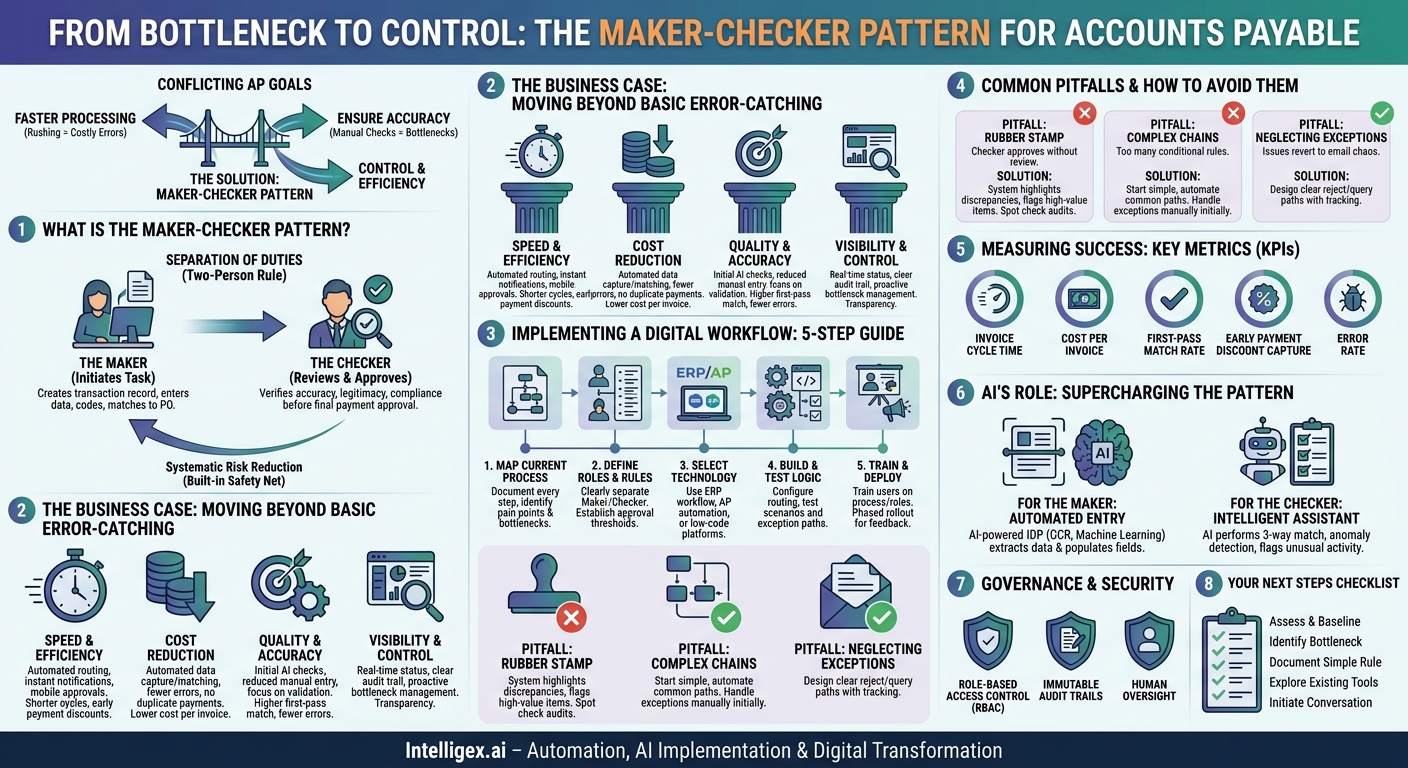
Accounts Payable (AP) departments are often caught between two conflicting goals: process invoices faster and ensure every payment is accurate. Rushing leads to costly errors like duplicate payments or overpayments. But adding too many manual checks creates bottlenecks, resulting in late payment fees, strained vendor relationships, and a frustrated finance team spending its time chasing paper trails instead of performing strategic analysis.
This is not a people problem. It’s a process problem. A lack of a structured, enforceable workflow makes the AP process inherently fragile. The solution lies in adopting a classic control principle, modernized for the digital age: the maker-checker pattern.
What is the Maker-Checker Pattern? A Practical Definition
The maker-checker pattern, also known as the “two-person rule” or “four-eyes principle,” is a foundational concept of internal controls. Its logic is simple yet powerful: no single person can execute and approve a transaction from start to finish. The process is split into two distinct roles:
- The Maker: This individual or system initiates a task. In AP, the maker is responsible for creating a transaction record. This could involve entering invoice data, coding it to the correct general ledger account, and matching it to a purchase order (PO).
- The Checker: This second individual or system is responsible for reviewing the maker’s work. The checker verifies the accuracy, legitimacy, and compliance of the transaction before giving final approval for payment.
This separation of duties is more than just a bureaucratic hurdle. It’s a built-in safety net. The maker focuses on task execution, while the checker provides independent verification. This deliberate division of labor systematically reduces the risk of both accidental errors and intentional fraud. In a manual, paper-based world, this meant one person filling out a form and another physically signing off on it. In a modern, digital environment, this pattern becomes the backbone of an automated, auditable, and highly efficient workflow.
The Business Case: Moving Beyond Basic Error-Catching
Implementing a digital maker-checker workflow does more than just catch typos. It delivers tangible business value across several key areas, transforming AP from a cost center into a strategic function.
Speed and Efficiency
A manual process relies on emails, shared folders, and physical handoffs, all of which are slow and prone to items getting lost. A digital maker-checker workflow automates the routing. As soon as the maker submits an invoice, the system instantly notifies the designated checker. The checker can review and approve from their desktop or a mobile device, eliminating dead time. This dramatically shortens the invoice processing cycle, allowing the organization to capture early payment discounts and avoid late fees.
Cost Reduction
The cost of processing a single invoice involves more than just the AP clerk’s salary. It includes the time spent on manual data entry, tracking down approvals, and correcting errors. Automation of the maker role (through data capture) and the checker workflow (through automated routing and matching) significantly lowers the cost per invoice. Furthermore, by preventing duplicate payments and other costly mistakes, the system pays for itself by plugging financial leaks.
Quality and Accuracy
Human error is inevitable in repetitive tasks like data entry. A digital maker-checker process builds quality in from the start. The system can perform initial checks even before the human checker sees the invoice, such as verifying vendor details against the master file or flagging a potential duplicate invoice number. The human checker is then free to focus on validating the substance of the transaction, not just re-keying data. This leads to a higher first-pass match rate and a drastic reduction in payment errors.
Visibility and Control
One of the biggest frustrations in a manual AP process is the lack of visibility. Where is the invoice? Who needs to approve it? A digital workflow provides a real-time dashboard view of the entire AP pipeline. Managers can see every invoice, its current status, who it’s assigned to, and how long it has been in each stage. This transparency allows for proactive management of bottlenecks and provides a clear, indisputable audit trail for every single transaction.
Implementing a Digital Maker-Checker Workflow: A 5-Step Guide
Transitioning from a manual system to an automated maker-checker process requires a structured approach. Following these steps can help ensure a smooth and successful implementation.
- Map Your Current Process and Identify Pain Points
Before you build the new workflow, you must understand the old one. Document every step an invoice takes from arrival to payment. Who touches it? Where does it wait for approval? Identify the biggest bottlenecks and sources of errors. Is it manual data entry? Chasing approvals via email? This map will be your baseline and guide your design choices. - Define Roles, Responsibilities, and Thresholds
Clearly define who can be a “maker” and who can be a “checker.” These roles should not overlap for the same transaction. Establish clear business rules and approval matrices. For example:- Invoices under $1,000 require one checker (e.g., a department manager).
- Invoices between $1,000 and $10,000 require a senior manager as the checker.
- Invoices over $10,000 require two checkers (e.g., a director and a VP of Finance).
This tiered approach ensures the level of scrutiny matches the level of risk.
- Select and Configure Your Technology
You may already have the tools you need. Modern ERP systems like SAP or NetSuite have built-in workflow capabilities. Dedicated AP automation platforms offer advanced features like AI-powered data capture. Additionally, low-code platforms like the Microsoft Power Platform can be used to build custom approval workflows that integrate with your existing systems. The key is to choose a tool that can enforce your defined roles and rules automatically. - Build and Test the Workflow Logic
In your chosen platform, translate your business rules into automated workflow logic. Configure the routing so that when a maker submits an invoice that meets certain criteria (e.g., “Vendor X,” “Amount > $5,000”), it is automatically sent to the correct checker’s queue. Run extensive tests using real-world scenarios. Test your exception paths: what happens if a checker rejects an invoice? The system should automatically route it back to the maker with the checker’s comments. - Train Users and Deploy in Phases
Technology is only half the battle. Provide clear training to all users on the new process and their specific roles. Don’t just show them which buttons to click; explain why the new process is in place. Consider a phased rollout, starting with a single department or a specific vendor. This allows you to gather feedback and make adjustments before a full-scale deployment.
Common Pitfalls and How to Avoid Them
Even with a solid plan, implementation can have challenges. Being aware of these common pitfalls can help you navigate them successfully.
Pitfall: The “Rubber Stamp” Problem
The biggest risk to a maker-checker system is a complacent checker who approves everything without a proper review. This negates the entire purpose of the control.
How to avoid it: The system should assist the checker. Automatically highlight discrepancies between the PO, invoice, and receiving documents. Flag invoices that are significantly above the historical average for a vendor. Combine this with periodic “spot check” audits of approved invoices to ensure checkers are performing their due diligence.
Pitfall: Overly Complex Approval Chains
In an effort to cover every possible scenario, it’s easy to design workflows with dozens of conditional rules and multiple layers of approval. This can make the new automated process just as slow as the old manual one.
How to avoid it: Start simple. Implement the most common approval paths first (e.g., based on dollar amount). Handle rare exceptions manually at first. You can add more complex rules over time as the team gets comfortable with the new system. It’s better to automate 80% of invoices efficiently than 100% of them slowly.
Pitfall: Neglecting Exception Handling
No process is perfect. Invoices will arrive with missing PO numbers, incorrect pricing, or other issues. If your workflow doesn’t have a clear path for handling these exceptions, they will fall out of the system and revert to email chaos.
How to avoid it: Design clear “reject” and “query” paths. A checker should have an easy way to send an invoice back to the maker with specific questions. The system should track these exceptions to ensure they are resolved in a timely manner, rather than getting lost in an inbox.
Measuring Success: Key Metrics for Your AP Process
To demonstrate the value of your new process, you need to track the right metrics. These key performance indicators (KPIs) will help you measure your return on investment and identify areas for further improvement.
- Invoice Cycle Time: The average time from when an invoice is received to when it is approved for payment. This is a primary indicator of efficiency.
- Cost Per Invoice Processed: Calculated by dividing the total cost of the AP function (salaries, technology, etc.) by the number of invoices processed. Automation should steadily drive this number down.
- First-Pass Match Rate: The percentage of invoices that are processed and approved automatically without any human intervention. A high rate indicates a clean and efficient process.
- Early Payment Discount Capture Rate: The percentage of offered discounts that your company successfully captures. This is a direct measure of financial value created by a faster process.
- Error Rate: The number of invoices processed with errors (e.g., duplicates, incorrect amounts) as a percentage of the total. This directly measures the quality and effectiveness of your maker-checker control.
AI’s Role in Supercharging the Maker-Checker Pattern
Artificial intelligence is not about replacing people in the AP process. It’s about augmenting their capabilities to make the maker-checker pattern faster and more intelligent.
For the Maker: The “maker” role can be largely automated. AI-powered intelligent document processing (IDP) tools can “read” invoices, whether they are PDFs or scanned images. Using technologies like optical character recognition (OCR) and machine learning, these tools can extract key information like vendor name, invoice number, date, line items, and amounts, and then automatically populate the data fields in your ERP or accounting system. This transforms the human maker’s job from tedious data entry to one of exception handling and validation.
For the Checker: AI can act as an intelligent assistant for the human checker. Before the invoice even reaches the approver’s queue, an AI engine can perform a preliminary check. It can execute a three-way match between the invoice, the purchase order, and the goods receipt note. It can also perform anomaly detection, flagging an invoice that looks unusual. For example, it might flag an invoice from a regular supplier that is 50% higher than the monthly average, prompting the human checker to take a closer look.
Governance and Security in an Automated System
Automating a critical financial process like AP approvals requires a strong foundation of governance and security. Without it, the efficiency gains can be quickly undermined by compliance failures or security breaches.
Role-Based Access Control (RBAC): This is the technical enforcement of the maker-checker principle. Your system must be configured so that users assigned a “maker” role cannot approve their own transactions. Access should be granted on a “least privilege” basis, meaning employees only have the permissions necessary to perform their specific duties.
Immutable Audit Trails: Every action taken on an invoice must be logged automatically. The system must record who submitted it, what data was entered or changed, who reviewed it, who approved it, and the timestamp for each action. This digital trail is essential for internal audits and for demonstrating compliance with regulations like the Sarbanes-Oxley Act (SOX).
Human Oversight: Automation is a tool to enhance human judgment, not eliminate it. The “checker” remains a critical part of the process. For high-value transactions or flagged anomalies, the workflow should always require final validation by an accountable human. The goal is to empower your team to focus their expertise where it matters most, letting the system handle the routine checks.
Your Next Steps to a Smarter AP Process
Implementing a digital maker-checker workflow is a practical and high-impact project for any organization looking to improve its financial operations. It moves your Accounts Payable process from a manual, reactive function to a controlled, visible, and efficient one. By starting with a clear understanding of your current process and taking an incremental approach, you can build a system that reduces costs, minimizes errors, and provides a scalable foundation for growth.
Here is a simple checklist to get you started:
- Assess and Baseline: Take an honest look at your current process. What are your average invoice cycle time and estimated error rate today?
- Identify a Bottleneck: Pinpoint the single biggest source of delay in your current approval flow. Is it getting budget-holder sign-off? Is it matching invoices to POs?
- Document a Simple Rule: Write down the ideal “maker-checker” approval rule for one common invoice type (e.g., a marketing expense under $2,000).
- Explore Existing Tools: Investigate the workflow or approval features within your current ERP or accounting software. You may already own the tools you need. Major platforms like SAP have robust modules for this.
- Initiate the Conversation: Schedule a brief meeting between key stakeholders in Finance, IT, and a user department to discuss the feasibility of launching a small pilot project.
Your Next Read:
Category:
Get a FREE
Proof of Concept
& Consultation
No Cost, No Commitment!
