

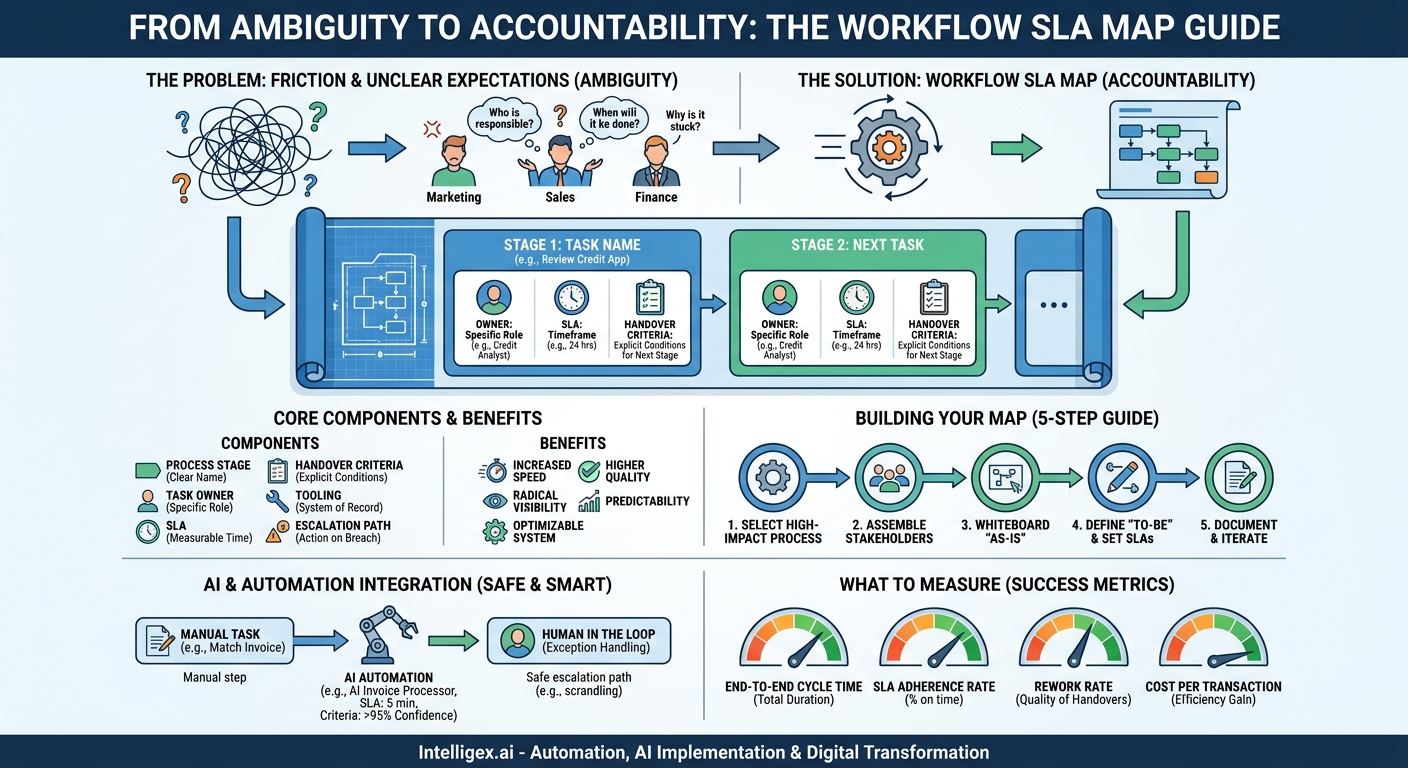
Your business runs on workflows. From onboarding a new hire to paying a vendor, these sequences of tasks are the lifeblood of your operations. But when a process stalls, who is responsible? When a customer is waiting, how long should they expect to wait? Without clear answers, you get friction, finger-pointing, and missed deadlines. The result is a drag on efficiency that silently erodes your bottom line and frustrates both employees and customers.
The problem is rarely a lack of effort. It’s a lack of clarity. Teams operate in silos with unstated assumptions about who does what and by when. The marketing team assumes sales will follow up on a lead within a day. The finance team assumes department heads will approve invoices within a week. When these assumptions prove false, the entire system slows down. The solution is to make these implicit expectations explicit with a powerful tool: the Workflow Service Level Agreement (SLA) Map.
What is a Workflow SLA Map (and What It Isn’t)?
A Workflow SLA Map is a documented agreement that outlines every stage of a business process. It goes far beyond a simple flowchart by assigning three critical pieces of information to each step: a specific owner, a clear timeframe for completion (the SLA), and the exact criteria required for a successful handover to the next stage. It is a blueprint for accountability and predictability.
Think of it as the difference between a rough sketch of a house and a detailed architectural plan. A flowchart shows you the rooms, but an SLA map gives you the precise dimensions, the load-bearing walls, and the electrical wiring plan. It transforms a process from a series of vague steps into a predictable, measurable, and optimizable system.
This isn’t about micromanagement or creating rigid bureaucracy. Instead, it’s about establishing clear “rules of the road” that empower teams to work together seamlessly. When everyone knows what is expected of them and what they can expect from others, collaboration becomes smoother, and problems are identified before they escalate. The business value is immediate: increased speed, higher quality output, and radical visibility into where work actually gets stuck.
The Core Components of an Effective SLA Map
A robust SLA map is built on a foundation of clear, unambiguous components. Leaving any of these out creates loopholes that lead back to the very confusion you are trying to solve. When documenting your workflow, ensure every single stage includes the following elements.
- Process Stage: A clear, simple name for the task. Use action-oriented language, such as “Review Customer Credit Application” or “Generate Purchase Order,” not vague labels like “Finance Step.”
- Task Owner: The specific role or team responsible for executing the stage. Be precise. “Account Executive” is better than “Sales.” “Accounts Payable Specialist” is better than “Finance.” This clarity eliminates any doubt about who is accountable.
- Service Level Agreement (SLA): The maximum acceptable time for the owner to complete the task and hand it off. This must be specific and measurable, for example, “24 business hours,” “3 business days,” or “15 minutes.”
- Handover Criteria: The explicit conditions that must be met for the stage to be considered complete. This is arguably the most critical and often overlooked component. For example, a handover from sales to legal might require “Signed contract PDF uploaded to the shared drive and all customer contact fields in the CRM are complete.” This prevents half-finished work from being passed downstream.
- Tooling / System of Record: Where does this work happen? Specify the software or platform, like Salesforce for a sales stage or NetSuite for a finance stage. This helps new team members get up to speed quickly and provides a single source of truth for the task’s status.
- Escalation Path: What happens if the SLA is breached? Define who is notified and what action should be taken. It could be an automatic notification to the owner’s manager or a flag in a project management dashboard. An SLA without an escalation path is just a suggestion.
A Practical Example: Mapping the Employee Onboarding Process
Let’s apply these components to a common, cross-functional workflow: onboarding a new employee. This process is notorious for delays and dropped balls, involving HR, IT, and the hiring manager. A poorly executed onboarding can leave a new hire feeling disconnected and unproductive for weeks.
Here is how a simplified SLA map for this process might look:
Process: New Employee Onboarding
Stage 1: Offer Letter Signed
- Owner: HR Coordinator
- SLA: 2 business hours (from receiving signed letter)
- Handover Criteria: New hire record created in the HRIS system. Onboarding ticket submitted to IT. Welcome email sent to the hiring manager.
- Tooling: HRIS, IT Ticketing System (e.g., Jira or ServiceNow)
- Escalation: HR Manager notified if SLA is breached.
Stage 2: IT Provisioning
- Owner: IT Support Specialist
- SLA: 3 business days
- Handover Criteria: Laptop imaged and configured. All necessary software accounts (email, Slack, core applications) created. Credentials documented securely.
- Tooling: IT Asset Management System, Active Directory
- Escalation: IT Helpdesk Manager notified if SLA is breached.
Stage 3: Manager Pre-Onboarding Prep
- Owner: Hiring Manager
- SLA: 1 business day (before start date)
- Handover Criteria: 30-day onboarding plan and objectives documented. First-week meetings scheduled. Team notified of new hire’s start date and role.
- Tooling: Shared Document (e.g., Confluence or Google Docs), Team Calendar
- Escalation: Department Head notified if not complete by end of day before start date.
With this map, the ambiguity disappears. The IT team knows exactly when their clock starts (upon ticket receipt from HR) and what they need to deliver. The hiring manager has a clear checklist and deadline. The result is a smooth, professional day-one experience for the new employee, which boosts engagement and accelerates their time to productivity.
How to Build Your First Workflow SLA Map: A 5-Step Guide
Creating your first map can feel daunting, but a structured approach makes it manageable. The goal is progress, not a perfect, all-encompassing document on day one. Follow these steps to build a practical map that delivers immediate value.
- Select a High-Impact, High-Pain Process. Do not try to map every workflow in your company at once. Start with one that is widely recognized as broken, slow, or critical to business outcomes. Good candidates often involve multiple departments, such as quote-to-cash, lead-to-opportunity, or procure-to-pay. Fixing a process that everyone agrees is painful will build momentum for future efforts.
- Assemble the Cross-Functional Stakeholders. Get the people who actually perform the work in a room (whether physical or virtual). This is not just a meeting for managers. You need the sales ops analyst, the AP clerk, and the IT support specialist. These are the people who know the real-world friction points and workarounds. Their input is essential for creating a realistic and effective map.
- Whiteboard the “As-Is” Process. Before you can design the future, you must understand the present. Ask the group to walk you through the current process step by step. Use a whiteboard or digital collaboration tool. At each step, ask the key questions: Who does this? What information do you need to start? What do you produce? Who gets it next? How long does it usually take? Be prepared for surprises; the official process and the real process are often very different.
- Define the “To-Be” Process and Set SLAs. Now, shift the conversation to the ideal state. Look for redundant steps to eliminate, bottlenecks to resolve, and handovers to clarify. This is where you collaboratively define the core components: owner, SLA, and handover criteria for each step. The SLAs should be a negotiation, balancing ambition with reality. Use historical data if you have it, but rely on the expertise of the practitioners in the room.
- Document, Communicate, and Iterate. Capture the final map in a clear, accessible format, such as a company wiki page or a shared document. Do not bury it in a forgotten folder. Communicate the new process and SLA map to all affected teams, explaining the “why” behind the changes. Finally, schedule a recurring review (e.g., quarterly) to check if the map is working. Processes evolve, and your map must evolve with them.
Integrating AI and Automation Safely
A well-defined Workflow SLA Map is the perfect foundation for intelligent automation. You cannot and should not automate a process you do not deeply understand. The map provides the clarity needed to identify the best opportunities for AI and to implement it responsibly.
For example, in a procure-to-pay workflow, the “Match Invoice to Purchase Order” step is often manual, repetitive, and prone to error. This is a prime candidate for automation. An AI-powered document processing tool can be introduced to handle this stage for standard invoices.
The SLA map is simply updated:
- Owner: AI Invoice Processor
- SLA: 5 minutes
- Handover Criteria: Invoice matched with >95% confidence score. Data extracted and validated against PO.
- Escalation: If confidence is <95% or a mismatch is found, escalate to “AP Exception Queue” for human review by an AP Specialist.
This approach significantly accelerates the process for the majority of invoices while ensuring human oversight for complex or unusual cases. However, integrating AI requires careful governance.
A Note on Safe Implementation
When you introduce automation, especially one that handles sensitive financial or customer data, you must build safety into the process map itself. The most important principle is keeping a human in the loop. Your map must explicitly define the conditions under which the AI escalates a task to a person. This ensures that the system fails safely and that complex edge cases receive human judgment. Furthermore, ensure strict access control. The AI model that processes invoices should only have permission to read invoice data and access the procurement system, nothing more. Finally, be mindful of data privacy. If the workflow involves personally identifiable information (PII), ensure the entire process, including the automated steps, complies with regulations like GDPR.
What to Measure: Tracking Success Beyond Speed
The primary benefit of an SLA map is often seen as increased speed, but its value extends to quality, cost, and predictability. To understand the full impact, you need to track a balanced set of metrics. Your map provides the clear stage boundaries needed to measure them accurately.
- End-to-End Cycle Time: This is the total time from when a process begins to when it ends. For customer onboarding, it’s the time from a signed contract to a fully provisioned and trained user. An SLA map helps you identify which specific stages are contributing the most to overall cycle time.
- SLA Adherence Rate: For each stage in your map, track the percentage of tasks completed within the defined SLA. A low adherence rate on a specific step is a clear signal of a bottleneck, which could be caused by a lack of resources, poor training, or an unrealistic SLA.
- Rework Rate: How often is a task sent back to a previous stage for correction? This metric directly measures the quality of your handovers. If the sales-to-finance handover has a high rework rate, it likely means the handover criteria are unclear or not being followed.
- Cost Per Transaction: As you streamline the process and introduce automation, the amount of human effort required should decrease. By estimating the time spent on each stage, you can calculate a rough cost per transaction (e.g., cost to process one invoice) and track its reduction over time.
Next Steps: Putting Your Map into Action
Clarity is the ultimate accelerator. A Workflow SLA Map replaces ambiguity with accountability, transforming slow, frustrating processes into fast, predictable, and scalable operations. It is the foundational step in any meaningful digital transformation initiative. You do not need a massive project to get started.
This week, identify one process in your organization that causes consistent delays or complaints. Schedule a 90-minute meeting with the key people involved, from start to finish. Use the five-step guide in this article to sketch out your first SLA map on a whiteboard. Focus on defining the owners, setting initial timeframes, and clarifying the handovers. This single action will create more visibility and drive more improvement than months of abstract planning.
Your Next Read:
Category:
Get a FREE
Proof of Concept
& Consultation
No Cost, No Commitment!
