

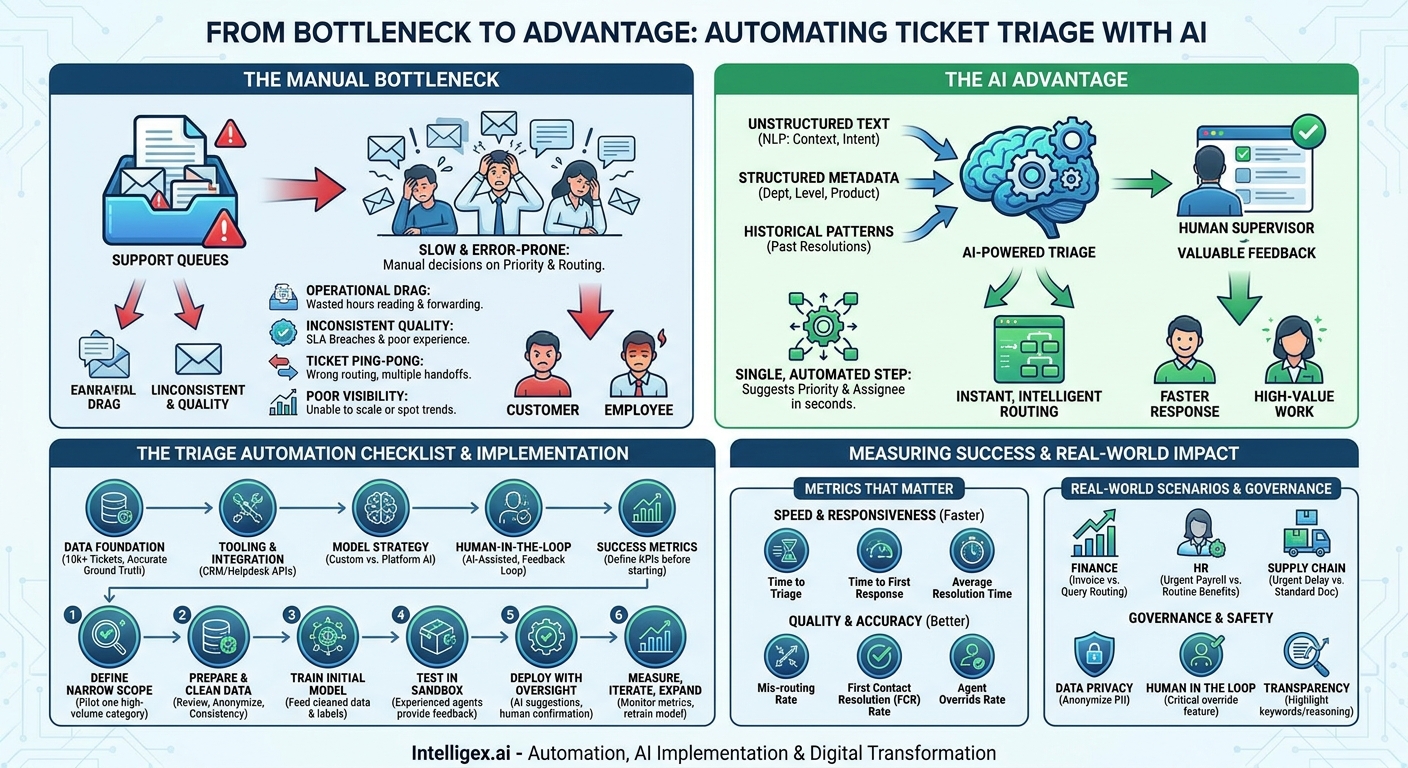
Your support queues are overflowing. Your team is spending hours every day just reading, categorizing, and forwarding tickets. An urgent customer issue gets buried under a pile of routine requests, while simple questions get escalated to senior engineers. This isn’t a sign of a failing team; it’s a symptom of a broken process. Manual ticket triage is a bottleneck that slows down your entire operation, from IT and HR to Finance and customer support.
The traditional approach involves a human agent making two separate, sequential decisions: “What is the priority of this issue?” and “Who is the right person to solve it?” This process is slow, prone to human error, and nearly impossible to scale during periods of high volume. The result is delayed responses, frustrated customers, and burned-out employees. But by applying modern AI, you can combine these two decisions into a single, intelligent, and automated step, transforming your triage process from a bottleneck into a competitive advantage.
The Hidden Costs of Manual Triage
Before exploring the solution, it’s critical to understand the real-world business impact of an outdated triage system. The costs go far beyond the salary of the person sorting through the queue. They ripple across the organization, affecting efficiency, customer satisfaction, and your ability to grow.
Operational Drag and Wasted Hours
The most obvious cost is labor. Every minute an employee spends manually reading a ticket, deciphering its intent, assigning a priority level, and finding the correct team is a minute they could have spent solving problems. This isn’t just a task for a junior team member. Often, experienced personnel are pulled into triage to handle complex requests, taking them away from high-value work. This operational drag creates backlogs that can take days or even weeks to clear.
Inconsistent Quality and SLA Breaches
Humans are not robots. Two different agents might assign two different priorities to the same ticket based on their experience, workload, or even the time of day. This inconsistency leads to a poor customer experience, where one user gets an immediate response for a minor issue while another waits hours for a critical one. When a high-priority ticket is miscategorized as low-priority, you risk breaching your Service Level Agreements (SLAs), which can have financial penalties and damage your brand’s reputation.
The “Ticket Ping-Pong” Effect
When a ticket is routed to the wrong team, it gets bounced back into the queue or forwarded again. This “ping-pong” effect is incredibly inefficient. Not only does it dramatically increase the total resolution time, but it also forces the customer or employee to explain their problem multiple times to different people. Each handoff introduces more delay and frustration, eroding trust in your support process.
Poor Visibility and Inability to Scale
A manual process makes it difficult to see the bigger picture. You can’t easily spot trends, like a sudden spike in password reset requests or a recurring bug report from a specific customer segment. Your ability to forecast workload or identify systemic problems is limited. Furthermore, this model simply does not scale. If your ticket volume doubles overnight due to a new product launch or a system outage, your only option is to throw more people at the problem, which increases costs and complexity without guaranteeing better results.
How AI Unifies Priority and Routing
AI-powered triage fundamentally changes the workflow. Instead of a person reading and interpreting each ticket, a machine learning model analyzes it instantly upon creation. It doesn’t just look for keywords; it uses Natural Language Processing (NLP) to understand the context, intent, and sentiment behind the words.
The AI model examines multiple data points simultaneously:
- Unstructured Text: The subject line and body of the ticket. The model can identify phrases like “system is down” or “cannot login” as indicators of high urgency.
- Structured Metadata: Information like the user’s department (e.g., Sales vs. Engineering), their subscription level (e.g., Basic vs. Enterprise), or the product version they are using.
- Historical Patterns: The model learns from thousands of previously resolved tickets, recognizing patterns that humans might miss. For example, it might learn that tickets containing a specific error code, reported by users in a certain region, are almost always high-priority and belong to the network engineering team.
Based on this comprehensive analysis, the AI produces a single, actionable recommendation: a suggested priority level and a suggested team or individual agent for assignment. This happens in seconds, not minutes or hours. The human agent’s role then shifts from manual sorter to supervisor. They can quickly validate the AI’s suggestion or, in rare cases, override it, which provides valuable feedback to further train and improve the model.
A Practical Framework: The Triage Automation Checklist
Getting started with AI triage doesn’t require a massive, multi-year project. It requires a pragmatic approach focused on a clear business case. Before you write a single line of code or sign a contract, use this checklist to assess your readiness and build a solid foundation.
- Data Foundation: Do you have a sufficient volume of historical ticket data? A good starting point is typically 10,000 or more resolved tickets. Most importantly, is this data reliable? The tickets should have accurate final assignments and priority levels, as this is the “ground truth” the AI will learn from.
- Tooling and Integration: What is your current ticketing system? Common platforms like Salesforce Service Cloud, Zendesk, or Jira often have APIs that allow for integration with AI services. You need a way to send ticket data to the model and receive its prediction back into your system.
- Model Strategy: Will you build a custom model or use a platform with pre-built AI capabilities? Building a custom model offers more control but requires specialized data science expertise. Using an existing AI feature within your helpdesk software or a third-party AI platform can significantly accelerate deployment.
- Human-in-the-Loop Process: How will agents interact with the AI? The best practice is to start with “AI-assisted” triage, where the model suggests the priority and route, and an agent confirms with one click. You must have a clear process for agents to override the suggestion and for that feedback to be captured. This is essential for continuous improvement.
- Success Metrics: How will you define success? Identify the key performance indicators (KPIs) you want to improve before you begin. This could be reducing “Time to First Response,” “Mis-routing Rate,” or increasing “First Contact Resolution Rate.”
Step-by-Step: Implementing Your First AI Triage Model
Moving from concept to reality can be broken down into a manageable, iterative process. The key is to start small, prove value, and then expand. This approach minimizes risk and helps build organizational buy-in.
- Define a Narrow Scope for Your Pilot. Do not try to automate everything at once. Pick one high-volume, well-defined ticket category. Good candidates are often Tier 1 IT support issues (like password resets or software access requests) or common HR inquiries (like benefits questions or leave requests). The goal is to choose a predictable area where you can achieve a quick win.
- Prepare and Clean Your Training Data. This is the most critical step. Export a set of historical tickets from your chosen pilot category. Work with your team to review the data for consistency. Remove any tickets that were incorrectly categorized or routed. Ensure that sensitive personal information is anonymized or removed if it is not relevant to the model’s decision-making process.
- Train the Initial Model. Using your cleaned data, you can train a classification model. This can be done using a variety of tools, from cloud AI platforms like those on AWS or Google Cloud to more user-friendly, no-code AI applications. The model is fed the ticket text and metadata, and it learns to associate those inputs with the correct output labels (e.g., Priority: P3, Team: IT Support).
- Integrate and Test in a Sandbox Environment. Before deploying to your live system, connect the AI model to a non-production, or “sandbox,” version of your ticketing software. Ask a few of your most experienced agents to use it. They can provide invaluable feedback on the accuracy of the suggestions and the usability of the interface. Does it feel faster? Are the recommendations helpful?
- Deploy with Human Oversight. Once testing is complete, deploy the model to your live environment, but in an advisory capacity. Configure the system so the AI populates the “Priority” and “Assigned To” fields as a suggestion. The agent’s job is to review and confirm. This “human-in-the-loop” approach builds trust and ensures that edge cases or complex issues are still handled with human judgment.
- Measure, Iterate, and Expand. Continuously monitor the metrics you defined in your checklist. Track the agent override rate; a high rate may indicate that the model needs to be retrained with more or better data. Use the feedback from these overrides to periodically retrain and improve the model. Once you have demonstrated success in your pilot, you can use the same methodology to expand the AI triage to other departments and ticket types.
Measuring Success: Metrics That Matter
The success of an AI triage system should be measured with concrete business metrics, not vague promises of “efficiency.” By tracking the right KPIs, you can build a clear business case for further investment and demonstrate tangible value to stakeholders.
Speed and Responsiveness Metrics
These metrics quantify how much faster your team can respond to and resolve issues.
- Time to Triage: The time elapsed from ticket creation to its first correct assignment. This is the most direct measure of the AI’s impact and should decrease significantly.
- Time to First Response: How quickly a customer receives a meaningful response (not just an auto-reply). Faster triage means the right agent sees the ticket sooner, enabling a quicker response.
- Average Resolution Time: While influenced by many factors, reducing the initial triage delay and routing errors will lower the overall time it takes to close a ticket.
Quality and Accuracy Metrics
These metrics measure the effectiveness of the routing and prioritization decisions.
- Mis-routing Rate: The percentage of tickets that must be manually re-assigned after the initial triage. This should drop dramatically as the AI learns the correct routing patterns.
- First Contact Resolution (FCR) Rate: The percentage of issues resolved by the first agent who handles them. By getting the ticket to the right expert on the first try, AI directly improves FCR.
- Agent Override Rate: The frequency with which agents disagree with the AI’s suggestions. Initially, this might be higher, but as the model learns from feedback, this rate should decline, indicating increasing accuracy and agent trust.
Real-World Scenarios Across Your Business
AI-powered triage is not just for IT helpdesks. Its principles can be applied to any business unit that manages inbound requests. Here are a few examples:
- Finance and Accounts Payable: An AI model can differentiate between an email with an attached invoice that needs processing and an email from a vendor querying the status of a payment. It can route the invoice directly to the AP automation workflow while assigning the vendor query to a support specialist, ensuring both are handled by the appropriate resource without manual sorting.
- HR Service Delivery: An employee submits a ticket that says, “My paycheck seems wrong.” Another submits one that says, “How do I enroll in the dental plan?” The AI can identify the sensitive and urgent nature of the payroll issue and route it directly to a senior payroll specialist, while the more routine benefits question is assigned to the Tier 1 HR support queue.
- Supply Chain and Logistics: A system can be trained to analyze emails from suppliers. It can prioritize a message with the subject “URGENT: Shipment Delay for PO #12345” and route it to the logistics manager, while a standard “Bill of Lading Attached” email is routed to a documentation clerk.
Governance and Safe Implementation
Implementing AI, especially with customer or employee data, requires a thoughtful approach to governance and safety. Building trust in the system is just as important as the technology itself.
Data Privacy: Be mindful of Personally Identifiable Information (PII) in your ticket data. During data preparation, use anonymization or masking techniques for sensitive fields that are not necessary for the model to make its decision. The goal is to train the model on the problem description, not the person’s private information.
Human in the Loop: This cannot be overstated. Always design your system with a clear and simple way for a human to override the AI’s decision. This is not a weakness; it is a critical feature. It empowers your agents, ensures complex edge cases are handled correctly, and provides the essential feedback loop needed to make the AI smarter over time.
Transparency: While the inner workings of an AI model can be complex, you can often provide transparency into its decisions. For instance, the system could highlight the keywords or phrases in the ticket (e.g., “urgent,” “system down,” “critical error”) that led to its high-priority classification. This helps agents understand and trust the AI’s reasoning.
Your Next Steps to Smarter Triage
Transforming your ticket triage process is an achievable goal that delivers rapid business value. By taking a structured, step-by-step approach, you can move from a reactive, manual system to a proactive, intelligent one.
Here’s how to begin:
- Audit Your Current Process. Map out exactly how tickets flow through your system today. Identify the primary bottlenecks, measure your current triage time, and talk to your agents about their biggest pain points.
- Assess Your Data. Take an honest look at your historical ticket data in one specific category. Is it labeled consistently? Is there enough volume to support a pilot project?
- Launch a Small, Focused Pilot. Select one team and a single, high-volume ticket type. Use this pilot to prove the technology’s value, refine your process, and build momentum for a wider rollout.
- Seek Expert Guidance. Navigating the landscape of AI tools and integration strategies can be complex. Partnering with experts who have implemented these systems before can help you avoid common pitfalls and accelerate your path to success.
By automating the repetitive work of sorting and routing, you free your team to focus on what they do best: solving problems and delivering exceptional service.
Your Next Read:
Get a FREE
Proof of Concept
& Consultation
No Cost, No Commitment!
