

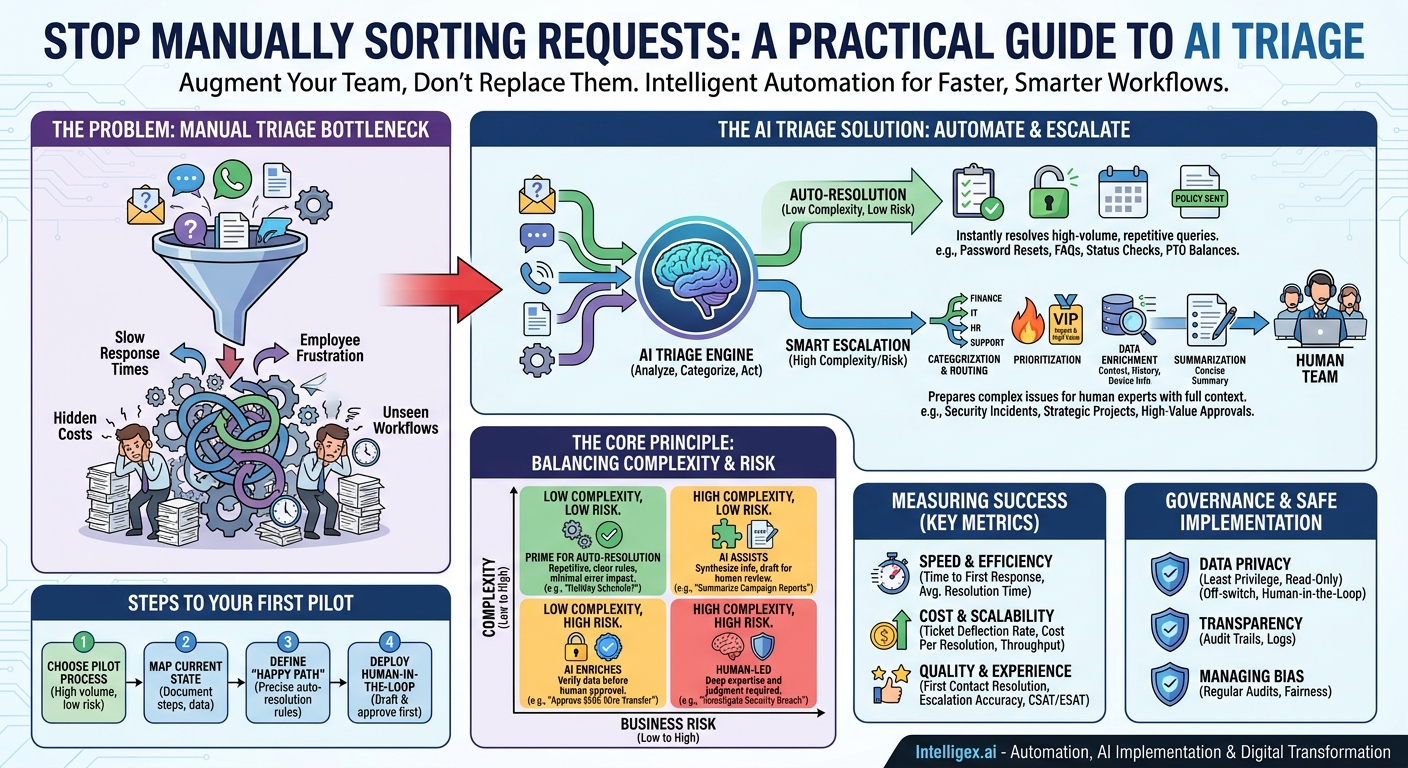
Every day, your business is flooded with requests. Customer support tickets, IT helpdesk queries, invoice questions for finance, and HR policy clarifications land in a dozen different inboxes and systems. The first, and often most time-consuming, step is simply figuring out what each request is, who should handle it, and how urgent it is. This manual triage is a hidden bottleneck, a drag on productivity that slows down response times and frustrates both your employees and your customers. What if you could intelligently automate this sorting process, instantly resolving simple issues while perfectly preparing complex ones for your expert teams? This is the promise of AI Triage.
AI Triage is not about replacing your team. It is about augmenting them. By using AI to analyze, categorize, and act on incoming requests, you can create a system that automatically resolves a significant portion of routine inquiries and escalates the rest with all the necessary context. This frees your team to focus on high-value work, delivering faster service, reducing operational costs, and gaining unprecedented visibility into your workflows.
The Core Principle: Balancing Complexity and Risk
Deciding what to automate versus what to escalate is the most critical part of building an effective AI triage system. A common mistake is to focus only on the complexity of a task. The real key is to evaluate each process on two axes: complexity and business risk. This simple framework helps you prioritize automation efforts and protect your business from potential errors.
Think of it as a four-quadrant matrix:
- Low Complexity, Low Risk: These are your prime candidates for full auto-resolution. The tasks are repetitive, follow clear rules, and the impact of a mistake is minimal. Think of a user asking, “What is the company holiday schedule?” The answer is static and public, making it a perfect automation target.
- High Complexity, Low Risk: These are tasks that require synthesizing information but have a low blast radius if the AI gets it wrong. For example, “Summarize the last three marketing campaign reports for the European region.” The AI can gather the data and create a draft summary for a human to review and refine. It assists, but does not execute the final step.
- Low Complexity, High Risk: These tasks seem simple but carry significant consequences. An example is a request like, “Please approve the attached wire transfer for $50,000.” The steps might be straightforward, but the financial risk is far too high for full automation. Here, AI should be used to enrich the request (e.g., verifying the payee against a vendor list) before handing it to a human for final approval.
- High Complexity, High Risk: These are tasks that require deep expertise, nuanced judgment, and have serious implications. Think “Investigate this security incident” or “Develop a new go-to-market strategy.” These processes should always be human-led. AI can play a supporting role by gathering data or identifying patterns, but the core strategy and decision-making must remain with your team.
By categorizing your workflows using this model, you can build a roadmap for automation that starts with the safest, highest-return opportunities and progressively incorporates more sophisticated AI assistance where it makes sense.
Identifying Prime Candidates for Auto-Resolution
The best place to start your AI triage journey is with the “low complexity, low risk” tasks. These are the high-volume, repetitive queries that consume your team’s time but require little to no critical thinking. Automating them delivers immediate value in speed and cost savings.
Here are concrete examples from different business functions:
- IT Help Desk: Handling password reset requests, providing instructions for connecting to Wi-Fi, granting access to standard software applications, or answering “how-to” questions by linking to the correct knowledge base article.
- Human Resources: Answering questions about paid time off (PTO) balances, providing links to benefits enrollment forms, or explaining standard company policies by pulling directly from an employee handbook.
- Finance & Accounting: Checking the status of an invoice for a vendor, confirming receipt of a customer payment, or answering questions about expense report submission guidelines.
- Customer Support: Providing order status updates, explaining the return policy, or answering basic questions about product features that are documented in a public FAQ.
Checklist: Is This Process a Good Automation Candidate?
Before you commit to automating a workflow, run it through this simple checklist. The more questions you can answer with “yes,” the better the candidate.
- Is it highly repetitive? Does your team answer the same question or perform the same task multiple times a day?
- Is the answer data-driven? Can the solution be found by looking up information in a structured system like a database, CRM, or knowledge base?
- Does it follow clear rules? Can you write down the decision logic in a simple “if this, then that” format?
- Is the impact of an error low? If the AI provides the wrong answer, is the consequence easily correctable and minor (e.g., sending a link to the wrong policy document)?
- Is the required data accessible? Can the AI system be given secure, read-only access to the necessary information?
- Can success be measured? Can you clearly define what a successful auto-resolution looks like?
Designing a Smart Escalation Path
Auto-resolution is only half of the equation. For every request that cannot be fully automated, the AI’s role shifts from “solver” to “assistant.” A smart escalation path ensures that when a task does reach a human, it arrives prepared, contextualized, and routed to the perfect person. This is where AI triage delivers massive efficiency gains for your expert teams.
Instead of just forwarding a raw email, the AI can perform several value-add steps first:
- Categorization and Routing: The AI reads the request and determines the intent. Is it a billing question, a technical bug report, or a sales inquiry? Based on this analysis, it automatically assigns the ticket to the correct department (Finance, Engineering, or Sales), eliminating the need for a human to manually sort the queue.
- Prioritization: The system can be trained to recognize keywords that signal urgency, such as “outage,” “critical,” or “unable to process payments.” It can also connect to your CRM, like Salesforce, to identify requests from high-value customers and automatically flag them for immediate attention.
- Data Enrichment: This is one of the most powerful functions. When escalating a ticket, the AI can automatically pull and attach relevant information from other systems. For a customer support issue, it could append the customer’s order history and previous support interactions. For an IT ticket, it could add the user’s device information and software version. This gives your team the full picture instantly, without having to hunt for it across multiple applications.
- Summarization: For long, complicated email chains or support tickets, a generative AI model can produce a concise summary of the issue, the steps already taken, and the user’s ultimate goal. This saves your agent critical minutes on every single complex ticket.
The result is that your team member opens a ticket that is already classified, prioritized, and enriched with all the context they need to begin solving the problem immediately.
A Step-by-Step Guide to Your First Triage Workflow
Theory is great, but practical implementation is what matters. Launching your first AI triage workflow doesn’t have to be a massive, multi-year project. By starting with a small, well-defined process, you can build momentum and demonstrate value quickly. Follow these steps for a successful pilot.
- Choose Your Pilot Process: Don’t try to boil the ocean. Select one high-volume, low-risk workflow. A great example is the HR team handling employee questions about the travel expense policy. It’s repetitive, the answers are in a single document, and the risk is very low.
- Map the Current State: Sit with the team that handles the process today. Document every single step. How do requests arrive? What information do they look for? Where do they find the answer? How do they respond? How long does it take? This map is your baseline.
- Define the “Happy Path” for Automation: Be precise. What are the exact conditions for a successful auto-resolution? For our example: If an incoming email contains the words “travel policy” or “expense limit,” and the AI determines the sentiment is a question, then it will automatically reply with a link to the official policy document on the intranet.
- Define Escalation Triggers: The escalation path should be your default at first. Any request that does not meet the strict “happy path” criteria gets escalated. This includes emails with ambiguous language, multiple questions, or an angry tone. The AI should simply categorize it as “Complex Travel Policy Question” and assign it to the HR queue.
- Connect Your Knowledge Source: For the AI to work, it needs access to the correct information. In this case, you would grant the system secure, read-only access to the specific page or document containing the travel expense policy. This follows the principle of least privilege; the AI only gets access to what it absolutely needs.
- Build and Test in a Safe Environment: Never build in production. Use a testing environment or sandbox to configure the workflow. Feed it dozens of real-world (anonymized) emails from the past to see how it performs. Does it correctly identify the happy path? Does it escalate when it should? Tweak the logic until the accuracy is high.
- Deploy with a Human-in-the-Loop: For the first few weeks, don’t allow the AI to send responses directly. Instead, configure it to draft the reply and assign it to a human for one-click approval. This builds trust with your team, allows them to catch any edge cases, and provides valuable feedback for improving the model.
- Measure, Iterate, and Expand: Track your key metrics. How many queries were auto-resolved? What was the average resolution time? Once the pilot is proven successful and your team is confident, you can switch to full auto-resolution for that workflow and begin identifying your next pilot process.
Measuring Success: The Metrics That Matter
To justify and expand your AI triage program, you need to track its impact on the business. Focus on metrics that clearly demonstrate improvements in speed, cost, quality, and scalability. Avoid vanity metrics and concentrate on what truly moves the needle.
Speed and Efficiency
- Time to First Response: This measures how quickly a user receives an initial acknowledgment or, in the case of auto-resolution, a complete answer. AI can shrink this from hours to seconds.
- Average Resolution Time: The total time from when a request is opened until it is closed. Track this for both auto-resolved issues and those that are escalated. For escalated tickets, you should see this time decrease as agents get better-prepared assignments.
Cost and Scalability
- Ticket Deflection Rate: The percentage of incoming requests that are fully resolved by the AI without any human involvement. This is a direct measure of cost savings.
- Cost Per Resolution: Calculate the loaded cost of your team’s time. By tracking the deflection rate, you can quantify the direct financial savings of automation.
- Request Throughput: Measure how many requests the system can process per hour. Unlike a human team, AI capacity doesn’t fluctuate. It can handle massive spikes in volume (e.g., during a product launch or service outage) without a drop in performance.
Quality and Customer Experience
- First Contact Resolution (FCR): For issues handled by AI, this should be nearly 100%. For escalated issues, a higher FCR indicates the AI is routing and enriching them effectively.
- Escalation Rate Accuracy: What percentage of escalated tickets were routed to the correct team on the first try? This measures the effectiveness of the AI’s categorization logic.
- User Satisfaction (CSAT/ESAT): After an interaction, survey your users. Are they satisfied with the speed and accuracy of the automated responses? This is the ultimate test of quality.
Governance and Safe Implementation
Implementing any AI system requires a thoughtful approach to governance and security. A triage system, by its nature, will interact with employee and customer data, making it essential to build a foundation of trust and safety from day one. Focus on these core principles.
Data Privacy and Access Control: Adhere strictly to the principle of least privilege. The AI should only have access to the minimum information required to make a decision. If it only needs to read a knowledge base, do not give it access to employee PII. Use read-only access wherever possible to prevent the AI from making unauthorized changes to your systems of record.
Human Oversight and Intervention: Always maintain a clear “off-switch.” Your team must be able to pause the automation or manually intervene in any workflow. For sensitive or high-risk processes, a permanent “human-in-the-loop” model, where an AI drafts a response for human approval, is a responsible and effective approach.
Transparency and Audit Trails: Every decision the AI makes should be logged and auditable. Why was a specific ticket auto-resolved? Why was another one escalated to the finance team? This transparency is crucial for troubleshooting errors, satisfying compliance requirements, and continuously improving the system’s logic.
Managing Bias: An AI system trained on historical data can inadvertently learn and perpetuate existing human biases. For example, if your team historically deprioritized requests from a certain region, the AI might learn to do the same. Regularly audit the AI’s decisions across different user segments to ensure fairness and equitable treatment.
Your Next Steps
Starting with AI triage is a practical, high-impact way to begin your automation journey. It addresses a universal business problem, delivers measurable ROI, and builds a foundation for more advanced AI integrations in the future. It’s not about a futuristic, all-knowing AI; it’s about a practical tool that makes your business faster, smarter, and more efficient.
You can start planning today. Here is a simple action plan:
- Identify One Candidate Process: Get your team leaders together and ask a simple question: “What is the most common, repetitive question you wish you never had to answer again?” That is likely your best starting point.
- Map the Workflow: Grab a whiteboard and chart out the current process for handling that request. Identify the key decision points and the information needed to resolve it.
- Define Resolution vs. Escalation: Clearly document the difference between a simple request that can be resolved with a standard answer and a complex one that needs human expertise.
- Listen to Your Team: Your frontline employees are the experts. They understand the nuances and edge cases better than anyone. Involve them in the design process from the very beginning to ensure the solution you build actually solves their problems.
By taking a structured, step-by-step approach, you can move beyond the hype and implement an AI triage system that empowers your team, delights your users, and delivers real, tangible business value.
Your Next Read:
Get a FREE
Proof of Concept
& Consultation
No Cost, No Commitment!
