

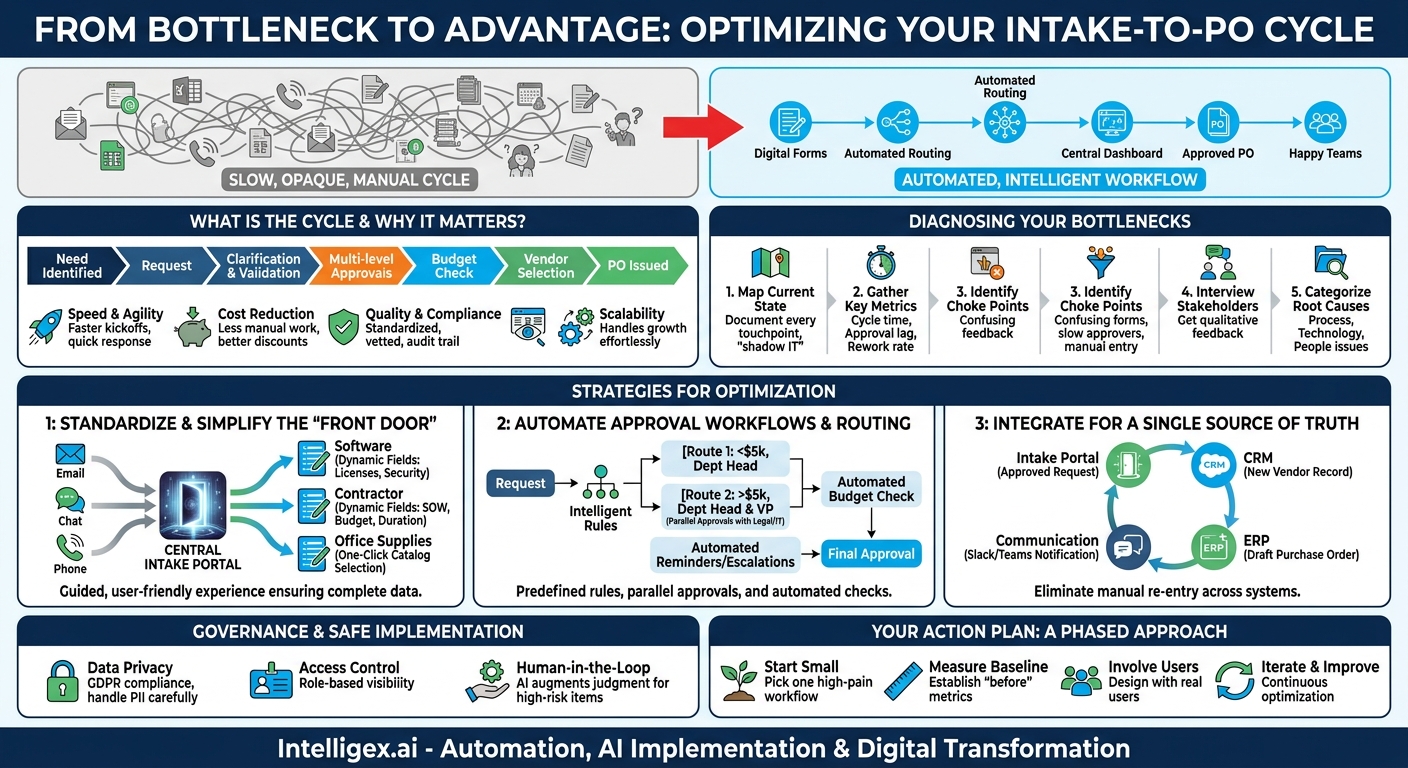
A simple request can trigger a surprisingly complex chain of events. Your marketing team finds the perfect vendor for a critical campaign, but the clock is ticking. They submit a request, and it vanishes into a black hole of emails, spreadsheets, and follow-up meetings. Weeks later, when the purchase order is finally approved, the window of opportunity has closed. This isn’t a rare occurrence; it’s the daily reality in organizations where the intake-to-purchase-order (PO) cycle is slow, opaque, and manually intensive. This internal friction doesn’t just cause frustration. It directly impacts agility, inflates operational costs, and puts your business at a competitive disadvantage.
The good news is that this cycle is not an unchangeable law of business. It’s a process, and like any process, it can be analyzed, streamlined, and optimized. By transforming your intake-to-PO process from a manual bottleneck into an automated, intelligent workflow, you can unlock significant value across the entire organization, enabling teams to move faster, control costs, and focus on strategic work instead of administrative churn.
What Exactly Is the Intake-to-PO Cycle (and Why Should You Care)?
The intake-to-PO cycle is the end-to-end process that begins the moment an employee identifies a need and formally requests a product or service, and ends when a legally binding purchase order is issued to a vendor. This journey includes several critical stages: request submission, clarification, validation, multi-level approvals, budget checks, vendor selection, and finally, PO creation and dispatch.
When this cycle is slow and inefficient, the consequences ripple outward. It’s not just about procurement taking too long. It’s about the tangible business impact of that delay.
The Business Value of a Shorter Cycle
Optimizing this process delivers measurable improvements in several key areas:
- Speed and Agility: A faster cycle means faster project kickoffs, quicker responses to market changes, and the ability to seize opportunities before competitors do. When your IT team can procure new software in days instead of weeks, they can deliver business-critical tools sooner.
- Cost Reduction: Manual processes are expensive. They consume valuable employee hours in data entry, follow-ups, and error correction. Automation reduces this administrative overhead. Furthermore, a streamlined process gives you better leverage for early payment discounts and more time for strategic negotiations with vendors.
- Quality and Compliance: A standardized, automated process drastically reduces “rogue spend” where employees bypass official channels. It ensures all purchases are properly vetted, budgeted, and compliant with company policies and regulatory requirements, creating an audit trail by default.
- Visibility and Control: A manual process based on emails and spreadsheets offers zero visibility. You can’t know the status of a request without sending another email. A digitized workflow provides a central dashboard where anyone, from the original requester to the CFO, can see the real-time status of every request.
- Scalability: As your company grows, the volume of requests will increase. A manual process breaks under this pressure, forcing you to hire more administrative staff. An automated system scales effortlessly, allowing you to handle 10x the request volume with the same or even less human effort.
Diagnosing Your Bottlenecks: A 5-Step Process Audit
You cannot fix what you do not understand. Before jumping to solutions, you must first pinpoint exactly where your current process is breaking down. A vague feeling that “things are too slow” is not enough. You need data. Follow these steps to conduct a thorough audit of your intake-to-PO cycle.
- Map the Current State from Start to Finish: Forget the official flowchart in a dusty binder. Follow a few recent requests from different departments (e.g., a software license for IT, a contractor for HR, a creative agency for Marketing). Document every single touchpoint, handoff, and communication channel. Who submits the request? Where do they submit it? Who approves it? What happens if information is missing? Be brutally honest and capture the informal “shadow IT” steps, like chasing approvals via chat messages.
- Gather Key Performance Metrics: Data will reveal the truth. For each stage you mapped, measure what you can. The most critical metric is cycle time, the time elapsed from one stage to the next.
- Total Cycle Time: From initial request to PO issuance.
- Approval Lag Time: How long does a request sit waiting for each approver?
- Rework Rate: How often are requests sent back for more information?
- Request Volume by Type: Which categories of requests are most frequent?
- Identify the Choke Points: With your map and metrics in hand, the bottlenecks will become obvious. Is the initial intake form so confusing that 50% of submissions require clarification? Does one specific executive approver consistently take two weeks to review requests? Is the finance team spending days manually re-entering approved request data into the ERP system? These are your primary targets for optimization.
- Interview the Stakeholders: Talk to the people who live this process every day. Ask requesters what their biggest frustrations are. Ask approvers what information they are consistently missing. Ask the procurement team where they spend the most time on low-value tasks. Their qualitative feedback is just as important as your quantitative data.
- Categorize the Root Causes: Group your findings into themes. Are the problems caused by a lack of a standardized process (e.g., requests come via email, chat, and phone calls)? Are they technology-based (e.g., disconnected systems requiring manual data entry)? Or are they people-related (e.g., unclear approval authority, lack of training)? This categorization will help you prioritize the right solutions.
Strategy 1: Standardize and Simplify the Intake “Front Door”
The single most impactful change you can make is to eliminate the chaos of unstructured requests. When requests arrive through a dozen different channels, each with incomplete or incorrect information, the process is doomed from the start. The solution is to create a single, intelligent “front door” for all internal requests.
This isn’t about creating one massive, intimidating form. It’s about creating a guided, user-friendly experience that ensures you get the right information, right from the beginning.
Build a Centralized, Dynamic Intake Portal
Instead of relying on email templates or downloadable PDFs, implement a central portal where all requests are initiated. This portal should be powered by dynamic forms that adapt based on the user’s input. For example:
- If a user selects “Software Request,” the form can automatically display fields for the number of licenses, data security requirements, and integration needs.
- If the request is for a “New Marketing Contractor,” the form can prompt for a statement of work, budget details, and expected duration.
- For low-value, common items like office supplies, the process can be simplified to a one-click catalog selection.
This approach, often called a “service catalog,” makes life easier for the requester while ensuring the procurement and finance teams receive complete, structured data every time. This eliminates the endless back-and-forth emails that plague manual processes, instantly cutting down the initial stage of the cycle time.
Strategy 2: Automate Approval Workflows and Routing
Approvals are often the biggest black hole in the intake-to-PO cycle. Requests sit in inboxes for days or weeks, waiting for a manager who might be on vacation or simply overwhelmed. Manual routing, where a requester has to guess who needs to approve what, leads to delays and mistakes. Automation can solve this entirely.
Intelligent workflow automation uses predefined business rules to route requests to the right people, in the right order, automatically. This is not about futuristic AI; it’s about applying simple, powerful logic to your existing business policies.
From Manual Chasing to Automated Execution
A well-designed workflow can handle complex logic with ease. For example, a rule can be set to: “IF the request is for IT Hardware AND the total cost is less than $5,000, route to the department head for approval. IF the cost is over $5,000, route to the department head AND then to the VP of IT.”
The system handles the routing, sends automated reminders to approvers, and provides escalations if an approval is taking too long. This creates a clear, accountable, and transparent process. More advanced systems can even use AI to perform initial validation, checking if a request is a duplicate or suggesting the correct expense category, flagging potential issues before a human even sees them.
Checklist for Smarter Approval Workflows:
- Define clear approval matrices: Document who needs to approve what, based on department, request type, and cost threshold.
- Enable delegation: Allow approvers to set up a delegate for when they are out of the office to prevent bottlenecks.
- Leverage parallel approvals: For requests needing review from multiple departments (e.g., Legal and IT Security), send the request to both simultaneously instead of sequentially.
- Automate budget checks: Integrate with your financial system to automatically check if the requested amount is within the department’s budget before it even goes for approval.
Strategy 3: Integrate Your Systems for a Single Source of Truth
Even with a perfect intake form and automated approvals, the process can grind to a halt if your systems don’t talk to each other. The classic example: an approved request in your service management tool has to be manually re-entered into your ERP to generate the PO. This swivel-chair data entry is not only a waste of time but also a major source of errors.
The goal is to create a seamless flow of data between the systems you already use. An integrated ecosystem ensures that information is entered once and then automatically populates everywhere else it’s needed. This creates a reliable “single source of truth” and eliminates redundant work.
An Example of an Integrated Workflow
Imagine a sales team member needs a specialized data subscription. They submit the request through the central portal. Once it’s approved:
- The system automatically creates a new vendor record in your CRM, like Salesforce.
- It simultaneously creates a draft purchase order in your ERP (e.g., NetSuite or SAP) with all the correct details.
- A notification is posted to a specific Slack or Teams channel to inform the procurement team.
- The status in the original request portal is updated to “PO Generated,” visible to the salesperson who made the request.
This entire sequence happens in seconds, without any manual copy-pasting. This level of integration is achievable with modern integration platforms and APIs. It connects your best-of-breed applications into a single, cohesive process, turning a fragmented series of tasks into a fluid, end-to-end workflow.
A Note on Governance and Safe Implementation
As you introduce automation and AI into your procurement processes, it’s crucial to do so responsibly. Speed and efficiency should never come at the expense of security, privacy, or common-sense oversight. A well-governed automated system is more secure than a chaotic manual one, but it requires thoughtful design.
Key Principles for Safe Automation:
- Data Privacy: Ensure that any personally identifiable information (PII) or sensitive commercial data within a request is handled in compliance with regulations like GDPR. Not all data should be visible to all people in the workflow.
- Access Control: Use role-based access to ensure that employees can only view, submit, or approve requests relevant to their job function. The IT team should not be able to see the details of a sensitive HR-related vendor request, for example.
- The Human-in-the-Loop: Automation is for handling the predictable 80%. For high-value, high-risk, or strategically critical purchases, AI should be used to augment, not replace, human judgment. The system can gather all the data, validate the budget, and recommend a course of action, but the final decision should rest with an experienced human stakeholder.
Putting It All Together: Your Action Plan
Reducing your intake-to-PO cycle time is not a massive, all-or-nothing project. It’s a journey of continuous improvement that delivers value at every step. Attempting to boil the ocean will lead to paralysis. Instead, focus on a pragmatic, phased approach to build momentum and demonstrate results quickly.
Your Next Steps:
- Start Small, Aim for a Quick Win: Don’t try to fix every procurement process at once. Pick one high-volume, high-pain request type that you identified during your audit. Focus all your initial efforts on streamlining that single workflow.
- Measure Your Baseline: Before you make any changes, make sure you have solid metrics for the existing process. You can’t prove the value of your improvements without a clear “before” picture to compare against.
- Involve the Real Users: The people in procurement, finance, and the departments making requests are your greatest asset. Involve them in the design of new forms and workflows. If the system doesn’t work for them, they won’t use it.
- Iterate and Improve: Once you’ve successfully optimized your first process, use the lessons learned to tackle the next one. Treat process optimization as an ongoing program, not a one-time fix.
By systematically addressing the bottlenecks in your intake-to-PO cycle, you are doing more than just speeding up paperwork. You are building a more responsive, efficient, and scalable operational foundation for your entire business.
Your Next Read:
Category:
Get a FREE
Proof of Concept
& Consultation
No Cost, No Commitment!
