

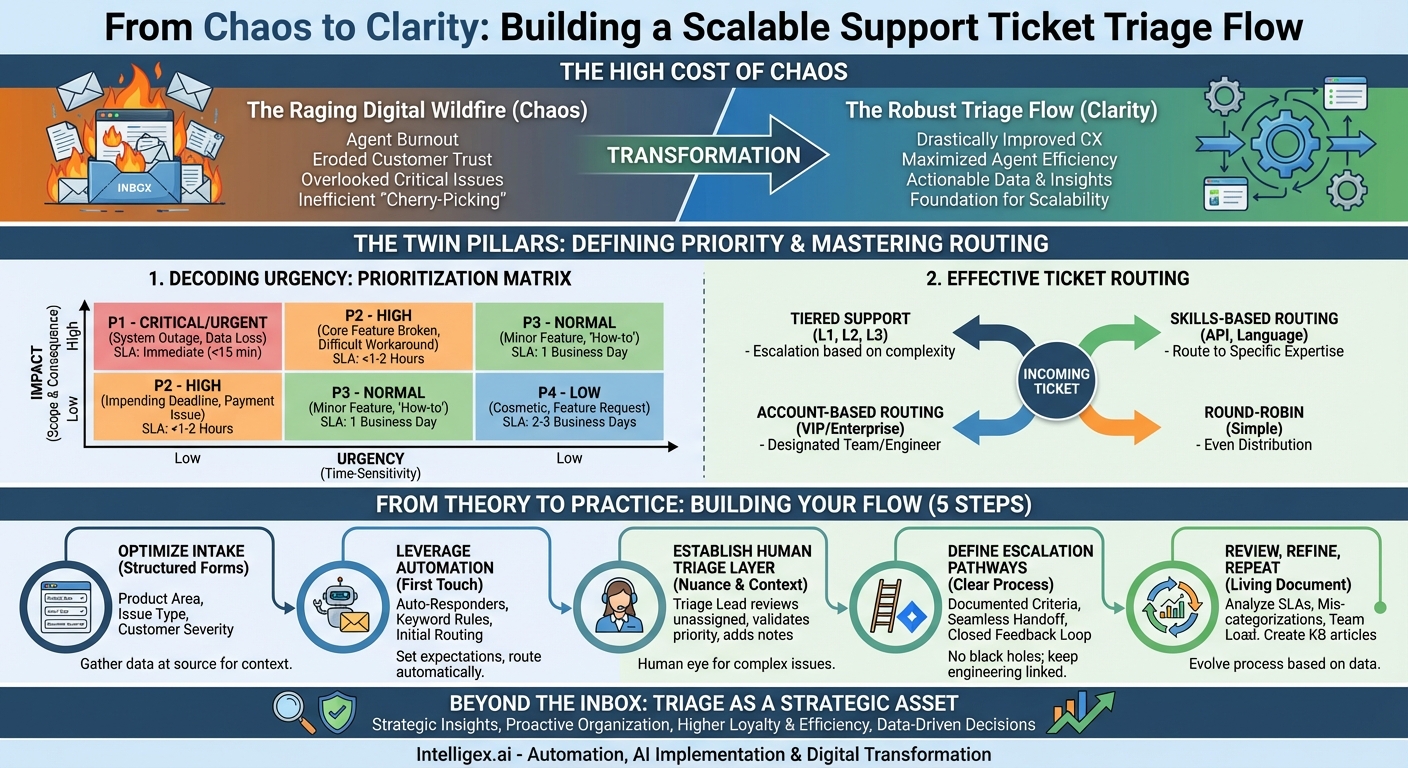
In the world of customer support, the ticket queue can often feel less like an orderly line and more like a raging digital wildfire. Tickets flood in—some are small sparks of curiosity, others are five-alarm emergencies threatening to burn down a customer’s entire workflow. Without a system, agents frantically jump from one fire to the next, often overlooking the most critical blazes until it’s too late. This reactive, chaotic approach not only leads to agent burnout but also erodes customer trust. The antidote to this chaos is a robust, well-defined support ticket triage flow. It’s the strategic process of assessing, prioritizing, and routing every incoming ticket to ensure the right issues get to the right people at the right time.
Think of it as the emergency room of your business. When a patient arrives, a triage nurse doesn’t just send them to the first available doctor. They assess the severity of the condition—a gunshot wound takes precedence over a sprained ankle. They gather initial information and direct the patient to the appropriate specialist. A well-oiled ticket triage system does the exact same thing for your customer issues, transforming your support inbox from a source of stress into a powerful engine for customer satisfaction and business intelligence.
The High Cost of Chaos: Why Triage is Non-Negotiable
For small teams, an informal “all hands on deck” approach might seem sufficient. But as a company scales, this lack of structure quickly becomes a significant liability. A formal triage process isn’t just a “nice-to-have” for large enterprises; it’s a foundational element of a scalable, effective customer support operation. Here’s why it’s so critical:
- Drastically Improved Customer Experience: When a high-value customer with a system-down issue is stuck waiting behind a simple “how-to” question, their frustration skyrockets. Triage ensures that the most critical issues receive the fastest response. This not only solves their immediate problem but also demonstrates that you understand and value their business. It sets clear expectations and builds long-term loyalty.
- Maximized Agent Efficiency and Morale: A chaotic queue encourages “cherry-picking,” where agents grab the easiest tickets to boost their resolution numbers, leaving complex issues to fester. A structured triage flow ensures a fair distribution of work. By routing tickets based on skill set, it empowers agents to work on problems they are best equipped to solve, increasing their job satisfaction, reducing resolution times, and preventing burnout.
- A Goldmine of Actionable Data: Every triaged ticket is a data point. When you systematically categorize issues (e.g., bug, feature request, billing inquiry) and track their priority, you start to see patterns. Are you getting a flood of tickets about a specific feature? That’s valuable feedback for your product team. Is a certain type of issue taking too long to resolve? That might indicate a need for better documentation or agent training. Triage turns your support function into a proactive listening post for the entire organization.
- Foundation for Scalability: The ad-hoc methods that work with 50 tickets a day will completely collapse with 500. A formal triage process, especially one enhanced by automation, is built to scale. As your customer base grows, your system can handle the increased volume without a corresponding decline in service quality. It’s the framework that supports your growth instead of being crushed by it.
The Twin Pillars: Defining Priority and Mastering Routing
At its heart, ticket triage is built on two core concepts: prioritization (what needs our attention now?) and routing (who is the best person to provide that attention?). Mastering these two elements is the key to an effective flow.
Decoding Urgency: The Prioritization Matrix
Not all tickets are created equal. Prioritization is the art and science of assigning a level of urgency to each incoming request. This goes far beyond a simple “first-in, first-out” queue. A robust prioritization framework typically evaluates two key factors:
- Impact: How severe is the issue’s effect? This considers the scope and business consequence. A bug that prevents a single user from accessing a minor feature has a low impact. A system-wide outage that stops all users from logging in has a critical impact.
- Urgency: How time-sensitive is the request? Is there an impending deadline? Is data loss occurring? A user asking for a feature that would be “nice to have next quarter” has low urgency. A user unable to process credit card payments at the end of the fiscal month has extremely high urgency.
By combining impact and urgency, you can create a clear prioritization matrix. While the specifics will vary by business, a common framework looks like this:
P1 – Critical/Urgent
This is an all-hands-on-deck emergency. It represents a catastrophic failure with high business impact.
- Examples: System-wide outage, major data corruption, a critical security vulnerability.
- SLA Target: Immediate acknowledgement (< 15 minutes), rapid response, and continuous work until resolution.
P2 – High
This is a serious issue that significantly impairs a customer’s ability to use the product, but it isn’t a complete system failure. A core feature is broken for a segment of users, or a difficult workaround is required.
- Examples: A key reporting feature is failing, a primary integration is broken, performance is severely degraded for several users.
- SLA Target: Acknowledgment within 1-2 hours, with a clear plan for resolution communicated promptly.
P3 – Normal
This is the bread and butter of the support queue. The issue affects a single user with a minor feature, or it’s a general “how-to” question. The user can still largely use the product.
- Examples: A UI element is misaligned, a user needs help configuring a setting, a non-critical bug with an easy workaround.
- SLA Target: Response within one business day.
P4 – Low
These are non-disruptive requests. They can be handled when higher-priority work is complete.
- Examples: Cosmetic suggestions, general feedback, feature requests with no time sensitivity.
- SLA Target: Response within 2-3 business days.
The Grand Central Station: Effective Ticket Routing
Once a ticket’s priority is set, the next step is routing it to the right destination. The goal is to minimize handoffs and connect the customer with the person or team best equipped to solve their problem on the first try. Several routing models exist, and many organizations use a hybrid approach.
- Tiered Support: The classic model. Tier 1 (L1) agents handle common, easily solvable issues. If they can’t resolve it, they escalate to Tier 2 (L2), who are product specialists with deeper technical knowledge. Tier 3 (L3) is typically the engineering team, who handle code-level bugs.
- Skills-Based Routing: A more sophisticated model where tickets are routed based on the specific expertise required. If a ticket mentions “API,” it’s automatically sent to the API specialist team. If it’s in Spanish, it goes to a Spanish-speaking agent. This ensures the expert sees the ticket first.
- Account-Based Routing: For high-value or enterprise clients, you might route all their tickets to a Designated Support Engineer or a dedicated account team. This provides a white-glove, high-context service experience.
- Round-Robin: The simplest model, where tickets are distributed evenly among a group of agents. This is effective for teams where all agents have a similar skill set and handle the same types of issues (e.g., a pure Tier 1 team).
From Theory to Practice: Building Your Triage Flow
Knowing the components is one thing; assembling them into a seamless, efficient machine is another. Here is a step-by-step guide to building your triage flow.
- Optimize Information Gathering at the Source: A good triage process starts before the ticket is even created. Your intake form is your first line of defense. Instead of a simple “contact us” box, use structured forms with dropdown menus that force users to self-categorize their issues. Ask for:
- Product Area (e.g., Billing, Dashboard, API)
- Issue Type (e.g., Bug Report, Question, Feature Request, Password Reset)
- Customer-Reported Severity (Let them tell you how much it’s impacting them)
This data provides immediate context and is the fuel for your automation engine.
- Leverage Automation for the First Touch: The first few minutes after a ticket is submitted are crucial for setting expectations. Automation is your best friend here.
- Auto-Responders: Immediately send a confirmation email that includes a ticket number and a link to your SLA policy. This reassures the customer that their issue has been received and tells them when to expect a human response.
- Keyword-Based Rules: Create automation rules that scan the ticket subject and body for keywords. If a ticket contains “urgent,” “down,” or “outage,” automatically set its priority to P1 and notify the on-call team. If it contains “invoice” or “billing,” route it directly to the finance queue.
- Initial Routing: Use the data from your intake form to perform initial routing. If “Product Area” is “API,” send it to the developer support team. This handles a significant portion of tickets without any human intervention.
- Establish a Human Triage Layer: Automation can’t catch everything. Nuance and context still require a human eye. Designate a “Triage Lead” or a rotating “Triage Duty” for your support team. This person’s sole responsibility for their shift is to monitor the unassigned queue. They will:
- Review tickets that automation couldn’t categorize.
- Validate customer-reported priority. (A customer might mark a P4 issue as P1).
- Merge duplicate tickets from the same user.
- Add internal notes with initial diagnostic thoughts.
- Manually route complex or ambiguously worded tickets to the appropriate specialist.
- Define Crystal-Clear Escalation Pathways: What happens when a support agent determines an issue is a bug that requires engineering? A vague escalation process leads to tickets getting lost in a black hole. Define it explicitly.
- Escalation Criteria: What constitutes a valid escalation? It should require a reproducible bug, logs, and clear steps to replicate the issue.
- The Handoff: How is the ticket handed off? Is it moved to a specific project in Jira? Is a new ticket created and linked? Ensure the process is documented and followed.
- The Feedback Loop: This is the most critical part. The engineering team must be required to provide status updates on the original support ticket. This empowers the support agent to keep the customer informed, closing the communication loop and preventing the customer from feeling abandoned.
- Review, Refine, Repeat: Your triage process is a living document, not a stone tablet. It must evolve with your product and your team. Schedule regular reviews (monthly or quarterly) to analyze your triage data. Ask key questions:
- Are our SLAs being met for each priority level? If not, why?
- Which types of tickets are being mis-categorized most often? This could mean your automation rules need tweaking or your agents need more training.
- Is one team consistently overloaded with tickets? Perhaps their product area is too buggy or you need to hire more specialists for that team.
- What are the top 5 most common P3 issues? Let’s write knowledge base articles for them to encourage self-service and reduce ticket volume.
Beyond the Inbox: Triage as a Strategic Asset
Implementing a support ticket triage flow is about far more than just creating an organized inbox. It’s a fundamental business process that pays dividends across the entire organization. It ensures your most critical customer issues are addressed with lightning speed, turning potential disasters into moments of loyalty-building service. It empowers your support agents by giving them structure, clarity, and the ability to work on issues that match their skills, leading to higher efficiency and job satisfaction.
Most importantly, it transforms your support queue from a simple cost center into a rich source of strategic insight. By systematically categorizing and analyzing the problems your customers face, you gain an unparalleled, real-time view into the health of your product and the needs of your market. A well-oiled triage machine is the first step in evolving from a reactive fire-fighting team to a proactive, data-driven organization. The process starts today. Map your flow, identify your biggest bottleneck, and make one change. Your customers, and your team, will thank you for it.
Your Next Read:
Get a FREE
Proof of Concept
& Consultation
No Cost, No Commitment!
