

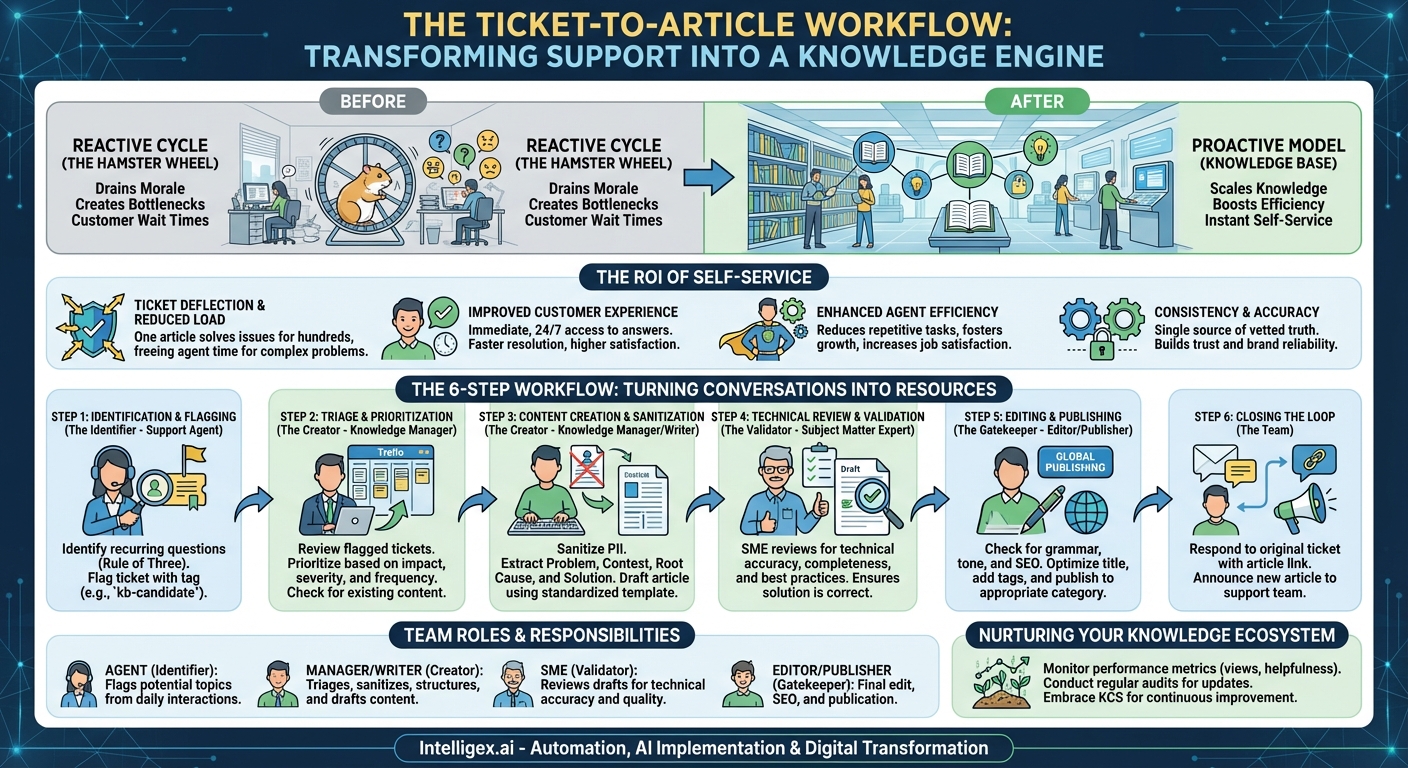
In the world of customer support, there’s a recurring nightmare. It’s the feeling of déjà vu as you type out the same detailed answer to the same customer question for the fifth time this week. Your support queue feels less like a help center and more like a hamster wheel of repetitive inquiries. This reactive cycle not only drains your team’s morale but also creates a bottleneck for your customers, who are left waiting for answers to questions that have been asked and answered countless times before. Breaking this cycle requires a fundamental shift from a reactive to a proactive support model. The most powerful tool in this transition is a structured Knowledge Base Update Workflow—a systematic process for turning customer support tickets into permanent, self-service solutions.
This “Ticket-to-Article” workflow is more than just a documentation strategy; it’s a core business process that transforms your support team from a cost center into a value-generating engine. It’s about capturing the valuable, hard-won knowledge from one-on-one interactions and scaling it to serve thousands. This post will guide you through the why, who, and how of building this essential workflow, providing a step-by-step blueprint to turn your support queue from a liability into your company’s greatest knowledge asset.
Why Turn Tickets into Knowledge? The ROI of Self-Service
Before diving into the mechanics of the workflow, it’s crucial to understand the profound impact it can have on your business. Implementing a Ticket-to-Article process isn’t just about “being more organized”; it’s a strategic investment with a clear and measurable return on investment (ROI). The benefits extend far beyond the support team, influencing customer satisfaction, operational efficiency, and even employee retention.
Ticket Deflection and Reduced Support Load
This is the most direct and quantifiable benefit. Every time a customer finds an answer in your knowledge base, that’s one less ticket your team has to handle. Consider the math: if a specific issue generates 10 tickets per week, and each ticket takes an agent 15 minutes to resolve, that’s 2.5 hours of agent time spent on that single issue every week. A well-written article, created once, can resolve that issue for hundreds or even thousands of customers over its lifetime. This frees up your agents’ time, allowing them to focus their expertise on complex, unique, and high-value customer problems that truly require a human touch.
Improved Customer Experience and Satisfaction
Modern customers are resourceful. They don’t always want to talk to someone; they want fast, accurate answers. A comprehensive knowledge base empowers them with immediate, 24/7 access to the information they need. Waiting hours or days for an email response to a simple question is a frustrating experience. Finding the solution instantly in a clear, concise article is a delightful one. By investing in self-service, you are respecting your customers’ time and providing them with the autonomy they expect, leading to higher satisfaction and loyalty.
Enhanced Agent Efficiency and Morale
Answering the same question over and over is a recipe for burnout. It’s monotonous, unchallenging, and can make talented support professionals feel like robots. A Ticket-to-Article workflow transforms their role. Instead of just being problem-solvers, they become knowledge creators and subject matter experts. They contribute to a lasting resource, see the direct impact of their work on ticket volume, and can dedicate their brainpower to more engaging challenges. This shift in responsibility fosters professional growth, increases job satisfaction, and helps you retain your top support talent.
Consistency and Accuracy of Information
When answers live only in individual agents’ heads or past ticket threads, consistency suffers. One agent might provide a slightly different solution than another, leading to customer confusion. A centralized knowledge base acts as the single source of truth. It ensures that every customer receives the same, vetted, and approved information, every time. This consistency builds trust and reinforces your brand’s reputation for reliability and expertise.
Building the Team: Roles and Responsibilities
A successful knowledge creation process is a team sport, not a solo endeavor. While a single person might own the knowledge base, the workflow itself relies on collaboration across different roles. Clearly defining these roles ensures that the process is smooth, efficient, and produces high-quality content. Even in a small team, one person might wear multiple hats, but understanding the distinct responsibilities is key.
- The Support Agent (The Identifier): Your frontline support team members are the foundation of this entire workflow. They are in the trenches every day, directly interacting with customers and understanding their pain points intimately. Their primary responsibility in this process is to act as the “eyes and ears,” identifying recurring issues, confusing product features, or gaps in existing documentation. They are the ones who flag a ticket as a potential candidate for a new knowledge base article.
- The Knowledge Manager / Content Writer (The Creator): This individual or team is the central hub of the workflow. They are responsible for taking the raw material flagged by the support agents and transforming it into a polished, easy-to-understand article. Their tasks include triaging the queue of candidate tickets, sanitizing them of any private customer information, structuring the content logically, and writing the article in a consistent brand voice. They are the architects of your knowledge base.
- The Subject Matter Expert (SME) (The Validator): Not every Knowledge Manager can be an expert on every facet of your product. This is where the SME comes in. The SME is often a senior support engineer, a product manager, or a developer who possesses deep technical or domain-specific knowledge. Their crucial role is to review draft articles for technical accuracy, completeness, and clarity. They ensure the solution provided is not just a workaround but the best possible practice.
- The Editor / Publisher (The Gatekeeper): This role provides the final layer of quality control. Before an article goes live, the editor checks for grammar, spelling, style guide adherence, and overall readability. They also play a vital part in the article’s discoverability, optimizing the title, adding relevant tags or keywords for search, and placing it in the most logical category within the knowledge base. In many teams, this role is combined with the Knowledge Manager.
The Anatomy of a Ticket-to-Article Workflow
Now we get to the heart of the matter: the step-by-step process of turning a conversation into a permanent resource. A well-defined workflow removes ambiguity and ensures that valuable insights don’t fall through the cracks. While the specific tools may vary, the core stages remain consistent.
-
Step 1: Identification and Flagging
It all starts on the front lines. Train your support agents to recognize potential knowledge base candidates. A great rule of thumb is the “Rule of Three”: if you’ve had to manually write out the answer to the same question three times, it deserves an article. The mechanism for flagging must be incredibly simple and low-friction. Adding a specific tag (e.g., `kb-candidate` or `create-article`) to the ticket in your helpdesk software is often the most efficient method. Other options include a dedicated Slack channel or a simple submission form. The key is to make it a seamless part of the agent’s existing workflow, not a cumbersome extra task.
-
Step 2: Triage and Prioritization
Not every flagged ticket will or should become a new article. The Knowledge Manager is responsible for regularly reviewing the queue of candidates. They must first check if an article covering the topic already exists—perhaps it’s just hard to find and needs better SEO or a slight update. If no content exists, they prioritize the candidates based on impact. Key questions to ask include: How many customers are affected by this issue? What is the severity of the problem? Does it relate to a new feature launch? Use a simple backlog system (a Trello board, Asana project, or Jira queue works perfectly) to track the status of each candidate from “Identified” to “Published.”
-
Step 3: Content Creation and Sanitization
Once a ticket is prioritized, the writing begins. This is the most critical transformation stage. The writer must first sanitize the ticket completely. This means removing all customer names, email addresses, company details, and any other personally identifiable information (PII). The goal is to generalize the specific problem into a universal one. Next, extract the core components from the ticket thread:
- The Problem: What was the user trying to accomplish? Frame it clearly.
- The Context/Environment: What version or plan were they on? (e.g., “For users on the Pro plan…”)
- The Root Cause (if applicable): Why was the problem happening?
- The Solution: The clear, step-by-step instructions provided by the agent.
Draft the article using a standardized template. Templates ensure consistency across your entire knowledge base, making it easier for users to scan and find information. Use clear headings, bullet points, and screenshots or GIFs where necessary to break up text and illustrate complex steps.
-
Step 4: Technical Review and Validation
Before publishing, the draft must be validated for accuracy. The writer sends the draft to the designated SME. This step is a crucial quality gate. The SME’s job is to act as the customer’s advocate, reading through the steps to ensure they are correct, complete, and don’t have any unintended consequences. They might add a crucial warning, a helpful “pro-tip,” or clarify a technical term. This collaborative review process, often handled through Google Docs comments or your helpdesk’s built-in collaboration features, is what separates a good knowledge base from a great one.
-
Step 5: Editing and Publishing
With the content technically approved, it moves to the final editing stage. The editor polishes the text, checking for typos, grammatical errors, and adherence to your company’s tone and voice. They then perform a final SEO check, ensuring the title is a question a customer would actually search for and that relevant keywords are included. Finally, they publish the article, placing it in the most appropriate category and adding tags to make it easily discoverable through both internal search and external search engines.
-
Step 6: Closing the Loop
This final step is frequently overlooked but is essential for maximizing the workflow’s impact. Once the article is live, go back to the original ticket that spawned its creation (and any other similar tickets). Respond to the customer with a link to the new article. This does two powerful things: it provides immediate value to that customer and subtly trains them to check the knowledge base in the future. Furthermore, announce the new article to the rest of the support team so they can begin using it in their own ticket responses immediately.
Beyond Publishing: Nurturing Your Knowledge Ecosystem
Creating and publishing an article is not the end of the journey. A knowledge base is not a static library of documents; it’s a living, breathing garden that requires ongoing care and attention to flourish. A “publish and forget” mentality will quickly lead to an outdated and untrustworthy resource. To ensure your knowledge base remains a valuable asset, you need to incorporate processes for maintenance and improvement.
Article Performance Monitoring
Your knowledge base software should provide analytics. Pay close attention to them. Track key metrics like article views, community comments, and, most importantly, helpfulness ratings (the “Was this article helpful? Yes/No” feedback). A high-view, low-helpfulness article is a red flag indicating the content is either unclear, inaccurate, or incomplete. Also, look at data from “contact us” forms. If many customers are creating tickets after viewing a specific article, that article is failing to solve their problem and needs to be revised.
Content Audits and Updates
Your product evolves, and your documentation must evolve with it. Schedule regular content audits—quarterly is a good starting point—to proactively review articles. Look for outdated screenshots that show an old user interface, references to deprecated features, or broken links. This is also a good time to merge articles on similar topics or archive content that is no longer relevant. Assigning “ownership” of different knowledge base categories to specific team members can help distribute this workload.
Embracing Knowledge-Centered Service (KCS)
As your workflow matures, you may want to explore more advanced methodologies like Knowledge-Centered Service (KCS). KCS is a philosophy that deeply integrates the use, improvement, and creation of knowledge directly into the problem-solving workflow. In a KCS model, agents don’t just “flag” a ticket for later; they are empowered to draft or update articles in real-time as they solve a problem. The Ticket-to-Article workflow described here is a fantastic first step and a foundational building block for adopting a full KCS culture.
Your support queue is a goldmine of customer insights and content ideas. Every ticket represents a question that needs an answer, a problem that needs a solution, and an opportunity to build a resource that serves everyone.
Implementing a Ticket-to-Article workflow is a transformative step for any organization. It’s a commitment to efficiency, customer empowerment, and agent development. It doesn’t require a massive, expensive overhaul to get started. Begin small. This week, task your team with identifying just one common, repetitive question. Take that question through these steps. Turn that one ticket into one article. By doing so, you’ll take the first crucial step away from the endless hamster wheel of reactive support and toward building a scalable, proactive, and truly helpful customer experience. Stop just answering questions; start building the answers.
Your Next Read:
Get a FREE
Proof of Concept
& Consultation
No Cost, No Commitment!
