

Every business wants more leads. It’s the lifeblood of growth, the first step in the customer journey. You spend countless hours and significant budget crafting the perfect ad, writing a compelling ebook, or optimizing your website to convince a visitor to hand over their precious contact information. They finally click “Submit,” and for a brief moment, there’s a sense of victory. But what happens next? For many businesses, this critical moment is where a smooth, efficient process breaks down into a frantic, manual scramble. The information lands in an email inbox, a spreadsheet, or a disconnected app, waiting for someone to notice it, copy it, and paste it somewhere else. This gap between capturing a lead and getting it into your Customer Relationship Management (CRM) system is a silent killer of sales, where hot leads grow cold and opportunities are lost in the digital shuffle.
The solution is not to work harder, but to work smarter by creating a seamless, automated flow from the point of capture to its final destination in your CRM. This isn’t a complex, enterprise-level luxury; it’s a fundamental process that businesses of any size can and should implement. By understanding the basic flow, you can eliminate manual data entry, reduce human error, ensure speed-to-lead, and empower your sales team with the information they need, exactly when they need it. Let’s break down this essential journey, step by step, from the initial handshake to the final, actionable record in your system of truth.
The Starting Point: Understanding Lead Capture Methods
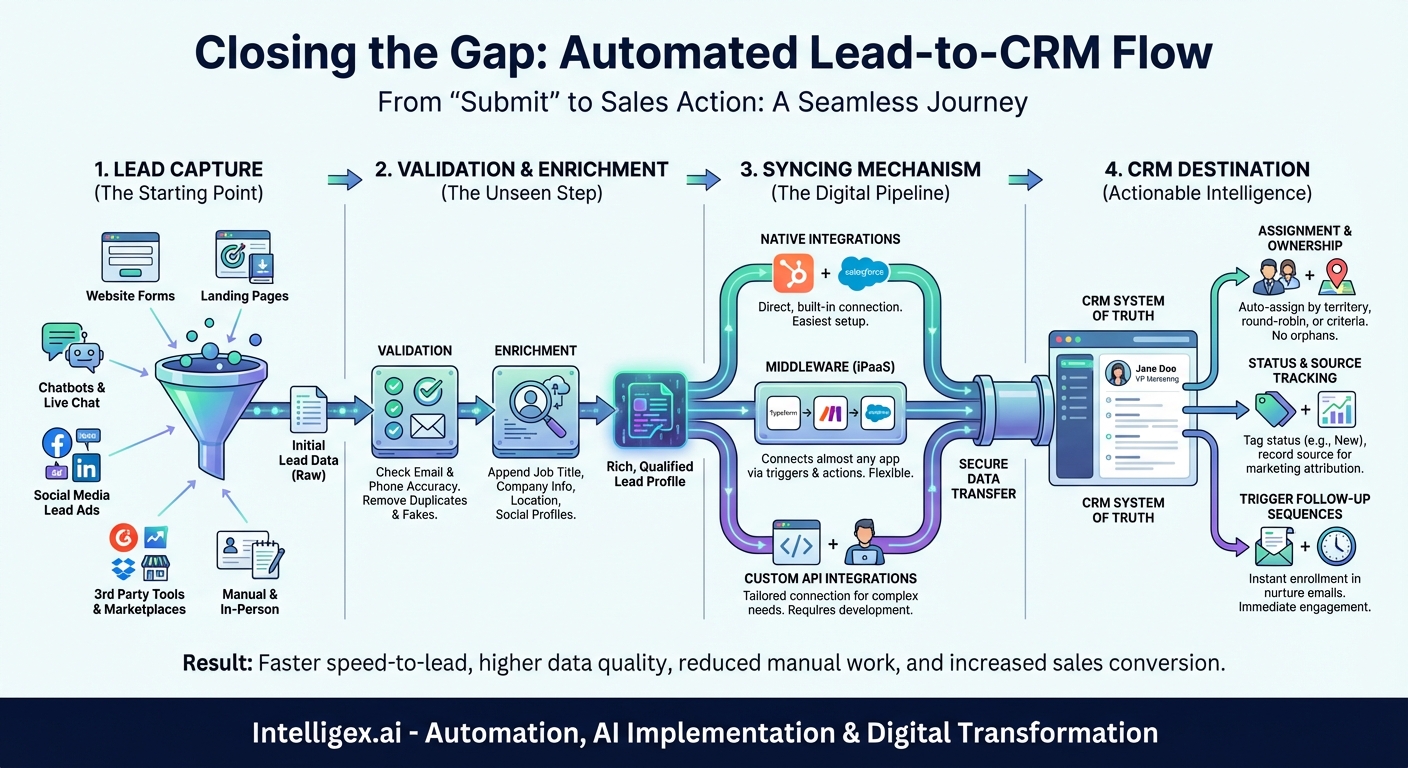
Before a lead can be synced, it must first be captured. A lead capture point is any digital or physical location where a potential customer provides you with their information. While this may seem straightforward, the variety of these sources is often a primary cause of process fragmentation. To build a solid flow, you first need to identify all your entry points. Think of these as the tributaries that will eventually feed into the main river of your CRM.
Common lead capture methods include:
- Website Forms: This is the most classic example. Your “Contact Us” page, a “Request a Demo” form, or a blog subscription box are all primary capture points.
- Landing Page Forms: These are specialized pages designed for a specific campaign, often offering a piece of valuable content (like an ebook, whitepaper, or webinar registration) in exchange for contact details. This is often where your most qualified marketing leads originate.
- Chatbots and Live Chat: Modern chatbots are adept at more than just answering questions. They can qualify visitors and collect information like name, email, and company, creating a lead directly from a conversation.
- Social Media Lead Ads: Platforms like Facebook, Instagram, and LinkedIn allow you to run ads with pre-filled forms directly within the app. This removes friction for the user and is a powerful source of mobile-first leads.
- Third-Party Tools & Marketplaces: If you’re listed on a software review site like G2 or a marketplace, they may have their own lead generation forms that send interested prospects your way.
- Manual & In-Person: Don’t forget the offline world! This includes business cards collected at a trade show, lists from an event sponsor, or information taken down over the phone. While not digital at the source, the goal is to get them into the digital flow as quickly as possible.
Each of these sources represents a starting line. A robust system ensures that no matter which door a lead walks through, their journey to the CRM is consistent, fast, and reliable.
The Unseen Step: Validation and Enrichment
Once a lead submits their information, it’s tempting to fire it directly into the CRM. However, a crucial intermediate step can dramatically increase the quality of your data and the effectiveness of your follow-up: validation and enrichment. Think of this as a quality control checkpoint before the information is officially filed away.
Data Validation
Validation is the process of checking the submitted information for accuracy and legitimacy. The most common and critical piece to validate is the email address. A simple typo (`[email protected]`) or a fake entry (`[email protected]`) can lead to bounced emails, hurt your sender reputation, and waste a salesperson’s time. Basic form validation can catch some of this, but more advanced services can perform real-time checks to ensure the email domain is real and the inbox can receive mail. Similarly, phone number formats can be checked to ensure they are valid. This simple act of cleaning data at the source prevents your CRM from becoming a digital junkyard of useless contacts.
Data Enrichment
Enrichment is where you take the data you were given and make it more valuable. Using just a corporate email address, data enrichment tools (like Clearbit, ZoomInfo, or Apollo.io) can automatically find and append a wealth of additional information to the lead record. This can include:
- Job Title and Role: Is this person a decision-maker, an influencer, or an intern?
- Company Information: What industry are they in? How many employees do they have? What is their annual revenue?
- Location Data: Country, state, and city for proper territory assignment.
- Social Profiles: Links to their LinkedIn or Twitter profiles for deeper context.
This automated enrichment process transforms a simple lead—”[email protected]”—into a rich profile: “Jane Doe, VP of Marketing at Acme Corp, a 500-employee SaaS company in the fintech industry.” This context is invaluable for your sales team, allowing them to personalize their outreach and prioritize high-value leads without spending hours on manual research.
The Digital Pipeline: The Syncing Mechanism
This is the heart of the process—the actual movement of data from the capture point to the CRM. This transfer isn’t magic; it relies on a connection or integration between the two systems. There are three primary ways this “digital plumbing” is typically set up.
1. Native Integrations
The simplest and often most reliable method. Many marketing platforms, form builders, and CRM systems are designed to work together seamlessly. For example, if you use HubSpot’s marketing tools, the forms you build with it will natively and instantly sync new contacts to the HubSpot CRM. Salesforce has its own Web-to-Lead forms. These connections are built and maintained by the software provider, making them easy to set up and generally very stable. If a native integration exists between your lead capture tool and your CRM, it should almost always be your first choice.
2. Middleware & Integration Platforms (iPaaS)
What happens when your form builder doesn’t have a native integration with your specific CRM? This is where middleware, also known as an Integration Platform as a Service (iPaaS), comes in. Tools like Zapier, Make (formerly Integromat), and Workato act as universal translators for thousands of web apps.
The process works on a simple “trigger and action” principle:
- Trigger: A new form is submitted in Typeform.
- Action: Create a new lead in Salesforce.
During setup, you perform a critical task called data mapping. This is where you tell the middleware exactly how to connect the data fields. You map the “First Name” field from your form to the “First Name” field in your CRM, the “Email” field to the “Email” field, and so on. This ensures that the information lands in the correct place. These platforms are incredibly powerful because they can connect virtually any two systems and even handle complex, multi-step workflows (e.g., Form submission -> Enrich with Clearbit -> Add to CRM -> Send a Slack notification).
3. Custom API Integrations
For businesses with unique requirements or homegrown systems, a custom integration using Application Programming Interfaces (APIs) might be necessary. An API is essentially a set of rules that allows different software applications to communicate with each other. This approach requires development resources to build and maintain but offers complete control and flexibility over the data flow. It’s the most powerful but also the most complex and costly option, typically reserved for larger organizations with specific needs that off-the-shelf solutions can’t meet.
The Destination: Actionable Intelligence in the CRM
The journey doesn’t end the moment the data arrives in the CRM. The arrival itself should trigger a series of automated internal actions to ensure the lead is handled promptly and correctly. A well-configured CRM doesn’t just store data; it makes it actionable.
Assignment and Ownership
A lead without an owner is an orphan. As soon as a lead is created, an automation rule should assign it to the correct salesperson or team. This can be based on various criteria:
- Geography: Leads from a specific country or state are assigned to the regional rep.
- Company Size: Leads from enterprise companies go to the enterprise team, while SMB leads go to another.
- Round Robin: Leads are distributed evenly among a team to ensure fair workload distribution.
This immediate, automated assignment eliminates the question of “who should follow up with this?” and ensures accountability.
Status and Source Tracking
The new lead should be given an initial status, such as “New” or “Open,” to place it at the top of the sales queue. Critically, the CRM must also record the lead’s source. Was it from the “Q4 Webinar,” a “Facebook Lead Ad,” or the “Contact Us Form”? This attribution data is vital for marketing. It allows you to measure the ROI of your campaigns and understand which channels are delivering the most valuable leads.
Triggering Follow-up Sequences
Finally, the arrival of the lead can kick off the first engagement. The most common action is to enroll the new lead into an automated email nurture sequence. This could be a simple “Thank you for your download, here’s your ebook!” email, followed by a series of messages that provide more value and educate the prospect about your solutions. This ensures every lead gets an immediate, relevant touchpoint, bridging the gap until a salesperson can make a personal connection.
By connecting these dots, you transform a simple form submission into a powerful, automated engine for growth. The flow from lead capture to CRM sync is more than a technical process; it’s the foundation of a modern, scalable sales and marketing operation. It ensures that the hard-won interest of a potential customer is met with the speed, personalization, and professionalism it deserves, turning a moment of curiosity into a lasting business relationship.
Your Next Read:
Get a FREE
Proof of Concept
& Consultation
No Cost, No Commitment!
