

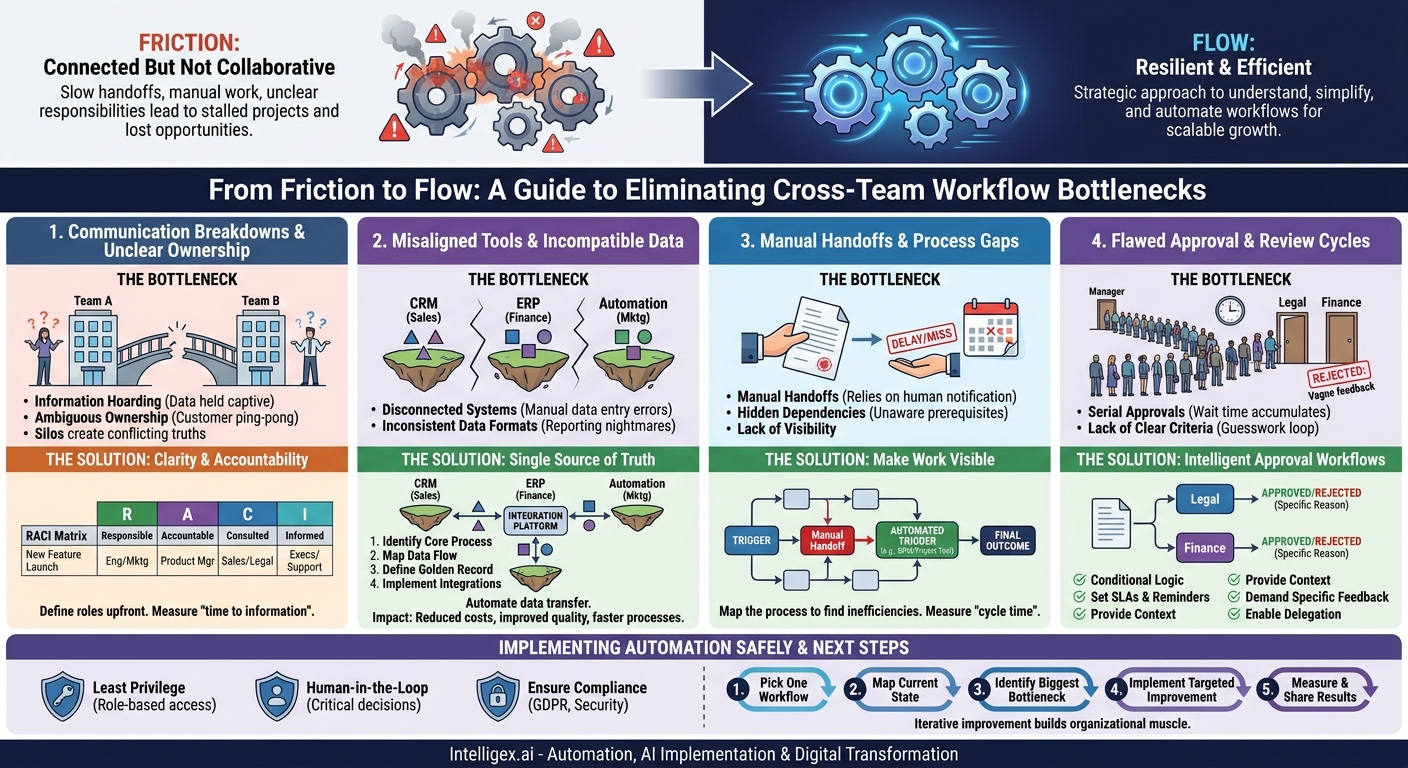
In today’s interconnected business environment, no team is an island. The marketing team’s campaign success depends on sales execution. The finance team’s forecasts rely on accurate data from operations. This constant collaboration is the engine of growth, but it’s also where friction builds, costs escalate, and momentum dies. When handoffs between teams are slow, manual, or unclear, the entire organization feels the impact. Projects stall, customers wait, and opportunities are lost.
These points of friction are bottlenecks, and they do more than just slow things down. They introduce errors, reduce visibility, and make it impossible to scale effectively. The good news is that these bottlenecks are not inevitable. By identifying and systematically addressing them, you can create resilient, efficient workflows that accelerate business value instead of hindering it. This is not about a single magical software fix; it’s about a strategic approach to understanding, simplifying, and automating how work gets done across your organization.
Communication Breakdowns and Unclear Ownership
The most common and corrosive bottlenecks are often rooted in poor communication. When teams operate in silos, they create their own versions of the truth, leading to confusion, duplicated effort, and conflicting priorities. This isn’t a personality issue; it’s a structural one.
One classic bottleneck is information hoarding, where one team holds critical data that another team needs to proceed. For example, a supply chain team might be waiting on a sales forecast to order raw materials, but the sales team only shares its final numbers at the end of the quarter. This delay creates a ripple effect, potentially leading to stockouts or expensive expedited shipping. Another is ambiguous ownership. When a customer has a complex issue that touches both technical support and billing, who owns the resolution? Without a clear owner, the customer is passed back and forth, and their frustration grows.
How to Establish Clarity and Accountability
Solving communication bottlenecks requires creating clear frameworks for responsibility. A RACI matrix is a simple yet powerful tool for this. It defines who is Responsible for doing the work, who is Accountable for the outcome, who needs to be Consulted, and who just needs to be Informed.
Example: New Product Feature Launch
- Responsible: Engineering Team (builds the feature), Marketing Team (creates launch materials).
- Accountable: Product Manager (owns the success of the feature).
- Consulted: Sales Team (provides feedback on market needs), Legal Team (reviews for compliance).
- Informed: Executive Leadership, Customer Support Team.
Defining these roles before a project starts eliminates guesswork. It ensures the right people are involved at the right time and prevents key stakeholders from being left out of the loop until it’s too late.
What to measure: Track the “time to information” or the average time an employee waits for a response from another team. You can also monitor the number of revision cycles on a project, as a high number often indicates that the right people weren’t consulted early enough.
Misaligned Tools and Incompatible Data
Every department has its favorite tools. Sales lives in their CRM, finance in their ERP, and marketing in their automation platform. While these systems are great for their specific functions, they often create digital islands. The inability of these systems to communicate is a massive, hidden bottleneck that forces employees into mind-numbing manual work.
This leads to two primary problems. First, disconnected systems require manual data transfer. Imagine a salesperson closes a deal in Salesforce. To get the customer invoiced, they must email the details to the finance team, who then manually re-enters the same information into their accounting software. Every manual keystroke is an opportunity for error. Second, inconsistent data formats make reporting a nightmare. If the sales team records a country as “USA” and the logistics team uses “United States,” a simple report on country-wide sales will be inaccurate without manual data cleaning.
Building a Single Source of Truth
The goal is to create a seamless flow of information where data entered once is available and consistent across all relevant systems. This is achieved through integration.
- Identify the Core Process: Start with one critical cross-team workflow, like “quote-to-cash” (from sales quote to payment received) or “procure-to-pay” (from purchase order to vendor payment).
- Map the Data Flow: Document every piece of information that moves between teams and systems. What data does sales need from marketing? What data does finance need from sales?
- Define a “Golden Record”: For critical data entities like “customer” or “product,” decide which system will serve as the single source of truth. For example, the CRM holds the official customer contact and address information, while the ERP holds the official billing history.
- Implement Integrations: Use integration platforms (like Zapier, MuleSoft, or custom APIs) to connect the systems. The rule is simple: automate any instance where a human is acting as a “copy and paste” bridge between two applications. A well-designed integration can trigger actions automatically. For instance, when a deal is marked “Closed-Won,” the integration can create a new customer in the ERP, generate a draft invoice, and assign a task to the onboarding team.
Business Value: Integrating systems directly impacts the bottom line. It reduces labor costs by eliminating manual data entry, improves data quality by removing human error, and accelerates processes like billing and order fulfillment, which can improve cash flow.
Manual Handoffs and Process Gaps
Even with great communication and integrated tools, workflows can still stall at the handoff points. A manual handoff occurs whenever a task’s completion requires a person to manually notify the next person in the chain. For example, an HR representative emailing an IT manager to set up a new employee’s laptop is a manual handoff. What if the email is missed? What if the IT manager is on vacation? The process stops cold.
An even more subtle bottleneck is a hidden dependency. This happens when a team is unaware that their work is a prerequisite for another team’s task. The marketing team might plan a big product announcement for Tuesday, not realizing the web development team needs a 72-hour code freeze before any major site update. This lack of visibility leads to last-minute scrambles and missed deadlines.
Making Work Visible with Process Mapping
You cannot fix a process you do not understand. Process mapping is the exercise of visualizing every step, decision, and handoff in a workflow. This simple act often reveals surprising inefficiencies.
Gather stakeholders from every team involved in the process (e.g., HR, IT, and a hiring manager for an employee onboarding workflow). Use a whiteboard or a digital tool to map out the current state. Ask questions like:
- What event triggers this process?
- What is the very next action, and who does it?
- How does that person know they need to do it? (This question is key for finding manual handoffs).
- What information do they need to complete their task?
- Where does the work go next?
- What is the final outcome that signals the process is complete?
Once the process is mapped, you can clearly see the bottlenecks. The email from HR to IT becomes a box labeled “Manual Handoff: High Risk of Delay.” The goal is to replace these manual steps with automated triggers within a central system, like a project management tool from a vendor such as Atlassian or a dedicated business process management (BPM) platform.
What to measure: The primary metric here is “cycle time,” the total time from the start of a process to its completion. For employee onboarding, it would be the time from a candidate signing their offer letter to them having all the tools and access they need on day one. A shorter cycle time means faster time-to-productivity for new hires.
Flawed Approval and Review Cycles
Approvals are a necessary part of business, meant to ensure quality, compliance, and fiscal responsibility. But when designed poorly, they become black holes where progress disappears for days or weeks. A common culprit is relying on serial approvals when parallel work is possible. For example, a contract might need review from both the legal and finance departments. In a serial process, it goes to legal first, waits, then goes to finance. The total wait time is the sum of both delays. A parallel process would send it to both teams simultaneously, cutting the wait time significantly.
Another major bottleneck is a lack of clear approval criteria. When a manager rejects a purchase request or a creative director rejects a design with vague feedback like “I don’t like it” or “this isn’t strategic enough,” the team is left guessing. They go back to the drawing board, make changes, and resubmit, hoping they’ve guessed correctly. This creates frustrating, time-consuming loops.
Designing Intelligent Approval Workflows
Modern workflow tools allow you to design and automate approval processes that are both faster and more transparent. The key is to build the logic directly into the system.
Checklist for Better Approvals:
- Use Conditional Logic: Route approvals based on data. For instance, expense reports under $500 are automatically approved, those between $500 and $5,000 go to the direct manager, and those over $5,000 go to the department head.
- Set Service Level Agreements (SLAs): Define an expected turnaround time for every approval step (e.g., 24 hours). The system should send automatic reminders to the approver as the deadline approaches and escalate to their manager if it’s missed.
- Provide All Necessary Context: The approval request should contain all the information needed to make a decision. A purchase request should include the vendor quote, the business justification, and the relevant budget line.
- Demand Specific Feedback: If an item is rejected, make it mandatory for the approver to select a reason from a predefined list or provide specific written comments. This eliminates guesswork for the person making revisions.
- Enable Delegation: Allow approvers to easily delegate their authority when they are out of the office, preventing them from becoming a single point of failure.
A Note on Implementing Automation Safely
As you begin to connect systems and automate workflows, it’s crucial to address data governance and security from the start. Automation introduces efficiency, but it also changes how information is accessed and used. A thoughtless implementation can create more problems than it solves.
First, apply the principle of least privilege. Just because systems are connected doesn’t mean everyone should see everything. Use role-based access controls to ensure that employees can only view and act on the data that is directly relevant to their job. For example, an integration might pull sales contract values into a financial planning tool, but it shouldn’t expose the sensitive contact details of the customer to the finance team.
Second, incorporate a human-in-the-loop for critical decisions. Automation is ideal for repetitive, rules-based tasks, but it should not be given final authority over high-impact actions. For instance, a system can automatically flag an unusually large customer refund request based on predefined rules, but the final decision to approve that refund should be made by a person. This combines the speed of machines with the judgment of humans.
Finally, ensure compliance. Any tool or process that handles personal data must adhere to regulations like GDPR. When evaluating automation or integration platforms, verify that they have the necessary security certifications and provide tools for managing data responsibly.
Your Next Steps: From Bottleneck to Breakthrough
Identifying and resolving cross-team workflow bottlenecks is not a one-time project; it’s a continuous practice of improvement. The complexity of modern business means that new points of friction will always emerge. The key is to build the organizational muscle to find and fix them quickly.
Don’t try to boil the ocean. Instead of launching a massive, company-wide transformation initiative, start small and build momentum. Follow this simple, iterative plan:
- Pick One Workflow: Choose a single process that is notoriously slow, error-prone, or frustrating for employees. Good candidates are often employee onboarding, sales-to-finance handoffs, or marketing campaign approvals.
- Map the Current State: Assemble a small group of people from the teams involved and map the process as it exists today. Be honest about the ugly parts, the manual workarounds, and the long delays.
- Identify the Biggest Bottleneck: Don’t try to fix everything at once. Pinpoint the one or two steps that cause the most significant delays or errors. Is it a manual data entry step? An ambiguous approval? A missing piece of information?
- Implement a Targeted Improvement: Introduce a single change to address that bottleneck. It could be as simple as a shared checklist in a project management tool, or it might involve a small-scale automation using a tool like Zapier to connect two applications.
- Measure and Share the Results: Track the impact of your change. Did the cycle time decrease? Did the error rate go down? Share this small win with the teams involved and with leadership. Success breeds confidence and creates the buy-in needed to tackle the next bottleneck.
By repeating this cycle, you transform your organization one process at a time. You move from a state of reactive problem-solving to one of proactive, continuous improvement, creating a scalable foundation for growth.
Your Next Read:
Category:
Get a FREE
Proof of Concept
& Consultation
No Cost, No Commitment!
