

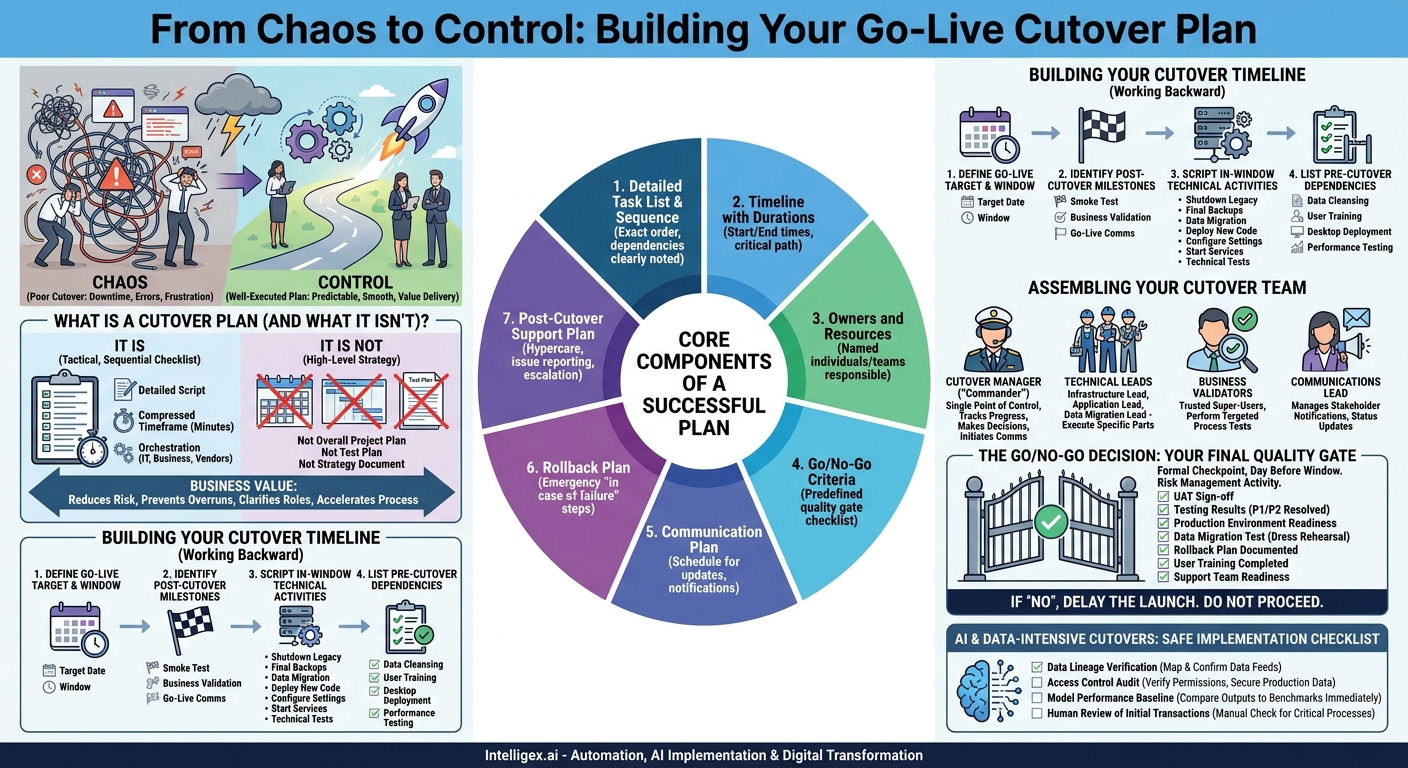
The final hours before a new system goes live are often the most stressful phase of any digital transformation project. All the planning, development, and testing culminate in a single event: the cutover. This is the moment you switch from the old way of doing things to the new. A poorly executed cutover can lead to extended downtime, data corruption, frustrated users, and a direct impact on revenue. A well-executed cutover, however, is almost invisible. It’s a smooth transition that protects business continuity and delivers the value of your new system on day one.
The difference between chaos and control is the cutover plan. This isn’t just another project document. It’s a detailed, time-based script for every action, every decision, and every person involved in the launch. It transforms a high-stakes event into a predictable, manageable process, directly improving the speed and quality of your deployment while lowering risk and cost.
What is a Cutover Plan (and What It Isn’t)?
First, let’s clarify what a cutover plan is. It is the tactical, sequential checklist of every task that must be completed to deactivate an old system and activate a new one. Think of it as the flight crew’s pre-takeoff checklist. It’s not about the destination, it’s about the precise, ordered steps to get airborne safely. The plan covers the specific cutover window, which is the period of planned downtime, often a weekend or overnight.
It is important to understand what a cutover plan is not. It is not the overall project plan, which covers months of work. It is not the test plan, which validates system functionality. And it is not a high-level strategy document. The cutover plan is a granular, execution-focused script where tasks are often measured in minutes, not days. Its primary purpose is to orchestrate a complex set of activities across multiple teams (IT, business, vendors) in a compressed timeframe.
The business value of this disciplined approach is immense. A detailed plan minimizes the risk of human error, which is the most common cause of deployment failures. This directly reduces the likelihood of costly overruns from emergency troubleshooting. By clearly defining roles, it provides visibility into the process, so everyone knows exactly what they are responsible for and when. This coordination accelerates the entire process, minimizing the business-impacting downtime.
The Core Components of a Successful Cutover Plan
A robust cutover plan is more than just a list of tasks. It’s a comprehensive package that prepares your team for a successful launch. While the specifics will vary based on your project, every effective plan should include these fundamental components.
- Detailed Task List & Sequence: Every single action, from “disable user access to old ERP” to “run final data validation script” to “re-enable firewall rule.” Tasks should be in the exact order they need to happen, with dependencies clearly noted.
- Timeline with Durations: Each task needs a start time, an estimated duration, and an end time. This creates a clear schedule (e.g., Friday 10:00 PM – 10:15 PM) and helps identify the critical path.
- Owners and Resources: Every task must have a named individual or team responsible for its execution. This eliminates confusion. For example, the “Database Admin” is responsible for backups, while a “Finance Power User” is responsible for verifying opening balances.
- Go/No-Go Criteria: A predefined checklist of conditions that must be met before the cutover can begin. This is a critical quality gate to prevent starting a launch that is destined to fail.
- Communication Plan: A schedule for all communications. This includes technical team updates in a command center, status notifications to business leaders, and “system is live” announcements to end-users.
- Rollback Plan: The “in case of emergency” procedure. It details the specific steps and decision points for aborting the cutover and reverting to the old system if a critical failure occurs.
- Post-Cutover Support Plan: Details on the “hypercare” period immediately following go-live. Who is on call? How do users report issues? What is the escalation path for critical problems?
Without these elements, you are relying on luck. With them, you have a repeatable, scalable process that builds confidence and ensures a professional execution.
Building Your Cutover Timeline: A Step-by-Step Guide
The timeline is the heart of your cutover plan. It choreographs the entire event. Building it requires working backward from your goal and accounting for every dependency along the way. Follow this process to create a realistic and actionable timeline.
- Define the Go-Live Target and Cutover Window: First, establish the exact moment the new system should be available to users (e.g., Monday at 8:00 AM). Then, determine the business-acceptable downtime window. For a global supply chain system, this might be a very narrow 4-hour window on a Sunday. For an internal HR system, it might be the entire weekend from Friday evening to Sunday night. This window dictates the pace and pressure of the entire event.
- Identify Post-Cutover Milestones: Working backward from the go-live time, list the final activities. These are your last checkpoints to confirm success. Examples include: a final smoke test by the IT team, business process validation by key users (e.g., “Sales team, please create a test opportunity in Salesforce“), and sending the official “go-live” communication.
- Script the In-Window Technical Activities: This is the most detailed part of the plan. List every technical step that must occur during the outage. Start with the initial shutdown tasks and move forward. This sequence might look like this:
- Shut down application services for the legacy system.
- Take final backups of legacy databases and file systems.
- Perform the final data migration or delta synchronization.
- Run data validation scripts to check for completeness and accuracy.
- Deploy the new application code to production servers.
- Configure system settings, integrations, and user permissions.
- Start the new application services.
- Perform technical smoke tests (e.g., login, key API checks).
- List Pre-Cutover Dependencies: Finally, identify all the “readiness” tasks that must be completed before the cutover window even begins. These are often the items on your Go/No-Go checklist. Examples include final data cleansing, user training completion, deployment of new software to user desktops, and final performance testing of the production environment.
By building the plan in this reverse-chronological order, you ensure that no dependency is missed. You start with the desired outcome and logically construct the path to get there, which is a far more reliable method than starting from the beginning and hoping you end up in the right place.
Assembling Your Cutover Team: Roles and Responsibilities
A plan is useless without people to execute it. Defining clear roles and responsibilities is essential for a smooth cutover where everyone moves in sync. While titles may vary, these key roles are present in nearly every successful cutover.
The Cutover Manager (or “Commander”)
This person is the single point of control during the cutover window. They are not necessarily doing the technical work but are responsible for managing the plan. Their job is to track progress against the timeline, run status check-in calls, make decisions, and initiate the communication plan. This role provides the visibility and centralized command needed to keep the event on track.
Technical Leads
These are the hands-on experts responsible for executing specific parts of the plan. You will have leads for different domains, such as:
- Infrastructure Lead: Manages servers, networks, and cloud environments, perhaps on platforms like AWS or Azure. They handle tasks like server restarts, network rule changes, and performance monitoring.
- Application Lead: Responsible for deploying the new software, running configuration scripts, and performing initial application-level tests.
- Data Migration Lead: Owns the critical process of moving data from the old system to the new one, including the final validation and reconciliation.
Business Validators
These are not IT staff. They are trusted super-users from the business departments who will use the new system, such as Finance, Operations, or Marketing. Their role during the cutover is to perform targeted business process tests to confirm the system works as expected from a user’s perspective. For example, a Finance user might be tasked with posting a sample journal entry to confirm the general ledger is functioning correctly. Their sign-off provides business-level confidence.
Communications Lead
This individual manages all stakeholder notifications. They follow the communication plan to send status updates to leadership, inform help desks of the progress, and distribute the final go-live announcement to all employees. This frees the technical team to focus on their tasks without being interrupted for updates.
The Go/No-Go Decision: Your Final Quality Gate
The Go/No-Go meeting is one of the most important moments in any project. It is a formal checkpoint, typically held the day before the cutover window opens, to make a final, evidence-based decision to proceed. This should not be a ceremonial rubber stamp. It is a serious risk management activity designed to prevent a predictable failure.
The meeting should be attended by the project sponsor, project manager, cutover manager, and key technical and business leads. The agenda is simple: review the Go/No-Go criteria against their current status. These criteria should have been defined weeks in advance.
Example Go/No-Go Checklist
- UAT Sign-off: Has User Acceptance Testing been formally signed off by all required business departments?
- Testing Results: Have all Priority 1 and Priority 2 defects been resolved? Is there a clear plan for any remaining minor defects?
- Production Environment Readiness: Is all hardware and cloud infrastructure provisioned, configured, and performance tested?
- Data Migration Test: Has a full-scale dress rehearsal of the data migration been completed successfully?
- Rollback Plan: Is the rollback plan documented, reviewed, and technically feasible?
- User Training: Has the required percentage of the user base completed mandatory training?
- Support Team Readiness: Is the IT help desk trained on the new system and ready to handle post-launch inquiries?
If any of these items are marked “No,” a serious discussion must follow. It may be better to delay the launch by a week to fix a critical issue than to proceed and face a multi-day outage and a loss of user confidence. This single meeting is a crucial control that directly impacts the quality and cost of your launch.
A Note on AI and Data-Intensive Cutovers
When the system you are launching involves artificial intelligence, machine learning models, or sensitive analytics platforms, the cutover complexity increases. It’s not just about moving an application; it’s about ensuring the integrity, performance, and governance of the data pipelines and models that drive business decisions.
A cutover plan for an AI system must include specific validation steps beyond standard technical checks. The goal is to ensure the model not only runs but also produces reliable and secure results in its new production environment. A lack of diligence here can lead to flawed business automation, biased outcomes, or data privacy breaches.
Safe Implementation Checklist for AI Systems
- Data Lineage Verification: Before the cutover, explicitly map and confirm that the data feeds for your model in the new system are identical to the ones used for training and testing. A subtle change in a data source can dramatically alter model behavior.
- Access Control Audit: During the cutover, run a script to verify that security permissions and access controls on the new production data stores and model endpoints are correctly configured. Ensure only authorized service accounts and personnel can access sensitive information.
- Model Performance Baseline: Immediately after the new system is live, run a pre-defined set of inputs through the model and compare the outputs (e.g., predictions, classifications) against a known, trusted benchmark. This confirms the model is behaving as expected.
- Human Review of Initial Transactions: For critical processes, such as an AI-driven fraud detection or a supply chain forecasting tool, plan for human experts to manually review the first batch of live transactions. This provides a final layer of assurance before the process becomes fully automated.
Treating the AI components as a black box during cutover is a significant risk. These extra governance steps are essential for a safe, scalable, and trustworthy implementation.
Your Next Steps: From Plan to Action
A detailed cutover plan demystifies the go-live process, turning a source of anxiety into a well-managed operational procedure. It is the ultimate tool for delivering a project’s value with minimum disruption. By investing the time to create a thorough plan, you are directly investing in the speed, quality, and success of your digital transformation efforts.
Don’t wait until the last minute. The best cutover plans are developed and refined over weeks, not days. Start now by taking these simple actions:
- Appoint a Cutover Manager: Identify a single person who will own the creation and execution of the cutover plan. This clarity of ownership is the first and most important step.
- Schedule the First Draft Session: Get the core project team in a room and start outlining the major phases and tasks on a whiteboard. You don’t need to have all the answers, just start building the framework.
- Engage Business Stakeholders Early: Talk to the business users who will depend on the new system. Ask them what success looks like and what validation steps would give them confidence on day one. Use their input to build your business validation checklist.
- Document Your Go/No-Go Criteria Now: Don’t wait until the week before launch to decide what “ready” means. Define your quality gates early in the project so the entire team is working toward the same clear, measurable goals.
Your Next Read:
Category:
Get a FREE
Proof of Concept
& Consultation
No Cost, No Commitment!
