

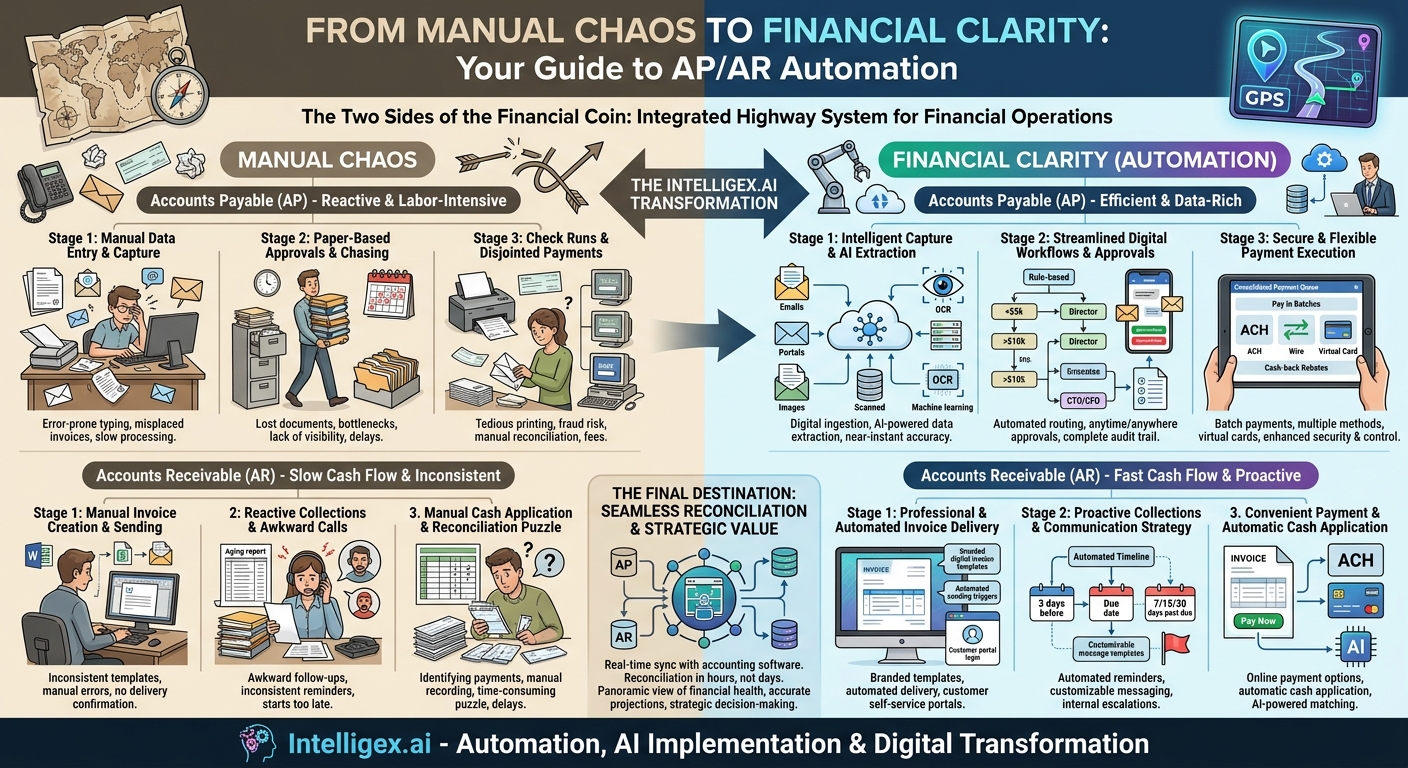
In the world of finance, the processes of Accounts Payable (AP) and Accounts Receivable (AR) are the two fundamental currents that determine a company’s cash flow. One represents money flowing out, the other money flowing in. For decades, these currents have been navigated manually, through a chaotic sea of paper invoices, spreadsheets, physical checks, and endless email chains. This manual approach is not just inefficient; it’s a labyrinth of potential errors, delays, and strategic blind spots. It’s time to trade in the old, hand-drawn map for a modern, digital GPS: AP/AR automation.
Think of automation not as a single tool, but as a fully integrated highway system for your financial operations. It charts the most efficient route for every single transaction, from the moment an invoice is born to the final act of reconciliation. This post serves as your guide to that map, exploring each stop along the journey for both AP and AR, revealing how technology transforms a series of disjointed tasks into a seamless, transparent, and strategic workflow.
The Two Sides of the Financial Coin
Before we embark on the journey, it’s crucial to understand why automating both AP and AR is so powerful. They are inextricably linked. The efficiency with which you pay your vendors (AP) impacts your relationships and credit, while the speed at which you collect from your customers (AR) directly affects your liquidity. Automating one without the other is like paving only one side of a two-lane road. True transformation and a holistic view of your company’s financial health can only be achieved when both sides are streamlined. Let’s begin with the journey of an incoming bill.
The Accounts Payable (AP) Automation Journey: From Bill to Paid
The AP process is traditionally reactive and labor-intensive. It begins when a bill arrives and ends only after a payment is sent and recorded. Automation flips this on its head, turning a cost center into an efficient, data-rich operation.
Stage 1: Intelligent Invoice Capture and Data Extraction
The Old Way: Invoices arrive through various channels—snail mail, different employee email inboxes, or as a crumpled piece of paper from a manager’s desk. An AP clerk must manually sort these, identify the key information, and painstakingly type it into the accounting system. Every keystroke is a potential for error, and a single misplaced invoice can lead to a late payment and a strained vendor relationship.
The Automated Route: This is the digital on-ramp. An AP automation platform establishes a central hub for all incoming invoices.
- Digital Ingestion: Vendors can email invoices directly to a dedicated address (e.g., [email protected]) or submit them through a vendor portal. Physical mail is scanned upon arrival.
- AI-Powered Data Extraction: This is where the magic happens. Using Optical Character Recognition (OCR) and machine learning, the software “reads” the invoice. It intelligently identifies and extracts critical data points like vendor name, invoice number, date, line-item details, amounts, and PO numbers with incredible accuracy.
The system isn’t just typing faster; it’s learning. With each invoice, it gets smarter at recognizing layouts from different vendors, reducing the need for manual review over time. The result is the near-instantaneous creation of a digital bill record, free from data entry errors.
Stage 2: Streamlined Coding and Approval Workflows
The Old Way: The manually entered invoice is printed or emailed and physically or digitally “walked” around the office for approval. It sits in an inbox, gets lost under a pile of papers, or is forgotten entirely. Chasing approvals becomes a full-time job for the AP team, and there’s zero visibility into where a bill is in the process.
The Automated Route: Once the invoice data is captured, the system initiates a pre-configured, rule-based approval workflow. This is a game-changer for control and visibility.
- Automated Routing: You can set up custom rules. For example, all marketing invoices under $5,000 are routed directly to the Marketing Director. Any IT invoice over $10,000 requires approval from both the CTO and the CFO. The system handles the routing automatically.
- Anytime, Anywhere Approvals: Approvers are notified via email or a mobile app. They can view the invoice image, check the coding, and approve or deny it with a single click, whether they are at their desk or on the go.
- Complete Audit Trail: Every action—submission, review, comment, approval—is timestamped and logged. This creates an unbreakable audit trail, making month-end closes and annual audits significantly less painful.
This stage eliminates bottlenecks entirely. The AP team transforms from chasers into strategic overseers of the process.
Stage 3: Efficient and Secure Payment Execution
The Old Way: Once approved, it’s time to pay. This often means a weekly “check run”—a tedious process of printing, stuffing, and mailing paper checks. For electronic payments like ACH or wires, it involves logging into separate, clunky bank portals, a process ripe for both error and fraud.
The Automated Route: Payment execution becomes a simple, secure, and even profitable part of the workflow. The automation platform consolidates all approved bills into a payment queue. You can then:
- Pay in Batches: Select dozens or hundreds of bills to be paid at once, with just a few clicks.
- Offer Multiple Payment Methods: Pay vendors in their preferred method, whether it’s ACH, domestic wire, international wire, or a paper check (which the system prints and mails for you).
- Leverage Virtual Cards: For vendors who accept them, virtual cards offer a highly secure, single-use credit card number for the exact amount of the invoice. This method not only mitigates fraud risk but can also generate cash-back rebates, turning your AP department into a revenue generator.
This flexibility improves vendor relationships by offering faster, more convenient payment options while giving your company unprecedented control and security over outgoing funds.
The Accounts Receivable (AR) Automation Journey: From Invoice to Reconciled
If AP is about control and efficiency, AR is about speed and cash flow. The goal is to shrink the time between delivering a service and getting paid for it, also known as reducing Days Sales Outstanding (DSO). AR automation paves the smoothest road possible for incoming cash.
Stage 1: Professional Invoice Creation and Delivery
The Old Way: Invoices are created manually in Word or Excel, prone to inconsistencies and errors. Then, they are individually attached to emails and sent out, with no real way to confirm if the customer ever received or opened it.
The Automated Route: Automation brings consistency and intelligence to the very first step.
- Branded Templates: Create professional, consistent invoice templates that reinforce your brand.
- Automated Delivery: The system automatically generates and emails invoices based on triggers from your sales or project management system. For recurring billing, invoices are sent out on a pre-set schedule without any manual intervention.
- Customer Portals: Many platforms offer a self-service portal where customers can log in to view their current and past invoices, check their balance, and make payments. This reduces inquiries to your AR team and empowers your customers.
Stage 2: Proactive Collections and Communication
The Old Way: Collections is an uncomfortable and manual process. It involves an AR specialist scrolling through an aging report, identifying overdue accounts, and then starting a series of awkward phone calls and manually drafted reminder emails. It’s inconsistent and often starts too late.
The Automated Route: This transforms collections from a reactive chore into a proactive, systematic communication strategy.
- Automated Reminders: You can set up a cadence of communications that triggers automatically based on the invoice due date. For example, a friendly reminder 3 days before it’s due, another on the due date, and a series of more direct notices 7, 15, and 30 days past due.
- Customizable Messaging: The tone and content of these reminders can be fully customized, allowing you to maintain a positive customer relationship while still being firm about payment.
- Internal Escalations: If an invoice reaches a certain age (e.g., 60 days past due), the system can automatically flag it and notify the account manager or a collections specialist for personal follow-up.
This ensures no invoice falls through the cracks and dramatically accelerates payment times by keeping your bill top-of-mind with your customers.
Stage 3: Convenient Payment Reception and Cash Application
The Old Way: You receive a check in the mail. Now the work begins. You have to figure out which invoice(s) the check is for, manually record the payment in your accounting system, and then apply it against the correct open invoices. A single payment covering multiple invoices can turn into a time-consuming puzzle.
The Automated Route: Make it incredibly easy for your customers to pay you. The easier it is, the faster you get your cash.
- Online Payment Options: Invoices sent from the system include a “Pay Now” button. Customers can click this link and pay instantly via ACH or credit card through a secure online portal.
- Automatic Cash Application: Because the payment is made directly through the system against a specific invoice, the cash application is done for you. The payment is automatically recorded and matched to the correct invoice, closing it out instantly.
- AI-Powered Matching: For payments that still arrive from outside the portal (like a bank transfer), advanced systems use AI to match the incoming payment details from a bank feed to the open invoices, suggesting a match and drastically reducing manual reconciliation work.
The Final Destination: Seamless Reconciliation
At the end of the month, we arrive at the final, and often most dreaded, destination: reconciliation. Manually, this means a painstaking, line-by-line comparison of your bank statement against your general ledger, hunting for discrepancies between the AP and AR records you entered and what actually happened with the bank.
With an integrated AP/AR automation system, this final stop is less of a destination and more of a scenic viewpoint. Because every transaction—both incoming and outgoing—was executed and recorded within a single, integrated system that syncs directly with your accounting software (like QuickBooks, NetSuite, or Sage Intacct), the loop is already closed. The data in your general ledger is a real-time reflection of reality. Reconciliation becomes a simple act of verification, not a massive investigative project. The month-end close process can be reduced from days to mere hours.
Beyond the Map: The Strategic Value of Automation
This automation map does more than just get you from point A to point B faster. It provides a panoramic view of your entire financial landscape. With centralized data and real-time dashboards, you can instantly see your cash on hand, your total outstanding payables, and your aging receivables. This visibility allows finance leaders to move from being historical record-keepers to forward-looking strategists. You can make more accurate cash flow projections, decide the optimal time to pay vendors to take advantage of early-pay discounts, and identify at-risk customer accounts before they become a problem. By automating the transactional journey, you free up your most valuable asset—your people—to focus on the strategic decisions that will drive the business forward.
Your Next Read:
Get a FREE
Proof of Concept
& Consultation
No Cost, No Commitment!
